Bios Password

  • Subscribe to our RSS feed.
  • Twitter
  • StumbleUpon
  • Reddit
  • Facebook
  • Digg

Sunday, June 30, 2013

Odds and Ends: Recent Utilities and Tips of Note

Posted on 5:42 PM by Unknown

Here is a quick dash-off of some free software and utilities that struck my fancy.

Please use caution as your fancy may not be quite as robust as mine…

  • Portable Update - free and interesting tool to update your MS Windows system in an isolated environment.
  • WSUS Offline Update - This is the tool that we use to do almost all our heavy post-image application Microsoft system updating. It was updated to version 8.4 on May 27 2013.
  • JavaRa 2.2 - SingularLabs JavaRa freeware utility that lets you deploy, update and remove the JRE. Really handy when you are dealing with lots of deployments or think you have a mis-install of JRE causing issues.
  • Updates: Autoruns v11.6, Procexp v15.31, Procmon v3.05, Sigcheck v1.92 - Sysinternals
  • TurnedOnTimesView - Nirsoft - new tool from Nir Sofer that reads the Windows Event logs and only reports on those system system launch/shutdown events.  Read Nir’s utility announcement at his blog.  I had been using PC On/Off Time but the freeware version was limited to the last 3-weeks it would report on. The NirSoft version doesn’t quite have the nice graphical view but has no limitations at all on the range of event log data it reports, and the NirSoft app allows you to export your data to a file.
  • Macrium Reflect FREE Edition - version 5.2 -  Information and download. This BetaNews post has more details on the improvements: Macrium Reflect Free improves Explorer integration, updates recovery builder tool
  • Parted Magic - Linux LiveCD - an awesome good tool that seems to be updated every other day. That is a REAL work of love to keep up that effort. Latest version was released June 14 2013 at version 2013_06_15. I used this tool to overcome a particularly interesting image deployment situation recently and it really worked brilliantly well. You will have to wait just a bit for that blog post to come! It was a great “thinking outside the box” solution.
  • Sandboxie  - Major update of version 4.02. For some details take a look at at BetaNews post: Sandboxie adds full 64-bit protection, improves compatibility
  • Oracle VM VirtualBox - free - Newly released version 4.2.14 (and matching Extension Pack) came out June 21 2013. See the Changelog for details.
  • PassMark MemTest86 - Now at Version 4.2.0 released March 18 2013. It’s nice to see this perennial RAM tester still supported and being updated regularly. You may also remember Memtest86+ which is very similar, but hasn’t been updated in several years. I carry both, just in case.
  • Running Mac OS X on Windows VMware Workstation - Chris Nackers Blog. While I do Apple iOS quite well on our iPhones and iPad, I don’t have any experience on OS X. Last time I used a Macintosh was back when it was a chunky box with a black/white monitor. Seriously! However I am always on the lookout for cool ways and tips to load different OS versions in virtual machines so this well-written guide really caught my eye. Chris Nackers is a neat IT guy and Microsoft MVP. I’m digging RSS feeding his blog. You should too!
  • Native VHD Boot in Windows 8 - 4sysops - Nice post by Timothy Warner. Don’t let the title fool you. He walks through setting up a Windows Server 2012 build in a “Boot from VHD” configuration. We’ve covered booting from VHD before here at GSD and it never fails to amaze me just how cool that ability is for Windows multi-boot fans.

Cheers!

Claus Valca.
Read More
Posted in Apple, boot-cd's, Link Fest, Linux, Microsoft, tutorials, utilities, virtualization | No comments

Forensic News and Blog Update Link Fest

Posted on 3:25 PM by Unknown

Here is a mini-roundup of some great forensic posts over the past few weeks I bookmarked.

  • There Are Four Lights: Incident Response - Windows Incident Response blog - I’m always on the lookout to be humbled (and schooled) in better incident response methodologies.
  • There Are Four Lights: LNK Parsing tools - WIndows Incident Response blog
  • Crossing Streams - WIndows Incident Response blog
  • RegRipper Updates - WIndows Incident Response blog
  • The Tool Validation "Myth-odology" - WIndows Incident Response blog -file under “know your tools”.
  • Good Reading, Tools - WIndows Incident Response blog
  • Unleashing auto_rip  - Journey into Incident Response blog - nice new tool walkthough that leverages “RegRipper” for doing some pre-assessment of a potentially compromised system.
  • Is WinFE still being used? - Windows Forensic Environment blog. Uh, Hell Yeah it is! This post has some excellent links on how WinFE is being used, and ways to build your own. Of course Brett Shavers’ WinFE blog is littered with links, tools, and tips on how to do that if you didn’t already realize it!
  • A Windows Live CD plugin for my UserAssist utility - Didier Stevens - (updated)
  • Control Panel Forensics: Evidence of Time Manipulation and More - Cool stuff from Chad Tilbury over on the SANS Computer Forensics and Incident Response blog.

Meanwhile, in the world of digital forensics, our dear friend Dr. Neal Krawetz has had his hands full between teaching us the nuances of digital image forensics and fighting the noble fight against clarity, objectivity, and transparency in the world of digital news photography and photography contests. You go Dr. Krawetz!

  • Unbelievable - The Hacker Factor Blog
  • Angry Mob - The Hacker Factor Blog
  • Deep Dive - The Hacker Factor Blog

When I grow up I want to be gothic physical/digital forensic examiner…just like Abby Sciuto!

Seriously…

(IN)SECURE Magazine - June 2013 edition (PDF download) covers a number of great topics this month including:

    • Becoming a computer forensic examiner
    • UEFI secure boot: Next generation booting or a controversial debate
    • How to detect malicious network behavior
    • DNS attacks on the rise: Rethink your security posture
    • IT security jobs: What's in demand and how to meet it
    • Remote support and security: What you don’t know can hurt you

Cheers!

--Claus V.

Read More
Posted in boot-cd's, forensics, Link Fest, security, tutorials, utilities, Win FE | No comments

Microsoft’s EMET v 4.0 Released … in case you missed it

Posted on 3:01 PM by Unknown

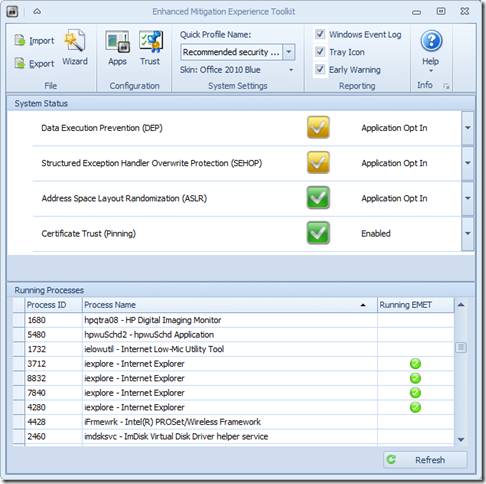
Microsoft’s Enhanced Mitigation Experience Toolkit 4.0 - EMET - just got released about two weeks ago.

It really hasn’t made that big a splash in the security news pond; maybe getting lost in all the waves from coverage on our domestic network digital data gathering, leaks in the SS Minnow, and that whole Facebook Shadow Profile data collection fiasco.

Oh, then there is that whole breaking story in the food world that has everyone shocked and a-twitter--How Cronuts Are Driving New York City Crazy.

So it’s not surprising that news of the release of a Windows-specific security tool to prevent advanced malware attacks got little notice.

So here you go.  Little rock toss into a big pond.

a0n12tap.xsg

I’ve got it running on all our home systems as well as all my Windows virtual machines. I’ve seen no performance issues at all and it is super-quiet; no chatter at all. Accordingly, I would recommend it to all my friends/family-members, especially those who insist on using Internet Explorer and do a lot of work in MS Office applications and documents. It is not a solution to replace any existing anti-virus/anti-malware security software you have, but rather it works to supplement and harden it.  I’m running it aside Microsoft Security Essentials (Win 7 systems), Windows Defender (Win 8 systems), and Bitdefender Antivirus Free (Win 8 systems). It works great.

  • Nuclear Scientists, Pandas and EMET Keeping Me Honest - SANS ISC Diary - great post from Johannes Ullrich detailing just how deployment and use of EMET (v3.5) could have prevented a recent “watering-hole” attack. It’s a great introduction on how the EMET software works. Version 4.0 is better.
  • EMET 4.0 is now available for download - SANS ISC Diary notice/followup.
  • EMET 4.0 now available for download - Microsoft Security Research & Defense blog. Great overview of the tool and all the new features and capabilities. Read this next before considering deployment
  • Enhanced Mitigation Experience Toolkit 4.0 - Official Microsoft Download Center source. It runs on everything from XP SP3 to Windows 8 platforms, as well as all related Server OS’s as well.
  • Enhanced Mitigation Experience Toolkit 4.0 - bink.nu - quick recap summary scraped from the product details of the official download site.
  • Microsoft’s EMET 4 adds even more malware-blocking power - Betanews overview of the tool.
  • Microsoft releases Enhanced Mitigation Experience Toolkit 4.0 - Help Net Security announcement of the tool.
  • Enhanced Mitigation Experience Toolkit 4.0 final is out - Ghacks.net - Nice review and overview of the EMET 4.0 features.

Not impressed enough yet to download?

Well, did I mention it has “skins” so you can change the theme to some pretty snazzy color schemes?

Seriously, if you spend any time on the Web (particularly in IE) and run a Windows system, then you really should consider deployment of this tool. Just take the default configuration settings to get started, then you can tweak away and add additional protection coverage after you read the manual.

Cheers!

Claus Valca.

Read More
Posted in anti-virus software, browsers, Internet Explorer, malware tools, Microsoft, networking, security, viruses, Windows 7, Windows 8, XP | No comments

Short List of free video-editing apps

Posted on 2:01 PM by Unknown

It’s been quite a while since my Video-Editing Resource Roundup back in 2009. Check that link out for a recap, though quite a few have disappeared in the time since that post first was written.

There are tons of resources, but these (beyond the Microsoft ones that come on/with Windows) are the primary free versions that I am playing with nowadays.

  • Shotcut by MLT Framework - a free, open-source cross-platform video editor. It has a nice GUI and runs on Linux, OS X, and Windows. For a brief introduction, take a look at this review by AddictiveTips blogger Waqas Ahmed. Shotcut: Nifty Multi-Platform Video Clip Editor With Custom Filters
  • Lightworks - Wow. This one still amazes me. The free version is a bit stripped down with some of the supported features but for most wanna-be video-editors, it’s a great place to get your feet wet and have the water go quickly over your head. Download. The newest version requires activation, but you can register for a free account to activate it.
  • Avidemux - free and no-frills video editor do to basic cutting/filtering/encoding. Latest version is 2.6.4 released May 09 2013 so it is still being updated regularly. Good place if you want an alternative video editor but don’t need all the bells and whistles of the big-boy-toys.
  • VirtualDub - video capture software that also lets you do pre/post processing. Pretty cool if you don’t want to use the manufacturer’s software that come with the video device.

Moving on now…

Claus V.

Read More
Posted in Link Fest, software, utilities, video | No comments

Mostly Wi-Fi and Network Security: Linkfest

Posted on 1:47 PM by Unknown

Ok. In the time it took me to work on that last post (mostly), I was able to cycle some laundry through the machines AND get my VMWare Player build of Windows 8.1 up and running.

It tossed me a few curves, but nothing that big a deal.

bmilmnfz.xol

I tried the new and updated “Windows Start button” all for five minutes before ditching it for the free IOBit StartMenu8. Went on with no issues. Tossed on Google Chrome (Dev), FreeCommanderXE beta, dropped some snazzy wallpapers on to cycle through, added Process Explorer to run in the system tray, and while I kept Windows Defender this time, I supplemented it with Microsoft's EMET 4.0.

That’s it for now, more tweaking and testing and twisting it in the weeks to come. Expect some follow-up Windows 8/8.1 posts as well around here.

So now let’s turn to the world of Wi-Fi (in)Secuirty and networking in this GSD Link Fest edition:

Wi-Fi, Web, and Networking Security Headaches Galore - Pineapple Flavored!

  • Your Mac, iPhone or iPad may have left the Apple store with a serious security risk - Troy Hunt’s blog
  • iPhones can auto-connect to rogue Wi-Fi networks, researchers warn - Ars Technica
  • Pineapple Surprise! Mixing trusting devices with sneaky Wi-Fi at #wdc13 - Troy Hunt’s blog
  • The beginners guide to breaking website security with nothing more than a Pineapple - Troy Hunt’s blog
  • Your login form posts to HTTPS, but you blew it when you loaded it over HTTP - Troy Hunt’s blog
  • Understanding the risk of mixed content warnings - Troy Hunt’s blog
  • iOS Personal Hotspot passwords vulnerable to brute force attacks - iMore.com
  • VIDEO: Targeted Attacks Video Series from TechNet - Kurt Shintaku's Blog. From that post:

      We have a new security video resource called the Targeted Attacks Video Series  on Advanced Persistent Threats (APTs), or what we at Microsoft call Targeted Attacks by Determined Human Adversaries. These five short informational videos summarizes three security whitepapers, Determined Adversaries and Targeted Attacks, Mitigating Pass-the-Hash (PtH) Attacks and Other Credential Theft Techniques, and Best Practices for Securing Active Directory. The five short videos are:

      1. Introduction to Determined Adversaries and Targeted Attacks: Tim Rains, Director, Microsoft Trustworthy Computing, provides background information on these types of attacks and set the context for the rest of the video series.
      2. Mitigating Pass-the-Hash Attacks: Patrick Jungles, Security Program Manager, Trustworthy Computing, explains what a Pass-the-Hash attack is and some tested mitigations to help manage the risk associated with credential theft attacks.
      3. Anatomy of a Cyber-attack Part 1: Sean Finnegan, CTO of the Microsoft Consulting Services Cybersecurity Practice, walks through a typical targeted attack, step by step, describing how attackers perpetrate these attacks.
      4. Anatomy of a Cyber-attack Part 2: Sean Finnegan finishes his briefing on how determined adversaries commit targeted attacks.
      5. Importance of Securing Active Directory: Bret Arsenault, Microsoft CISO, discusses the importance of protecting your Active Directory in the context of target attacks.

All great videos to watch on your own or with your IT team for a mini training & discussion session.

Networking Tools

There have been a number of nice networking tool updates recently:

  • SoftPerfect Network Scanner: fast and free network scanner - Now updated to version 5.4.11 (May 08 2013)
  • DNSQuerySniffer - DNS queries sniffer - New free app from Nir Sofer’s Nirsoft factory that shows the DNS queries sent by your system (x32/x64 bit flavors are available).
  • Wireshark - Now at stable release version 1.10.0.  For more info see these 1.10.0 Release Notes
  • toolsmith: Visual Malware Analysis with ProcDOT - HolisticInfoSec - I’m still getting my courage up to start working with this gem that mind-melds Process Monitor data with GraphViz. Super cool.
  • TightVNC 2.7.7 is now out and released. download
  • Deep Dive Packet Analysis (by Hansang Bae) - Sharkfest 2013 session- Video presentation on using and analyzing challenging network issues.

Microsoft Message Analyzer Beta 3 Released!

The next beta version of Microsoft’s answer to Wireshark is out.

  • Microsoft Message Analyzer Beta 3 is released (Build 6211)! - MessageAnalyzer blog

It is a far and different animal from the old MS Network Monitor platform and takes a lot of work getting used to.

Tip: you have to be registered on the Microsoft Connect site to get the non-public download. I have been from some time but when I tried to find the actual MA Beta 3 bits for download on the project page, I couldn’t find them. I looked, waited a few days, looked some more, nada.

Finally I backed out a bit and found a “new” (3rd) “Message Analyzer, Network Monitor and Protocol Test Suites” product program listed that I wasn’t joined to. I joined it and there were the bits. Ok…I guess that was my bad by assuming that just because I had joined a particular Product, that other Programs could be added without me realizing it. Oh well.

Note: I believe it requires a Windows 7/8 platform as well as some .NET packages. It definitely doesn’t seem to be supported on XP. Come-on team, time to upgrade that OS!

Wi-Fi Tools and Updates

  • Wi-Fi Inspector - Xirrus - Neat and techy-looking free Wi-Fi signal scanner. Now updated to version 1.2.1.4. I keep this on handy
  • inSSIDer for Home - MetaGeek - This seriously-updated edition of inSSIDer really rocks! This is the free version for home users but they also offer a super-cool Office version that has some additional graphing and reporting features, Finally they also offer some super-beefy enterprise-level Wi-Fi assessment and troubleshooting software tools. Neat stuff here.
  • HeatMapper - Ekahau’s free Wi-Fi coverage mapping tool for homes and small offices. Simple registration required for the free download. Current version 1.1.4 (March 03 2012) with Win8 Consumer preview support.
  • Cisco Meraki - WiFi Mapper - Cisco product that can run in a browser session via a Java application. Nice basic review here: Wi-Fi Testing and Mapping Apps for Techs via Technibble
  • WifiInfoView - free NirSoft tool to capture information on Wi-Fi networks that are broadcasting in your vicinity. This version works on Windows Vista - Windows 7/8. Not XP, however.
  • WirelessNetView - free NirSoft tool that also captures broadcasting Wi-Fi network details. This one does run on XP.
  • Wireless Network Watcher - free NirSoft tool that shows who is connected to your wireless network.
  • SoftPerfect WiFi Guard - free app that also shows who is on your wireless network, but has an added feature of alerting you if a new device joins that is unknown

Stay safe and remain watchful!

Claus Valca

Read More
Posted in Link Fest, networking, software, utilities, virtualization, Windows 8 | No comments

Rapid-Fire Security Linkfest

Posted on 12:12 PM by Unknown

Time to empty out the “to-blog” hopper again.

In this edition, critical and curious security-related posts. Culled from the Web buffet bar over the past few weeks.

Meanwhile…we are installing Windows 8.1 Beta in a fresh VMWare Player build. Details to follow.

And the Password is…”stealmecrackme”

  • It’s official: Password strength meters aren’t security theater - Ars Technica
  • Why your password can’t have symbols—or be longer than 16 characters - Ars Technica
  • Anatomy of a hack: How crackers ransack passwords like “qeadzcwrsfxv1331” - Ars Technica
  • On the h4xx0ring of p4sswordZ - Dan’s Data
  • Hackers To Manage Your Apple ID, If Caught From Phishing Bait - Security Intelligence Blog at Trend Micro
  • Your login form posts to HTTPS, but you blew it when you loaded it over HTTP - Troy Hunt’s blog
  • iCloud users take note: Apple two-step protection won’t protect your data - Ars Technica
  • New attack cracks iPhone autogenerated hotspot passwords in seconds - Ars Technica

Compromising Situations

  • Do you cover up your webcam? - F-Secure Weblog : News from the Lab
  • Camjacking: Click and say Cheese - Egor Homakov’s Blog - I took the challenge on my locked-down and highly updated/patched Win7 system and the browsers installed (IE/FF/Chromium) and didn’t experience the vulnerability. I think that’s a good thing!
  • Gmail Retention and Your Privacy - Forensic 4cast
  • Ad injection and you - how adware gets on your computer - Microsoft Malware Protection Center

Locking it down & Cleaning up the Mess

  • Java: A Fix it for when you cannot let go - Security Research & Defense - MS Technet blogs
  • HitmanPro rescues anti-virus programs from malware attack -  HitmanPro Blog
  • Windows 8.1: High-performance behaviour monitoring for Defender -The H Security - Note: I cannot find any info if these features will be eventually bundled/included in the Microsoft Security Essentials builds or not. This GSD post has some tips for tweaking Windows Defender configuration in Windows 8: Advanced Tips for Windows Defender with Windows 8.
  • Five Common Corporate Pitfalls in Cyber Security Management - Speaking of Security – The RSA Blog and Podcast

And now a GSD PSA:

  • Parents--make sure your kids view this TED presentation--no matter what their age.
  • Children--make sure your parents view this TED presentation--no matter what their age.
  • Employers--consider sharing with your employees.

Juan Enriquez: Your online life, permanent as a tattoo - TED.com - video appx 6 min.

“What if Andy Warhol had it wrong, and instead of being famous for 15 minutes, we’re only anonymous for that long? In this short talk, Juan Enriquez looks at the surprisingly permanent effects of digital sharing on our personal privacy. He shares insight from the ancient Greeks to help us deal with our new “digital tattoos.”

For even more TED videos on the impact of digital media, check out this related playlist of 10 more brief TED Talks: Our digital lives

Cheers.

--Claus V.

Read More
Posted in anti-virus software, Link Fest, malware tools, Microsoft, security, viruses | No comments

Saturday, June 29, 2013

iPhone Tips - When you don’t care to RTFM

Posted on 11:24 AM by Unknown

Just for my reference….moving on.

Understanding iOS Status Bar Symbols - Apple Club

hyperlink - What is "mt=8" in iTunes links for the appstore? - Stack Overflow. From that link:

Apple designates a number of different Media Types (mt values):

1 Music
2 Podcasts
3 Audiobooks
4 TV Shows
5 Music Videos
6 Movies
7 iPod Games
8 Mobile Software Applications
9 Ringtones
10 iTunes U
11 E-Books
12 Desktop Apps

So, to answer your question, the "mt=8" in iTunes links simply identifies it as being of type 'Mobile Software Applications'.

and further in those comments:

For the commenter above, in case you haven't figured out, ls=1 means the URL will try and open iTunes and follow the link. If ls=1 is not included it will simply load the web page for that particular media asset.

safari safe browsing data what is it? - Apple Support Communities

Q: what is the safari safe browsing data when you sync you phone after the iOS 5 update??

A: Google Safe Browsing Data Syncs to iOS Devices Via iTunes - The Mac Security Blog

--Claus V.

Read More
Posted in Apple, iOS, iPhone | No comments
Newer Posts Older Posts Home
Subscribe to: Posts (Atom)

Popular Posts

  • New Year’s Day - First Post 2011
    Same day I came out with my first post after a long drought, I fell upon this article Blogging Seems To Have Peaked, Says Pew Report over a...
  • Finally! Time to Post! New material list
    After a recent text from my bro reminding me it has been since March since I’ve done a blog post, I was finally able to clear the schedule a...
  • Oscar watch Linkpost
    Alvis and Lavie are watching the Oscars tonight and I’m along for the ride. I wasn’t able to come even close to getting out some of the pos...
  • Ubuntu 13.10 Upgrade - Lessons Learned & VIDMA utility found
    A few weeks ago a new release of Ubuntu came out. Naturally that meant it was update time! I have been getting pretty good at this now so ...
  • iodd : Multi-boot madness!
    Like many computer technicians and responders, I seem to always have at hand a collection of bootable media; CD’s, DVD’s, USB-HDD’s, flash m...
  • Network Capture Tools and Utilities
    At a conference this week, we had quite a section regarding network captures. The instructor was going on about how you can try to sort ou...
  • Mostly Minor Network Notes
    Here are some minor tweaks and features, mostly of a network nature. Manual Uninstall of the Cisco VPN Client « Mobile Expertise -- becaus...
  • It just has to be bigger on the inside…
      Last Christmas, Lavie gifted me with a cute little Jawbone JAMBOX unit. I thought it was pretty cool. It uses a Bluetooth connection t...
  • Windows Live Mail error 0x80041161
    Dad is working with his father-in-law who has an issue with his Suddenlink web-mail-based “forwarding” handling of messages. Seems that (an...
  • FireCAT 1.5 “Plus” Add-On Collection
    In yesterday’s GSD post I noted the following: Both of these tools brought be back to the excellent FireCAT 1.5 collection of Firefox...

Categories

  • Active Directory
  • anti-virus software
  • Apple
  • architecture
  • art
  • AVG
  • Blogger
  • blogging
  • books
  • boot-cd's
  • browsers
  • cars
  • cell-phones
  • cheat sheets
  • Chrome/Chromium
  • command-line interface
  • cooking
  • crafts
  • crazy
  • curmudgeon
  • DHC
  • Dr. Who
  • E-P1
  • Education
  • family
  • Firefox
  • firewalls
  • For the Gentleman
  • forensics
  • Gmail
  • Google
  • graphics
  • hacks
  • hardware
  • humor
  • hurricanes
  • imagex
  • Internet Explorer
  • iOS
  • iPhone
  • iPod
  • iTunes
  • Kindle
  • Learning
  • Link Fest
  • Linux
  • malware tools
  • Microsoft
  • movies
  • music
  • networking
  • NewsFox
  • NFAT
  • Nook
  • Opera
  • organization
  • PDF's
  • photography
  • politics
  • PowerShell
  • recipes
  • Remote Support
  • RSS
  • science
  • Scripting
  • search engines
  • security
  • Shuttle SFF
  • software
  • Texana
  • Thunderbird
  • troubleshooting
  • TrueCrypt
  • tutorials
  • utilities
  • VBscript
  • video
  • Virtual PC
  • virtualization
  • viruses
  • Vista
  • Vista mods
  • wallpapers
  • Win FE
  • Win PE
  • Win RE
  • Windows 7
  • Windows 8
  • Windows Home Server
  • Windows Live Writer
  • Windows Phone
  • writing
  • XP
  • XP mods
  • Xplico

Blog Archive

  • ▼  2013 (83)
    • ▼  November (8)
      • Ubuntu 13.10 Upgrade - Lessons Learned & VIDMA uti...
      • ForSec Linkfest - 2013 DST Fallback Edition
      • CryptoLocker Ransomware Info & Free Prevention Sol...
      • Linkfest for the SysAdmins
      • Microsoft Security Essentials/Defender & PowerShell
      • Miscellaneous TrueCrypt linkage
      • PowerShell 4.0 and a tiny “gotcha”
      • New Software Updates + VMware Tools Update fix
    • ►  October (8)
    • ►  September (14)
    • ►  August (6)
    • ►  July (10)
    • ►  June (10)
    • ►  April (11)
    • ►  March (6)
    • ►  February (7)
    • ►  January (3)
  • ►  2012 (96)
    • ►  December (8)
    • ►  November (4)
    • ►  October (9)
    • ►  September (8)
    • ►  August (12)
    • ►  July (4)
    • ►  June (3)
    • ►  May (7)
    • ►  April (13)
    • ►  March (3)
    • ►  February (5)
    • ►  January (20)
  • ►  2011 (41)
    • ►  December (8)
    • ►  November (7)
    • ►  September (4)
    • ►  August (4)
    • ►  July (2)
    • ►  June (6)
    • ►  March (5)
    • ►  February (1)
    • ►  January (4)
  • ►  2010 (69)
    • ►  December (1)
    • ►  October (3)
    • ►  September (2)
    • ►  August (13)
    • ►  July (17)
    • ►  June (3)
    • ►  May (3)
    • ►  April (3)
    • ►  March (11)
    • ►  February (1)
    • ►  January (12)
  • ►  2009 (177)
    • ►  December (20)
    • ►  November (11)
    • ►  October (7)
    • ►  September (7)
    • ►  August (21)
    • ►  July (17)
    • ►  June (7)
    • ►  May (18)
    • ►  April (9)
    • ►  March (17)
    • ►  February (23)
    • ►  January (20)
  • ►  2008 (35)
    • ►  December (23)
    • ►  November (12)
Powered by Blogger.

About Me

Unknown
View my complete profile