Bios Password

  • Subscribe to our RSS feed.
  • Twitter
  • StumbleUpon
  • Reddit
  • Facebook
  • Digg
Showing posts with label virtualization. Show all posts

Saturday, November 2, 2013

Ubuntu 13.10 Upgrade - Lessons Learned & VIDMA utility found

Posted on 4:13 PM by Unknown

A few weeks ago a new release of Ubuntu came out.

Naturally that meant it was update time!

I have been getting pretty good at this now so I though I had it all figured out.

Wrong.

Here you go…documented for your entertainment and my education.

  1. Find in RSS feeds that my Ubuntu 13.04 Raring Ringtail install has a Ubuntu 13.10 Saucy Salamander update available.
    ●  Upgrade your PCs, servers, and phones: Ubuntu 13.10 lands tomorrow - Ars Technica
    ●  Ubuntu 13.10 review: The Linux OS of the future remains a year away - Ars Technica
    ●  Ubuntu 13.10 Released - But Is It An Essential Upgrade? - OMG! Ubuntu
    ●  Ubuntu 13.10 Saucy Salamander Review: A Boring Amphibian - Desktop Linux Reviews
    ●  Ubuntu 13.10 (Saucy Salamander) review: Smart Scopes in, Mir out - ZDNet
    ●  Saucy Salamander/Release Notes - Ubuntu Wiki
  2. Excitedly start the in-place upgrade of my VirtualBox Ubuntu build.
  3. Remembered this time (3rds the charm) that VirtualBox upgrades screw with Ubuntu (and I had recently upgraded to a new VirtualBox release and hadn’t ran my Ubuntu guest since) unless you first disable 3D acceleration in the VM machine settings. So I disabled it, launched the Ubuntu VM and now was able to load the desktop!
    hk3ijk2t.dbz
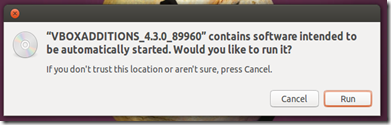
    At that point I was able to install/upgrade to the latest VirtualBox Extension pack within Ubuntu proper. It ran slow as molasses but got the job done. For some reason I keep forgetting what the correct option clicks to get the Extension pack installer auto-running after I mount the CD/ISO file. I did better this time. For some reason the dialog window prompts aren’t fully intuitive to me as a Windows user.
    1. First, run the installer from the host.
      rlkvvpwv.u4z
    2. Next choose the “Ask what to do” option (I think this is where I get tripped up and select another option incorrectly).
      egm215wp.p3c
    3. Run the auto installer
      zdshppbk.nv0
    4. Authenticate and install
      rf4k25to.2tb
      ●  How do I install Guest Additions in VirtualBox? - Ask Ubuntu.
      ●  Installing Guest Additions on Ubuntu - VirtualBoxes
  4. Once done, I rebooted the system after re-enabling the 3D Acceleration option in the VM settings.
  5. From there I continue by using Daniel Benny Simanjuntak’s tip in a previous Ubuntu post comments I did to run the following command from the terminal to start the upgrade process.
         …through terminal one can upgrade as well using the command:
          sudo do-release-upgrade -d
  6. Watch with anticipation.
  7. Installation failed.
  8. What!
  9. Try again.
  10. Failed again.
  11. Read error and log dialogs carefully and figure out I don’t have enough free space on my virtual hard drive. Apparently I set it up for a fixed disk size of about 8 GB.
  12. Started simple and ran command “sudo apt-get clean”. I seem to recall I had to do that last time I did an Ubuntu upgrade.
  13. That cleaned a bunch of stuff but when I tried to do the upgrade, I still didn’t have enough free space left to perform the upgrade. It eventually became clear that it was time to increase the size of my virtual hard drive. Goody.
  14. I tried a number of processes to expand (in place) my VM’s VDI virtual HDD file. None of them seemed to work successfully. It was super frustrating.
  15. Found vidma - Virtual Disks Manipulator (tool for resizing VDI). It’s a tiny standalone command line tool for resizing (fixed size) VDI files. It is “Alpha” software but I figured I had little to loose at this point as if this didn’t work, I’d probably be going back to square one anyway.
    1. To make things easy I copied the utility over into the same location of my VDI file.
    2. Opened a command line window in this location
    3. Ran the command “vidma Xplico.vdi 20480” and fed it confirmations as needed. (Actually I  used the even value amount “20000” and resulted in a 19.53 GB expanded drive…not quite 20 GB even which the 20480 figure would have done.)
    4. Watched and waited patiently as it processed the file.
    5. When it was done I relaunched the VM (hurray it came up fine) and using GParted inside the current Ubuntu VM, checked the /dev/sda drive. It was showing the full 19.53 GiB partition. Up from the original 8 GiB.
  16. That was part one. Now I had to resize my active partition to incorporate the additional unallocated space that I had created in step 13 with vidma.
  17. I shut down the VM and rebooted it after attaching a GParted ISO. This would let me manipulate the internal partition information of my VDI file.
    1. Basically I followed (starting down the page at Step 4 “Expand the partition in the larger virtual disk”) the guide found posted by Eugene over at Trivial Proof: Resizing a VirtualBox Virtual Hard Disk”
    2. Because I had set my Ubuntu drive up with a swap partition, I had to deal with it first as explained in the addendum in that guide.
    3. For some reason I was not able to move the swap partition out of the way as it describes. So I ended up following a tip in the comments from “jayesh” after carefully noting what size it originally was set at.

      ”I had an extended partition containing a swap partition between my root partition and unallocated space. So i tried to follow ADDENDUM steps but i was not able to move the extended partition in one step. So, i extended the "extended partition" with unallocated space, then moved the swap partition to the end of this new partition and finally shrink the extended partition to its original size, leaving unallocated space close to my root partition.”

      This post guide over at mwpreston.net expands that process in wonderful detail if you want more information before trying: Expanding a Linux disk with gparted (and getting swap out of the way) - mwpreston.net
    4. I then was able to expand the existing (in use partition) to take in (almost) all of the newly created unallocated space.
    5. Whew!
    6. Rebooted and detached the GParted ISO.
    7. My VM guest came up just fine and after another check in the GParted tool, confirmed things were put right again and I now had 18.43 GB of available space.
      0kiq0qqt.5i2
  18. Time to retry the Ubuntu 13.10 upgrade!
  19. From a terminal session: “sudo do-release-upgrade -d”
  20. Let it run forever…do a few reboots…
  21. When it is all settled down, I log in and kick the tires a bit, and change the desktop to the charming “Saucy Salamander” image.
    xefhiohv.gp2
  22. Looked for and updated any pending applications needing updating. Done.
  23. Check “Upgrade to Saucy Salamander” off my to-do list.

I would swear I captured a ton of screen shots of the actual VDI expansion and post-GParted partition wrangling work to document what I was doing, but I just can’t find where I put the screen cap files. Despite my best efforts to scour my HDD’s looking for them they just haven’t turned up. If I do later stumble upon them, I’ll update the post accordingly.

The only other “gotcha” I discovered immediately after the upgrade is that my beloved power-button in the top-right bar in Ubuntu 13.04 had been removed.  How do I shut the figgin thing down now?

prdh4foo.lrr

Apparently I wasn’t the only dolt stumbling over this, post upgrade.

  • unity - Why am I not able to shutdown, log-off and restart after an upgrade to Ubuntu 13.10? - Ask Ubuntu

Per that thread, I ended up settling for the “open a terminal, type sudo shutdown -h now, press enter and put the password” shutdown method.

Since that original upgrade to 13.10, I have since ran the Software Updater again to bring it current and I find my familiar shutdown icon is now back. Hurrah!

j0ajwvzt.gnj

I hope this helps any Ubuntu noobies out there with the upgrade process if you are running it in VirtualBox.

Previous Ubuntu upgrade posts here on GSD.

  • grand stream dreams: Ubuntu 12.10 (Quantal Quetzal) Upgrade
  • grand stream dreams: Ubuntu 13.04 (Raring Ringtail) Upgrade..a bit faster this time

--Claus Valca

Read More
Posted in Linux, tutorials, virtualization | No comments

Linkfest for the SysAdmins

Posted on 12:21 PM by Unknown

Here is some assorted linkage from the past week or two that might be of interest to the system administrators lurking around.

  • US State Governments Can’t Shake IT Woes - IEEE Spectrum - This week in gooberment IT support and deployment silliness. Offered as object lessons for self-improvement.
  • HealthCare.gov deferred final security check, could leak personal data - Ars Technica
  • The seven deadly sins of HealthCare.gov - Ars Technica
  • Can we trust the data brokers who store our most intimate private details? - Ars Technica
  • Defrag Tools: #61 - Windows 8.1 - Disk Space, Sysinternals DU and RU - Defrag Tools on Channel 9
  • PowerShell: Location, Location, Location - 4sysops
  • Download Active Directory Replication Status Tool - Microsoft Download Center
  • How to make your USB drive Write-protected under Windows - RMPrepUSB, Easy2Boot and USB booting
  • Install Windows 8.1 on Oracle VirtualBox - BetaNews article from Wayne Williams
  • Customizing the Windows 8.1 Start Screen? Don’t follow Microsoft’s guidance - Aaron Parker
  • Windows 8.1 / Windows Server 2012 R2 - Updated Shell UI changes - Ask the Performance Team blog

Cheers,

Claus Valca

Read More
Posted in Link Fest, Microsoft, PowerShell, tutorials, video, virtualization, Windows 8 | No comments

New Software Updates + VMware Tools Update fix

Posted on 11:19 AM by Unknown

The Valca household has survived last week’s torrential rain event. Unfortunately both our vehicles took a hit.

No…no cars were flooded due to poor driving decisions…they stayed high-and-dry…but they did suffer some incidental damage.

My beloved Saturn Ion apparently had material in the catalytic converter come loose and cause a blockage in the exhaust system.  That led to a significant power-loss -- I was only able to nurse it up to 55-60 MPH on the freeway. That’s a life-threatening highway speed here in Texas. I found a new local repair shop that was able to diagnose it (and +1 point for my dad who also guessed that would be the issue). So it awaits a new cat-converter install…and for good measure I’m having the front struts replaced as well as they are OEM and the front suspension is all clunky over road bumps and RR tracks. With almost 200,000 miles on it, I guess it is time.

Meanwhile, I got in Lavie’s car yesterday to borrow it while mine is in the shop. She doesn’t drive it much. It is a 2001 Nissan Altima with barely 43,000 miles on it. All was well until I went to unplug and toss her cell-phone charger on the passenger side foot-well floorboard…and found it full with 1.5” of standing water. Gasp!  Luckily I hadn’t put the car in reverse yet to slosh it out. Bother.  After some extensive wet/dry vac work it was only damp and between a few sunny dry days and some well placed Damp Rid containers I think we will be good. The windshield has some cracks in it that might cause it to not pass this month’s due vehicle safety inspection so the decision was made to schedule a windscreen replacement…which will result in all new weather seals.  The rest of the car was bone-dry so I really don’t think it was a seal that failed. My guess is the torrential rains (appx 3.5 inches in 24 hours) cascading down the windshield may have poured into the fresh-air intake vent under the hood which ran down into the passenger side foot well.  Not sure why it was just that side and not the driver’s as well. Thoughts?

So with one car finishing the air-out process and the other in the shop, it has been a bit stressful. Fortunately family and friends and Boss have been supportive and encouraging…and our older but beloved (and paid for) vehicles will continue to drive on a while longer.

Anyway…enough boring personal stuff…here is small collection of updated software you might want to check out as well as a fix for an aggravating VMware Player problem I ran into this morning after updating the main VMware Player application.

VMware Player Plus - Now updated to version 6.0.1. Note that VMware Player Plus is the $ version for commercial license usage. The free for personal use VMware Player is still around, but you just have to confirm that option during the setup. I prefer to use this VM software platform for my Windows guest clients and VirtualBox for my Linux-based ones.

  • Download VMware Player 6.0
  • VMware Player 6.0.1 Release Notes

One curious thing about this most recent version that I hadn’t encountered until now.

I had just upgraded to this latest VMware Player (host) software on Windows 7 and then launched an XP client so I could update the VMware Tools as well.

Strangely the Windows XP guest I started up reported it was stuck downloading the tools. On boot up of the VM guest, it offered me the upgrade tools option at the bottom of the window, and when I selected that action button, it popped a dialog window that said "VMware Tools installation cannot be started until the current download finishes." If I go to the VMware host’s menu, it says "Downloading VMware Tools" where it should say Upgrade/Reinstall VMware Tools.

I took matters into my own hands and was able to map the virtual CD ROM in my virtual XP client to the VMWare Tools ISO file for Windows at "C:\Program Files (x86)\VMware\VMware Player\windows.iso" figuring that it was the latest version and came down for the ride when I updated the host client software.

Once "mounted" it auto-started the VMWare Tools setup wizard in the XP guest session which I ran though and installed with no issues. A reboot and it was current in the XP VM.

However....on reboot VMware Player host software still was reporting the upgrade tools option at the bottom of the window, and when I selected that again, it said "VMware Tools installation cannot be started until the current download finishes."

Here's how I cleared it in VMWare Player (based on this forum thread I found and solution offered by John Swanagon).

    • Launch VMware Player.
    • Click "Player"
    • Click "File"
    • Click “Player Preferences”.
    • Under "Software updates” section.
    • Click “Connection Settings”.
    • In the “Connection Settings” window, change the proxy from “No proxy” to “Windows proxy settings”.
    • Click OK.
    • Click OK.
    • Open Internet Explorer. (note these IE steps may vary based on your IE version)
    • Click "Tools" then select “Internet Options”.
    • Click the “Connections” tab.
    • Click the “LAN settings” button.
    • Confirm/Select the “Automatically detect settings” option.
    • Click “OK”.
    • Click “OK”.
    • Close Internet Explorer.
    • Exit VMware Player.
    • Run VMware Player as an Administrator.
    • Click "Player"
    • Click "File"
    • Click “Player Preferences”.
    • Under "Software updates” section.
    • Click “Edit” -> “Preferences”.
    • Click “Download All Components Now”.

Additional components for other guest OS systems downloaded and when done, and VMware player re-launched, the message at the bottom of the screen finally was cleared!

Updates: PsExec v2.0, RAMMap v1.3, Sigcheck v2.0  - Sysinternals Site Discussion Blog

Updates: RAMMap v1.32, Sigcheck v2.01 - Sysinternals Site Discussion Blog

New Utility - QuickHash - Foolish IT LLC

OSFMount - updated 10-22-13 - version 1.5.1014.

  • Fixed issue with detecting partitions for ImageUSB images
  • Windows dynamic disks are now supported
  • Fixed issue with mounting via OSFMount command line with "-o rw" option
  • Fixed issue with mounting multiple partitions in an image file as writable due to file sharing permissions
  • Fixed issue with mounting multiple partitions in an image file from command line
  • Drive letters 'A' and 'B' can now be used
  • Propagated changes from Imdisk v1.7.5 including some key fixes:
    • Disks with "lost" drive letters can now be removed
    • Notifications hanging on drive creation and removal

I personally prefer to use Olof Lagerkvist’s ImDisk Virtual Disk Driver, also recently updated on 10-25-13 to build version 1.7.6.

Why do I mention that? well the OSFMount utility is based on Olof’s ImDisk software. That’s all.

mozdev.org - newsfox: installation - My favorite Firefox RSS reader is updated to 1.0.8.4.4.  Release notes

Speaking of Mozilla, Firefox was updated to version 25.0 and Thunderbird was updated to 24.1.0

Also, I’ve gone to a 3-monitor setup at home with my laptop. My desk is quite full!

I’m running my primary display from the attached Dell Studio 15 HD laptop display. It is super-sharp and has great resolution.

My secondary display is one of a pair of older Samsung SyncMaster 930B-A displays I got a long time ago as a gift from my brother. Maximum resolution is just 1280x1024 so it looks a bit under-scaled with the other displays but it seems to work great for text which is fine when I am pounding out blog posts. No OEM Win7 x64 bit hardware drivers exist for it either so it’s running the standard Microsoft PnP display driver just fine. The 4:3 ratio (the others are wide-screen format) also makes composing text documents more comfortable.

Since (like most Dell laptops) the laptop can only drive a maximum of two display outputs natively, I’m running this display with a StarTech USB 3.0 to DVI Adapter. I didn’t have any issues getting the drivers installed and the system up and running. It’s a must-have hardware accessory if you are running multiple monitors with a laptop and can’t toss in another hardware card internally.

My third display is a HP Pavilion 22bw 21.5-inch Diagonal IPS LED Backlit Monitor(C4D29AA) that I picked up some time ago on sale at a big-box outlet. Not a lot to say. It is HD and I am running it off the HDMI port on my laptop. Overall it is decent, but I am disappointed in the text-clarity of the display. Watching a video on it is fine, but for extended text-composition on it, it just isn’t as clear as I would prefer.

In good news, under Windows 7 (at least) you can set the ClearType text on a per-monitor basis!

5jle4vuv.ji2

That has helped a bit but the text still doesn’t compare with my primary laptop display.

Cheers!

Claus Valca.

Read More
Posted in Firefox, hardware, Link Fest, Microsoft, troubleshooting, utilities, virtualization, Windows 7 | No comments

Sunday, October 20, 2013

New or Updated App Linkfest for the week

Posted on 11:30 AM by Unknown

OK kiddos.  Here is an eclectic roundup of all kinds of freeware software and utility goodies that has been collected these past weeks.

I’m sure you can find something here for the little kid or serious sysadmin in you.

LightZone - Open-source digital darkroom software for Windows/Mac/Linux - free open-source alternative to Adobe LightRoom. Actively developed and supported by a very large community. If you do digital photography, then this is well worth the time to check out. Note that free registration is required to download the software. Spotted via this Noupe blog post LightZone: Totally Free Photo Lab lets you Forget Adobe Lightroom.

The Photographer's Ephemeris - free Win/Mac desktop app versions (AdobeAir based) and for $ supports smartphone/pad devices as well.  This super cool application lets photographers (film/digital) plan outdoor photography shots with natural (sun/moon) lighting conditions in mind.  Basically you provide the time and place and it will show how the light falls on your scene. I can’t believe this is free and I haven’t found it until now!  Spotted via a reference in this amazing Sean Goebel Photography: Timelapse post where Sean explains the techniques used to capture his time-lapse photo video among the observatory telescopes up on Mauna Kea, Hawaii.  Totally worth the time invested to both view the video (it even has lasers!) and read his well composed post.

Inno Setup - jrsoftware - just got a version 5.5.4 release last week. If you do Windows application/software packaging for setup and distribution this might be of interest to you. However, I don’t but it was still of interest to me. I then checked innounp, the Inno Setup Unpacker which is a sourceforge project to see if it was updated. It isn’t quite as current but is at version 0.39 supporting Inno Setup versions 2.0.8 through 5.5.3. Why do I care about innounp you ask?  Well, see I lean heavily on Universal Extractor to unpack various software package files in attempt to make semi-portable versions of them rather than fully installed versions on my system. One of the most popular packagers I run into is Inno Setup. Many developers use the latest versions of Inno Setup.  Jared Breland of Legroom.net created Universal Extractor but it hasn’t been updated in quite some time. Fortunately, what Jared has done is leverage many of the individual unpacker binaries in his application. So if you can find that one of the supported unpacker binaries has been updated, I find I can generally just replace the older version in UE with the newer one and keep up with the times!  So now you see why this is a good tip for you UE users.

InDeep File List Maker: List files & folders in Windows - Link and review via The Windows Club. Interesting little portable app to create listings of files in your Windows systems including removable drives and optical drive media.

Phrozen Windows File Monitor v1.0 - PhrozenSoft Blog - another neat little utility to monitor and select changes in your file system. This is an early version and the developer plans to add additional features moving forward. I really like it and the fact that you can switch between both list and tree-views. Spotted in this BetaNews post review: Phrozen Windows File Monitor lets you watch file system activity in real time. See also this Ghacks blog review: Windows Files Monitor records any file system change in its interface.

That product and those reviews then led me to find PRIMO (version 2.7.3 released Feb 27, 2012). PRIMO was developed to monitor program installs on Windows systems from Win2000, XP, Vista, & 7.

I’ve got lots of freeware utilities to monitor and log system changes, but for now we are keeping the discussion just on utilities that monitor (primarily) folder changes. Accordingly other tools you may want to check out are NirSoft’s FolderChangesView, Brutal Developer’s Directory Monitor, Leelu Soft: Watch 4 Folder 2.3 and Track Folder Changes. Do you have any other recommendations?

Oracle VM VirtualBox - Version 4.3 released on Oct 15, 2013.

  • Downloads – Oracle VM VirtualBox
  • Changelog – Oracle VM VirtualBox
  • What's New in VirtualBox 4.3? - The Fat Bloke Sings
  • VirtualBox adds multi-touch, webcam support, and allows users to video-capture sessions - BetaNews

Cheers.

--Claus Valca

Read More
Posted in Link Fest, photography, software, utilities, virtualization | No comments

Saturday, September 14, 2013

GSD Saturday Linkfest: IT Crowd and ForSec Folks welcome

Posted on 4:31 PM by Unknown

News and Links For the ForSec Crowd

Kali Linux 1.0.5 and Software Defined Radio - Kali Linux - new build released with updates and some bells-and-whistles to boot!

Windows 8 / Server 2012 Memory Forensics - Forensic Methods

Inside Windows Rootkits - Forensic Methods

Links - Windows Incident Response blog - Lots of great fresh material here!

Forensic Perspective - Windows Incident Response blog

Tools to Grab Locked Files - Journey Into Incident Response blog - Cory Harrell has a simply amazing post full of tremendous resources worth taking a look into for using to grab locked files.

DOWNLOAD: Microsoft Security Intelligence Report, Volume 14 Windows Application & PDF - Kurt Shintaku's Blog - This is too good to pass up! From Kurt’s post.

The Microsoft Security Intelligence Report Windows application analyzes the threat landscape of exploits, vulnerabilities, and malware using the latest data from hundreds of millions of systems around the world and some of the Internet’s busiest online services.

Readers will find the data, insights, and guidance provided in this report useful in helping them protect their organizations, software, and users.  

Key features of the application include:

  • All content, in one convenient place – includes all 800+ pages of content from Volume 14 of our latest report and is fully searchable.
  • High fidelity charts – Many customers have asked us if they can obtain high resolution versions of the charts. We’ve delivered that in the application and have even included the “save as” functionality so that customers may use them in other applications, such as PowerPoint.
  • Reader friendly – We’ve designed the application with you, the reader in mind. One example of this is the integration of our glossary into the body of a page which appear as mouse-over tool-tips.

Security Intelligence Report (SIR) vol.14 (Windows Application) - Microsoft.com - The installable application has 800+ pages of content while the PDF version checks in at 120 pages. Pick you medicine and pucker up.

Other useful Microsoft security and threat response links:

  • Microsoft Malware Protection Center
  • Microsoft Security Response Center
  • Computer Security Tools & Downloads – TechNet Security
  • Microsoft Security Intelligence Report

Microsoft Security Essentials Prerelease - Microsoft Download Center - new pre-release version 4.4.207.0 for interested users of MSSE. Released on 09.09.13 so it is very fresh.

(IN)SECURE Magazine issue 39 released - HelpNet Security - Download directly here (PDF link).

News and Links For the IT Crowd

I enjoy the technical and scientific articles I get in my RSS feeds over from the IEEE Spectrum website. It has great material and is terribly technical. Some sadly interesting IT news I’ve seen over there recently tag state IT departments.

  • IT Hiccups of the Week: A Bad Week for U.S. State Government IT - IEEE Spectrum
  • Is There a U.S. IT Worker Shortage? - IEEE Spectrum
  • IT Hiccups of the Week: U.S. State Government IT System Meltdowns Galore - IEEE Spectrum

A new find this week has been the Microsoft Office Configuration Analyzer Tool

The Microsoft Office Configuration Analyzer Tool (OffCAT) is a program that provides a detailed report of your installed Office programs. This report includes many parameters about your Office program configuration and highlights known problems found when OffCAT scans your computer. For any problems that are listed in the report, you are provided with a link to a public-facing article (usually a Microsoft Knowledge Base article) on the issue so you can read about possible fixes for the problem. If you are a Help Desk professional, you can also save the report to file so that the report can be viewed in the Office Configuration Analyzer Tool on another client where the tool is installed. The Office Configuration Analyzer Tool 1.1 also includes a command-line version that can be used to collect an OffCAT scan without user intervention.

I’ve been playing with it for a while and am amazed at the depth of information and assistance it provides, particularly for many very obscure items.

Spotted over at this 4sysops post FREE: Microsoft OffCAT – Office Configuration Analyzer Tool 1.1

MBSA 2.3 Preview Release Available - Anything about IT - News about a new preview release version of Microsoft Baseline Security Analyzer (note link is to public version 2.2) that supports MS OS’s between XP and Windows 8.1

Windows 8.1 Command Prompt or PowerShell - Anything about IT

PowerShell 4.0 – A first look - 4sysops

How to Know When an Object Was Created and Changed in Active Directory - WindowsNetworking.com

When was the Last Password Changed for a User Account in Active Directory - WindowsNetworking.com

Office 365 for Nonprofits Organizations - Microsoft.com - Microsoft recently announced that they are offering Office 365 for non-profits (including eligible churches). This could be a big deal for many, learn more here.

SysInternals Tools, Windows 8 Training - Microsoft Virtual Academy - Seven video training modules and supporting materials to assist with learning the latest in core SysInternals tools. Check it out! Hat tip to Kurt Shintaku.

Kyle Beckman has posted a great series about Folder Redirection over at 4sysops that I (re)discovered. Lots of good information and tips here.

  • Folder Redirection – Part 1: Introduction - 4sysops
  • Folder Redirection – Part 2: Setting up your file server
  • Folder Redirection – Part 3: Explanation of folder permissions
  • Folder Redirection – Part 4: Group Policy configuration
  • Folder Redirection – Part 5: Best practices
  • How to disable Folder Redirection

Create a new Windows Service

Moon Point Support Weblog had a helpful post: Creating a Service for a Windows System

It caught my eye as we are working with a system down in the coal-mines that requires running the core features as applications rather than services which makes security and log-in/account management more than a little bit challenging. Alas, this won’t solve those headaches but it is worth bookmarking and knowing.

How To Create a User-Defined Service - Microsoft Support

How to create a Windows service by using Sc.exe - Microsoft Support

NSSM - the Non-Sucking Service Manager

Virtualization Software Updates

Download VMware Player 6.0 - VMware

VMware woos power users and IT pros with Fusion and Workstation upgrades - Ars Technica

VMware Player 6 Released with Full Windows 8.1 Support - Next of Windows

Oracle VM VirtualBox - Version 4.2.18 released - Oracle

General Application and Utility Updates of Note

UltraVNC VNC - version release 1.1.93 now out.

PeStudio - version release 7.45 now out.

Speccy v1.23 - Piriform - new release.

HWiNFO Portable - version 4.24-2000 - PortableApps.com - in what begs another GSD LinkList post, HWiNFO is yet another system hardware info-gathering resource I’ve been playing with. I’ve got more than a few I call up from the bullpen and this one has been added to the pitching stable.

IOBit Driver Booster Free - I confess I was very skeptical when I saw this new application appear. I have a few trusted driver apps to catalog and/or back up existing drivers on a system, and some vendor-specific driver update scanning applications used to update my systems. However, I have generally distained apps that claim to scan for driver updates on Windows systems and tell me what I need. Driver updating can be a dangerous and system-harmful thing if the wrong one is applied. So when I tried with trepidation this application, I found the UI was super clean and easy to navigate, the scan was immediate and dead-on fast, it seemed very accurate (finding only one out of date driver), provides a detailed and comprehensive list of drivers checked and their status, and creates a Restore point before every driver update is installed. It’s so easy I’d recommend it to my non-techy friends and family who I support. Great job IOBit! I’ll be running this one weekly!

SoftPerfect Network Scanner - updated to version 5.5. See Changelog for details.

Wireshark - updated to Stable version 1.10.2 and Old Stable version 1.8.10.

  • Wireshark 1.10.2 - Release notes
  • Wireshark 1.8.10 - Release notes

For you crazy WinPE building fans who use WinBuilder, a new version has been released that is much different from the previous version you may be familiar with. At the time of this blog-posting, the Winbuilder.net site seems to be temporarily down, but here were the applicable links you need to check out. I suspect fans of WinBuilder will fall one one side of the fence or the other; love it or hate it. Particularly with the Java building components.

  • WinBuilder - Development - reboot.pro
  • WinBuilder - reboot.pro
  • without imbedded Java RTEs - download version.

lessmsi (aka Less Msiérables) · ActiveScott at GitHub - now at version 1.1.3 The download link is a bit hard to find on the page if you aren’t used to GitHub. Look for “1 release" at the top bar just above the purple band and click it to find the compiled binaries in lessmsi-v1.1.3.zip.

d7 v10 Just Released! - Computer Technician - Foolish IT LLC.the updated change list is too expansive for me to try to list here. Check it out.

SoundVolumeView - new NirSoft utility - View/change sound levels & save/load sound level profiles on Windows Vista/7/8/2008 - More details in this NirSoft blog post.

Whew!  That post tired me out…or maybe it was the A&M/Alabama game live-streaming on my second monitor.

--Claus Valca

Read More
Posted in Active Directory, anti-virus software, boot-cd's, forensics, Link Fest, Linux, malware tools, Microsoft, networking, PowerShell, security, software, tutorials, utilities, virtualization, viruses | No comments

Monday, September 2, 2013

Admin-Related Links - GSD Linkpost

Posted on 5:29 PM by Unknown

…and here are some fun links for the SysAdmins in the crowd

Videos!

  • Defrag Tools: #51 - Support Diagnostics - (video) - Defrag Tools @ Microsoft’s Channel 9
  • Defrag Tools: #53 - Crashes, Hangs and Slow Performance - (video) - Defrag Tools @ Microsoft’s Channel 9
  • Defrag Tools: #44 - WPT - DiskIO Analysis - (video) - Defrag Tools @ Microsoft’s Channel 9
  • Defrag Tools: #43 - WPT - Wait Analysis - (video) - Defrag Tools @ Microsoft’s Channel 9
  • Defrag Tools: #41 - WPT - Command Line - (video) - Defrag Tools @ Microsoft’s Channel 9
  • Defrag Tools: #39 - Windows Performance Toolkit - (video) - Defrag Tools @ Microsoft’s Channel 9

The awesomely helpful 4sysops site has some good info posts:

  • What is the System Reserved Partition? - 4sysops
  • Windows 8 Secure Boot - 4sysops
  • Five free admin tools from Netwrix - 4sysops
  • Move VirtualBox folder with virtual machines to a new location - 4sysops

How to enable Group Policy Preferences Logging via the Local Group Policy Editor - Anything about IT blog

FIX: Adobe Flash not working on Windows 8/Internet Explorer 10 running on a Lenovo ThinkPad X1 Carbon Touch - Kurt Shintaku's Blog

For Office 365 folks:

  • Office 365 Migration Considerations (Part 1) - WindowsNetworking.com post by Mitch Tulloch
  • Office 365 Migration Considerations (Part 2) - WindowsNetworking.com post by Mitch Tulloch
  • Office 365 Migration Considerations (Part 3) - WindowsNetworking.com post by Mitch Tulloch

Windows PE boot in BIOS or UEFI mode (Google Translated) - Borns IT and Windows Blog

Redefining what "Never doing that again" means... Troubleshooting with the Windows Sysinternals Tools, Second Edition - Aaron Margosis' Non-Admin, App-Compat and Sysinternals WebLog

Cheers.

--Claus Valca.

Read More
Posted in Active Directory, Link Fest, Microsoft, troubleshooting, tutorials, virtualization | No comments

Saturday, August 31, 2013

QuickPost: VMware Player micro-fix

Posted on 12:19 PM by Unknown

A quick-post in case others search for a solution for this particular issue:

I’ve been running VMware Player 5.0 on my Windows 7 x64 system for a long while now.

This morning when working in all my Modern.IE Tester VM’s (Win7Ent, Win8 & Win8.1) as well as a fully-installed (and licensed) version of XP Home I noticed the following issues:

  • No options showing on VMWare Player tool-bar for three-key toggle, etc.
    kw5y1qnn.rin
  • Unity working fine however allowing drag/drop of files between host and client desktops.
  • After shutting down the running virtualized OS cleanly (Start--shutdown/power-off), the running vm window just stays black and doesn’t close after any length of time.
  • Trying to close or force shutdown with the VMware Player options says it is still running and to wait.
  • Checking the running processes showed the sub-process “vmware-unity-helper.exe” still running:
    3xp2z0pu.mdn
  • I was able to kill the process tree to close out the window but that seemed very brutal.

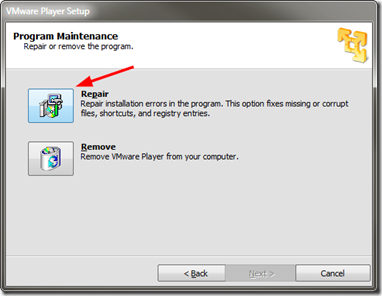
I first tried running a “repair” of VMware Player from the “Programs and Features” options but it would not work as it said the core installation files were missing.

I re-downloaded the VMware Player setup file from VMware and then ran it.

I selected the “repair” option and let it do its thing.

v3vregoy.bva

Once finished I relaunched the vm’s and all ran fine, my VMware Player toolbar was restored, and after closing the vm out, after a brief pause, the window closed and the running processes terminated normally.

Not sure what caused the issue but all is well again.

VMware Player “repair” is your friend!

--Claus V.

Read More
Posted in troubleshooting, virtualization | No comments

Sunday, August 11, 2013

Regarding the Modern.IE Tester VM’s

Posted on 5:08 PM by Unknown

I’ve spend much of the weekend building and tweaking the various Internet Explorer | modern.IE Virtual Machine builds. I went with the VMware Player versions as I tend to use that platform for Windows systems while using VirtualBox for Linux machines.

Anyway, this wasn’t for kicks and grins. Rather I needed to do some platform testing of different remote-control access and these seemed perfect, after some modifications.

Again, carefully read Rey Bango’s blog post and the comments to get a good sense of these systems; Making Internet Explorer Testing Easier with new IE VMs

Time Limits on the VMs

All of the VMs have a time limit 90 days of total time from the moment you first use the VM. Basically it’s 30 days usage with two 30-day rearms. To rearm, go into a command prompt with Administrator privileges and type in “slmgr –rearm”

At the end of the 90 days, you’ll be able to use the VM for an hour before it shuts down. At this point, you’ll need to decide if that’s okay or if you’d like to recreate the VM and use it for another 90 days. Remember, you can reuse the same files you originally downloaded to recreate the VM so don’t delete them (unless you just love downloading big files).

After I enabled Remote Desktop access to the first system (Windows 7 Enterprise) and then started trying to use mstsc.exe (Remote Desktop Connection), it would connect…then instantly through an error and disconnect. Remote Desktop Access is disabled on these VM’s by default. I assume you know how to enable them but if not…Enabling Remote Desktop Connections in Windows 7 | 7 Tutorials

Took me awhile to figure it out, but the system was also configured with the single profile account and to automatically log into the account. Once I connected to the account with remote desktop, it logged the running account off, then that caused it to force the relogin of the same account, knocking me off!

This then required me to disable the “auto-login” feature for the accounts. Again, I’m sure all my dear readers know how to do that but if not…Tip: Auto-Login Your Windows 7 User Account | Cool Stuff | Channel 9 except in this case after first running “control userpasswords2”, for step 4 you want to “Check the option “User must enter a user name and password to use this computer.”  Now you won’t get kicked off when you use Windows Remote Desktop Connection to reach it.

Of course, if you do that, you will now need to enter the default password for these systems.  You do know the default user account password for the VM’s right? No?

I found it clearly documented in this provided PDF: Modern.IE VM Notes - 6-24-2013. The PDF is interesting as the file name says 06-27-2013 but the internal document date is 06-24-2013. Oh well. Here is another earlier version as well: Modern.IE VM Notes. Rey Bango actually references the first one in his post if you can find it in the last sentence of the last paragraph of his “Installing the VMs” section.

What else…Oh…as I was setting these up in VMWare Player, for one of them I somehow configured it to use Home Groups. Oopsie.  It ended up creating a non-delete-able HomeGroup icon on my host desktop. Hmmm. Followed this tip from “reminore reminore” to get it cleared off: Unable to remove Homegroup Icon - Microsoft Community. There are a couple of techniques in the post but this did it simply for me.

This worked for me win 7 - 64 bit home premium
1) Drive to "Folder Options"
2) Click "View"
3) Scroll down to "Use Sharing Wizard (Recommended)" it must be checked
4) Un-Check  the Check -box
5) Click "Apply"......the Icon will be removed from your desktop
6) Re-Check the Check-box .....the icon will not be back

HomeGroup Desktop Icon - Add or Remove - Windows 7 Help Forums has some additional pre-packaged .REG file fixes if that is your thing, or the above doesn’t work.

One last tip. Once I finished tweaking the user-account/settings and adding some core files/portable apps to it in the profile folder, to make future rebuilding of these systems super-easy, I just ran the Easy Transfer Wizard on one of them to build an “myaccount.mig" file and off-loaded it back to my host system. Then after I set up the Win 7 system I could semi-clone that profile setup to the rest of them with much less setup time than the first one, and when I have to rebuild them after the 90-day period ends. How to Use Easy Transfer in Windows 7 - For Dummies

--Cheers.

Claus Valca.

Read More
Posted in Internet Explorer, Microsoft, troubleshooting, tutorials, virtualization, Windows 7, Windows 8 | No comments

Sunday, July 28, 2013

SysAdmin Linkfest - Chock'-o’-Videos Edition (G-rated version)

Posted on 3:41 PM by Unknown

This is a super-heavy linkpost filled to the rim with video presentation linkages. Make sure you have some extra time and bandwidth set aside for all these.

Seriously. You think I’m joking, but all it takes is one sysadm running around careless with streaming video file links and then “bam” someone ends up loosing their bandwidth.

As tempting as it is, I’m just providing the links to the video rather than embeds of the video in a player itself. Not that Mark and the Defrag Tool guys aren’t handsome or anything, its more because I just hate seeing the Flash SWP pre-load in everyone’s web-browser when I then get behind in posting and you fans are hit with it when you land on a GSD blog page with embedded video and you aren’t using a Flash-blocking plugin, or have it disabled for my blog.

w1fil0k5.j3p

(the evidence as seen in Process Explorer as happened back from April 2013 - late June 2013 )

General philosophy: wipe the baby and keep it, toss the diapers

Why wiping decommissioned IT assets should be a must - Help Net Security - Duh.

The cost of cleaning up - ISC Diary

GrandStreamDreams blog has written heavily regarding securely wiping hard drives. It should be a no-brainer in today’s digital age…and coupled with some whole disk encryption (to boot). Likewise I just can’t grasp how it is cheaper to trash 170 PC’s because they were infected rather than having a secure-wipe/standard-image reload process. Don’t skip the ISC Diary article’s Comments section.

Sysinternals/Pass the Hash TechEd North America talks

Sysinternals - and Pass the Hash - at TechEd next week- Aaron Margosis' "Non-Admin" and App-Compat WebLog - These were five keynote talks back from June. In case you couldn’t stop by New Orleans last month, you got some serious catching up to do now!

  • License to Kill: Malware Hunting with the Sysinternals Tools - Channel 9 - Mark Russinovich presenting
  • Case of the Unexplained 2013: Windows Troubleshooting with Mark Russinovich - Channel 9 - Mark Russinovich presenting
  • Sysinternals Primer: TechEd 2013 Edition - Channel 9 - Aaron Margosis presenting
  • Pass the Hash and Other Credential Theft and Reuse: Preventing Lateral Movement and Privilege Escalation - Channel 9 - Aaron Margosis, Mark Simos presenting
  • Defrag Tools: Live - TechEd USA 2013 - Channel 9 - Andrew Richards presenting

The Case of…

Case of the Slow Logon – Anti-Virus vs 3rd Party Application - chentiangemalc

Case of the Windows 8 Explorer Hang – Part 1 - chentiangemalc

Defrag Tools takes on Windows Performance Toolkit

You may recall the GSD blog post Case of the Unexplained Donut of Death where I started out using Windows 7 Xperf tool to do some performance troubleshooting. I then jumped from it to the new WPT set in Windows 8 SDK and outlined just how amazing the level of logging detail and analysis was.

Windows Perfmance Analyzer SDK 8

As the time there was not a considerable amount of documentation out for us mere mortals on how leverage the true power the tools contained.

No more. The team at Channel 9 has hit the ground hard with a series of videos going into the details on the tool and its features. I suspect more will come. Now I can really start figuring out what all those indicators shown above really mean!

  • Defrag Tools: #39 - Windows Performance Toolkit
  • Defrag Tools: #40 - WPT - WPR & WPA
  • Defrag Tools: #41 - WPT - Command Line
  • Defrag Tools: #42 - WPT - CPU Analysis
  • Defrag Tools: #43 - WPT - Wait Analysis
  • Defrag Tools: #44 - WPT - DiskIO Analysis
  • Defrag Tools: #45 - WPT - File & Registry Analysis
  • Defrag Tools: #46 - WPT - Driver Analysis
  • Defrag Tools: #47 - WPT - MiniFilter Analysis
  • Defrag Tools: #48 - WPT - Memory Analysis - Pool

Offline Windows Updating

WSUS Offline Update - I have been a longtime fan of this tool, updated a few days ago to version 8.5. I never leave my cubicle to respond to a system or re-image/deployment without it on my USB stick. It is the #1 tool I know of to help conserve bandwidth and minimize impact at a site where we are doing a deployment. It remains highly Valca recommended! If you are a Windows PC deployment tech or analyst and you don’t have this tool, you either have some super-big circuits, an internal WSUS server, or you can swagger like Beckham and just don’t care.

Portable Update - This “bravo-ware” tool is new to me. Like WSUS Offline Updater, once built you can use it to redeploy Windows/MS patches to a target system. The process seems considerably different that USUS-OU but it may work better for your needs. I’m hoping to test it soon and have a better side-by-side experience to compare them against. For more information on the tool check out the application’s How to use page as well as this AddictiveTips post: Apply Windows Update To Multiple PCs From A USB Drive While Offline.

SysAdmin Tips

Run any app under the NT Authority\Local System account - TinyApps.org - Comparison between ETS (Elevate To System) tool (it has an optional GUI) and psexec.exe from Sysinternals.

FREE: Get Local Admins GUI – Find users with administrator rights - 4sysops

How To Make UEFI Bootable USB Flash Drive to Install Windows 8 - Next of Windows

Making a better, somewhat prettier, but definitely more functional Windows Command Line - Scott Hanselman’s ComputerZen blog

How To Quickly Unlock Local Administrator Account in Windows 8 - Next of Windows

Finally a Windows Task Manager Performance tab blog! - Ask the Performance Team

SysAdmin Utility & Software Leads

Updates: Mark's TechEd Sessions, Autoruns v11.61, Strings v2.52, ZoomIt v4.5 - Sysinternals Site Discussion

Updates: Autoruns v11.6, Procexp v15.31, Procmon v3.05, Sigcheck v1.92 - Sysinternals Site Discussion

Update: Autoruns v11.62 - Sysinternals Site Discussion

Free Windows virtual machines for Mac, Linux, or Windows - TinyApps.org blog - Official developer virtual machine files for XP, Vista, WIn7 and Win 8. These are really for Internet Explorer developers but are great for other software testing purposes. Even more details here: Making Internet Explorer Testing Easier with new IE VMs - Rey Bango.  Main VM’s download link here.

CopyToFlash - Foolish IT - This could be really dangerous. REALLY dangerous. Like most stuff over at Foolish IT. However it could just be dead-helpful for the right audience and application. Basically it just starts a drive monitoring process and then (with a few configuration actions) will copy the contents of a monitored source folder location to any USB flash drive that attaches to the system. Yeah. Dangerous but helpful if you are responsible for updating new content to tons of USB sticks. Oh, did you know it uses RoboCopy? Yep.

Office 2010 Service Pack 2 Released…(mostly)

Just in time after a major Office 2010 rollout at our coal-mine. Nice timing guys…

Microsoft delivers Office 2010 Service Pack 2 - ZDNet - Mary Jo Foley

Office 2010 and SharePoint 2010 Service Pack 2 Availability - Office Sustained Engineering Blog

Description of Office 2010 SP2 - Microsoft Support

How to obtain and install the service pack

Method 1: Microsoft Update (recommended)

Note In addition to the products in the Office 2010 suite, the service pack 2687455 also updates Microsoft Project 2010, Microsoft Visio 2010, and Microsoft SharePoint Designer 2010.

To download the service pack from Microsoft Update, go to the following Microsoft website:

Microsoft Update

You can opt in a computer to the Microsoft Update service, and then register that service with the Automatic updates to receive the SP2 update. Microsoft Update will detect which products that you have installed, and then apply all updates to the products.

Method 2: Download the SP2 package from Microsoft Download Center

The following files are available for download from the Microsoft Download Center:

  • Download the Microsoft Office 2010 Service Pack 2 32-bit package now.
  • Download the Microsoft Office 2010 Service Pack 2 64-bit package now.

For more information about how to download Microsoft support files, click the following article number to view the article in the Microsoft Knowledge Base:

119591 How to obtain Microsoft support files from online services

Microsoft scanned this file for viruses. Microsoft used the most current virus-detection software that was available on the date that the file was posted. The file is stored on security-enhanced servers that help prevent any unauthorized changes to the file.

For more information about a complete list of all released SP2 desktop packages, click the following article number to view the article in the Microsoft Knowledge Base:

2687521 List of all Office 2010 SP2 packages

Cheers,

Claus Valca

Read More
Posted in Active Directory, Internet Explorer, Learning, Link Fest, malware tools, Microsoft, security, troubleshooting, tutorials, utilities, video, Virtual PC, virtualization | No comments

Sunday, June 30, 2013

Odds and Ends: Recent Utilities and Tips of Note

Posted on 5:42 PM by Unknown

Here is a quick dash-off of some free software and utilities that struck my fancy.

Please use caution as your fancy may not be quite as robust as mine…

  • Portable Update - free and interesting tool to update your MS Windows system in an isolated environment.
  • WSUS Offline Update - This is the tool that we use to do almost all our heavy post-image application Microsoft system updating. It was updated to version 8.4 on May 27 2013.
  • JavaRa 2.2 - SingularLabs JavaRa freeware utility that lets you deploy, update and remove the JRE. Really handy when you are dealing with lots of deployments or think you have a mis-install of JRE causing issues.
  • Updates: Autoruns v11.6, Procexp v15.31, Procmon v3.05, Sigcheck v1.92 - Sysinternals
  • TurnedOnTimesView - Nirsoft - new tool from Nir Sofer that reads the Windows Event logs and only reports on those system system launch/shutdown events.  Read Nir’s utility announcement at his blog.  I had been using PC On/Off Time but the freeware version was limited to the last 3-weeks it would report on. The NirSoft version doesn’t quite have the nice graphical view but has no limitations at all on the range of event log data it reports, and the NirSoft app allows you to export your data to a file.
  • Macrium Reflect FREE Edition - version 5.2 -  Information and download. This BetaNews post has more details on the improvements: Macrium Reflect Free improves Explorer integration, updates recovery builder tool
  • Parted Magic - Linux LiveCD - an awesome good tool that seems to be updated every other day. That is a REAL work of love to keep up that effort. Latest version was released June 14 2013 at version 2013_06_15. I used this tool to overcome a particularly interesting image deployment situation recently and it really worked brilliantly well. You will have to wait just a bit for that blog post to come! It was a great “thinking outside the box” solution.
  • Sandboxie  - Major update of version 4.02. For some details take a look at at BetaNews post: Sandboxie adds full 64-bit protection, improves compatibility
  • Oracle VM VirtualBox - free - Newly released version 4.2.14 (and matching Extension Pack) came out June 21 2013. See the Changelog for details.
  • PassMark MemTest86 - Now at Version 4.2.0 released March 18 2013. It’s nice to see this perennial RAM tester still supported and being updated regularly. You may also remember Memtest86+ which is very similar, but hasn’t been updated in several years. I carry both, just in case.
  • Running Mac OS X on Windows VMware Workstation - Chris Nackers Blog. While I do Apple iOS quite well on our iPhones and iPad, I don’t have any experience on OS X. Last time I used a Macintosh was back when it was a chunky box with a black/white monitor. Seriously! However I am always on the lookout for cool ways and tips to load different OS versions in virtual machines so this well-written guide really caught my eye. Chris Nackers is a neat IT guy and Microsoft MVP. I’m digging RSS feeding his blog. You should too!
  • Native VHD Boot in Windows 8 - 4sysops - Nice post by Timothy Warner. Don’t let the title fool you. He walks through setting up a Windows Server 2012 build in a “Boot from VHD” configuration. We’ve covered booting from VHD before here at GSD and it never fails to amaze me just how cool that ability is for Windows multi-boot fans.

Cheers!

Claus Valca.

Read More
Posted in Apple, boot-cd's, Link Fest, Linux, Microsoft, tutorials, utilities, virtualization | No comments

Mostly Wi-Fi and Network Security: Linkfest

Posted on 1:47 PM by Unknown

Ok. In the time it took me to work on that last post (mostly), I was able to cycle some laundry through the machines AND get my VMWare Player build of Windows 8.1 up and running.

It tossed me a few curves, but nothing that big a deal.

bmilmnfz.xol

I tried the new and updated “Windows Start button” all for five minutes before ditching it for the free IOBit StartMenu8. Went on with no issues. Tossed on Google Chrome (Dev), FreeCommanderXE beta, dropped some snazzy wallpapers on to cycle through, added Process Explorer to run in the system tray, and while I kept Windows Defender this time, I supplemented it with Microsoft's EMET 4.0.

That’s it for now, more tweaking and testing and twisting it in the weeks to come. Expect some follow-up Windows 8/8.1 posts as well around here.

So now let’s turn to the world of Wi-Fi (in)Secuirty and networking in this GSD Link Fest edition:

Wi-Fi, Web, and Networking Security Headaches Galore - Pineapple Flavored!

  • Your Mac, iPhone or iPad may have left the Apple store with a serious security risk - Troy Hunt’s blog
  • iPhones can auto-connect to rogue Wi-Fi networks, researchers warn - Ars Technica
  • Pineapple Surprise! Mixing trusting devices with sneaky Wi-Fi at #wdc13 - Troy Hunt’s blog
  • The beginners guide to breaking website security with nothing more than a Pineapple - Troy Hunt’s blog
  • Your login form posts to HTTPS, but you blew it when you loaded it over HTTP - Troy Hunt’s blog
  • Understanding the risk of mixed content warnings - Troy Hunt’s blog
  • iOS Personal Hotspot passwords vulnerable to brute force attacks - iMore.com
  • VIDEO: Targeted Attacks Video Series from TechNet - Kurt Shintaku's Blog. From that post:

      We have a new security video resource called the Targeted Attacks Video Series  on Advanced Persistent Threats (APTs), or what we at Microsoft call Targeted Attacks by Determined Human Adversaries. These five short informational videos summarizes three security whitepapers, Determined Adversaries and Targeted Attacks, Mitigating Pass-the-Hash (PtH) Attacks and Other Credential Theft Techniques, and Best Practices for Securing Active Directory. The five short videos are:

      1. Introduction to Determined Adversaries and Targeted Attacks: Tim Rains, Director, Microsoft Trustworthy Computing, provides background information on these types of attacks and set the context for the rest of the video series.
      2. Mitigating Pass-the-Hash Attacks: Patrick Jungles, Security Program Manager, Trustworthy Computing, explains what a Pass-the-Hash attack is and some tested mitigations to help manage the risk associated with credential theft attacks.
      3. Anatomy of a Cyber-attack Part 1: Sean Finnegan, CTO of the Microsoft Consulting Services Cybersecurity Practice, walks through a typical targeted attack, step by step, describing how attackers perpetrate these attacks.
      4. Anatomy of a Cyber-attack Part 2: Sean Finnegan finishes his briefing on how determined adversaries commit targeted attacks.
      5. Importance of Securing Active Directory: Bret Arsenault, Microsoft CISO, discusses the importance of protecting your Active Directory in the context of target attacks.

All great videos to watch on your own or with your IT team for a mini training & discussion session.

Networking Tools

There have been a number of nice networking tool updates recently:

  • SoftPerfect Network Scanner: fast and free network scanner - Now updated to version 5.4.11 (May 08 2013)
  • DNSQuerySniffer - DNS queries sniffer - New free app from Nir Sofer’s Nirsoft factory that shows the DNS queries sent by your system (x32/x64 bit flavors are available).
  • Wireshark - Now at stable release version 1.10.0.  For more info see these 1.10.0 Release Notes
  • toolsmith: Visual Malware Analysis with ProcDOT - HolisticInfoSec - I’m still getting my courage up to start working with this gem that mind-melds Process Monitor data with GraphViz. Super cool.
  • TightVNC 2.7.7 is now out and released. download
  • Deep Dive Packet Analysis (by Hansang Bae) - Sharkfest 2013 session- Video presentation on using and analyzing challenging network issues.

Microsoft Message Analyzer Beta 3 Released!

The next beta version of Microsoft’s answer to Wireshark is out.

  • Microsoft Message Analyzer Beta 3 is released (Build 6211)! - MessageAnalyzer blog

It is a far and different animal from the old MS Network Monitor platform and takes a lot of work getting used to.

Tip: you have to be registered on the Microsoft Connect site to get the non-public download. I have been from some time but when I tried to find the actual MA Beta 3 bits for download on the project page, I couldn’t find them. I looked, waited a few days, looked some more, nada.

Finally I backed out a bit and found a “new” (3rd) “Message Analyzer, Network Monitor and Protocol Test Suites” product program listed that I wasn’t joined to. I joined it and there were the bits. Ok…I guess that was my bad by assuming that just because I had joined a particular Product, that other Programs could be added without me realizing it. Oh well.

Note: I believe it requires a Windows 7/8 platform as well as some .NET packages. It definitely doesn’t seem to be supported on XP. Come-on team, time to upgrade that OS!

Wi-Fi Tools and Updates

  • Wi-Fi Inspector - Xirrus - Neat and techy-looking free Wi-Fi signal scanner. Now updated to version 1.2.1.4. I keep this on handy
  • inSSIDer for Home - MetaGeek - This seriously-updated edition of inSSIDer really rocks! This is the free version for home users but they also offer a super-cool Office version that has some additional graphing and reporting features, Finally they also offer some super-beefy enterprise-level Wi-Fi assessment and troubleshooting software tools. Neat stuff here.
  • HeatMapper - Ekahau’s free Wi-Fi coverage mapping tool for homes and small offices. Simple registration required for the free download. Current version 1.1.4 (March 03 2012) with Win8 Consumer preview support.
  • Cisco Meraki - WiFi Mapper - Cisco product that can run in a browser session via a Java application. Nice basic review here: Wi-Fi Testing and Mapping Apps for Techs via Technibble
  • WifiInfoView - free NirSoft tool to capture information on Wi-Fi networks that are broadcasting in your vicinity. This version works on Windows Vista - Windows 7/8. Not XP, however.
  • WirelessNetView - free NirSoft tool that also captures broadcasting Wi-Fi network details. This one does run on XP.
  • Wireless Network Watcher - free NirSoft tool that shows who is connected to your wireless network.
  • SoftPerfect WiFi Guard - free app that also shows who is on your wireless network, but has an added feature of alerting you if a new device joins that is unknown

Stay safe and remain watchful!

Claus Valca

Read More
Posted in Link Fest, networking, software, utilities, virtualization, Windows 8 | No comments

Sunday, April 28, 2013

Ubuntu 13.04 (Raring Ringtail) Upgrade..a bit faster this time

Posted on 11:51 AM by Unknown

Yesterday turned out to be a deluge of epic proportions.  A moisture-saturated atmosphere dumped an unexpectedly large amount of water across the upper Gulf Coast. The Houston area had to deal with waves of hail, flooded freeways littered with floating and abandoned cars, high-water rescues, and general misery. What the local forecasters said on Friday would be a 10-30% chance of scattered showers became a 100% certainty of something floating in backyards everywhere. 

So it was the perfect day to settle in with my visiting father-in-law as the girls swam around town and watch home-improvement shows on cable and perform an upgrade to by VirtualBox session of Ubuntu.

  1. Find in RSS feeds that my Ubuntu 12.10 Quantal Quetzal install has a 13.04 Raring Ringtail upgrade available.
    ●  Ubuntu 13.04 is ready to deploy - Ubuntu
    ●  Ubuntu 13.04 boosts graphics performance to prepare for phones, tablets - Ars Technica
    ●  Ubuntu 13:04 Raring Ringtail published: The most important features at a glance - Caschys Blog (GTranslated)
    ●  New Ubuntu version hits today! - Boing Boing
    ●  Ubuntu 13.04 'Raring Ringtail' gives some, takes some - BetaNews
    ●  Hands-On With The New Features In Ubuntu 13.04 Raring Ringtail - AddictiveTips
  2. Begin making plans to do an in-place upgrade of my VirtualBox Ubuntu build…forgetting I had recently updated VirtualBox to 4.2.12 and it didn’t hurt my Windows VM systems…so why should I care about Ubuntu impact.
    ●  Downloads – Oracle VM
    ●  Changelog – Oracle VM VirtualBox
  3. Launched my VirtualBox Ubuntu build and logged in normally…and got a blank desktop. I did this several times. I could launch the VM and get the expected account login window for Ubuntu 12.10 just fine, but the desktop would never load. Hmmm. Wonder if that recent VirtualBox update had anything to do with it? Probably.
  4. Did some research and found some posts regarding VMWare upgrades screwing with Ubuntu in the past and they had tips about disabling 3D acceleration in the VM machine settings. VirtualBox has a similar feature (that was enabled) so I disabled it, relaunched the Ubuntu VM and now was able to load the desktop! Lesson learned; after upgrading VirtualBox, disable 3D acceleration on first-boot.

    hk3ijk2t.dbz
    ●  Latest Ubuntu update broke cinnamon · Issue #1763 · linuxmint/Cinnamon - GitHub
    ●  Later remember I also had 3D headaches last Ubuntu upgrade that I had to power-through.
  5. At that point I was able to install/upgrade to the latest VirtualBox Extension pack within Ubuntu proper. It ran slow as molasses but got the job done. Shut down the VM when done, re-enabled 3D acceleration in the VM machine settings, and was able to log back into the Ubuntu desktop with no issues and it was super-fast again. Yea! Looks like my former fixes from that post are still sticking:
        ● Ubuntu 12.10 – VirtualBox Guest Additions not Working -Complete, Concrete, Concise
        ● #10901 (vboxvideo fails to auto-load on Ubuntu 12.10 Guest) – Oracle VM VirtualBox
        ● virtualbox.org • View topic - Ubuntu 12.10 "virtually" unusable
        Edited “/etc/modules” file to include “vboxvideo” line as suggested above. Shut down.
        ● [ubuntu] newbie question on editing as root - Ubuntu Forums
        Edited “/etc/modules” file to include “vboxvideo” line as suggested above. Shut down.
        ● [ubuntu] newbie question on editing as root - Ubuntu Forums
  6. Used Daniel Benny Simanjuntak’s tip in the last Ubuntu post comments I did to run the following command from the terminal to start the upgrade process: Piece of Cake (and it wasn’t a lie)!
         …through terminal one can upgrade as well using the command:
          sudo do-release-upgrade -d
  7. Let it run forever…do a few reboots…
  8. When it is all settled down, I log in and kick the tires a bit, and change the desktop to the snazzy Raring Ringtail image.

    52rur2va.rbu
  9. Check “Upgrade to Raring Ringtail” off my to-do list.

I keep this particular Ubuntu build around mostly for working with the super-cool NFAT Xplico. However it is good for testing additional specialized software utilities and just trying to get more familiar with the Ubuntu environment in general.

This particular virtual HDD is just 8 GB so free space is a premium. I could expand it to at least 10 GB but HDD space on my laptop is at a premium so for now I’m trying to keep it thin.

After I got the upgrade done, I uninstalled some extra programs that had come in the default Ubuntu build to make room. I also ran through a few of the tips in this older Mike's Software Development Blog: Freeing hard disk space in Ubuntu Linux post. There may be more tips for freeing up space I haven’t found yet. I’m open for new tips and tricks!

Finally, the super awesome and brilliant Ubuntucat must be living here on the Gulf Coast as well as she has found a bunch of free time (homebound due to biblical-portioned rainstorms perhaps?) and is ripping out tons of posts on Ubuntu 13.04 over the last two days! Thank you, Thank you, Thank you Ubuntucat!

  • Installing Ubuntu 13.04 - Ubuntucat
  • Installing software in Ubuntu 13.04 - Ubuntucat
  • Tweaking Privacy Settings in Ubuntu 13.04 - Ubuntucat
  • Installing proprietary drivers on Ubuntu 13.04 - Ubuntucat
  • Pure Ubuntu 13.04 - Ubuntucat
  • Pure Kubuntu 13.04 - Ubuntucat (see Kubuntu | Friendly Computing for more info on this build)
  • Pure Xubuntu 13.04 - Ubuntucat (see Xubuntu for more info on this build)
  • Pure Lubuntu 13.04 - Ubuntucat (see lubuntu | lightweight, fast, easier for more info on this build)

--Claus V.

Read More
Posted in Linux, NFAT, tutorials, virtualization, Xplico | No comments
Older Posts Home
Subscribe to: Posts (Atom)

Popular Posts

  • New Year’s Day - First Post 2011
    Same day I came out with my first post after a long drought, I fell upon this article Blogging Seems To Have Peaked, Says Pew Report over a...
  • Oscar watch Linkpost
    Alvis and Lavie are watching the Oscars tonight and I’m along for the ride. I wasn’t able to come even close to getting out some of the pos...
  • Finally! Time to Post! New material list
    After a recent text from my bro reminding me it has been since March since I’ve done a blog post, I was finally able to clear the schedule a...
  • Ubuntu 13.10 Upgrade - Lessons Learned & VIDMA utility found
    A few weeks ago a new release of Ubuntu came out. Naturally that meant it was update time! I have been getting pretty good at this now so ...
  • iodd : Multi-boot madness!
    Like many computer technicians and responders, I seem to always have at hand a collection of bootable media; CD’s, DVD’s, USB-HDD’s, flash m...
  • Network Capture Tools and Utilities
    At a conference this week, we had quite a section regarding network captures. The instructor was going on about how you can try to sort ou...
  • It just has to be bigger on the inside…
      Last Christmas, Lavie gifted me with a cute little Jawbone JAMBOX unit. I thought it was pretty cool. It uses a Bluetooth connection t...
  • Mostly Minor Network Notes
    Here are some minor tweaks and features, mostly of a network nature. Manual Uninstall of the Cisco VPN Client « Mobile Expertise -- becaus...
  • Windows Live Mail error 0x80041161
    Dad is working with his father-in-law who has an issue with his Suddenlink web-mail-based “forwarding” handling of messages. Seems that (an...
  • FireCAT 1.5 “Plus” Add-On Collection
    In yesterday’s GSD post I noted the following: Both of these tools brought be back to the excellent FireCAT 1.5 collection of Firefox...

Categories

  • Active Directory
  • anti-virus software
  • Apple
  • architecture
  • art
  • AVG
  • Blogger
  • blogging
  • books
  • boot-cd's
  • browsers
  • cars
  • cell-phones
  • cheat sheets
  • Chrome/Chromium
  • command-line interface
  • cooking
  • crafts
  • crazy
  • curmudgeon
  • DHC
  • Dr. Who
  • E-P1
  • Education
  • family
  • Firefox
  • firewalls
  • For the Gentleman
  • forensics
  • Gmail
  • Google
  • graphics
  • hacks
  • hardware
  • humor
  • hurricanes
  • imagex
  • Internet Explorer
  • iOS
  • iPhone
  • iPod
  • iTunes
  • Kindle
  • Learning
  • Link Fest
  • Linux
  • malware tools
  • Microsoft
  • movies
  • music
  • networking
  • NewsFox
  • NFAT
  • Nook
  • Opera
  • organization
  • PDF's
  • photography
  • politics
  • PowerShell
  • recipes
  • Remote Support
  • RSS
  • science
  • Scripting
  • search engines
  • security
  • Shuttle SFF
  • software
  • Texana
  • Thunderbird
  • troubleshooting
  • TrueCrypt
  • tutorials
  • utilities
  • VBscript
  • video
  • Virtual PC
  • virtualization
  • viruses
  • Vista
  • Vista mods
  • wallpapers
  • Win FE
  • Win PE
  • Win RE
  • Windows 7
  • Windows 8
  • Windows Home Server
  • Windows Live Writer
  • Windows Phone
  • writing
  • XP
  • XP mods
  • Xplico

Blog Archive

  • ▼  2013 (83)
    • ▼  November (8)
      • Ubuntu 13.10 Upgrade - Lessons Learned & VIDMA uti...
      • ForSec Linkfest - 2013 DST Fallback Edition
      • CryptoLocker Ransomware Info & Free Prevention Sol...
      • Linkfest for the SysAdmins
      • Microsoft Security Essentials/Defender & PowerShell
      • Miscellaneous TrueCrypt linkage
      • PowerShell 4.0 and a tiny “gotcha”
      • New Software Updates + VMware Tools Update fix
    • ►  October (8)
    • ►  September (14)
    • ►  August (6)
    • ►  July (10)
    • ►  June (10)
    • ►  April (11)
    • ►  March (6)
    • ►  February (7)
    • ►  January (3)
  • ►  2012 (96)
    • ►  December (8)
    • ►  November (4)
    • ►  October (9)
    • ►  September (8)
    • ►  August (12)
    • ►  July (4)
    • ►  June (3)
    • ►  May (7)
    • ►  April (13)
    • ►  March (3)
    • ►  February (5)
    • ►  January (20)
  • ►  2011 (41)
    • ►  December (8)
    • ►  November (7)
    • ►  September (4)
    • ►  August (4)
    • ►  July (2)
    • ►  June (6)
    • ►  March (5)
    • ►  February (1)
    • ►  January (4)
  • ►  2010 (69)
    • ►  December (1)
    • ►  October (3)
    • ►  September (2)
    • ►  August (13)
    • ►  July (17)
    • ►  June (3)
    • ►  May (3)
    • ►  April (3)
    • ►  March (11)
    • ►  February (1)
    • ►  January (12)
  • ►  2009 (177)
    • ►  December (20)
    • ►  November (11)
    • ►  October (7)
    • ►  September (7)
    • ►  August (21)
    • ►  July (17)
    • ►  June (7)
    • ►  May (18)
    • ►  April (9)
    • ►  March (17)
    • ►  February (23)
    • ►  January (20)
  • ►  2008 (35)
    • ►  December (23)
    • ►  November (12)
Powered by Blogger.

About Me

Unknown
View my complete profile