Bios Password

  • Subscribe to our RSS feed.
  • Twitter
  • StumbleUpon
  • Reddit
  • Facebook
  • Digg
Showing posts with label forensics. Show all posts

Saturday, November 2, 2013

ForSec Linkfest - 2013 DST Fallback Edition

Posted on 1:23 PM by Unknown

FYI…tomorrow morning at 2 AM here in the United States of America it will be time to “fall back” from DST. One more hour of sleep and then it’s weeks of trying to get the body’s timeclock to readjust.

So as you get ready to find all the clocks you need to manually adjust (don’t forget the vehicles!), here is some linkage to distract you from that task. Please note I’ve also sprinkled in some networking items as well to keep you on your toes!

  • Wireshark 1.10.3 and 1.8.11 Released - Wireshark website
  • Wireshark - Official site Download
  • Reviewing Wireshark's Capture Pane (by Tony Fortunato) - LoveMyTool blog
  • Using PowerShell to Automate Tracing - MessageAnalyzer blog
  • Nmap cheat sheet - HelpNet Security blog - From the notice:
    • Counter Hack founder and SANS instructor Ed Skoudis and his team created a helpful cheat sheet for Nmap, which includes notable scripts of the Nmap Scripting Engine, script categories, instructions for scan types, probing options, and more.
  • How A Wireless Issue Looks Like a Wired Issue (by Tony Fortunato) - LoveMyTool blog
  • NAFT: The Movie - Didier Stevens
  • New utility to quickly set the DNS servers of your Internet connection - QuickSetDNS utility from Nir Sofer's workbench.
  • On getting Pineappled at Web Directions South - Troy Hunt’s blog
  • Disassembling the privacy implications of LinkedIn Intro - Troy Hunt’s blog
  • Command-line Forensics of hacked PHP.net - NETRESEC Blog
  • iOS apps can be hijacked to show fraudulent content and intercept data - Ars Technica
  • Your iPhone knows where you’ve been, puts it on a map - Chron.com’s TechBlog
  • What's New in the Prefetch for Windows 8?? - Invoke-IR blog
  • Re-Introducing the Vulnerability Search - Journey Into Incident Response blog
  • Links - Windows Incident Response blog
  • Incident Response Teams are the New (Security) Black - Speaking of Security - The RSA Blog and Podcast
  • Red Alert: 10 Computer Security Blogs You Should Follow Today - MakeUseOf blog
  • New Security Intelligence Report, new data, new perspectives - Microsoft Malware Protection Center blog
  • Meet “badBIOS,” the mysterious Mac and PC malware that jumps airgaps - Ars Technica
  • Hacking a Reporter: Writing Malware For Fun and Profit (Part 1 of 3) - SpiderLabs Anterior
  • Treasure Hunting with FTK, EnCase, and SQLite Databases - Computer & Digital Forensics at Champlain blog
  • Add the CAINE ISO to your E2B drive - RMPrepUSB, Easy2Boot and USB booting

Cheers,

Claus Valca
Read More
Posted in boot-cd's, cheat sheets, forensics, iOS, Link Fest, networking, NFAT, PowerShell, security, utilities | No comments

Sunday, October 20, 2013

Forensic News Flashes - New Projects and learning opportunities galore!

Posted on 9:11 PM by Unknown

It’s late and has been a super-long weekend.

Lavie isn’t too impressed I’m still sitting at my desk working on posts.

In the meantime, I’m commited to getting this last bit of ForSec linkage collected over the past few weeks out the door so you can have fun reviewing it this week.

Those young and crazy pups over at the Computer & Digital Forensics at Champlain program have clearly caught their dean napping. In an interesting series of posts, they attempt to wreak havoc on different hard-drives and then try to put humpty-dumpty back together again.

  • Destructed Data Forensics- Part 3
  • Data Destruction Forensics- Part 2
  • Data Destruction Forensics

MantaRay Forensics - anTech Triage & Analysis System. As far as I can tell, this is the first time I have posted any mention of MantaRay Forensics here at GSD.  Spotted in this C&DF@C post Swimming with MantaRay Forensics

MantaRay was designed to automate processing forensic images, directories and individual files with open source tools. With support for numerous image formats, this tool provides a scalable base to utilize open source and custom exploitation tools. MantaRay was developed by two forensic analysts, Doug Koster and Kevin Murphy.

ForGe Forensic test image generator v1.1 - Git Hub project page. from the Overview description:

ForGe is a tool designed to build computer forensic test images. It was done as a MSc project for the University of Westminster. Its main features include:

  • Web browser user interface
  • Rapid batch image creation (only NTFS supported)
  • Possibility to define a scenario including trivial and hidden items on images
  • Variance between images. For example, if ForGe was told to put 10-20 picture files to a directory /holiday and create 10 images, all these images would have random pictures pulled from repository.
  • Variance in timestamps. Each trivial and hidden file can be timestamped to a specific time. Each scenario is given a time variance parameter in weeks. If this is set to 0, every image receives an identical timeline. If nonzero, a random amount of weeks up to the maximum set is added to each file on each image
  • Can modify timestamps to simulate certain disk actions (move, copy, rename, delete)
  • Implements several data hiding methods: Alternate data streams, extension change, file deletion, concatenation of files and file slack space.
  • New data hiding methods can be easily implemented. Adding a new file system is also documented.

Developer Hannu Visti goes shares a great post over the features and background of this tool over at Forensic Focus. ForGe – Computer Forensic Test Image Generator.  This could be a really fresh and innovative tool to help with both simulating forensic images for training and drill purposes. Very interesting and well worth the time to check out. It’s beyond my skill set to review and comment on but if any of the ForSec pros out there have any thoughts or comments, please feel free to drop them in the comments here for our community education.

Linkz 4 Free Infosec and IT Training - Journey Into Incident Response - Corey Harrell goes above and beyond with an outstanding listing of trainings, exercises, and learning resources that are ForSec focused and absolutely-friggin-free for the taking!  Corey promises to keep the listing updated so bookmark the page and check back often. I’m particularly interested in the CSIRT-like topics and materials listed like those in the ENISA CERT linkage. I’ve downloaded most all of the PDF versions already to review this week as time allows!

Many of these trainings have supplemental videos and VM’s for download too!

Other specific courses from Corey’s post I’m listing below so I can find them quickly…

  • Incident management guide - ENISA CERT
  • Tools - ENISA CERT - OMG what a detailed and categorized listing.
  • Certified Information Systems Security Professional (CISSP)® Common Body of Knowledge (CBK)® Review - via Open Security Training
  • Flow Analysis & Network Hunting - via Open Security Training
  • Introduction to Vulnerability Assessment - via Open Security Training
  • Introduction to Network Forensics - via Open Security Training
  • Offensive, Defensive, and Forensic Techniques for Determining Web User Identity - via Open Security Training
  • Utilizing SysInternals Tools for IT Pros course - Microsoft Virtual Academy - Note I think I have already posted this one earlier!

What 'tier 2' & 'tier 3' tools do you load on your forensic workstation(s)? - ForensicKB blog - Lance Mueller has a great list of Tier 2 and Tier 3 apps he considers. I’m pleased to find more than a few in my toolkit already. Note that not all of the software listed here is necessarily free or open-source. More than a few are commercial applications. That’s not at all a bad thing, but just something to be aware of.

 Windows Incident Response: Shell Item Artifacts, Reloaded - Harlan Carvey undertakes some very methodical validation exercises on Windows shell item artifacts. Definitely worth reading.

Meanwhile, from another ForSec guy who appears to never sleep… Brett Shavers has been in a posing frenzy over at his Windows Forensic Environment blog site.

Best publicly available testing of WinFE I’ve seen to date - Windows Forensic Environment (Note post info is good but link in it has been superseded by one found in post below.

Updated link on the Mistype project - Windows Forensic Environment

WinFE - direct link to the article mentioned. I agree, it is a truly fascinating read for WinFE aficionados. I’m coming back to read this one carefully this week.

Mini-WinFE - Windows Forensic Environment - This post has tons and tons of screenshots to illustrate the new Mini-WinFE project as well as an introduction that goes over the project features. Very basically, this specific project (1 of 3 promised for alternative WinFE building) allows you to roll your own WinFE boot disk in a “minimal” configuration with FAU utilities, FTK Imager and support for X-Ways Forensics. Total build time is estimated at 10 minutes from start to media in your hand.

Mini-WinFE is out of beta! - Windows Forensic Environment - See you waited too long! The first link was requesting Beta testers. Now it is released!  Direct project link here via Reboot.pro and extensive Mini-WinFE project documentation from Misty is linked here.

Quick video on building a Mini-WinFE - Windows Forensic Environment - a very short (3:33 min) YouTube video is available on this post page for those who want to check out the building process.

Since we are on a WinFE bender, let’s shift gears slightly and use that excuse to post a link on the WinFE’s kissable cousin for sysadmins who aren’t quite as focused on disk read-only preservation, WinPE.

How to Customize Windows PE Boot Images to Use in Configuration Manager - Chris Nackers Blog. Chris links to this Microsoft TechNet resource How to Customize Windows PE Boot Images to Use in Configuration Manager

New website and project roadmap - DEFT Linux - Computer Forensics live CD - The DEFT development team has put some fresh paint on their website as well as outlined where they plan to head in the coming months. Congratulations to DEFTA President Stefano Fratepietro and all the community and project contributors who have worked hard to make DEFT Linux a premiere Forensic live CD resource! From that post..

Here follows the forthcoming milestones concerning the new versions of DEFT 8, Virtual Appliance and User Manual.

  • DEFT Linux 8.1 with relevant news for Mobile Forensics – November 2013
  • DEFT 8 VMware Virtual Appliance – late November 2013
  • Roadmap of projects supported by donations – December 2013
  • DEFT 8 User Manual – February 2014
  • Third Italian National Conference DEFTCON 2014  – Polytechnic of Milano, April 11, 2014

Installing VMware Tools on Kali Linux and Some Debugging Basics - SpiderLabs Anterior - Christophe De La Fuente goes to the mat to show some advanced debugging skills in getting VMware Tools onto Kali Linux. As is pointed out in the comments, there are easier ways to do it, but the experience shared of the road taken makes us all a bit wiser. Which this post then led me to discover and add to my RSS feed pile…

Computer Howto's by Lewis Encarnacion - Lewis’s posts are great. Covering not just Windows 7 topics, but also some of the finer points in using and getting comfortable in Kali Linux.

FAU -version 1.3.0.2464 - Speaking of the Forensic Acquisition Utilities (FAU) it seems a new version came out in August 2013. I don’t think I caught that release. The link has a “what’s new” jump as well as the new binary set download link but for the lazy…from that source:

  • Volume_dump and DD now recognize drives with BusTypeSata as devices supporting the ATA feature set.  ATA specific attributes are reported for these drives.
  • Fixed a problem with the DD --verify option when writing an image to certain to certain drives.  Under certain circumstances the DD --verify option reported a spurious failure even though the reimaging of the target drive succeeded and the cryptographic checksum of the destination drive was in fact identical to the cryptographic checksum source image file or drive.  This problem did not affect the accuracy of the reimaged drive but required that the user to validate the target drive after the imaging process was complete.  Thanks to Suman Beros for reporting this problem.
  • When acquiring a physical drive DD now drops the block size down to the device block size when approaching the putative end of the source drive.  Hard drives often misreport their capacity either by over estimating or under estimating the true size.  The only reliable way to image a hard drive is to attempt to acquire beyond the purported end of the drive and see if valid data is returned.  However, we have encountered a few drives that freeze or hang the imaging process if you attempt to read beyond the end of the drive with a block size that is greater than the device block size.  Needless to say, this can be disconcerting when you have already read 1 TiB of data only to have the whole process hang on the last few sectors.  Dropping down to the device block size when approaching the end of a drive should produce more reliable acquisitions.  A disadvantage is that drive acquisition will be slower at the end of the drive.
  • Examples have been added to the DD help text which show how to acquire a physical drive.

That’s all for tonight!

Cheers my friends.

Claus Valca

Read More
Posted in boot-cd's, cheat sheets, Education, forensics, Learning, Link Fest, Linux, security, software, tutorials, utilities, Win FE, Win PE | No comments

Sunday, September 29, 2013

Links of the Week

Posted on 2:04 PM by Unknown

Here is a hodge-podge of links that stood out this week.

Tr3Secure Data Collection Script Reloaded - Journey Into Incident Response blog - Corey Harrell has new news and updated on the Tr3Secure Volatile Data Collection Script he developed some time ago.

Tr3Secure Data Collection Script Reloaded - Journey Into Incident Response blog - Corey then follows up with a “real-world” walkthough of the Tr3Secure Volatile Data Collection Script after purposefully a lab pc for the sake of the discussion. It’s one thing to read about what a tool and process can do, it is a real treat to have the author lead a guided walkthough of the tool in action. As always, don’t forget to follow up with a comments reading as well.

plaso - super timeline - from the website “Plaso (plaso langar að safna öllu) is the Python based back-end engine used by tools such as log2timeline for automatic creation of a super timelines. The goal of log2timeline (and thus plaso) is to provide a single tool that can parse various log files and forensic artifacts from computers and related systems, such as network equipment to produce a single correlated timeline. This timeline can then be easily analysed by forensic investigators/analysts, speeding up investigations by correlating the vast amount of information found on an average computer system.”  Spotted via this CDF at Champlain post.

Microsoft Security Essentials: Aiming low? - ZDNet - Larry Seltzer offers some thoughts on Microsoft’s free AV solution. He really doesn’t thrash MSE but does point out that there are many other free alternatives that tend to perform higher. It seems like a pretty reasonable perspective.  FYI, I have been debating making a change from Microsoft Security Essentials to Bitdefender Antivirus Free. Yesterday I uninstalled MSE and replaced it with BAF. The changeover went very smooth. The deciding factor for me was the ongoing poor post-boot performance of my system.  While I don’t have a SSD drive in my laptop, I is running an Intel i7 CPU with 8 GB RAM. After boot, MSE scans on the post boot environment seem to be leading to slower post-boot launch of a number of my applications for a while as processes and files get scanned. Now that I am on BAF, I don’t see those post-boot application hangs. That said, I will continue to primarily recommend MSE to family and friends unless repeated infections indicate a need for the advance protection BAF may provide.

Before moving on from Microsoft Secuirty Essentials and Windows Defender (for Win 8), I thought this post Windows Defender and context menu for file check? (GTranslated) at Borns IT and Windows Blog was very insightful.  Some time ago I posted a number of Windows Defender tweaking tips Advanced Tips for Windows Defender with Windows 8, one of which was how to add a scan with Windows Defender to the context menu list in Win 8.  Born’s acknowledges that is a popular request and go though how it is accomplished. However, as he points out, the way Windows Defender operates, when a file is accessed via the (File) Explorer, Windows Defender already scans it before allowing access. If it is infected then you don’t get to fiddle with it.  Same thing with downloaded files; again pre-scanned by Windows Defender.  So, you can manually scan them again if you want, but know that if you do use Windows Defender in Win 8, it has already scanned the file.

Message Analyzer has Released – A New Beginning and Message Analyzer: Why so different from Network Monitor? - MessageAnalyzer Blog - Final release now public for Microsoft’s network capture analysis tool. I’m not sure it will replace Wireshark, but the approach is a step up from their older Network Monitor capture tool and is at the very minimum a great supplemental network capture tool for packet analysis.

Plugin Activation in Firefox - Mozilla Add-ons Blog - basically in a future version of Firefox, all plugins (except Flash) will become “click-to-activate”. This may or may not be a great thing depending on your security versus convenience perspective.

Wendel's Small Hacking Tricks - Killing Processes from the Microsoft Windows Command Line interface - SpiderLabs Anterior - I’m always looking to find a way to do something without a third-party tool so this is handy information to be familiar with.

Universal USB Installer (also YUMI) USB Flash drive does not boot on EeePC - RMPrepUSB, Easy2Boot and USB booting... blog - This is a pretty esoteric technical post for most folks, however if you are into USB-based system booting, it is interesting.

When setting up Windows 8.1, Microsoft appears to do all it can to shove you to create/use an on-line Microsoft account rather than a local one.  For some folks that might be fine but others (particularly the old-school crowd) will find this process similar to a cattle chute. If you are a thinking cow, it probably isn’t a very pleasant experience. Fortunately, there seem to be a number of outs if you know the game ahead of time.

  • How To Install Windows 8.1 Without Microsoft Account - Into Windows
  • Use Windows 8.1 with a local account instead of a Microsoft account - 4sysops
  • How to setup local account in Windows 8.1 - DeDoimedo.com
  • Windows 8.1 How To Convert Windows Live Account To Local Account - Next of Windows

Group Policy Search Engine Gets Updated - Group Policy Central blog - From that post by Alan Burchill:

“The Group Policy Search Engine is a great web site that has all the different version of Microsoft Group Policy ADMX files that allows you to easily and quickly search for the policy setting. This site is one I use very frequently especially and is a must have bookmark for any Group Policy Administrator.

“Well, Stephanus from Microsoft who maintains the web site has just loaded the Windows 8.1 and Windows Server 2012 R2 policy setting meaning you can now look up all the new policy setting in the latest version of Windows. “

Group Policy Search - site homepage.

Google Static Map Maker: Static Maps on Steroids - noupe - Nice tool to create linkable custom static Google maps rather than using a screen-shot image or a embedded and modifiable one.

Google Static Map Maker - site homepage by Katy Decorah.

Cheers!

--Claus Valca

Read More
Posted in Active Directory, browsers, Firefox, forensics, Google, Internet Explorer, Link Fest, malware tools, Microsoft, networking, security, Windows 8 | No comments

Saturday, September 14, 2013

PowerShell for ForSec & Incident Response: A Brief Musing

Posted on 5:25 PM by Unknown

I am a PowerShell noobie and know beyond next to nothing on PowerShell usage.

Not that I’m not trying to get up to speed. 

  • PowerShell Learning Grinds On - GSD Blog
  • PowerShell Reference Post: The Train Cometh Near… - GSD blog

However it’s a slow climb up that learning mountain with my time being so tight at the moment.

In typical fashion, that hasn’t stopped my brain from chewing on the potential applications for PowerShell once I get more accomplished.

It struck me last week that PowerShell might be a useful tool (in some circumstances with knowledge aforethought of the impact using PowerShell on that system might have) for ForSec and Incident Response efforts. Having the “power” of PowerShell at our disposal once our enterprise goes Win7 on the desktops might allow expanded options where some third-party tools might be a challenge deploying.

So I hit the Google and here is what I found that looked worthy of investigation and additional reading and study.

Note: there were a number of additional websites I found that seemed -- in title at least -- to be applicable. However, I chose not to include them at this time as they seemed pretty new and the material on the (for now)  didn’t seem to be that useful. If they mature and grow, then I will add them in at a later time.

Live Response Using PowerShell - PDF link - SANS Institute Reading Room paper written by Sajeev Nair - August 2013.

Incident Management with PowerShell - video ~45 min - YouTube - Presentation by Matt Johnson & J. Wolfgang Goerlich of MWJ Computing - March 2013

The Power of PowerShell Remoting - SANS Computer Forensics and Incident Response blog - Mike Pilkington

Weekend Scripter: Using PowerShell to Aid in Security Forensics - Hey, Scripting Guy! Blog - Will Steele guest blogger

Use PowerShell to Aid in Security Forensics - Hey, Scripting Guy! Blog

toolsmith: Security Investigations with PowerShell - HolisticInfoSec blog post by Russ McRee

How to find running processes and their port number - Shay Levy - (added to post 09/15/2013) - Embedded in Russ McRee’s post above was a quick reference to this post which has some juicy material for you network guys.

Script Get-NetworkStatistics - netstat -ano with filtering - (added to post 09/15/2013) - Embedded in the comments of Shay Levy’s post was a link to this one as well offered by rambling cookie monster. Whew!

The rambling cookie monster’s site is darn sharp and has these tasty crumbs we can pick up and enjoy:

  • PowerShell Basic Cheat Sheet
  • PowerShell Cheat Sheet

Tools to Grab Locked Files - Journey Into Incident Response - Corey Harrell - Post mentions “Invoke-NinjaCopy” which is a PowerShell script. More detailed info here: Using PowerShell to Copy NTDS.dit / Registry Hives, Bypass SACL’s / DACL’s / File Locks - clymb3r

Powershell: Forensic Onliners - ldap389 blog. (added to post 09/15/2013) The post itself is great, but there is a reference to other PowerShell material near the top that you might overlook. Hit the whitepaper link below and browse to the section.

You can find a cool onliner that retrieves the events of the Account logon category in this Windows Logon Forensics whitepaper (chapter 6.4. Querying Events). The onliner fetchs the following events which occurred during the past five days:

  • A Kerberos authentication ticket (TGT) was requested.
  • The computer attempted to validate the credentials for an account.

Live forensics: prefetch and powershell - 8bits blog

Parsing Windows Eventlogs in Powershell - ISC Diary

PoshSec (PowerShell Security) - GitHub - (added to post 09/15/2013) - added after great comment tip from J Wolfgang Goerlich.

  • PoshSec Main Repository - GitHub - PoshSec Wiki - per that page:
  • Current Release Features

    This initial project release was based on SANS CSIS 20 Controls to assist an organization securing itself against digital attacks. The purpose of this release is to "baseline" an environment given the stated controls in the CSIS. The release is focused on the following controls:

    • Account Monitoring
    • Inventory of Authorized and Unauthorized Devices
    • Network Baseline

    Account Monitoring

    • accounts that do not expire
    • accounts that expire
    • list all accounts
    • disabled accounts
    • locked out accounts
    • passwords over expired date
    • disabled account access

    Inventory of Authorized and Unauthorized Devices

    • DNS Logging Status
    • Inventory

    Network Baseline

    • open ports


    About

    This project started by Will Steele (@pen_test) and Matt Johnson (@mwjcomputing) has several goals:

    • Publish a PowerShell module to aid people in the use of PowerShell in regards to security.
    • Provide some guidance on how to use PowerShell in the information security space, on both the offensive and defensive side with blog posts and articles.
    • Be a location to obtain links to others using PowerShell in the information security space.
  • Getting Started with PoshSec - PoshSec Wiki.

Digital Forensic Case Leads : Flame On! The most sophisticated malware since...the last one, Higher Ed data breach and PowerShell forensics - SANS Computer Forensics and Incident Response blog - (added to post 09/15/2013) - buried near the bottom are these PS gems under the “Good Reads” section:

  • PowerShell to do evil: PowerSploit - A PowerShell Post-Exploitation Framework
  • PowerShell to find evil:
    • Use PowerShell to Aid in Security Forensics - Technet blog
    • Offline analysis
    • Get File Hashes
    • Find Changed Files

I suspect that just because there isn’t that much (yet) material in this area, doesn’t mean that PowerShell isn’t a worthwhile supplemental tool in these areas. Powershell is primarily used for system administration tools and tasks, but I bet that with time and development, some clever out-of-the-box thinkers can expand on how it can be leveraged. Particularly if it involves collecting and parsing out registry, activity logs, and file-system data remotely from live systems.

As the Hey, Scripting Guy! Ed Wilson posted in one of the aforementioned links:

RM, the key thing to remember, whether you are doing security forensics, Exchange Server administration, Office automation, or anything between, is that Windows PowerShell is Windows PowerShell is Windows PowerShell. This means that all of the Windows PowerShell best practices still apply. One of those Windows PowerShell best practices is to preserve the object. The object-oriented nature of Windows PowerShell is one of the revolutionary features of the language, and it is a major contributor to its ease-of-use.

Note   When doing any type of computer forensics, a major principle is to avoid making any changes to the system. Therefore, as a crucial first step, you should use a tool such as the Windows Sysinternals utility tool, Disk2vhd, so you can be assured of not changing things like file access times on the original system.

Therefore, in keeping with the object-oriented nature of Windows PowerShell, you want to use techniques that preserve the object for as long as possible.

So my question is this, do any of the ForSec/Incident Response readers of this blog know of any other recommended resources that would be useful to me and others in using PowerShell in these applications?

If you do, please drop a tip/recommendation or even a “sanitized to protect the guilty” case-study example in the comments.

Cheers!

--Claus V.

Read More
Posted in forensics, PowerShell, security | No comments

GSD Saturday Linkfest: IT Crowd and ForSec Folks welcome

Posted on 4:31 PM by Unknown

News and Links For the ForSec Crowd

Kali Linux 1.0.5 and Software Defined Radio - Kali Linux - new build released with updates and some bells-and-whistles to boot!

Windows 8 / Server 2012 Memory Forensics - Forensic Methods

Inside Windows Rootkits - Forensic Methods

Links - Windows Incident Response blog - Lots of great fresh material here!

Forensic Perspective - Windows Incident Response blog

Tools to Grab Locked Files - Journey Into Incident Response blog - Cory Harrell has a simply amazing post full of tremendous resources worth taking a look into for using to grab locked files.

DOWNLOAD: Microsoft Security Intelligence Report, Volume 14 Windows Application & PDF - Kurt Shintaku's Blog - This is too good to pass up! From Kurt’s post.

The Microsoft Security Intelligence Report Windows application analyzes the threat landscape of exploits, vulnerabilities, and malware using the latest data from hundreds of millions of systems around the world and some of the Internet’s busiest online services.

Readers will find the data, insights, and guidance provided in this report useful in helping them protect their organizations, software, and users.  

Key features of the application include:

  • All content, in one convenient place – includes all 800+ pages of content from Volume 14 of our latest report and is fully searchable.
  • High fidelity charts – Many customers have asked us if they can obtain high resolution versions of the charts. We’ve delivered that in the application and have even included the “save as” functionality so that customers may use them in other applications, such as PowerPoint.
  • Reader friendly – We’ve designed the application with you, the reader in mind. One example of this is the integration of our glossary into the body of a page which appear as mouse-over tool-tips.

Security Intelligence Report (SIR) vol.14 (Windows Application) - Microsoft.com - The installable application has 800+ pages of content while the PDF version checks in at 120 pages. Pick you medicine and pucker up.

Other useful Microsoft security and threat response links:

  • Microsoft Malware Protection Center
  • Microsoft Security Response Center
  • Computer Security Tools & Downloads – TechNet Security
  • Microsoft Security Intelligence Report

Microsoft Security Essentials Prerelease - Microsoft Download Center - new pre-release version 4.4.207.0 for interested users of MSSE. Released on 09.09.13 so it is very fresh.

(IN)SECURE Magazine issue 39 released - HelpNet Security - Download directly here (PDF link).

News and Links For the IT Crowd

I enjoy the technical and scientific articles I get in my RSS feeds over from the IEEE Spectrum website. It has great material and is terribly technical. Some sadly interesting IT news I’ve seen over there recently tag state IT departments.

  • IT Hiccups of the Week: A Bad Week for U.S. State Government IT - IEEE Spectrum
  • Is There a U.S. IT Worker Shortage? - IEEE Spectrum
  • IT Hiccups of the Week: U.S. State Government IT System Meltdowns Galore - IEEE Spectrum

A new find this week has been the Microsoft Office Configuration Analyzer Tool

The Microsoft Office Configuration Analyzer Tool (OffCAT) is a program that provides a detailed report of your installed Office programs. This report includes many parameters about your Office program configuration and highlights known problems found when OffCAT scans your computer. For any problems that are listed in the report, you are provided with a link to a public-facing article (usually a Microsoft Knowledge Base article) on the issue so you can read about possible fixes for the problem. If you are a Help Desk professional, you can also save the report to file so that the report can be viewed in the Office Configuration Analyzer Tool on another client where the tool is installed. The Office Configuration Analyzer Tool 1.1 also includes a command-line version that can be used to collect an OffCAT scan without user intervention.

I’ve been playing with it for a while and am amazed at the depth of information and assistance it provides, particularly for many very obscure items.

Spotted over at this 4sysops post FREE: Microsoft OffCAT – Office Configuration Analyzer Tool 1.1

MBSA 2.3 Preview Release Available - Anything about IT - News about a new preview release version of Microsoft Baseline Security Analyzer (note link is to public version 2.2) that supports MS OS’s between XP and Windows 8.1

Windows 8.1 Command Prompt or PowerShell - Anything about IT

PowerShell 4.0 – A first look - 4sysops

How to Know When an Object Was Created and Changed in Active Directory - WindowsNetworking.com

When was the Last Password Changed for a User Account in Active Directory - WindowsNetworking.com

Office 365 for Nonprofits Organizations - Microsoft.com - Microsoft recently announced that they are offering Office 365 for non-profits (including eligible churches). This could be a big deal for many, learn more here.

SysInternals Tools, Windows 8 Training - Microsoft Virtual Academy - Seven video training modules and supporting materials to assist with learning the latest in core SysInternals tools. Check it out! Hat tip to Kurt Shintaku.

Kyle Beckman has posted a great series about Folder Redirection over at 4sysops that I (re)discovered. Lots of good information and tips here.

  • Folder Redirection – Part 1: Introduction - 4sysops
  • Folder Redirection – Part 2: Setting up your file server
  • Folder Redirection – Part 3: Explanation of folder permissions
  • Folder Redirection – Part 4: Group Policy configuration
  • Folder Redirection – Part 5: Best practices
  • How to disable Folder Redirection

Create a new Windows Service

Moon Point Support Weblog had a helpful post: Creating a Service for a Windows System

It caught my eye as we are working with a system down in the coal-mines that requires running the core features as applications rather than services which makes security and log-in/account management more than a little bit challenging. Alas, this won’t solve those headaches but it is worth bookmarking and knowing.

How To Create a User-Defined Service - Microsoft Support

How to create a Windows service by using Sc.exe - Microsoft Support

NSSM - the Non-Sucking Service Manager

Virtualization Software Updates

Download VMware Player 6.0 - VMware

VMware woos power users and IT pros with Fusion and Workstation upgrades - Ars Technica

VMware Player 6 Released with Full Windows 8.1 Support - Next of Windows

Oracle VM VirtualBox - Version 4.2.18 released - Oracle

General Application and Utility Updates of Note

UltraVNC VNC - version release 1.1.93 now out.

PeStudio - version release 7.45 now out.

Speccy v1.23 - Piriform - new release.

HWiNFO Portable - version 4.24-2000 - PortableApps.com - in what begs another GSD LinkList post, HWiNFO is yet another system hardware info-gathering resource I’ve been playing with. I’ve got more than a few I call up from the bullpen and this one has been added to the pitching stable.

IOBit Driver Booster Free - I confess I was very skeptical when I saw this new application appear. I have a few trusted driver apps to catalog and/or back up existing drivers on a system, and some vendor-specific driver update scanning applications used to update my systems. However, I have generally distained apps that claim to scan for driver updates on Windows systems and tell me what I need. Driver updating can be a dangerous and system-harmful thing if the wrong one is applied. So when I tried with trepidation this application, I found the UI was super clean and easy to navigate, the scan was immediate and dead-on fast, it seemed very accurate (finding only one out of date driver), provides a detailed and comprehensive list of drivers checked and their status, and creates a Restore point before every driver update is installed. It’s so easy I’d recommend it to my non-techy friends and family who I support. Great job IOBit! I’ll be running this one weekly!

SoftPerfect Network Scanner - updated to version 5.5. See Changelog for details.

Wireshark - updated to Stable version 1.10.2 and Old Stable version 1.8.10.

  • Wireshark 1.10.2 - Release notes
  • Wireshark 1.8.10 - Release notes

For you crazy WinPE building fans who use WinBuilder, a new version has been released that is much different from the previous version you may be familiar with. At the time of this blog-posting, the Winbuilder.net site seems to be temporarily down, but here were the applicable links you need to check out. I suspect fans of WinBuilder will fall one one side of the fence or the other; love it or hate it. Particularly with the Java building components.

  • WinBuilder - Development - reboot.pro
  • WinBuilder - reboot.pro
  • without imbedded Java RTEs - download version.

lessmsi (aka Less Msiérables) · ActiveScott at GitHub - now at version 1.1.3 The download link is a bit hard to find on the page if you aren’t used to GitHub. Look for “1 release" at the top bar just above the purple band and click it to find the compiled binaries in lessmsi-v1.1.3.zip.

d7 v10 Just Released! - Computer Technician - Foolish IT LLC.the updated change list is too expansive for me to try to list here. Check it out.

SoundVolumeView - new NirSoft utility - View/change sound levels & save/load sound level profiles on Windows Vista/7/8/2008 - More details in this NirSoft blog post.

Whew!  That post tired me out…or maybe it was the A&M/Alabama game live-streaming on my second monitor.

--Claus Valca

Read More
Posted in Active Directory, anti-virus software, boot-cd's, forensics, Link Fest, Linux, malware tools, Microsoft, networking, PowerShell, security, software, tutorials, utilities, virtualization, viruses | No comments

iPhone Traffic - ZAP’ed, Security, and Network Tap Tap Tapping

Posted on 9:59 AM by Unknown

This week brought in a very interesting post from web security/developer Troy Hunt.

 Unearthing the hidden shortcomings in Aussie mobile app security - Troy Hunt’s blog

Please go read then come back.

Interesting isn’t it?

I know most GSD readers probably wouldn’t be surprised to find some of their favorite mobile-apps leak user ids and passwords in plain-text, but for those who don’t know, some do.

Case in point (that has now been reported as fixed!):  Zscaler Research: Mobile App Wall of Shame: ESPN ScoreCenter

Naturally that got me thinking about a common mantras in the For/Sec world; “know your tools” & “verify, verify, verify”.

What I want to do is some benchmarking and analysis of the mobile apps I use on my own iPhone to have a better understanding on what is happening with their network traffic. This would be valuable information to know for general usage, and critical knowledge in case you unknowingly encounter a Wi-Fi Pineapple in the wild or a more complex man-in-the-middle Wi-Fi attack and get your network traffic captured.

One super-easy (and lazy) way I have found is to use ZAP - Zscaler Application Profiler.  From the “About” page link:

About ZAP

Zscaler Application Profiler (ZAP) is web based tool designed to streamline the capture and analysis of HTTP(S) traffic from mobile applications. ZAP is capable of analyzing traffic from both iOS and Android applications and includes the following functionality:

  • Search: View summarized historical results for past scans.
  • Scan: Proxy traffic from a mobile device through the ZAP proxy and the mobile app traffic will be automatically captured and analyzed
  • iPCU: Upload your iOS device configuration file(.deviceinfo) to check risk score of installed application. It will give you overall risk score of your device. The information provided is based on out knowledge base.

ZAP classifies traffic into the following buckets and calculates an overall risk score for the application:

  • Authentication: Username/password sent in clear text or using weak encoding methods.
  • Device Metadata Leakage: Data that can identify an individual device, such as the Unique Device Identifier (UDID).
  • Personally Identifiable Information Leakage: Data that can identify an individual user, such as an email address, phone number or mailing address.
  • Exposed content: Communication with third parties such as advertising or analytics sites.

Zscaler also has a detailed video on this service on their blog: Zscaler Research: Introducing ZAP.

So you can either check their historical report data on apps already researched, you can connect your device to their proxy to do a scan on a new app/version not already captured historically, or even upload your own iOS device config file.

Wow.  Bookmark this resource link now!

However, there may be cases you want to do your own local network traffic capture and analysis…because you like pain and frustration (and hands-on learning perhaps).

Part I - In Which Hardware TAP Options are narrowed down

At work (when & where authorized) we can set up network packet captures either on a specific system or on the LAN using port-SPAN.

At home, I don’t have a managed switch (or dumb hub) that can do that.  I suppose I could buy a USB-NIC (so I can have two wired network ports on my laptop) and then capture traffic temporarily though one of these messy devices (home-built or purchased) but that isn’t quite as elegant as I would prefer.

Or (as the TinyApps bloggist kindly just reminded me) use Cain & Abel.

  • Capturing Packets on a Broadcom Card - The Flying Frank
  • Configuration - OXID.I

Instead I decided I'll pick up a specialized device that support a network TAP.  This way I can just hook it in line between my Wi-Fi router and the cable modem and capture everything that passes though. It may not be 100% on packet captures, but I think it will be good enough for my home testing.

So the next question is what device?

I’ve settled on the following options:

  • Dualcomm DCSW-1005 USB Powered 5-Port 10/100 Fast Ethernet Switch TAP (Port Mirroring) - Amazon.com link
    • Dualcomm DCSW-1000/1005PT - Dualcomm product page
  • Dualcomm DCGS-2005L 5-Port 10/100/1000 Gigabit Ethernet Switch Network TAP (Plastic Case) - Amazon.com link
  • Dualcomm DCGS-2005 5-Port 10/100/1000 Gigabit Ethernet Switch Network TAP (USB Powered, Port Mirroring, PoE Pass-Through) - Amazon.com link
    • Dualcomm DCGS-2005/DCGS-2005L - Dualcomm product page

The DCSW-1005 model is an attractive basic option. It supports port-mirroring, is USB powered, and has 5-ports. (note only port #1 is mirrored to port #5).  The price is good.  The only “drawback” I see is that it only supports 10/100 speed on the network.  While I seriously doubt I would ever approach over 100 Mbps and cause a bottleneck on my home network…most all my other network equipment is 1000 Mbps capable.  So thinking forward, this could be slightly limiting down the road, or if I am asked by family/friends/associates to do some network troubleshooting on a “true” 1000 Mbps network, or tapping in between two network devices actually running at 1000 Mbps.  So there is that. Also, the buffer memory used by the device in the mirroring process is 256 KB. So if that gets saturated, there is the possibility of dropped packet captures.

The only difference between the DCGS-2005/2005L seems to be the “L” model has a metal cabinet while the other doesn’t. Of course, that option comes with a $20 markup as well.  I’m pretty sure the plastic cabinet would be just fine, but the vanity in me just likes the metal cabinet appearance a bit more. Probably just a bit more durable when tossed around in a go-bag and maybe it might dissipate heat a bit better? This model does support up to 1000 Mbps so there is that benefit since it is (at least $100 more expensive) but the buffer memory is just 104 KB. Hmmm. 

Should I be concerned about overloading either of the devices’ memory buffer when capturing home-network traffic? Probably not but what say you pros?

I did find these pretty basic and older reviews, including one from the guru of network security Richard Bejtlich.  I really didn’t find any more recent reviews of the device so if/when I get my hands on one, you can be assured I’ll have a write-up review.

  • DualComm Port Mirroring Switch - TaoSecurity - (Sept. 2010)
  • Review of Dualcomm 5-Port Pass-Through Port Mirroring Switch - LoveMyTool - Betty DuBois - (April 2010)
  • Network Security Monitoring with Dualcomm DCSW-1005PT - CyberArms - D.Dieterle - (Nov. 2010)

Part II - In Which Other Alternatives are discovered

So let’s assume that you are already comfortable with network packet captures, installing network software, and making network configuration changes to Wi-Fi devices.

Are there any options to capture iPhone network traffic without going to the trouble and expense of picking up TAP hardware just for that task?

Yep.

First option is a tool called Paros. It is Java based (I know, I know..) and can assess web application vulnerabilities. The link has a Windows binary that appears back from August 2008.

Here is a nice walkthough on using Paros Sniff Your iPhone's Network Traffic by Jerod Santofrom to give you some introduction to it.

There was a comment on the Paros page providing information to a very current “fork” of Paros: ZAP

(Note: Not to be confused with the Zscaler ZAP service)

OWASP Zed Attack Proxy Project - OWASP - OWASP.org

There are tons of information on that page on this tool:

  • Screenshots
  • wiki videos page
  • project pamphlet - a very quick intro
  • project presentation - longer presentation

And here are some quick links on ZAP usage:

  • Owasp ZAP - InfoSec Institute post
  • Debugging SSL on Both iOS Devices and Simulators with Man-in-the-middle Proxies - CodeProject
  • Intercepting iPhone traffic with your MacBook - Shaun Zinck’s blog

Next up, we have Fiddler, a free web debugging proxy from Telerik

  • Capturing HTTP traffic on an iPhone with Fiddler - Scott Wojan’s DotRant blog
  • Configuring Fiddler to Capture Web Traffic from an iPhone/iPad Device - ESRI Support Services blog
  • How To Sniff iPhone Network Traffic - Matt McClure’s blog

Finally, if you are hard-core, just go use Wireshark.

  • iPhone Meets Wireshark – Capture Wireless Network Traffic from Mobile Devices - EtherLook

Part III - Resources, References, & Pineapples

Here are some additional links related to all of the above discussions including the Dualcomm products, SPAN/TAP considerations, and the next network device I’m interested in picking up to play with; the Wi-Fi Pineapple.

SPAN Out of the Box (PDF Link) - John He’s Dualcomm Technology PowerPoint presentation at SharkFest 2010. Goes into details about SPAN/TAP considerations and specifics on what DualComm feels makes their product super special. SPAN out of the Box (Blip video)

B-7 (Battaglia) TAPS Demystified (PPT Link) - Samuel Battaglia’s Network Critical PowerPoint presentation at SharkFest 2010.

SPAN Port vs TAP (Video) - Betty DuBois- SharkFest 2009 presentation. PowerPoint presentation here (ZIP).

SPAN Port or TAP? CSO Beware - LoveMyTool blog - Tim O’Neill

Network Monitoring Madness: Poor Man’s Resource Linkfest - GSD blog post from 2010.

Let’s Get For/Sec-Motivated! - GSD blog post from 2011.

The beginners guide to breaking website security with nothing more than a Pineapple - Troy Hunt’s blog.

Your Mac, iPhone or iPad may have left the Apple store with a serious security risk - Troy Hunt’s blog.

Pineapple Surprise! Mixing trusting devices with sneaky Wi-Fi at #wdc13 - Troy Hunt’s blog.

Netgear DS104 4-Port 10/100 Dual Speed Hub with Uplink Button (Amazon link) - recommended to look into as well by TinyApps bloggist who reports he had good experience with it.

CaptureSetup/Ethernet - The Wireshark Wiki

CaptureSetup/WLAN - The Wireshark Wiki

Cheers!

--Claus Valca

Read More
Posted in Apple, forensics, iOS, iPhone, networking, NFAT, security, troubleshooting, tutorials, utilities, video | No comments

Monday, September 2, 2013

PowerShell Learning Grinds On

Posted on 6:20 PM by Unknown

My slow effort to learn PowerShell grinds on.

At this stage it isn’t really that anything about learning PowerShell is particularly taxing, I’m just finding it horribly difficult to find the time to commit to the process.

I made it though the first two videos in the Getting Started with PowerShell 3.0 MS Channel 9 series. Took lots of notes in my hand-dandy notebook even, yes I did.

And then two weeks of knock-down cage-match project work hit.

Despite the challenge presented, all is not a total wash. I did find more practical reference material to note for future reference.

List of Free PowerShell eBooks - Jason Hofferle’s post (at his Force Multiplication though IT Automation blog) is several years old now, and I’m sure there may be even more newer free material. (Sounds like a self-challenge for another GSD post topic.) However, if you are just cutting your baby teeth on PowerShell, these seem like great foundational material to gnaw on. I ripped though the links and downloaded every file I could get my hands on and dumped them on both my Kindle and iPhone for lunchtime reading and reference. These coupled with the mobile versions of the Channel 9 PowerShell videos on my iPhone present a great library to get started with. 

Once I chew through these and feel a bit more accomplished, I will look to updated versions of current PowerShell guides. Speaking of…

List of PowerShell Books - Jason Hofferle followed up his previous post with some recommendations of “for purchase” PowerShell books as well. The list looks very good and covers lots of different application areas.

Since these and several other posts I looked up established that Jason has some serious street creds when it came to PowerShell, I dug some more and found these interesting posts that seem to show the practical magic that PowerShell can bring to the table.

  • PowerShell for Desktop Support and Helpdesk Staff - Jason Hofferle
  • Quest PowerShell Cmdlet Cheat Sheet - Jason Hofferle
  • Generating Lists of Computer Names with PowerShell - Jason Hofferle
  • Guest Blog on PowerShell Remoting for Hey, Scripting Guy! - Jason Hofferle

That last one led to this great series from Jason on the Hey, Scripting Guy! Blog

  • An Introduction to PowerShell Remoting: Part One
  • An Introduction to PowerShell Remoting Part Two: Configuring PowerShell
  • An Introduction to PowerShell Remoting Part Three: Interactive and Fan-Out Remoting
  • An Introduction to PowerShell Remoting Part Four: Sessions and Implicit Remoting
  • An Introduction to PowerShell Remoting Part Five: Constrained PowerShell Endpoints

Poking around the Hey, Scripting Guy! blog led to these recent finds which are a great help in learning PowerShell as I can relate already to DiskPart so learning how to manipulate it in PowerShell is pretty cool.

  • Automating DiskPart with Windows PowerShell: Part 1
  • Automating DiskPart with Windows PowerShell: Part 2
  • Automating DiskPart with Windows PowerShell: Part 3
  • Automating DiskPart with Windows PowerShell: Part 4
  • Automating DiskPart with Windows PowerShell: Part 5

Even More Recent Resources

How to Run PowerShell Commands on Remote Computers - How-To Geek blog

CIM Cmdlets – Some Tips & Tricks - Windows PowerShell Blog

Community Tools| Scripting VBScript and PowerShell in 32 / 64 bit Editors; WMI Explorer- Sapien Technologies has some great free community tools for PowerShell use and support.

Enumerate devices on a given subnet – powershell script - Blog of Kliment Andreev

Live Response Using PowerShell (PDF link) - SANS Reading Room whitepaper by Sajeev Nair - August 20, 2013.

PowerShell Reference Post: The Train Cometh Near… GSD blog post because sometimes I’m too lazy to look for the prior link…

--Claus Valca

Read More
Posted in forensics, PowerShell | No comments

ForSec Labor Day Blow-out Linkfest

Posted on 6:15 PM by Unknown

Final link push for the GSD blog before shutting down for the night.

I hope all you ForSec guys and gals have had a restful Labor Day before heading back into the trenches tomorrow.

Here are some links of note to review this week that I picked out.

Richard Bejtlich on His Latest Book, “The Practice of Network Security Monitoring” - M-unition blog

Did It Execute? - M-unition blog post by Mary Singh on incident response.

Anatomy of an ongoing Drive-by-Download campaign - ZScaler ThreatLabZ blog post

Browser Related":

Psst. Your Browser Knows All Your Secrets. - SANS ISC Diary guest post by Sally Vandeven on pulling the crypto keys in a browser.

Cookie Cadger to Identify Cookie Leakage from Applications over An Insecure HTTP Request - Next of Windows

Cookie Cadger - project homepage. From the link:

“Cookie Cadger helps identify information leakage from applications that utilize insecure HTTP GET requests.

“Web providers have started stepping up to the plate since Firesheep was released in 2010. Today, most major websites can provide SSL/TLS during all transactions, preventing cookie data from leaking over wired Ethernet or insecure Wi-Fi. But the fact remains that Firesheep was more of a toy than a tool. Cookie Cadger is the first open-source pen-testing tool ever made for intercepting and replaying specific insecure HTTP GET requests into a browser.

“Cookie Cadger is a graphical utility which harnesses the power of the Wireshark suite and Java to provide a fully cross-platform, entirely open-source utility which can monitor wired Ethernet, insecure Wi-Fi, or load a packet capture file for offline analysis.”

Book stuff - Windows Forensic Environment - Brett Shavers teases us again with brief news he continues to develop a standalone WinPE/FE “one-push” builder. Also he has released an early Kindle version of his X-Ways Forensics Practitioner’s Guide. Finally Brett gives recommendations for some other great ForSec reference books in his post.

Sadly, I am embarrassed to confess that I have just rediscovered the SANS Institute: Reading Room.

It appears their Latest 25 Papers RSS link to the page may have some issues as though I can load it in Firefox, trying to use it in a dedicated RSS reader generates an error that it cannot find actual RSS data on the page. Hmm.

Anyhows…since I just found it (again) there are gazillion (or slightly less) new whitepapers for review and reading.

Here are the ones I picked out that looked interesting to my desk operations:

  • 60 Seconds on the Wire: A Look at Malicious Traffic - (direct PDF Link) - SANS Reading Room whitepaper by Kiel Wadner - August 22, 2013.
  • Live Response Using PowerShell - (direct PDF Link) - SANS Reading Room whitepaper by Sajeev Nair - August 20, 2013.
  • Event Monitoring and Incident Response - (direct PDF Link) - SANS Reading Room whitepaper by Ryan Boyle - May 15, 2013.
  • Detecting Security Incidents Using Windows Workstation Event Logs - (direct PDF Link) - SANS Reading Room whitepaper by Russ Anthony  - August 22, 2013.
  • Windows Logon Forensics - (direct PDF Link) - SANS Reading Room whitepaper by Sunil Gupta - March 15, 2013.
  • Custom Full Packet Capture System - (direct PDF Link) - SANS Reading Room whitepaper by Derek Banks - April 16, 2013.
  • Security Best Practices for IT Project Managers - (direct PDF Link) - SANS Reading Room whitepaper by Michelle Pruitt - June 24, 2013.
  • Get Out of Your Own Head: Mindful Listening for Project Managers - (direct PDF Link) - SANS Reading Room whitepaper by Charlie Scott - December 20, 2010.
  • The Death of Leadership in Management - (direct PDF Link) - SANS Reading Room whitepaper by Dana Hudnall - September 12, 2013.

That last link reminded me of the following particular motivational leadership links I keep handy on my blog sidebar:

  • Getting the Job Done - TaoSecurity blog’s Richard Bejtlich.
  • AFOATS Training Manual - 2004 edition via Google Docs
  • Five Qualities of Real Leadership - TaoSecurity blog’s Richard Bejtlich.
  • What I've Learned - USNI Blog post by Alexander Martin

Cheers,

--Claus Valca

Read More
Posted in browsers, forensics, Kindle, Link Fest, networking, NFAT, security, Win FE | No comments

Network News & Goodies - Labor Day Edition

Posted on 5:14 PM by Unknown

Linkfest post on Labor Day. Lots of network goodies here for the GSD fans!

Presented in no particular order…just how they came of the bench tonight.

Viewpoints: OSI Model and APSTNDP - Microsoft’s MessageAnalyzer blog

Wireshark Tutorial Series #2. Tips and tricks used by insiders and veterans - Sniff free or die Wireshark blog

Tools - The Wireshark Wiki - great Super-List of tools and supporting material for Wireshark.

I’ve posted recently quite a gushing rant on TraceWrangler. It is a free (still-Alpha release) no-install tool to help with sanitizing and anonymizing packet trace files. Pretty wicked cool. Jasper Bongertz posted an intro here and touched on some of the issues current tools of this kind have.

I mention it because the Wireshark Wiki Tools page does contain a list of capture file anonymization tools and (sadly) TraceWrangler isn’t on it yet. Somebody with a connection needs to send the Wiki editors some memos…just saying.

TraceWrangler (change log) - now at version Alpha 0.1.3 build 308.

Microsoft Security Advisory (2861855): Updates to Improve Remote Desktop Protocol Network-level Authentication - Microsoft Security TechCenter

Sequence Match View: Identifying Interesting Network Patterns - Microsoft’s MessageAnalyzer blog

How Secure Is Your Smartphone - Check the Packets (by Tony Fortunato) - LoveMyTool blog

The Do's and Do NOT's of using SPAN Ports (by Darragh Delaney) - LoveMyTool blog

NetFort SPAN Port Configurator - freeware - GUI Utility to set Span Ports on Cisco switches…because as you know, using the free Cisco Network Assistant to do so is such a pain.

ZMAP 1.02 released - SANS ISC Diary

ZMap · The Internet Scanner. From the home page:

“ZMap is an open-source network scanner that enables researchers to easily perform Internet-wide network studies. With a single machine and a well provisioned network uplink, ZMap is capable of performing a complete scan of the IPv4 address space in under 45 minutes, approaching the theoretical limit of gigabit Ethernet.

“While ZMap is a powerful tool for researchers, please keep in mind that by running ZMap, you are potentially scanning the ENTIRE IPv4 address space and some users may not appreciate your scanning. We encourage ZMap users to respect requests to stop scanning and to exclude these networks from ongoing scanning.”

“We suggest that users coordinate with local network administrators before performing any scans and we have developed a set of scanning best practices, which we encourage researchers to consider. It should go without saying that researchers should refrain from exploiting vulnerabilities or accessing protected resources, and should comply with any special legal requirements in their jurisdictions.”

While you may not break the Internet as handily as Jen does, you might do bad things to your own. Be sure you are well familiar with the tool before experimenting!

INMAP 6.40 Released - SANS ISC Diary

Nmap Change Log - nmap.org

Download the Free Nmap Security Scanner for Linux/MAC/UNIX or Windows - nmap.org

SoftPerfect WiFi Guard - version release to 1.0.3 (Change log)

NetworkTrafficView - NirSoft - version release to 1.76:

  • Added 'Maximum Packet Size' column. For TCP connections that transfers significant amount of data, the value under this column represents the actual MTU.

Wireless Network Watcher - NirSoft - version release to 1.67

  • Updated the internal MAC addresses database.

KiTTY - update to current version release of 0.63.0.2

60 Seconds on the Wire: A Look at Malicious Traffic (direct PDF Link) - SANS Reading Room whitepaper by Kiel Wadner - August 22, 2013.

Custom Full Packet Capture System - (direct PDF Link) - SANS Reading Room whitepaper by Derek Banks - April 16, 2013.

Updated from another recent GSD post because they seemed apropos here in this as well:

Psst. Your Browser Knows All Your Secrets. - SANS ISC Diary guest post by Sally Vandeven on pulling the crypto keys in a browser.

Cookie Cadger to Identify Cookie Leakage from Applications over An Insecure HTTP Request - Next of Windows

Cookie Cadger - project homepage. From the link:

“Cookie Cadger helps identify information leakage from applications that utilize insecure HTTP GET requests.

“Web providers have started stepping up to the plate since Firesheep was released in 2010. Today, most major websites can provide SSL/TLS during all transactions, preventing cookie data from leaking over wired Ethernet or insecure Wi-Fi. But the fact remains that Firesheep was more of a toy than a tool. Cookie Cadger is the first open-source pen-testing tool ever made for intercepting and replaying specific insecure HTTP GET requests into a browser.

“Cookie Cadger is a graphical utility which harnesses the power of the Wireshark suite and Java to provide a fully cross-platform, entirely open-source utility which can monitor wired Ethernet, insecure Wi-Fi, or load a packet capture file for offline analysis.”

Cheers.

--Claus Valca

Read More
Posted in forensics, Link Fest, Microsoft, networking, NFAT, Remote Support, tutorials, utilities | No comments

Sunday, August 11, 2013

Network & Network Security Quickpost - Last call NFAT edition

Posted on 8:22 PM by Unknown

I just couldn’t wrap up the weekend without sharing these links. I’m so going to be nodding off in my training class tomorrow. Must bring Thermos of extra coffee with me! Don’t want to make the teacher unhappy!

So many network tools, tricks, and nuggets came out last week I’m still exciting thinking about how to use them all!

Security Advisory: Two Vulnerabilities in NetworkMiner - NETRESEC Blog - Don’t let the boring post title fool you! Based on this, Erik Hjelmvik has released a new version of NetworkMiner! Now sparkling at version 1.5 (free/pro editions)

NetworkMiner packet analyzer - Download NetworkMiner version 1.5 (free) here.

While I was doing some super-fast (but apparently productive) beta testing for Erik on some Windows 7 and Windows 8/8.1 systems, I noticed I wasn’t getting great results from my test captures made with and being processed in NetworkMiner. My “doh”. Erik kindly reminded me of his post NETRESEC RawCap - A raw socket sniffer for Windows where he pointed out that using Windows raw socket sniffing has some problems. I had forgotten I didn’t yet install Wireshark/WinPcap on these particular test systems. From Erick’s post:

Microsoft's newer operating systems (later than WinXP) have limitations associated with raw socket sniffing of external interfaces, i.e. everything that isn't localhost. Known limitations in Windows Vista and Win7 are:

  • Windows 7 - Can't capture incoming packets
  • Windows Vista - Can't capture outgoing packets
Due to these limitations in the raw sockets implementations of Microsoft's current operating systems we suggest running RawCap on Windows XP if you need to capture from external interfaces.

Baselining Dropbox With Wireshark (by Tony Fortunato) - LoveMyTool blog video presentation.

Editing Tracefiles With TraceWrangler (by Tony Fortunato) - LoveMyTool blog video presentation. This short video presentation on a new (Alpha release) tool, TraceWranger blew me away. There are methods of sanitizing trace files for sharing/training but they are fraught with challenges for mere mortals. This new tool is amazing and I really hope the developer Jasper Bongertz gets the support needed to encourage his continued refinement and development of this valuable tool for analysts.

  • TraceWrangler - (alpha software) - currently at build version 0.1.3. Standalone application. No installation needed. Unzip and go. Written by Jasper Bongertz.
  • TraceWrangler Documentation - This is Must Read material if you are interested in using this tool properly
    •  Starting TraceWrangler - the basics
    • Anonymization Tasks - details for the options
  • Trace File Sanitization NG - SEC-04_Trace-File-Sanitization-NG_Jasper-Bongertz (PDF) - Link to his presentation of the tool at Sharkfest 2013.
  • Sharkfest 2013 - Trace File Sanitization (Jasper Bongertz) - YouTube. While PDF versions of presentations are nice, on a whim I decided to see if Jasper’s presentation was actually up on YouTube for viewing. It was!
  • Trace file sanitization for network analysts - Packet Foo - Jasper’s blog post with additional details on his tool in case you missed the presentation.
  • The notorious Wireshark “Out of Memory” problem - Packet Foo. Oh how this has hobbled me over the years! So much so that CLI based captures became my dearest friend!
  • Packet Foo RSS - Yeah. It’s that good. Feed yourself on it!

Nmap - Now at version 6.40 - Free Security Scanner For Network Exploration & Security Audits.

  • Nmap Change Log
  • Download Nmap Security Scanner - for Linux/MAC/UNIX or Windows

Message Analyzer Beta3 Refresh has Been Released (Build 6215) - MessageAnalyzer - Lost in all the news was a quiet announcement of the next generation of Microsoft’s own network traffic analysis tool MessageAnalyzer getting a Beta 3 refresh release. The interface is very different (to me) from Wireshark, but since I used NetMon a ton to supplement my Wireshark work, it is taking some getting used to.

HolisticInfoSec: toolsmith: C3CM Part 1 – Nfsight with Nfdump and Nfsen - HolisticInfoSec blog - Russ McRee’s post rocks on so many levels. Well worth the read and review.

Firefox Developer Tool Features for Firefox 23 - Mozilla Hacks – the Web developer blog. In case you missed it, Firefox 23 was released last week. Included in it (besides the new app icon update) was a new network tool called “Network Monitor.” 

I so love this! “F12” is the new “must know” hotkey in these modern browsers!

If only Mozilla (or Chrome or IE 10) were “approved” web-browsers in our enterprise. This feature alone would so help with network and web-app diagnostics and troubleshooting from the end-user desktops.

What’s that you say? One single element of your cloud-based web-application seems to time out in IE 8, crashing your session? The network is fine, site bandwidth is fine. Your PC is fine. Seems like it could be a server-side application issue. Let me make a ticket for your issue and send it up. (Response often comes back, “There is no problem…must be a client-side issue…check the PC and bandwidth, follow our response template and let us know…”) (Sigh…)

  • Network Monitor, now in Firefox Beta - Mozilla Hacks – the Web developer blog - More details on the feature.
  • A look at Firefox's new Network Monitor - Ghacks - Martin Brinkmann does an outstanding job introducing it as well.

Turns out Chrome web browser can do this trick as well

  • Evaluating network performance - Chrome DevTools — Google Developers
  • Performance profiling with the Timeline - Chrome DevTools — Google Developers
  • Chrome Dev Tools: Networking and the Console - Nettuts+
  • Google Chrome Dev Tools: Network Panel - TechRepublic

Turns out that Internet Explorer (IE9, IE10, IE11) also have a “F12” feature for network analysis in the browser.

  • Introduction to F12 Developer Tools (Windows) - IE Dev Center
  • Navigating the F12 Developer Tools Interface (Internet Explorer) - IE Dev Center
  • Internet Explorer's F12 Developers Tools: A feature walk-through - TechRepublic
  • A Peek at Internet Explorer’s Developer Tools - Nettuts+
  • Network Traffic Capturing with IE9 Developer Tools - LINQED.NET

And in IE11, it’s about to bring the house down on the competition!

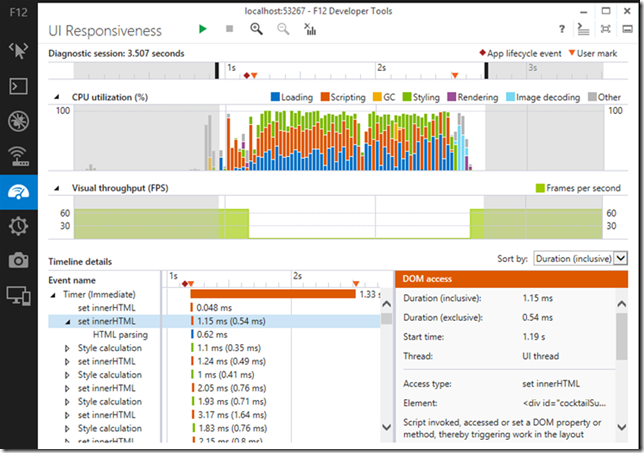
Debugging and Tuning Web Sites and Apps with F12 Developer Tools in IE11- IEBlog. OMG!!! I am so crushing on the new “F12” profiling and responsiveness tool interface in IE 11! Please tell me this is going to be backwards compatible with Win 7. (Why yes, Virginia, it is…)

3ohix43s.dfg

Anyway, back to more Firefox 23 release news and details.

  • Firefox 23 lands with a new logo and mixed content blocking - Ars Technica
  • Firefox Notes - Desktop - Mozilla.org
  • Firefox 23 enables mixed content blocking, consolidates search settings - BetaNews
  • A Look At What's New In Firefox 23 - Addictive Tips blog

Troubleshooting TCP/IP Connectivity Issues with This Command-Line Utility Portqry.exe - Next of Windows. Been using portqry.exe from the command line along with the PortQueryUI GUI fro some time. Dead helpful in a pinch!

PuTTY: a free telnet/ssh client - just released at version beta 0.63 for you console fans! See the extensive Changes page for all the details

  • PuTTY Portable 0.63 - PortableApps.com build version as well is available and updated.

KiTTY - let’s not forget about this fork version of PuTTY that has some additional bells-and-whistles!

  • News - latest KiTTY news is update 0.62.2.3 minor update in late May 2013.
  • Recent changes - tracking site-changes at KiTTY’s house
  • KiTTY Portable - why “yes” there is a PortableApps.com build version as well for KiTTY fans.

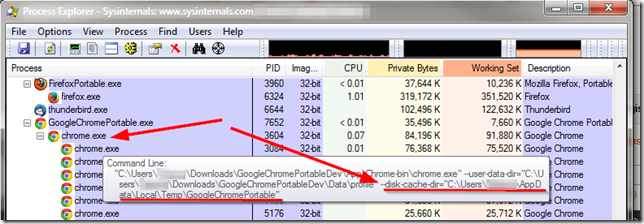
Finally, at home I run Mozilla Firefox, Portable Edition and Google Chrome Portable rather than installing them directly on my system. However I was trying to use some of NirSoft’s Browser Tools to explore and check my Google Chrome(ium) cache and wasn’t finding anything at all.

Strange.  Bug in the tool?

Turns out the answer was “of course not dummy” it’s the dummy’s bug.

Where is the Google Chrome Portable cache folder? - PortableApps.com. Bruce Pascoe kindly puts it like this:

Chrome Portable, like FFP, doesn't save the cache by default.

Note that unlike Firefox however, there's no way to turn the cache off completely in Chrome, so while it's running the cache is stored in the local temp directory (%TEMP%), but then it's immediately deleted when you exit Chrome.

So anyway, yeah, no surprise that you couldn't find it.

and cleared up a bit by “The MAZZTer”

The cache folder is saved in %TEMP%\GoogleChromePortable.

Where the %TEMP% is the user’s temporary file location under their profile.

04i5mjur.uan

This is interesting as it explains why the NirSoft tool ChromeCacheView wasn’t finding anything while pointing to the default user profile location in my Portable Apps application structure that ChromeHistoryView didn’t seem to have any issue with parsing. So even though the files were removed when the program terminated, it most likely did not “secure” delete them, so (depending on overwrite activity of the file system/free-space scrubber utilities) it might be possible to carve and recover them from a system that the portable-apps version of Chrome was used on. And that sounds like a challenge for another day…

Cheers!

--Claus Valca

Read More
Posted in browsers, Firefox, forensics, Google, Internet Explorer, Link Fest, Microsoft, networking, NFAT, security, troubleshooting, utilities | No comments
Older Posts Home
Subscribe to: Posts (Atom)

Popular Posts

  • New Year’s Day - First Post 2011
    Same day I came out with my first post after a long drought, I fell upon this article Blogging Seems To Have Peaked, Says Pew Report over a...
  • Oscar watch Linkpost
    Alvis and Lavie are watching the Oscars tonight and I’m along for the ride. I wasn’t able to come even close to getting out some of the pos...
  • Finally! Time to Post! New material list
    After a recent text from my bro reminding me it has been since March since I’ve done a blog post, I was finally able to clear the schedule a...
  • Ubuntu 13.10 Upgrade - Lessons Learned & VIDMA utility found
    A few weeks ago a new release of Ubuntu came out. Naturally that meant it was update time! I have been getting pretty good at this now so ...
  • iodd : Multi-boot madness!
    Like many computer technicians and responders, I seem to always have at hand a collection of bootable media; CD’s, DVD’s, USB-HDD’s, flash m...
  • Network Capture Tools and Utilities
    At a conference this week, we had quite a section regarding network captures. The instructor was going on about how you can try to sort ou...
  • It just has to be bigger on the inside…
      Last Christmas, Lavie gifted me with a cute little Jawbone JAMBOX unit. I thought it was pretty cool. It uses a Bluetooth connection t...
  • Mostly Minor Network Notes
    Here are some minor tweaks and features, mostly of a network nature. Manual Uninstall of the Cisco VPN Client « Mobile Expertise -- becaus...
  • Windows Live Mail error 0x80041161
    Dad is working with his father-in-law who has an issue with his Suddenlink web-mail-based “forwarding” handling of messages. Seems that (an...
  • FireCAT 1.5 “Plus” Add-On Collection
    In yesterday’s GSD post I noted the following: Both of these tools brought be back to the excellent FireCAT 1.5 collection of Firefox...

Categories

  • Active Directory
  • anti-virus software
  • Apple
  • architecture
  • art
  • AVG
  • Blogger
  • blogging
  • books
  • boot-cd's
  • browsers
  • cars
  • cell-phones
  • cheat sheets
  • Chrome/Chromium
  • command-line interface
  • cooking
  • crafts
  • crazy
  • curmudgeon
  • DHC
  • Dr. Who
  • E-P1
  • Education
  • family
  • Firefox
  • firewalls
  • For the Gentleman
  • forensics
  • Gmail
  • Google
  • graphics
  • hacks
  • hardware
  • humor
  • hurricanes
  • imagex
  • Internet Explorer
  • iOS
  • iPhone
  • iPod
  • iTunes
  • Kindle
  • Learning
  • Link Fest
  • Linux
  • malware tools
  • Microsoft
  • movies
  • music
  • networking
  • NewsFox
  • NFAT
  • Nook
  • Opera
  • organization
  • PDF's
  • photography
  • politics
  • PowerShell
  • recipes
  • Remote Support
  • RSS
  • science
  • Scripting
  • search engines
  • security
  • Shuttle SFF
  • software
  • Texana
  • Thunderbird
  • troubleshooting
  • TrueCrypt
  • tutorials
  • utilities
  • VBscript
  • video
  • Virtual PC
  • virtualization
  • viruses
  • Vista
  • Vista mods
  • wallpapers
  • Win FE
  • Win PE
  • Win RE
  • Windows 7
  • Windows 8
  • Windows Home Server
  • Windows Live Writer
  • Windows Phone
  • writing
  • XP
  • XP mods
  • Xplico

Blog Archive

  • ▼  2013 (83)
    • ▼  November (8)
      • Ubuntu 13.10 Upgrade - Lessons Learned & VIDMA uti...
      • ForSec Linkfest - 2013 DST Fallback Edition
      • CryptoLocker Ransomware Info & Free Prevention Sol...
      • Linkfest for the SysAdmins
      • Microsoft Security Essentials/Defender & PowerShell
      • Miscellaneous TrueCrypt linkage
      • PowerShell 4.0 and a tiny “gotcha”
      • New Software Updates + VMware Tools Update fix
    • ►  October (8)
    • ►  September (14)
    • ►  August (6)
    • ►  July (10)
    • ►  June (10)
    • ►  April (11)
    • ►  March (6)
    • ►  February (7)
    • ►  January (3)
  • ►  2012 (96)
    • ►  December (8)
    • ►  November (4)
    • ►  October (9)
    • ►  September (8)
    • ►  August (12)
    • ►  July (4)
    • ►  June (3)
    • ►  May (7)
    • ►  April (13)
    • ►  March (3)
    • ►  February (5)
    • ►  January (20)
  • ►  2011 (41)
    • ►  December (8)
    • ►  November (7)
    • ►  September (4)
    • ►  August (4)
    • ►  July (2)
    • ►  June (6)
    • ►  March (5)
    • ►  February (1)
    • ►  January (4)
  • ►  2010 (69)
    • ►  December (1)
    • ►  October (3)
    • ►  September (2)
    • ►  August (13)
    • ►  July (17)
    • ►  June (3)
    • ►  May (3)
    • ►  April (3)
    • ►  March (11)
    • ►  February (1)
    • ►  January (12)
  • ►  2009 (177)
    • ►  December (20)
    • ►  November (11)
    • ►  October (7)
    • ►  September (7)
    • ►  August (21)
    • ►  July (17)
    • ►  June (7)
    • ►  May (18)
    • ►  April (9)
    • ►  March (17)
    • ►  February (23)
    • ►  January (20)
  • ►  2008 (35)
    • ►  December (23)
    • ►  November (12)
Powered by Blogger.

About Me

Unknown
View my complete profile