Bios Password

  • Subscribe to our RSS feed.
  • Twitter
  • StumbleUpon
  • Reddit
  • Facebook
  • Digg
Showing posts with label wallpapers. Show all posts

Saturday, December 8, 2012

iPhone mini-linkfest

Posted on 4:30 PM by Unknown

gfh3klwx.g51

Just a quick post for some iPhone notes.

I finally got around to upgrading the default iPhone calendar app to Agenda Calendar. I liked the interface and layout views and that it was able to pull/sync from the default Reminders app that comes with the iPhone. I tweaked a few of the settings and what isn’t clearly evident from the app page is that there are quite a few alternative themes included if you don’t quite like the black/white look. It took me no-time at all to get up and going with the UI and at just a $0.99 price point, it is hard to go wrong.

I seriously considered both the Fantastical and the Calvetica Calendar apps before settling on Agenda. Fantastical really, really looked good I totally get the to-do view appointment layout. However according to the reviews this version didn’t sync with the iOS Reminders so that was a bit of a drawback. Calvetica is very nice looking and I love the bars-on-calendar visual for appointments but the price point was a bit steeper than I was willing to bite into.

Gmail - free - (Apple Store) - just got bumped to version 2.0 this week. This is a very refreshing update as it now supports multiple Gmail accounts in the same app. That was something I was wishing for. I like the UI and after using it less than a week find that it has become one of the most-used apps on my iPhone. Love it. Now I only wish it had a “unified” Inbox view option so you can see all your incoming messages in one place rather than having to tap a few times to switch between your different accounts. More reviews below:

  • Gmail for iOS Gets a Completely New Look, Finally Supports Multiple Accounts - Lifehacker
  • The Gmail app for iPhone and iPad: version 2.0 - Official Gmail Blog
  • Gmail 2.0 For iOS: It Doesn't Suck Anymore - ReadWrite
  • Gmail for iOS gets a major update - BetaNews
  • Gmail for iPhone and iPad gets redesigned, adds multiple account support, more - iMore.com
  • Hands-on: Gmail 2.0 for iOS is more Google-Plus-ified than ever (Updated) - Ars Technica

About the same time, we also have a nice YouTube -free - (Apple Store) app update as well. I didn’t have any complaints about the first version but I see they have made some changes to the category pick and a few other things that might appeal to some.  No biggie either way to me. I enjoy using it pretty well. iMore.com has a quick review and AddictiveTips blog goes into a more detailed review as well.  Don’t forget Vimeo for iPhone also has a new update (Vimeo - free - Apple Store) that works nicely.

I still haven’t read an iPhone 5 manual at all and I’m sure there are a lot of navigational and usage things that I’m missing out on. So until that time comes, I’m collecting and reading a lot of tips and trick posts from iPhone focus sites such as over at iMore.com.

  • How to replace the volume buttons in an iPhone 4S - iMore.com
  • How to manually transfer media to your iPhone and iPad with iTunes 11 -iMore.com
  • How to fix auto-brightness issues with iOS 6 - iMore.com

Likewise, I’m liking the new iTunes 11 release but as ArsTechnica points out, it’s a bit of a handful to take it all in: iTunes 11 review: Simple is as simple does - Ars Technica

Finally, there are bunch of quality iPhone wallpapers out there if you know where to find them.  Because of the standard square icon size of the apps, depending on the number of apps you have you might not get as much of a chance to see the background as much as you wish…unless perhaps on your lock-screen. Accordingly I think subtle goes a longer way than bold and detailed images.  Here are some to pick though if you desire.

iPhone 5 Wallpaper Pack - FiftyFootShadows.net. John Carey is an amazing writer and photographer and his blog is a must-follow read for me. His iPhone wallpaper pack is hands-down the very best (IMHO) of graphical goodness for refined and sophisticated images for iPhone. I selected one from this collection on the same day I brought home my iPhone (and though tempted at times) still haven’t found anything to make me want to change it.

iPhone 5 Wallpapers - Tumblr. This Tumblr blog is filled with iPhone 5 specific wallpapers. It’s a great place to check in daily at for some great high-quality wallpapers.

iPhone 5 Wallpapers HD - Retina ready, stunning wallpapers. This is a great site as it not only has more than a ton of HD iPhone 5 ready wallpapers, but it also has some gadgets to make your own customized wallpapers in a few themes. Nicely categorized for easy navigation and searching. If you notice, each image has two smaller icons underneath, hover over the padlock and you will see a sample of what the image would look like on the “lock” screen. hover over the four-grouped-icons and you will see a sample of the background covered with app icons.  This is a super-nice touch assessing the visual appeal of the wallpaper on an actual phone.

20 Unusual Wallpapers For The iPhone 5 - noupe. Nice roundup of some a bit more non-traditional wallpapers.

The Shelf iPhone Wallpapers - Barlelme.at - The standard iOS icon size and grid layout makes “shelf” wallpapers very appealing for some users. It’s not my thing but these are well done it it is yours.

iPhone 5 Internals Wallpaper - iFixit - These are simply brilliant and geeky! Wallpapers are in a perfect to-scale internal view of the iPhone components under the glass and a just-smaller-than-scale version to include a few more of the techy-bits if you want to see them.

Great iPhone 5 Wallpapers - MacStories.net - Nice collection of links to other wallpaper sites for iPhone.

Aperture Logos Modern Style (iPhone) - Damien Erambert - If you are a Portal fan, then you definitely need to consider these. Super fun for the “don’t eat the cake” fans!

Cheers!

--Claus Valca.
Read More
Posted in Apple, iOS, iPhone, iTunes, wallpapers | No comments

Sunday, January 3, 2010

Windows Things…

Posted on 1:02 PM by Unknown

image 

cc attribution: "4 Windows" on Flickr by gmahender

Odds-n-ends for Windows things.

  • Enable the secret ‘GodMode’ in Windows 7 –ithinkdifferent.  Spotted in Tweakfest! Enable God Mode in Windows 7  - TechBlog. This pretty cool for admins and heavy system tweakers.  I’ve been using the free utility Windows Access Panel for quick-jumps to commonly-used Windows 7 elements, but this looks mongo-cool.  I set my view to “small icons” after checking out the different views and it is grouped by type (to some degree).  Still, there’s a lot to sort out.  While Vista and Win7 share many of the same feature and setting locations, I’m still learning them after all these years with Vista.  Anything that helps round them up into a more browse-able format is a plus in my book.  Update: See Ed Bott’s take on the tweak and what is really going on.  That "God mode" Explorer trick does less than you think .  I still think its a useful way to find control items as I haven’t mastered the type-search-n-find method quite yet…

  • Folder Sharing between Windows 7 and VM – Windows Virtual PC blog – sharing folders isn’t as intuitive under Virtual PC now as it was under Virtual PC 2007.  This post lists two tricks you can easily follow to set up a simple folder sharing connection between your VM and Windows 7 host system.

  • Elevation PowerToys for Windows - blog.  There is some really, really cool and powerful stuff in this new-to-me blog.  Elevation PowerToys allow focused rights elevations for specific scenarios and contexts that just don’t quite work smoothly using normal techniques.  For some coolness applications see these links:
    • Explore as Administrator PowerToy  - tool plus tips to set up an elevated file-explorer browser alternative.
    • Free Elevation PowerToys for working with User Account Control – CMD prompt here as System.  Wow.
    • Utility Spotlight: Script Elevation PowerToys for Windows Vista – CMD prompt here as Administrator 

  • Virus scanning recommendations for computers that are running Windows Server 2008 R2, Windows Server 2008, Windows Server 2003, Windows 2000, Windows XP, Windows Vista, or Windows 7 – Microsoft Help and Support Article ID: 822158.  Long title but gist is that by configuring your anti-virus app to exclude these files and locations from scanning you can speed up the scan and possibly avoid corruption as your AV app and the OS fight out over control to these locations/files.  Which means that virus writers now have targeted locations to try to drop their apps into.

  • Win7 Library Tool – freeware - Zorn Software. Windows Libraries are like smart folders.  They contain references to other folders and display the content as if it existed in the library folder.  But it’s really not there, it’s still in the original location.  However, you can’t add network locations to a library folder.  This tool makes it possible.  Spotted via Lifehacker post.

  • Customize Windows 7 Screensavers with the Help from System Screensavers Tweaker  - freeware - Windows 7 hacker.  Maybe you don’t need a third-party screen saver but you are finding the options for the Windows screen savers a bit lacking.  This free utility allows you to fine-tune the existing Microsoft screen savers for Windows 7 a lot more than the native options allow.  More bubbly anyone?

  • How To Sync Your iTunes Library With Your Music Folders – Make Use Of blog clearly sorts out a new iTunes 9 feature of allowing iTunes to manage all your music folders.  Its easier than it looks and this guide makes it pretty clear with great screen shots.

  • The (Near) Final Word on Multi-Monitor Taskbars for Windows 7 - Ultramon vs. DisplayFusion – Scott Hanselman’s Computer Zen – Scott does a real-world comparison by a hard-core mulit-monitor user.  I’m running the mentioned 3.0.8 Ultramon beta on my dual-monitor desktop system at home and finding it very smooth and compatible with Windows 7.  Since I already own a license for it, it’s a no-brainer for me. However if I did want a freeware solution, DisplayFusion has much going for it.  As Scott shows, however, neither is perfect.

  • Celebrate the Arrival of 2010 with a New Windows 7 Theme! - Windows Experience Blog.

  • Desktop Wallpaper Calendar: January 2010 - Smashing Magazine.

  • win7utils - Windows 7 ISO Disc Image Utilities. From the developer’s page…   (as spotted via Lifehacker)

The Windows 7 ISO Image Edition Switcher is a set of small binary patches (and a tool to apply these patches) that will convert an official Windows 7 ISO disc image into an official Windows 7 ISO disc image of another edition. The resulting ISO images are bit-for-bit identical with those posted on MSDN or TechNet, and their SHA-1 hashes should match the official hashes posted by Microsoft.

The ei.cfg Removal Utility is a simple tool that will remove the ei.cfg from any Windows 7 ISO disc image, thereby converting the image into a "universal disc" that will prompt the user to select an edition during setup. This tool works by toggling the deletion bit in the UDF file table, eliminating the need for unpacking and rebuilding the ISO, which means that this is extremely fast (the process of patching the ISO to remove ei.cfg takes only a fraction of a second), and the process is easily reversible (running the utility on a disc image patched by this utility will restore the disc image to its original state).

Please note that these won’t allow your Windows Home Premium key to suddenly activate a Windows Ultimate install that you converted your install disk to offer…  Right key for right product version is still required….

  • Notepad2 Modifications - Kai Liu (developer of the W7 ISO disk image utility above, also offers a modded version of notepad2.  Not only that, he also has a tool that allows you to swap out the Microsoft Notepad with notepad2 automagically.  It can be done manually but is a royal pain.  This tool offers to make that process a lot easier.

  • Open Command Prompt Shell Extension – also offered by Kai Liu.  Like the Elevation PowerToys mentioned above, this autoconfig tool adds the ability to add the “open CMD here” and “open as Admin CMD here” to the right-click menu.  That reminded me of these native tricks as well; Windows 7 Trick: How to Open Command Prompt in Your Current Directory by a Single KeyStroke and Copy Path of a File to the Clipboard in Windows 7 or Vista.  The secret to get these to open on demand?  No, no “Alohomora” required.  Just hold down the “Shift” key when right-clicking and these options appear.

  • Microsoft prepares Windows 7 for external SP1 testing - Within Windows – Rafael Rivera uncovers evidence that Win7 systems are being seeded for qualification testing of the Win7 SP1 beta.  Per the post:

Similar to previous external beta service pack rollouts, Microsoft has enabled – via updates you already installed – a beta ‘candidacy check’ within its Windows Update software. Just like Windows Vista, a registry key and value pair need to be added prior to being authorized to download the new software.

Lots of coolness here.  Just be careful how you apply the power!

--Claus V.

Read More
Posted in anti-virus software, command-line interface, hacks, Link Fest, Microsoft, utilities, Vista, Vista mods, wallpapers, Windows 7 | No comments

Saturday, December 5, 2009

Valca Mobile Phone Upgrade

Posted on 8:29 PM by Unknown

…posted while waiting for my 500 Gig HDD to be zero’ed out before setting up the partitions.

One of the things I’ve been working hard at doing is staying more in touch with my little brother.  Well, he’s not physically little, but he is a few years younger than me so I guess that fits for something.

He and I are both quite busy during the work-week, and due to the distance, it’s not always easy to just pick up the phone for a telephone-based conversation.

However I’m finding great joy and shared accountability in feeding our relationship with more time and conversations.

To that end, we have of late become great texting buddies, sending multiple messages during the day to each other.  This seems to work well as they are more unobtrusive and allow us both to keep focused on work tasks but do present a nice quick keep-alive “ping”. 

Little Bro has a nice shiny and l33t iPhone.  He can do some power-texting with it.

Me?  Up until recently I’ve been having to keep up with my Samsung SGH-A727 multimedia phone.  It’s a fantastic phone, slim, looks incredible, and sports some long battery life.  No moving parts means nothing will break without effort.  However, texting on the numeric keyboard is a pain in the *ss.  Seriously.  It’s embarrassing.

So I needed to find one with a QWERTY type keyboard.  I didn’t want an iPhone and since I didn’t want to ding the budget with a data-plan upgrade (unlimited family texting is fine for now), my choices with AT&T were a bit limited.

So I hit the Net and began researching.  I had narrowed it down to the following models.

  • Solstice (SGH-a887) – via Samsung and Solstice A887 at AT&T Wireless.
  • Impression (SGH-a877) – via Samsung and Impression A877 at AT&T Wireless.
  • Mythic (SGH-a897) – via Samsung and Mythic at AT&T Wireless.

The Solstice seemed nice enough but it just didn’t inspire me much for some reason.

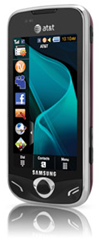
I really liked the Impression with the physical slide-out keyboard.  However reading the user’s guide I learned that it didn’t have voice-dialing, a feature I used heavily on my old Nokia flip-phone, my current Blackberry, and is painfully missing on my A727 phone.  However, the Impression’s QWERTY “real” keyboard might still win out.  They Mythic was a fresh model release, looked really beautiful, but didn’t have a “real” keyboard, only the virtual touchimage-screen one.  It did have the voice-dialing feature that the A877 did not.

So more research was in order.  Luckily Google is my dearest friend (next to Lavie…).

  • Samsung Mythic A897 Review - Phone Arena Reviews
  • First Impressions: Samsung Mythic (AT&T) - PhoneDog Cell Phone News & Articles
  • Samsung Mythic tries to revive AT&T Mobile TV service - InfoSync
  • Samsung Mythic SGH-a897 (AT&T) - At A Glance - Reviews by PC Magazine
  • Samsung Mythic - Google Videos full of reviews

The “print” reviews seemed quite positive about the phone, while the video reviews were a bit harsher, particularly regarding feedback and touch-screen in general.  I weighted those with some thought they were using the iPhone touch screen as a gold-standard of sorts.

I also pre-downloaded and read (yes, read) the Mythic User’s Guide booklet to make sure I understood and could benefit from the features.

In the end it would come down to a visit and some Valca “hands-on” time at one of the local AT&T storefronts.

I quickly learned just how small and awkward the Impression’s physical keyboard felt while texting in my hands. On the other hand I could compose a novel with very few mis-registers on the Mythic’s touch-screen.  It does provide “haptic feedback", which means it vibrates to confirm each key press. Nice touch. So the keyboard feel sold me, coupled with the voice dialing feature.  When the store manager learned that I planned to just order it from the AT&T on-line store due the great discount offered, they said they wouldn’t just match, but would beat it (something they wouldn't do when I picked up my A727.  And they did. Quite nicely.  I’m not sure that was a late night “Black Friday” thing or maybe sales were slow.  Regardless I walked out with a new phone, the Samsung Mythic.

Thoughts

If you want a real, technical review of the device, go back up and hit the links provided above. After a week’s usage I’d say they are all generally fair and accurate.

One other thing I heard mentioned in some of the video reviews of the device was that it was described as a “chick” phone (chick as in “girl”).  Moving from the tech-cool A727 style, I was a bit concerned.  As we all know, a guy can’t be seen with a “chick” cell phone right?

ad as spotted in post Should a Phone be Masculine or Feminine? – at Sociological Images blog

Well, I’ve had it in heavy use for a week now and have more than a few thoughts.  I still don’t regret the decision.  For a text-only needing, non-data-plan using dude, it works very well.

Size, heft, and physical styling are all high marks.  I wish it were just a bit less rounded on the edges as I feel it might tend to slide out of my hands.  The design also lends it to perform like a curling-stone on ice when placed on the passenger’s seat and I stop or corner too fast.  It is more secure left in the cup-holder station.  The front has the big screen with some black framing and chrome edging.  The back side actually has a deep rich burgundy/dark-cherry color with some tech-abstract Spirograph-like black striping.  It looks very professional and the color surprised (in a good way) from what I had expected from the web-images.

The camera/photo package is nice.  Photo resolutions are great, it has a “real” flash built in, lots of photo-editing and filter effects, and will auto-resize pictures before text-message sending them. Handy.

The video playback is very smooth in my testing.  I’ve no interest to use the AT&T streaming TV feature, but copying video files over and watching them on it is not too bad.  Though for my use it is more of a novelty and show-off thing.  I’m not the demographic that feature was designed for.

Call quality is nice.  No complaints from my voice parties.  I do prefer to use my Jawbone with it however.

The main screen has three different “desktops” which you can then put and rearrange “widgets” onto.  Each can be wallpapered separately.  This is where things break down a bit for me.  I’ve got a different desktop image for each one I resized/cropped for my personal pleasure.  However the widgets don’t always stay put where placed when they “activate”  That ends up covering up much the nice wallpapers and kinda defeats the purpose.  As a Windows guy I’m used to putting desktop icons in place and them staying locked there.  This doesn’t happen on the Mythic.

image

(my personally crafted Mythic “beautiful things” wallpapers currently in service on my phone; P-51 Mustang, a retro Amy Adams, a retro Moon Radio.  I’m sure a psychoanalysis of me based on these images would be fascinating…)

Now imagine having the widgets jump from their unobtrusively placed locations (bottom 1/3 area of pics above) to the center or top areas when “activated” and not return to the original place.  Who wants to cover all that beauty up? But “hiding” the widgets on the otherwise handy sidebar feature also doesn’t always work as they will re-pop on the desktop in some cases, or require even worse digging in the menu system to launch.  Bother.

Also the Menu screen has three pages (expandable to 4-5 total) with a wealth of additional application icons, settings buttons, etc.  Many, many of them deal with applications for streaming media services, social media (Twitter’ish) apps, Yahoo stuff, things like that.  Some can be removed. Most cannot and are locked in place.  What results is a bunch of locked in iPhone like icons that I have to wade through to find the six or seven I really care to use.

As mentioned, while you can change the wallpapers, the “lock” screen provides a screensaver slideshow of locked images full of flowers, butterflies and other pretty things.  While I don’t need “girlie” (as in Playboy) wallpapers, I also don’t find it too appealing to be locked into “girly” (as in Alvis and Lavie loving) images either.  You can’t change the images shown.  You can’t change the screensaver.  Yep.  It is a really pretty phone.

Luckily, I can set the “fade to black” timeout period to 8 sec or so.  That takes care of that a bit.  Though I wish they had at least offered this one as a default along with an “alternative” guy or neutral-image (abstracts only) screensaver.  That might expand the appeal to more guys.  Fortunately for Samsung I’m flexible and am one of those more emotionally sensitive tolerant types.

Another thing moving from the A727 to a “feature” phone like the Mythic is I am getting used to is the battery time.  Like I said, going 3-4 days of call/texting use between recharges on the A727 was common.  Now I can usually make it two days (tops) on the Mythic.  I don’t think it’s a bad battery or unit, it’s that the screen is so much larger, and brighter and on more as I compose text messages.  Typically it shows all battery bars for one day. Then drops one or two bars…looking like a 1/2 charge remains.  Then I do a text or have a voice call and BAM the battery indicator is showing emptied.  So for this month I’m letting it fully discharge a few times and then will be hooking it to the charger nightly.

I got a clear-plastic case for it while in use on my desk or weekend running in my jeans.  For the daily work-week I found a nice Blackberry mag-latch vertical holster fit it perfectly (sans the clear-plastic weekender shell). I did allow myself to be sold on the clear-plastic screen protectors as well.  They work well and don’t impact feel of the touch-screen whatsoever.

One last quibble.   As a Windows guy, I’m used to the double-click the icon rhythm to launch an application.  On the Mythic I’m still getting trained by the device if it is long-hold push to execute the application/widget, or if it is a double-tap, or a single-tap.  Different things seem to require different actions.  Please Samsung. Sick with a double-tap activation.   This is driving me a bit batty.  I need some consistency!

Voice-dialing is quite useful.  Although I still have to find and push the widget button to get it activated first.  Awkward while driving but an improvement over hunting through the contacts as I did before on the A727.

Overall texting is great now, and the device really does look smashing in both form and function.  I just wish it was a bit more refined and, well, customizable.

Management with a Windows 7 x64 bit System

Silly me.  I thought I could just download the PC/phone management link software and go.

I mean, the driver/software package was just released in late November.

Wrong…at least for x64 bit Windows 7.  Tons of driver installation issues.

Fortunately, after a wasted-night’s worth of banging the drivers into the system, I gave up, and just plugged the sucker into the Win 7 system via the USB cable and amazingly Windows 7 picked it up as a mass-storage device (because of the SSD micro card in it).

This finding means that while I can’t manage any contact info or stuff like that, I can copy images, files, music, and videos back and forth easily with no fuss.

So instead of using the Samsung software I’ve been using the following freeware Windows tools to create wallpaper and convert video files for playback on it.  Your results may vary.

Free FLV Converter – A Simple Freeware To Convert FLV Videos To AVI and Format Factory - Free media file format converter have been my cherished friends in this endeavor.  Using Firefox and the DownloadHelper add-in, it’s a piece of cake to capture and save most all web-based video files.  Then Format Factory can be used to covert them into a Samsung-device supported video file format.  It’s really that easy.

As for picture files and wallpaper making, the “desktop” screen takes a 800x480 ration sizing.  So in most cases I just use FastStone Image Viewer or Photoscape or even Hornil StylePix to resize and crop my preferred images for application as wallpapers.

Then I just transfer it all over USB onto the memory card on the phone. Done.

Of course, you could always just find some pre-made wallpapers (and other media items) already done for your Samsung Mythic:

  • Free Samsung Mythic SGH-a897 Wallpapers - mobile9
  • Samsung Mythic SGH-a897 – mobile9
  • 480x800 Wallpapers for Cell Phone – MobiNations.com

Still to do: make a few United States Military Academy at West Point wallpapers with that stunning coat of arms. (more regarding the USMA’s coat of arms and motto here.)  (And to clarify for the curious Google led visitor to this page, I did not attend and am not a graduate in any form or fashion of West Point.  I did make a run at selection to the US Air Force Academy my senior year in high school, but bowed out during the process (story for another day.)  Dad was an decorated US Army officer who served in the Vietnam “conflict”. And I still deeply hold to the many core values held by the various proud US military branches of service; and try to apply specific USMA-West Point leadership examples in my daily work and home-life: The West Point Way of Leadership by Larry Donnithorne.

Hmm. I’m digressing.

I’ve also got to clip a sound-sample of this awesome “Let A Stranger Drive You Home” Heineken Commercial .  As much as I like the Biz Markie’s - Just A Friend “original” remake of the original Just a Friend by Freddie Scott, I have to say, I’d buy a single from iTunes just to hear the cabbie’s (Timm Cooney) entire rendition of Just a Friend. Timm not only sings the song, but owns it with soul!

.Still digressing I see…

Additional Resources for the Mythic Hacking Geeks

Here are some more links for tips, tricks and hacks of your Samsung Mythic.

Most of the info is both helpful and great reference.  But some is hard-core programming-code feature hacking so “here be dragons” and proceed at risk of bricking your phone.

  • Samsung Mythic Forum – Samsung-Mythic.com
  • Mythic - AT&T Cell Phones blog (disclaimer: site is not endorsed or affiliated with AT&T btw…)
  • User Manual(a897 Mythic User Manual) – Official Samsung provided documentation.

Hope someone considering or owning a Samsung Mythic finds this useful.

Oh..and what of my cherished cool-tech Samsung A727 phone?

Funnily enough, Alvis has ditched her AT&T Quickfire phone (with both a “real” and virtual QWERTY keyboard, swapped out SIM cards, and is now using it as her cool-chick phone. 

Ironic.

And to make matters more embarrassing, she said she can text message her friends faster on the cursed numeric keypad than the QWERTY keyboards of the Quickfire.

Sigh.

--Claus V.

Read More
Posted in cell-phones, family, graphics, utilities, wallpapers | No comments

Saturday, November 21, 2009

Messing with Windows 7 Themes

Posted on 7:10 PM by Unknown

Using, making, and sharing Windows 7 themes has gotten very simple.

Though I still grab specific images for my desktop wallpaper, I have to confess, the standard sets of Microsoft-provided themes for Windows 7 are very nice.  I particularly like the scenic ones.

However it was a drag having the images rotating on my desktop a bit limited. By default the stock themes only contain five to seven wallpapers.  If I wanted to rotate to additional ones I had to switch to a different theme set.

Wouldn’t it be nice to have, say, just one theme with all the landscape/scenic themes?  But how?

Easy.

Get your Theme Material

First I had to get the source material by downloading or identifying all the themes with wallpapers I wanted to use.

  • Extract 5 Hidden Windows 7 International Themes (AU, CA, GB, US, ZA) – ITechnobuzz .  Offers that there are some additional “hidden” themes in the “…MCT folder with Path = “C:\Windows\Globalization\MCT” consists of 5 Hidden International Themes of Australia , Canada, United Kingdom, United States and South Africa.”
  • [How To] Add More Wallpapers to Existing Themes in Windows 7 - Windows 7 hacker post informs us that “…the default theme configuration files that come with Windows 7 are all located in c:\windows\resources\themes folder. You can find 6 of them there after you first installed Windows 7.  But all wallpaper files are not saved in the same folder. Instead, you can find them in c:\windows\web\wallpaper folder, in each organized subfolder.”
  • Personalization Gallery - Windows 7 themes, wallpapers, and gadgets - Microsoft Windows site has some wonderful commercial and scenic themes you can download.  I took a lot of of my scenic ones from these beautiful locations.  Download as many as you need, but I chose to “Save As” rather than download/install them.
  • my 7 themes . net – Additional collections of pre-packaged Windows 7 themes. I found just a few more here I downloaded as well.

Fill-Her-Up!

OK.  Next I made a folder on my desktop so it would be easy to navigate to.  I simply named it “Wallpapers”.

I also made a 2nd folder on my desktop called “Extracted Themes”.

Into the “Wallpapers” folder I just copied the accessible desktop wallpaper files from the c:\windows\web\wallpaper subfolders that I wanted.

Next I copied the various filename.theme files from the various locations where I had downloaded or located them (as noted above) into the “Extracted Themes” folder.

Now, we need to get into those theme packs to extract the wallpaper files.

Method One:  If you already have 7-Zip handy, you can use it to de-compress the filename.theme files you have directly with no fuss.

Method Two: If you don’t have it or don’t want to, just rename the file extension for each of the themepacks to .cab

That turns them back into their true format as a Microsoft “Cabinet” file format.  Then you can just use Windows 7’s own ability to open/extract them.

So once you have them all extracted, copy the appropriate wallpaper files you find within into the “Wallpapers” folder you made.

When you are all done, you should have quite a few desktop image files in the Wallpaper folder.

Move it and Set it

To tuck the “Wallpapers” folder away, I simply moved it to my user “Pictures” folder for safekeeping.  You can put it anywhere that makes sense to you.

Then I right-clicked on the desktop and selected “Personalize”

I clicked on the “Desktop Background” item at the bottom of that window.

I clicked on the “Browse” button to go to my Pictures\Wallpaper folder location and selected it.

I then verified the images I wanted to include as well as tweaked the rotation time and set them to “shuffle”

I saved the settings.

My super-duper scenic rotating wallpaper image theme was now ready to go!

(Note, you could easily add any additional images to this folder as well; these could be your own personal photos, other images downloaded from the net, whatever.  You don’t have to stick with just these theme wallpapers.)

Additional Diving

For more tips and background on Windows themes and the format that drives them, you might find these posts good reference material.

  • Creating, Saving, Sharing Themes in Windows 7 - Engineering Windows 7 blog
  • Creating and Installing Theme Files – Microsoft Developer Network
  • Download and Install Windows 7 Themes on your XP or Windows Vista Computer – Digital Inspiration
  • Windows 7 themes: how to unlock them or create your own – ARS Technica

Cheers!
--Claus V.

Read More
Posted in graphics, tutorials, wallpapers, Windows 7 | No comments

Sunday, September 13, 2009

Tool Stew

Posted on 2:10 PM by Unknown

I’m tired just looking at this list!

So I’m passing these links on to you so we can share the burden together.

Windows Base

  • Windows 7 Logon Background Changer - (freeware/Open Source) - Julien-Manici has released what has to imagebe one of the most elegant Windows 7 system tweakers I’ve seen yet! It only does one thing, and that is to allow a user to change the Windows 7 logon background to any other image they have a image file of.  It does all the conversion, cropping, and heavy lifting.  It is “standalone” in operation but it does come with both an exe-based and MSI based setup installer for those who like those things.  Not only does it allow you to switch the logon background graphic, but it provides a slick gallery previewer of the images in the folder you are pointing it to as well as a pre-view of what the login background will look like.  Simply amazing and I think all Win7 users should consider getting  it and putting it to work.  I can’t believe that MS allowed this option and didn’t include a tool like this one. For more information on just how Windows 7 is pulling off this trick see these Rafael Rivera Windows 7 to officially support logon UI background customization - Within Windows and Tweak your Windows 7 Logon UI “button set” - Within Windows posts.

  • Disable the New Libraries Feature on Windows 7 - (tip) – Lifehacker – I don’t mind the “libraries” feature of Win7 but it does take a while to get used to.  If you want to turn it off you can.

  • XP and W2K3 Release Candidate Versions of PowerShell are Now Available for Download – Windows PowerShell Blog.

  • Updated Windows Vista “seamless applications” package for Windows Virtual PC – Virtual PC Guy’s WebLog.

Network Veggies

  • The other day I mentioned NetGrok which is a clever Java-based network traffic visualizer.  I never was able to get it working on my Win 7 system, nor the Vista builds.  I spend some more time with it on my XP Pro system and still couldn’t get it working.  The Java kept erroring a nullPointer message.  I did load it up in a fresh XP Pro Virtual PC build and after following the steps and using the latest Java release I did get it working.  Not sure where the conflict is.  One of the tricks I learned is that the groups.ini file that controls the grouping display doesn’t use standard IP notation.  Nope instead you have to set the IP addresses in Classless Inter-Domain Routing (CIDR) notation.  I hadn’t ran into this format before but it was easy to follow.  Do a CIDR Notation - Google Search and you should be set.  One more thing, when you do get it running you will then need to use the menu-bar option to set your network adapter it should use.  Once I got it working it was very slick and cool.  Only it locked up after just 10 minutes of running.  Maybe it was a VPC thing…  Still hoping…

  • NetGrok uses the Jpcap set.  No changes with the version that is included in the setup package for it, but there is the link for the curious and watchful.

  • Related, check out Analyzer: a public domain protocol analyzer.  It worked pretty simply with no fuss.  However, I think that while it has a few things that are interesting as a packet-sniffer, the usual ones such as Wireshark, NetWitness Investigator Software, and Microsoft Network Monitor 3.3 fit my needs better.  For the full list see the recently GSD blogged Network Capture Tools and Utilities post.

  • NetworkMiner Network Forensic Analysis Tool (NFAT) and Packet Sniffer was one of the high-points in that post and I just found out that it was updated to version 0.89.

  • ZeroRemote v1.2.5 - (freeware) – Spotted and offered by TinyApps.Org Blog. Although I highly recommend and depend on the free version of ShowMyPC, I’m looking forward to playing with this one as well.  If TinyApps recommends it, it must be good!  Also related: Microsoft SharedView.

Browser Flavorings

  • Chromium Blog: Extensions Status: On the Runway, Getting Ready for Take-Off – Extensions for Chrome/Chromium are now coming down the pipe.  Nothing spectacular (Sample Extensions) just yet but I’m betting this will snowball pretty fast now.

  • woanware has an amazing collection of system utilities and some forensic-related tools to boot.  Particularly impressive is ChromeForensics which parses out the contents of the user-profile for Chrome and Chromium builds very, very nicely.  I was having trouble getting it to work with my Google Portable Chrome build.  Woany patiently spent some time with me troubleshooting and diagnosing.  In the end it turned out to be a freaky corrupt (but working fine) user profile.  I built a fresh portable Chromium build,downloaded the latest Chromium buildbot/snapshots, transferred my bookmarks over into it, and ChromeForensics worked perfectly.  The “Thumbnail” tab view is really spectacular.  Tip:  when you browse to import the location point it to the \default folder.  On my Vista\Win7 the Chrome folder location used is “C:\Users\Claus\AppData\Local\Chromium\User Data\Default” and for Chromium the folder location is “C:\Users\Claus\AppData\Local\Google\Chrome\User Data\Default”.   A few related freeware apps (not woanware) : ChromeAnalysis, and ChromeCacheView.image

  • Silvermel :: Theme for Firefox. – I’m usually quite happy to stick with the standard/default Firefox theme. But I stumbled onto Silvermel and am overjoyed with it.  IT doesn’t remarkably differ from the default theme but it is much more polished and refined.  It looks smacking-delicious in NewsFox rendering.  The horizontal icon/bookmark spacing seems a bit wider than the default, but the vertical spacing is tighter. I’m not sure if the font is different but it seems easier to read to me.  Really classy theme.

  • NASA Night Launch :: Theme for Firefox and PitchDark for Fx :: Theme for Firefox.  Here are two very dark, almost “special-ops” looking themes for Firefox.  Nice for night-time viewing and/or when you need that edgy-techy dressed for success look for your fox.  It’s no small wonder that NASA Night Launch remains at the top of the most weekly downloads list for the Themes, beating the next popular theme almost 2-to-1.

Meaty Tools

  • SpaceSniffer - (freeware) – Yep one more hard-drive file/folder size visualizers (of many such great Pocket Hard-Drive Utilities).  I do like the text labels very nicely. It also supports several different views, can scan NTFS Alternative Data Streams, is portable (no install needed), and uses a XML file for saving settings…not the registry.  Nice!

  • InstEd -- (freeware) – I’ve used Orca (Microsoft's MSI editor) before to muck around with MSI files, as well as Universal Extractor to open them.  However InstEd comes highly recommended so I’m adding it to my toolkit.

  • ProcNetMonitor -- (freeware) – tool by Nagareshwar Talekar to help hunt down processes, to network connections, to ports.  See also CurrPorts, Process Explorer, and VStat.  ProcessNetMonitor combines several of these abilities into one package.  Spotted at PenTestIT. Nagareshwar actually has a very large collection of PenTesting and password breaching tools at his SecurityXploded website. Check them out. Don’t forget about Nir Sofer’s Password Tools collection as well.

  • Paint.NET v3.5 Alpha, build 3533 -- (freeware) – New version recently released (Alpha so be warned).  I’ve got it operationally deployed on my Win7 x64 system and it really is fast and smooth.  Get it if you want to live on the bleeding edge.  I didn’t fully appreciate the number of Paint.NET community built Paint.NET Plugins that are out there as well.  Normally the base-set of included filters and features of Paint.NET are more than sufficient for my needs, but some effects are pretty cool and nothing like using a good plugin to get that perfect effect.  The thumbnailer application ImageWalker has some cool image filters as well, though I find the older version to have a more robust filter/effect set.  PhotoFiltre is another stunning tool for applying custom filters to images.  The version “X” is not free, but version 6 is still freeware as are a few other tools as well on the page.

I don’t know about you, but I’m pretty full!

Pending one more post later tonight from the forensics front.

Cheers for now.

--Claus V.

Read More
Posted in browsers, Chrome/Chromium, Firefox, graphics, hacks, Link Fest, Microsoft, networking, Remote Support, security, utilities, Virtual PC, wallpapers, Windows 7 | No comments

Monday, May 4, 2009

Visually Inspired…

Posted on 6:50 AM by Unknown

Lavie is scheduled for another round of outpatient procedures today so I’ve taken the day off to play supportive husband.

Expect intermittent blog posting today.

Offered in this post are a number of items that are inspiring visually.

First up, high-res desktop wallpaper guru Mando Gomez has presented a number of dual-monitor flag-themes over the years.  These three have particularly inspired me and rotate on my desktops:

image

mandolux desktops – Texas/v2

image

mandolux desktops ad – Hope

image

YARRRR! on Mandolux Flickr Photostream

(in case it wasn’t clear…attribution to all images is due Mando Gomez)

I wasn’t sure about the last one with all this Somali pirate shenanigans going on.  True piracy isn’t nearly as glamorous or entertaining as watching Johnny Depp carouse around.  However, given that at least some folks in the Navy look to have a handle on individual situations, and it is just plain hard to find a good Jolly-Roger desktop image, I figured I’d pass it on.

Crazy Dinosaur Comics artist Ryan North has this geek-inspired t-shirt: TopatoCo: Time Traveler Essentials Shirt 

It contains a summary of major scientific information that could be handy just in case you are swept unexpectedly through a time-space wormhole and pop up in say, the Middle-Ages.

image

There is also a poster available as well.

Graham Rawle has a collection of fun visual wordplay known as Lost Consonants.  Here’s the formula: take sentence and remove a single consonant from one key word, turning it into another.  Then add an image that goes with the repurposed sentence and see what you have got.  Kids and (most) adults pick it up pretty quickly and it is pretty clever.

Engineering Windows 7 : A Little Bit of Personality and TechBlog: Windows 7’s weird and wonderful wallpapers explained.

Both posts take some time to highlight the amazing (really is this Microsoft coming up with these?) choices in wallpapering options under Windows 7.

Many are quite “trippy” and I have to confess I’m liking the change from the traditional wallpapers offered by Microsoft.

Vista’s standard default wallpaper collections were a large move forward, but these Windows 7 options are amazing; not just for the diverse artwork in itself, but also for the deviation from the button-down collar attitude.

image

Fun!

--Claus V.

Read More
Posted in art, photography, wallpapers, Windows 7 | No comments
Older Posts Home
Subscribe to: Posts (Atom)

Popular Posts

  • New Year’s Day - First Post 2011
    Same day I came out with my first post after a long drought, I fell upon this article Blogging Seems To Have Peaked, Says Pew Report over a...
  • Oscar watch Linkpost
    Alvis and Lavie are watching the Oscars tonight and I’m along for the ride. I wasn’t able to come even close to getting out some of the pos...
  • Finally! Time to Post! New material list
    After a recent text from my bro reminding me it has been since March since I’ve done a blog post, I was finally able to clear the schedule a...
  • Ubuntu 13.10 Upgrade - Lessons Learned & VIDMA utility found
    A few weeks ago a new release of Ubuntu came out. Naturally that meant it was update time! I have been getting pretty good at this now so ...
  • iodd : Multi-boot madness!
    Like many computer technicians and responders, I seem to always have at hand a collection of bootable media; CD’s, DVD’s, USB-HDD’s, flash m...
  • Network Capture Tools and Utilities
    At a conference this week, we had quite a section regarding network captures. The instructor was going on about how you can try to sort ou...
  • It just has to be bigger on the inside…
      Last Christmas, Lavie gifted me with a cute little Jawbone JAMBOX unit. I thought it was pretty cool. It uses a Bluetooth connection t...
  • Mostly Minor Network Notes
    Here are some minor tweaks and features, mostly of a network nature. Manual Uninstall of the Cisco VPN Client « Mobile Expertise -- becaus...
  • Windows Live Mail error 0x80041161
    Dad is working with his father-in-law who has an issue with his Suddenlink web-mail-based “forwarding” handling of messages. Seems that (an...
  • FireCAT 1.5 “Plus” Add-On Collection
    In yesterday’s GSD post I noted the following: Both of these tools brought be back to the excellent FireCAT 1.5 collection of Firefox...

Categories

  • Active Directory
  • anti-virus software
  • Apple
  • architecture
  • art
  • AVG
  • Blogger
  • blogging
  • books
  • boot-cd's
  • browsers
  • cars
  • cell-phones
  • cheat sheets
  • Chrome/Chromium
  • command-line interface
  • cooking
  • crafts
  • crazy
  • curmudgeon
  • DHC
  • Dr. Who
  • E-P1
  • Education
  • family
  • Firefox
  • firewalls
  • For the Gentleman
  • forensics
  • Gmail
  • Google
  • graphics
  • hacks
  • hardware
  • humor
  • hurricanes
  • imagex
  • Internet Explorer
  • iOS
  • iPhone
  • iPod
  • iTunes
  • Kindle
  • Learning
  • Link Fest
  • Linux
  • malware tools
  • Microsoft
  • movies
  • music
  • networking
  • NewsFox
  • NFAT
  • Nook
  • Opera
  • organization
  • PDF's
  • photography
  • politics
  • PowerShell
  • recipes
  • Remote Support
  • RSS
  • science
  • Scripting
  • search engines
  • security
  • Shuttle SFF
  • software
  • Texana
  • Thunderbird
  • troubleshooting
  • TrueCrypt
  • tutorials
  • utilities
  • VBscript
  • video
  • Virtual PC
  • virtualization
  • viruses
  • Vista
  • Vista mods
  • wallpapers
  • Win FE
  • Win PE
  • Win RE
  • Windows 7
  • Windows 8
  • Windows Home Server
  • Windows Live Writer
  • Windows Phone
  • writing
  • XP
  • XP mods
  • Xplico

Blog Archive

  • ▼  2013 (83)
    • ▼  November (8)
      • Ubuntu 13.10 Upgrade - Lessons Learned & VIDMA uti...
      • ForSec Linkfest - 2013 DST Fallback Edition
      • CryptoLocker Ransomware Info & Free Prevention Sol...
      • Linkfest for the SysAdmins
      • Microsoft Security Essentials/Defender & PowerShell
      • Miscellaneous TrueCrypt linkage
      • PowerShell 4.0 and a tiny “gotcha”
      • New Software Updates + VMware Tools Update fix
    • ►  October (8)
    • ►  September (14)
    • ►  August (6)
    • ►  July (10)
    • ►  June (10)
    • ►  April (11)
    • ►  March (6)
    • ►  February (7)
    • ►  January (3)
  • ►  2012 (96)
    • ►  December (8)
    • ►  November (4)
    • ►  October (9)
    • ►  September (8)
    • ►  August (12)
    • ►  July (4)
    • ►  June (3)
    • ►  May (7)
    • ►  April (13)
    • ►  March (3)
    • ►  February (5)
    • ►  January (20)
  • ►  2011 (41)
    • ►  December (8)
    • ►  November (7)
    • ►  September (4)
    • ►  August (4)
    • ►  July (2)
    • ►  June (6)
    • ►  March (5)
    • ►  February (1)
    • ►  January (4)
  • ►  2010 (69)
    • ►  December (1)
    • ►  October (3)
    • ►  September (2)
    • ►  August (13)
    • ►  July (17)
    • ►  June (3)
    • ►  May (3)
    • ►  April (3)
    • ►  March (11)
    • ►  February (1)
    • ►  January (12)
  • ►  2009 (177)
    • ►  December (20)
    • ►  November (11)
    • ►  October (7)
    • ►  September (7)
    • ►  August (21)
    • ►  July (17)
    • ►  June (7)
    • ►  May (18)
    • ►  April (9)
    • ►  March (17)
    • ►  February (23)
    • ►  January (20)
  • ►  2008 (35)
    • ►  December (23)
    • ►  November (12)
Powered by Blogger.

About Me

Unknown
View my complete profile