Bios Password

  • Subscribe to our RSS feed.
  • Twitter
  • StumbleUpon
  • Reddit
  • Facebook
  • Digg
Showing posts with label viruses. Show all posts

Saturday, November 2, 2013

CryptoLocker Ransomware Info & Free Prevention Solutions

Posted on 1:08 PM by Unknown

I work hard to keep our home systems malware-free and safe.

That typically involves talking about good Windows end-user behavior with Alvis and Lavie, letting them know about various breaking threats, running a AV/AM product, installing advanced protection afforded by Microsoft's EMET v 4.0 on our home systems, making sure all Windows and third party browser plugins are kept updated, run backups, etc.

So generally, I don’t worry too much about viruses and malware…but this new CryptoLocker threat does have my nerves extra-edgy.

First, we don’t have 10 bitcoins sitting around to pony up for a decryption. Most home\SOHO Windows users probably don’t either. Note this price has gone up from the previous 2 bitcoin expense.

  • CryptoLocker developers charge 10 bitcoins to use new Decryption Service - Bleeping Computer News

Secondly, it seems to work primarily on social-engineering and spear-fishing techniques (for now) to trick a user into opening a payload delivered by email. While I can have pretty good confidence in software defense-in-depth security practices, I never can trust the end-user (myself included) to be 100% dependable in catching this attack. I am my own weakest link.

Lastly, although CryptoLocker primarily targets local drives, it will encrypt any targeted files on a network share if the shared folder is mapped as a drive letter rather than a UNC share. So if one person on a network gets infected, and has mapped drives via drive lettering, that could hose everyone! That’s scary bad.

So the first important step you can take is to educate yourself about the threat itself:

  • How To Avoid CryptoLocker Ransomware — Krebs on Security
  • CryptoLocker Ransomware Information Guide and FAQ - Bleeping Computer - Probably the current de-facto resource for all technical details on this threat. Updated frequently.
  • CryptoLocker Is The Nastiest Malware Ever - Here's What You Can Do - MakeUseOf blog
  • Cryptolocker Ransomware: What You Need To Know - Malwarebytes Unpacked
  • You’re infected—if you want to see your data again, pay us $300 in Bitcoins - Ars Technica

At home, my immediate response was to deploy a special package maintained by Foolish IT LLC on ALL our personal Windows systems (including my Windows VM’s) that protects against this threat. 

CryptoPrevent - free for personal and commercial deployment - Foolish IT LLC - current version at time of posting is 3.1 but that is certain to change. In both “portable” and installable versions.

Like any AV/AM vs. Security battle, it is a constant arms race of updates so if you go this method, check back frequently for new versions or pay the $ for the auto-updating version.

Just to illustrate the challenge, take a look at these posts from the developer to see how the tool has mutated to keep pace with the threat and customer’s needs.

  • CryptoPrevent v2.0 just released with whitelisting capabilities!
  • CryptoPrevent v2.1 - I just can't seem to win!
  • CryptoPrevent v2.4 just released with internal update feature - please update!
  • CryptoPrevent v2.5 - with a powerful new layer of protection introduced!
  • CryptoPrevent v2.6 released - my life is consumed by this madness!
  • CryptoPrevent v3.0 - Recycle Bin protection and a new optional AUTOMATIC UPDATE service!

For corporate locations, I learned about another solution via Brian Kreb’s post noted above. From that post:

A team of coders and administrators from enterprise consulting firm thirdtier.net have released the CryptoLocker Prevention Kit – a comprehensive set of group policies that can be used to block CryptoLocker infections across a  domain. The set of instructions that accompanies this free toolkit is comprehensive and well documented, and the group policies appear to be quite effective.

Cryptolocker Prevention Kit (updated) - Spiceworks

Get protected now if you are a Windows user. Period. 

It’s not worth dilly-dallying about.

Cheers,

Claus V.

Read More
Posted in anti-virus software, malware tools, Microsoft, security, viruses | No comments

Sunday, October 20, 2013

Security Tidbits

Posted on 7:39 PM by Unknown

And here are some security related links that caught my fancy this week.

Vulnerabilities Discovered in Global Vessel Tracking Systems - Trend Micro’s Security Intelligence Blog - Super study that sent chills down my spine reading. We take so many critical infrastructure systems for granted. I hear the next block-buster action novel waiting to pounce on this for the storyline.

Cryptolocker Prevention - Foolish IT LLC bloc - information on a new freeware tool to lock down any Windows OS (preventively) to block infection from the Cryptolocker malware/ransomeware. When infection occurs it encrypts personal files then offers to decrypt them for a paid ransom. More details on the utility here: CryptoPrevent. And the attack details courtesy of Ars Technica: You’re infected—if you want to see your data again, pay us $300 in Bitcoins.

Tools for reviewing infected websites - ISC Diary. They listed four and there are some more suggestions in the comment thread. Back in January 2012 I posted this fairly extensive roundup: Interesting Malware in Email Attempt - URL Scanner Links. I’ve not checked recently but hopefully more than a few of these are still active.

Learn By Example - The Hacker Factor Blog - Dr. Neal Krawetz has some wise words and poor examples of a generation that doesn’t seem to see the concern with publically posting tweeted photos of their debit/credit cards online. I’m clueless how someone can be so ill-informed. This is just one example. I see the commercials showing banking apps for smartphones that let people take a photo of a check and deposit it in their account. I also wonder if this is common as well…or even health-coverage ID/Info cards perhaps?  I suspect this is just the tip of the iceberg.

40 inappropriate actions to take against an unlocked PC - Troy Hunt’s blog - As a sysadmin, all I can say is that it is probably a violation of several computer usage agreements in the workplace to walk away from your computing device without first locking the screen to prevent unauthorized access. At the same time, it is probably a violation of additional computer usage agreements in the workplace to tamper with someone else’s computer -- even if they were a bonehead in the first place and left it unlocked. Instead what you need to do is take a photo of their unlocked screen and tweet it to everyone in the workplace. No wait…I just learned by example in the previous post that probably isn’t wise to do either. Never mind. Help us all out and just pull the power-cord out slightly to kill power to the system and make them call the sysadmins when it won’t power back on. No don’t do that either after further consideration. That might kill the system/drive and lead to a charge of wonton destruction of corporate resources; or at the very least prevent someone's unsaved labor of love on the critical TPS reports for the day. That would be bad too. OK…I give up.

Contrary to public claims, Apple can read your iMessages - Ars Technica

Experian Sold Consumer Data to ID Theft Service - Krebs on Security - Seriously, if you can’t trust the data broker companies who hold all your credit and personal financial data history records (and who they sell that data to) then who can you trust with it? Time go start digging out that backyard bunker again. Go read the article. Then get mad.

New effort to fully audit TrueCrypt raises $16,000+ in a few short weeks - Ars Technica

For your security, please email your credit card and driver’s license (and what PCI has to say about that) - Troy Hunt’s blog. See, it’s only a crazy idiotic thing to tweet your CC information if you don’t have a really important reason to do it. If you do it is stupidly insecure. However, if you are a big corporate entity (or govermint agency/official) then you can have something call “a policy” to require your customers to photocopy items critical to establishing and proving your identify and they can do whatever they want…oh, and by the way…please dent them to us via unencrypted email communications because like, nobody can sniff that traffic while it winds it’s way from your laptop to our desks. Sheesh. Needless to say, Troy goes to town on this one and why it is a Bad Thing™.

Please be wise, be patient, and be proactively safe.

Claus Valca

Read More
Posted in anti-virus software, Link Fest, malware tools, security, troubleshooting, utilities, viruses | No comments

Saturday, October 19, 2013

Back to MS-Security Essentials for now…

Posted on 8:29 PM by Unknown

In the last GSD post, I made note that I had made the change from Microsoft Security Essentials to Bitdefender Antivirus Free._2013-10-04_19-24-14

The installation process went smoothly. Once on my Win 7 x64 bit system seemed a bit “peppier” after reboots.  For the first week or two I really didn’t notice any issues at all.

Then about two-three weeks in to using it I noticed a little notification that I had 15 files quarantined.

Goodness!

A quick review of the log found that I hadn’t succumbed to an onslaught of malware and viruses due to sloppy computing habits.

No. Bitdefender finally got around to scanning my collection of Windows utilities and found it ripe with all kinds of potentially unwanted software applications. Bad stuff.  Things from NirSoft that let me recover passwords and other things from beloved family members’ systems when they forget their system and email and other account passwords -- among other things. Oh my!

Bitdefender Antivirus Free Edition - Logs_2013-10-04_19-25-21

Here is what a Bitdefender quarantined file looks like.

asterisk logger - FreeCommander XE_2013-10-04_19-27-37

Well, we can’t have that!  So I went though the process of un-quarantining them.

Bitdefender Antivirus Free Edition - Logs_2013-10-04_19-26-00

And quickly I was done.

gc423pge.jby

Yea!

asterisk logger - FreeCommander XE_2013-10-04_19-28-07

Only when I went to use one of them, the executable file refused to run!  Blocked!

Nothing I could do could get it running. It was showing “Excluded” but I just couldn’t run it.

To complicate matters, after a reboot (troubleshooting) Bitdefender appeared to be trying to do a pre-Windows clean and file removal too. Hmm. Turns out that while I was working on that issue, it also found a USB stick I carry these tools on as well and had gone to town on the same file sets on it as well. I had removed the USB stick before reboot so it couldn’t find the files it was looking for. Fortunately the system came up no worse for wear despite some fairly scary language, but my attempts to later un-quarantine the files on the USB drive failed horribly and it refused to find/see them when I tried to exclude them.  Right-clicking the quarantined files and trying to restore them wasn’t successful on the USB drive either.

So I figured I would just re-download the handful of them from Nir Sofer’s website, delete my original files on my C: and USB drives, and put them back in.

Except I was met with a very frightening and ugly warning message in my browser that Bitdefender had identified the NirSoft website as a dodgy and dangerous location and didn’t really want me going there. In fairness, on the Bitdefender Free website, if you dig down on the page it does clearly say that the product does the following:

HTTP Scanning - Protects you from scams such as credit card phishing attempts, Bitdefender Antivirus Free Edition scans all the links you access from your browser and blocks them when they prove to be unsafe.

Unfortunately for me, that was the final straw.

So I uninstalled Bitdefender and reinstalled Microsoft Security Essentials.

Then I had to delete the still not really working “excluded/quarantined” files shown above off both my local hard drive and my USB drive. Luckily I could do that once Bitdefender had been removed and the system rebooted.

Then I downloaded all the “lost” files again from their sources. MSSE caught a few of the Nir Soft downloads but they alerted immediately and I was able to restore/exclude them with no fuss and about 30 minutes later had everything put back together again.

qjiw0nr5.qab

So, I must really be unhappy with Bitdefender right?

Well, it was an inconvenience to say the least, but I’m really not bummed out. If Bitdefender were to make some minor changes to their product, it might still win me back. I really, really, really liked the fast speed and light resources it displayed; particularly in that it made my post-boot and Windows login experience must faster and responsive that when using MSSE.

What I would like to see is a better set of options for controlling and enabling/disabling/fine-tuning features in Bitdefender free.  Unless they are there and I’m totally overlooking them…

  • I want to be able to disable the HTTP scanning.
  • When I restore/exclude a file, I want it to return to full functionality and remain whitelisted for future downloads and execution.
  • I want to exclude portable/external drives from scans when I feel like it.
  • I would like to know when Bitdefender finds something with a real-time pop-up alert and ask me what I want to do then and there…not let me find out about it later.
  • I really would like Bitdefender to warn me at a system shutdown if it has any “pending actions” that it plans to take on the reboot…and let me decide to follow-through with those actions or postpone or cancel that activity.

I guess I just want somewhat more advanced technical control over the operations and fewer headaches putting things back to normal.

Even “basic” MSSE allows me to…

  • Disable scanning of removable drives,
  • Exclude specific running processes from scans,
  • Exclude specific file-types from a scan,
  • Exclude specific files and locations from a scan, and,
  • not fiddle with monitoring and intercepting HTTP traffic to and from my web browser.

Hopefully future versions of Bitdefender Free can incorporate these items.  If so then I’m game and open to give it another shot.

Until then, I’m sticking with MSSE and continuing to recommend it to my own family and IT-support provided friends…unless they are horribly poor with their computing activity and I have to clean their systems more than a few times in a row…only then will I recommend they go to a more powerful (and less flexible) AV/AM solution, and that would be Bitdefender Free over most of the other free AV/AM offerings for Windows systems.

At least for now….

Possibly related:

  • Goodbye Microsoft Security Essentials: Microsoft Now Recommends You Use a Third-Party Antivirus - How To Geek website
  • Microsoft (allegedly) Now Recommends You Use a Third-Party Antivirus - BleepingComputer news forum.
  • Sensationalist Press Got it WRONG! Microsoft Does Not Recommend Two Antivirus Programs! - Security Garden
  • Our commitment to Microsoft antimalware - Microsoft Malware Protection Center Blog

Cheers,

--Claus Valca

Read More
Posted in anti-virus software, malware tools, security, troubleshooting, utilities, viruses | No comments

Saturday, September 14, 2013

GSD Saturday Linkfest: IT Crowd and ForSec Folks welcome

Posted on 4:31 PM by Unknown

News and Links For the ForSec Crowd

Kali Linux 1.0.5 and Software Defined Radio - Kali Linux - new build released with updates and some bells-and-whistles to boot!

Windows 8 / Server 2012 Memory Forensics - Forensic Methods

Inside Windows Rootkits - Forensic Methods

Links - Windows Incident Response blog - Lots of great fresh material here!

Forensic Perspective - Windows Incident Response blog

Tools to Grab Locked Files - Journey Into Incident Response blog - Cory Harrell has a simply amazing post full of tremendous resources worth taking a look into for using to grab locked files.

DOWNLOAD: Microsoft Security Intelligence Report, Volume 14 Windows Application & PDF - Kurt Shintaku's Blog - This is too good to pass up! From Kurt’s post.

The Microsoft Security Intelligence Report Windows application analyzes the threat landscape of exploits, vulnerabilities, and malware using the latest data from hundreds of millions of systems around the world and some of the Internet’s busiest online services.

Readers will find the data, insights, and guidance provided in this report useful in helping them protect their organizations, software, and users.  

Key features of the application include:

  • All content, in one convenient place – includes all 800+ pages of content from Volume 14 of our latest report and is fully searchable.
  • High fidelity charts – Many customers have asked us if they can obtain high resolution versions of the charts. We’ve delivered that in the application and have even included the “save as” functionality so that customers may use them in other applications, such as PowerPoint.
  • Reader friendly – We’ve designed the application with you, the reader in mind. One example of this is the integration of our glossary into the body of a page which appear as mouse-over tool-tips.

Security Intelligence Report (SIR) vol.14 (Windows Application) - Microsoft.com - The installable application has 800+ pages of content while the PDF version checks in at 120 pages. Pick you medicine and pucker up.

Other useful Microsoft security and threat response links:

  • Microsoft Malware Protection Center
  • Microsoft Security Response Center
  • Computer Security Tools & Downloads – TechNet Security
  • Microsoft Security Intelligence Report

Microsoft Security Essentials Prerelease - Microsoft Download Center - new pre-release version 4.4.207.0 for interested users of MSSE. Released on 09.09.13 so it is very fresh.

(IN)SECURE Magazine issue 39 released - HelpNet Security - Download directly here (PDF link).

News and Links For the IT Crowd

I enjoy the technical and scientific articles I get in my RSS feeds over from the IEEE Spectrum website. It has great material and is terribly technical. Some sadly interesting IT news I’ve seen over there recently tag state IT departments.

  • IT Hiccups of the Week: A Bad Week for U.S. State Government IT - IEEE Spectrum
  • Is There a U.S. IT Worker Shortage? - IEEE Spectrum
  • IT Hiccups of the Week: U.S. State Government IT System Meltdowns Galore - IEEE Spectrum

A new find this week has been the Microsoft Office Configuration Analyzer Tool

The Microsoft Office Configuration Analyzer Tool (OffCAT) is a program that provides a detailed report of your installed Office programs. This report includes many parameters about your Office program configuration and highlights known problems found when OffCAT scans your computer. For any problems that are listed in the report, you are provided with a link to a public-facing article (usually a Microsoft Knowledge Base article) on the issue so you can read about possible fixes for the problem. If you are a Help Desk professional, you can also save the report to file so that the report can be viewed in the Office Configuration Analyzer Tool on another client where the tool is installed. The Office Configuration Analyzer Tool 1.1 also includes a command-line version that can be used to collect an OffCAT scan without user intervention.

I’ve been playing with it for a while and am amazed at the depth of information and assistance it provides, particularly for many very obscure items.

Spotted over at this 4sysops post FREE: Microsoft OffCAT – Office Configuration Analyzer Tool 1.1

MBSA 2.3 Preview Release Available - Anything about IT - News about a new preview release version of Microsoft Baseline Security Analyzer (note link is to public version 2.2) that supports MS OS’s between XP and Windows 8.1

Windows 8.1 Command Prompt or PowerShell - Anything about IT

PowerShell 4.0 – A first look - 4sysops

How to Know When an Object Was Created and Changed in Active Directory - WindowsNetworking.com

When was the Last Password Changed for a User Account in Active Directory - WindowsNetworking.com

Office 365 for Nonprofits Organizations - Microsoft.com - Microsoft recently announced that they are offering Office 365 for non-profits (including eligible churches). This could be a big deal for many, learn more here.

SysInternals Tools, Windows 8 Training - Microsoft Virtual Academy - Seven video training modules and supporting materials to assist with learning the latest in core SysInternals tools. Check it out! Hat tip to Kurt Shintaku.

Kyle Beckman has posted a great series about Folder Redirection over at 4sysops that I (re)discovered. Lots of good information and tips here.

  • Folder Redirection – Part 1: Introduction - 4sysops
  • Folder Redirection – Part 2: Setting up your file server
  • Folder Redirection – Part 3: Explanation of folder permissions
  • Folder Redirection – Part 4: Group Policy configuration
  • Folder Redirection – Part 5: Best practices
  • How to disable Folder Redirection

Create a new Windows Service

Moon Point Support Weblog had a helpful post: Creating a Service for a Windows System

It caught my eye as we are working with a system down in the coal-mines that requires running the core features as applications rather than services which makes security and log-in/account management more than a little bit challenging. Alas, this won’t solve those headaches but it is worth bookmarking and knowing.

How To Create a User-Defined Service - Microsoft Support

How to create a Windows service by using Sc.exe - Microsoft Support

NSSM - the Non-Sucking Service Manager

Virtualization Software Updates

Download VMware Player 6.0 - VMware

VMware woos power users and IT pros with Fusion and Workstation upgrades - Ars Technica

VMware Player 6 Released with Full Windows 8.1 Support - Next of Windows

Oracle VM VirtualBox - Version 4.2.18 released - Oracle

General Application and Utility Updates of Note

UltraVNC VNC - version release 1.1.93 now out.

PeStudio - version release 7.45 now out.

Speccy v1.23 - Piriform - new release.

HWiNFO Portable - version 4.24-2000 - PortableApps.com - in what begs another GSD LinkList post, HWiNFO is yet another system hardware info-gathering resource I’ve been playing with. I’ve got more than a few I call up from the bullpen and this one has been added to the pitching stable.

IOBit Driver Booster Free - I confess I was very skeptical when I saw this new application appear. I have a few trusted driver apps to catalog and/or back up existing drivers on a system, and some vendor-specific driver update scanning applications used to update my systems. However, I have generally distained apps that claim to scan for driver updates on Windows systems and tell me what I need. Driver updating can be a dangerous and system-harmful thing if the wrong one is applied. So when I tried with trepidation this application, I found the UI was super clean and easy to navigate, the scan was immediate and dead-on fast, it seemed very accurate (finding only one out of date driver), provides a detailed and comprehensive list of drivers checked and their status, and creates a Restore point before every driver update is installed. It’s so easy I’d recommend it to my non-techy friends and family who I support. Great job IOBit! I’ll be running this one weekly!

SoftPerfect Network Scanner - updated to version 5.5. See Changelog for details.

Wireshark - updated to Stable version 1.10.2 and Old Stable version 1.8.10.

  • Wireshark 1.10.2 - Release notes
  • Wireshark 1.8.10 - Release notes

For you crazy WinPE building fans who use WinBuilder, a new version has been released that is much different from the previous version you may be familiar with. At the time of this blog-posting, the Winbuilder.net site seems to be temporarily down, but here were the applicable links you need to check out. I suspect fans of WinBuilder will fall one one side of the fence or the other; love it or hate it. Particularly with the Java building components.

  • WinBuilder - Development - reboot.pro
  • WinBuilder - reboot.pro
  • without imbedded Java RTEs - download version.

lessmsi (aka Less Msiérables) · ActiveScott at GitHub - now at version 1.1.3 The download link is a bit hard to find on the page if you aren’t used to GitHub. Look for “1 release" at the top bar just above the purple band and click it to find the compiled binaries in lessmsi-v1.1.3.zip.

d7 v10 Just Released! - Computer Technician - Foolish IT LLC.the updated change list is too expansive for me to try to list here. Check it out.

SoundVolumeView - new NirSoft utility - View/change sound levels & save/load sound level profiles on Windows Vista/7/8/2008 - More details in this NirSoft blog post.

Whew!  That post tired me out…or maybe it was the A&M/Alabama game live-streaming on my second monitor.

--Claus Valca

Read More
Posted in Active Directory, anti-virus software, boot-cd's, forensics, Link Fest, Linux, malware tools, Microsoft, networking, PowerShell, security, software, tutorials, utilities, virtualization, viruses | No comments

Sunday, July 28, 2013

ForSec “Value Package” Linkfest - No coupons required!

Posted on 5:00 PM by Unknown

One last Linkfest from a now exhausted GSD blogger this weekend.

Cleaning out the “to-be-blogged” hopper is always rewarding, but I tend to get very behind on the weekend chores. My saving grace this weekend has been frequent scattered showers and an equally tired Lavie who hasn’t been interested in going out for shopping, groceries, or dining out. The kitchen has been cleaned. The laundry has been done for the week.

Next stop, a few hours of rest, post-blogging, then a wind-down with Endeavour on PBS Masterpiece.

Too Funny Not To Miss

Bloody galah scammers still not getting the message - Troy Hunt’s blog. Security guru Troy Hunt has had his fair share of “this is (not) Microsoft cold calling you…your PC is infected…let me remote control it” scams and has picked them all apart to the bone.

This time he takes a new angle…in a way that only an Aussie could pull off!  This is a classic! Troy, please offer us some of those sound files or link to where we can get them!  I need to put together a Texan sound-effect package for similar fun with unwanted callers. Brilliant!

Microsoft Security News

Microsoft Releases New Mitigation Guidance for Active Directory - Microsoft Security Blog

Overview of Microsoft`s "Best Practices for Securing Active Directory" - SANS Computer Forensics and Incident Response blog’s Mike Pilkington does a great summary and takeaway of the new AD mitigation guidance.

Security Awareness Training: Your First Line of Defense (Part 4) - WindowSecurity.com’s Deb Shinder discusses evaluating training effectiveness short and long-term.

See also these previous series posts:

  • Security Awareness Training: Your First Line of Defense (Part 1)
  • Security Awareness Training: Your First Line of Defense (Part 2)
  • Security Awareness Training: Your First Line of Defense (Part 3)

Network Security, News and Techniques

Wireshark 1.8.9 and 1.10.1 Security Update - ISC Diary

  • Wireshark 1.10.1 - Release Notes
  • Wireshark 1.8.9 - Release Notes
  • Wireshark - Downloads

Next up are some great and detailed video presentations from Sharkfest 2013

  • Sharkfest 2013 - Wireshark Network Forensics (by Laura Chappell)
  • Sharkfest 2013 - Trace File Sanitization NG (by Jasper Bongertz)
  • Sharkfest 2013 - Attack Trends and Techniques (by Steve Riley)
  • Sharkfest 2013 - Capture Limit of a Laptop, When does it Drop Packets? (by Chris Greer)

Recent Forensically Focused Posts

  • HowTos - Windows Incident Response blog
  • HowTo: Malware Detection, pt I - Windows Incident Response blog
  • HowTo: Data Exfiltration - Windows Incident Response blog
  • HowTo: Add Intelligence to Analysis Processes - Windows Incident Response blog
  • HowTo: Determine/Detect the use of Anti-Forensics Techniques - Windows Incident Response blog
  • HowTo: Investigate an Online Banking Fraud Incident - Windows Incident Response blog
  • Finding an Injected iframe - Journey Into Incident Response blog
  • MS Excel and BIFF Metadata: Last Opened By - Digital Forensics Stream blog

Physical (In)Security?

Duplicate house keys online - Keys Duplicated - This is either freaking amazing or super-scary. I just can’t decide! According to their Security page, precautions are taken.

The Keys Duplicated Blog - A couple really cool and technical posts on the behind the scenes things that make their keys pretty good.

…as spotted on Lifehacker’s post: Shloosl Copies Your House Keys Using a Smartphone Photograph

When 'Smart Homes' Get Hacked: I Haunted A Complete Stranger's House Via The Internet - Forbes

ForSec LiveCD Distro News

  • More on WinFE and Autopsy - Windows Forensic Environment blog
  • DEFT Linux 8 stable with DART 2 is out! - DEFT Linux - Computer Forensics live cd
  • Kali Linux Summer Update Release 1.0.4 - Kali Linux
  • Pass the Hash toolkit, Winexe - Kali Linux
  • Downloads - Kali Linux

AV/AM Bits

Microsoft Security Essentials quietly released version 4.3.216.0 engine update for their free antivirus scanning program. If you use MSSE, you should get it via the automatic updates…if you have them turned on…you do have them turned on right?

Download Microsoft Security Essentials - Microsoft Download Center - Like most things MSSE, trying to figure out just what got updated is next to impossible so let’s just say for now that this one must be better than the previous version and move on.

I’m still using MSSE around the Valca home on all our home systems. I also continue to recommend it to friends and family (generally everyone non-work-related) who I provide friendly IT support to. I find it is pretty non-threatening to the non-technical users I know and though it loves to alert on many of my security programs (potentially unwanted programs) since they can also be used for 3vil, it seems to do a more than adequate job security the systems.

For my Windows 8 systems, I’m instead relying on Bitdefender Antivirus Free. In some ways it’s a bit different model in that you need to sign up with an email address to set up your account. Then you can download the client to the system. What is nice is that if you manage multiple systems in your home, you can log into your account at their site and then get a console feedback on the status of those systems. That’s something that I do at work with another vendor’s enterprise AV client health/status management console. That’s super cool for a free product. I’m seriously leaning to expanding it’s coverage to my main Windows 7 laptop at home. Performance has been outstanding on my Windows 8 systems.

Kaspersky tops real world protection test - BetaNews - this post does point out that Bitdefender tied Kaspersky with a 99.9 % protection level in AV-Comparatives Independent Tests of Anti-Virus Software for July 2013. While Microsoft Security Essentials rated a 92.5 % protection level. There are some additional disclaimers so read the short BetaNews article carefully. Then head over to AV-Comparatives to dig deeper and see the full findings.

  • AV-Comparatives Real-World Protection Test March-June 2013 - AV-Comparatives
  • AV-Comparatives Real-World Protection Tests - AV-Comparatives

Finally, we wrap up this segment with this interesting discussion:

The evolution of Ronvix: Private TCP/IP stacks - Microsoft Malware Protection Center

It’s a bootkit infection that has its own private TCP/IP stack. By doing so it can be extra stealthy and bypass personal firewall hooks and can lurk unseen in standard tools and utilities (such as nbtstat). Doing so, depending on packet/network monitor off the infected machine may be ineffective. However, it still must talk ON the network, so an independent network monitoring and forensics analysis approach using a network monitoring appliance or span port capture may detect the traffic. This may be why comparing outside network traffic captures from a system on the network to network traffic captured on the system may be a useful exercise for incident response and monitoring purposes.

Legally Focused

I’ve been reading a wider range of subjects, and a small part of those touch on our legal system. Mainly they apply to digital law and crime but some are more general. I’m just tossing them out there for the interested or curious. Generally they tend to analysis of current events or provide a more detailed lawyer’s review than the talking/shouting legal heads we encounter on mass-media “news-like” entertainment outlets these days.

  • CYB3RCRIM3 - Susan Brenner’s blog on cybercrime and cyberconflicts in technology and law.
  • Popehat - group blog with a mostly legal focus (though topics can range far afield!)
  • Le·gal In·sur·rec·tion - group blog with mostly legal and law-in-today’s-culture focus. Pretty vibrant opinions. Alignments may vary.
  • Lowering the Bar - Sometimes lighthearted (though always serious at the core) look at some of the nonsense the legal system contains, or foists on others from time to time. Great site.
  • Massad Ayoob - legal, cultural, and educational postings primarily dealing with legal private firearm ownership issues. Also analysis of public media trends and news stories.

Have a great week!

--Claus Valca

Read More
Posted in Active Directory, anti-virus software, boot-cd's, cheat sheets, firewalls, forensics, humor, Link Fest, malware tools, Microsoft, networking, NFAT, security, troubleshooting, tutorials, utilities, video, viruses, Win FE | No comments

Sunday, June 30, 2013

Microsoft’s EMET v 4.0 Released … in case you missed it

Posted on 3:01 PM by Unknown

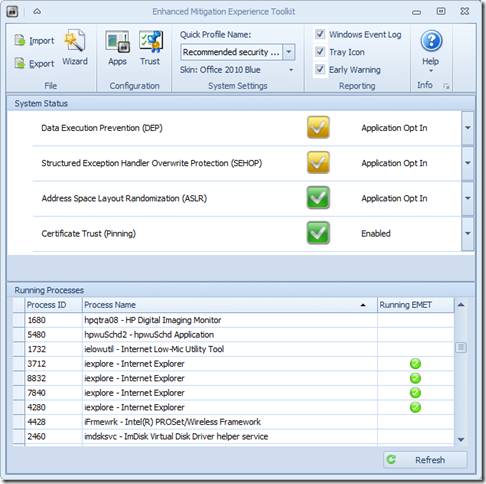
Microsoft’s Enhanced Mitigation Experience Toolkit 4.0 - EMET - just got released about two weeks ago.

It really hasn’t made that big a splash in the security news pond; maybe getting lost in all the waves from coverage on our domestic network digital data gathering, leaks in the SS Minnow, and that whole Facebook Shadow Profile data collection fiasco.

Oh, then there is that whole breaking story in the food world that has everyone shocked and a-twitter--How Cronuts Are Driving New York City Crazy.

So it’s not surprising that news of the release of a Windows-specific security tool to prevent advanced malware attacks got little notice.

So here you go.  Little rock toss into a big pond.

a0n12tap.xsg

I’ve got it running on all our home systems as well as all my Windows virtual machines. I’ve seen no performance issues at all and it is super-quiet; no chatter at all. Accordingly, I would recommend it to all my friends/family-members, especially those who insist on using Internet Explorer and do a lot of work in MS Office applications and documents. It is not a solution to replace any existing anti-virus/anti-malware security software you have, but rather it works to supplement and harden it.  I’m running it aside Microsoft Security Essentials (Win 7 systems), Windows Defender (Win 8 systems), and Bitdefender Antivirus Free (Win 8 systems). It works great.

  • Nuclear Scientists, Pandas and EMET Keeping Me Honest - SANS ISC Diary - great post from Johannes Ullrich detailing just how deployment and use of EMET (v3.5) could have prevented a recent “watering-hole” attack. It’s a great introduction on how the EMET software works. Version 4.0 is better.
  • EMET 4.0 is now available for download - SANS ISC Diary notice/followup.
  • EMET 4.0 now available for download - Microsoft Security Research & Defense blog. Great overview of the tool and all the new features and capabilities. Read this next before considering deployment
  • Enhanced Mitigation Experience Toolkit 4.0 - Official Microsoft Download Center source. It runs on everything from XP SP3 to Windows 8 platforms, as well as all related Server OS’s as well.
  • Enhanced Mitigation Experience Toolkit 4.0 - bink.nu - quick recap summary scraped from the product details of the official download site.
  • Microsoft’s EMET 4 adds even more malware-blocking power - Betanews overview of the tool.
  • Microsoft releases Enhanced Mitigation Experience Toolkit 4.0 - Help Net Security announcement of the tool.
  • Enhanced Mitigation Experience Toolkit 4.0 final is out - Ghacks.net - Nice review and overview of the EMET 4.0 features.

Not impressed enough yet to download?

Well, did I mention it has “skins” so you can change the theme to some pretty snazzy color schemes?

Seriously, if you spend any time on the Web (particularly in IE) and run a Windows system, then you really should consider deployment of this tool. Just take the default configuration settings to get started, then you can tweak away and add additional protection coverage after you read the manual.

Cheers!

Claus Valca.

Read More
Posted in anti-virus software, browsers, Internet Explorer, malware tools, Microsoft, networking, security, viruses, Windows 7, Windows 8, XP | No comments

Rapid-Fire Security Linkfest

Posted on 12:12 PM by Unknown

Time to empty out the “to-blog” hopper again.

In this edition, critical and curious security-related posts. Culled from the Web buffet bar over the past few weeks.

Meanwhile…we are installing Windows 8.1 Beta in a fresh VMWare Player build. Details to follow.

And the Password is…”stealmecrackme”

  • It’s official: Password strength meters aren’t security theater - Ars Technica
  • Why your password can’t have symbols—or be longer than 16 characters - Ars Technica
  • Anatomy of a hack: How crackers ransack passwords like “qeadzcwrsfxv1331” - Ars Technica
  • On the h4xx0ring of p4sswordZ - Dan’s Data
  • Hackers To Manage Your Apple ID, If Caught From Phishing Bait - Security Intelligence Blog at Trend Micro
  • Your login form posts to HTTPS, but you blew it when you loaded it over HTTP - Troy Hunt’s blog
  • iCloud users take note: Apple two-step protection won’t protect your data - Ars Technica
  • New attack cracks iPhone autogenerated hotspot passwords in seconds - Ars Technica

Compromising Situations

  • Do you cover up your webcam? - F-Secure Weblog : News from the Lab
  • Camjacking: Click and say Cheese - Egor Homakov’s Blog - I took the challenge on my locked-down and highly updated/patched Win7 system and the browsers installed (IE/FF/Chromium) and didn’t experience the vulnerability. I think that’s a good thing!
  • Gmail Retention and Your Privacy - Forensic 4cast
  • Ad injection and you - how adware gets on your computer - Microsoft Malware Protection Center

Locking it down & Cleaning up the Mess

  • Java: A Fix it for when you cannot let go - Security Research & Defense - MS Technet blogs
  • HitmanPro rescues anti-virus programs from malware attack -  HitmanPro Blog
  • Windows 8.1: High-performance behaviour monitoring for Defender -The H Security - Note: I cannot find any info if these features will be eventually bundled/included in the Microsoft Security Essentials builds or not. This GSD post has some tips for tweaking Windows Defender configuration in Windows 8: Advanced Tips for Windows Defender with Windows 8.
  • Five Common Corporate Pitfalls in Cyber Security Management - Speaking of Security – The RSA Blog and Podcast

And now a GSD PSA:

  • Parents--make sure your kids view this TED presentation--no matter what their age.
  • Children--make sure your parents view this TED presentation--no matter what their age.
  • Employers--consider sharing with your employees.

Juan Enriquez: Your online life, permanent as a tattoo - TED.com - video appx 6 min.

“What if Andy Warhol had it wrong, and instead of being famous for 15 minutes, we’re only anonymous for that long? In this short talk, Juan Enriquez looks at the surprisingly permanent effects of digital sharing on our personal privacy. He shares insight from the ancient Greeks to help us deal with our new “digital tattoos.”

For even more TED videos on the impact of digital media, check out this related playlist of 10 more brief TED Talks: Our digital lives

Cheers.

--Claus V.

Read More
Posted in anti-virus software, Link Fest, malware tools, Microsoft, security, viruses | No comments

Sunday, April 28, 2013

ForSec News Roundup

Posted on 4:04 PM by Unknown

Final GSD post of the weekend. 

Strategies of a world-class computer security incident response team - Help Net Security - Carson Zimmerman presents “…ten fundamental qualities of an effective CSIRT that cut across elements of people, process, and technology.” Run-time is just over 33 min.

ProcDOT - Visual Malware Analysis - SANS Computer Forensics and Incident Response blog. Christian Wojner introduces it thusly…“It correlates Procmon logfiles and PCAPs to an interactively investigateable graph. Besides that ProcDOT is now also capable of animating the whole infection evolution based on a timeline of activities. This feature lets you even quickly find out which server or which requests were responsible that specific data/code got on the underlying system, by which process it was written, how often, who injected what, which autostart registry key was set, what happened when, and so forth ...” Get it via ProcDOT - CERT.at

From the ProcDOT project page:

Screenshot

3crmye3k.ddd

Instruction-Media

The User Interface
Tutorial-Video 1: The User Interface
Tutorial-Video 2: The Graph
Tutorial-Video 3: Analysis (Part 1)
Tutorial-Video 4: Analysis (Part 2): The Timeline

Over at the ISC Diary blog, Mark Baggett has been posting a great series of articles examining the tug-and-pull between those in IT/Sec who advocate a full OS wipe/reload after a malware infection and those who say “save-time-and-clean-it” by removing the malware infection, but not reimage the system. There still seems to be some kind of mysterious desire by staff to possibly prove what a clever IT person we are by digging an infection out of a system rather than just recovering the user’s data, wiping the system, then restoring it from a clean image and putting the data back. Maybe we all want to be a hero. However, as Mark’s posts show, if not done properly and effectively, the malware may remain persistently hidden but functional and you may be back before you know it (and the rest of your data secrets lifted or network exploited). These posts are a good guide and gut-check for how challenging these threats can play hide-and-seek. Familiarity with these techniques might be your last line of defense if your shop doesn’t have a fast-n-hard policy of recover/wipe/restore remediation.

  • Wipe the drive! Stealthy Malware Persistence Mechanism - Part 1 - ISC Diary blog
  • Wipe the drive! Stealthy Malware Persistence - Part 2 - ISC Diary blog
  • Wipe the drive! Stealthy Malware Persistence - Part 3 - ISC Diary blog
  • Wipe the drive! Stealthy Malware Persistence - Part 4 - ISC Diary blog

Tracking Down Persistence Mechanisms - Journey Into Incident Response blog - Not to be outdone, Corey Harrell does a great companion-piece to the ISC Diary blog posts above.  Corey details how he uses Microsoft Autoruns utility in that process.

From one of the comments there, we jump over to Finding Evil: Automating Autoruns Analysis post over in the trustedsignal blog from Dave Hull.

And then in spot-on timing within the ForSec community, Mark Woan at woanware releases a new utility called autorunner. 

“Autorunner is based upon the AutoRuns tool by the Sysinternals/Microsoft gurus. It is designed to perform automated Authenticode.aspx) checking for binaries designed to auto-start on a host. Its primary purpose is to aid forensic investigations.

“…autorunner is designed to work around all of these issues. It will check against all user profiles associated with the host. It will parse out LNK files to the actual binary (one level down). It allows the user to specify multiple drive mappings, so that if the forensic image contains multiple partitions you can map the original drives to mounted drives on the forensic workstation.

“The application should be used against a forensic image that has been mounted using whatever method you desire.”

Securely wiping an SSD - TinyApps blog - Getting back to the drive-wiping thought, this quick-post reminds us of some of the hazards of attempting to sanitize a SSD device. Some might think using a SSD device to hold image captures might be a good idea but if you do, be sure it is one you can truly “zero-out” and sanitize before porting your image over to it! Does anyone use SSD devices yet for that purpose? What other challenges (cost aside) would this present. Are there any benefits to a SSD over a HDD for storing or capturing disk images?

Placing the Suspect Behind the Keyboard – NEW BOOK! - Windows Forensic Environment - Congratulations to Brett Shavers for his new book! It’s been added to my Amazon.com wish-list queue for triggering once my next Amazon.com gift certificate ship comes into port.

Tool Time - The Hacker Factor Blog - A great post in the theme of “know your tools” before you trust the results they provide. One of the gem finds in Dr. Neal Krawetz’s post is his link to the National Institute of Standards and Technologies (NIST) and National Institute of Justice (NIJ) 2012 Computer Forensics Tool Testing Handbook from their computer forensic tool testing program. It’s got 173 pages of goodness to review. The latest publications can be found on this Topical Collection: Computer Forensic Tool Testing Publication Database | National Institute of Justice.

4:mag Issue #1 - Forensic 4cast. A very nice and slick digital publication debuts. This edition covers topics in iOS device/application data & malware, starting out in the digital forensics field, and hard-drive secrets.

The students over at the Champlain College Computer & Digital Forensics department have been busy working on papers addressing Private Browsing. Expect more in this series:

  • Private Browsing Forensics: Introduction - (PDF Link) Private Browsing Forensics: Introduction
  • Private Browsing Part 2 - (PDF Link) Private Browsing Part 2

RegRipper Ripper (3R) and the list of reg keys covered by RR plugins - hexacorn bog.

RegRipper Consolidation - Windows Incident Response blog. Harlan and crew have been super-busy trying to clean house and tie up some loose ends in the RegRipper landscape. This new effort should help make “one-stop-shopping” and development support for RegRipper and plug-ins much easier. Additionally, Harlan has been working hard on the blog to post additional background information on some of myriad (Cory referred to 280+ in his post) RegRipper plug-ins.

Forensic 4cast Awards 2013 – Meet the Nominees - Forensic 4cast. Voting is now open. You can place your votes here.

Encrypted Disk Detector Version 2 - SANS Computer Forensics and Incident Response blog - Chad Tilbury announces and introduces a new version that is out. Get it here over at Magnet Forensics.

What is "up to date anti-virus software"? - ISC Diary.Great post and great discussions in the comments.

Case Leads: LivingSocial Hack, New Cyber Warriors, analyzeMFT update and more... - SANS Computer Forensics and Incident Response blog

Cheers!

--Claus Valca.

Read More
Posted in anti-virus software, books, forensics, iOS, Link Fest, malware tools, networking, NFAT, security, utilities, viruses, Win FE | No comments

Friday, October 19, 2012

Grandpa would not be impressed…

Posted on 10:46 AM by Unknown

My late maternal grandfather was an F.B.I. Special Agent back from the ‘40’s to late 1960’s.

So I was bemused when a gentleman from the church brought me his wife’s XP laptop that when booted displayed an “official” looking lock screen from the “FBI” (complete with FBI seal) saying computer violations were found and locked by the FBI unless the user paid them a fine via a legitimate “MoneyPak” service.

Really?

No.

It was just a run-of-the-mill Trojan drive-by infection crafted by scummy scammers.

  • New Internet Scam - Press release from the REAL Federal Bureau of Investigation at fbi.gov.
  • FBI Ransomware: Reveton seeks MoneyPak payment in the name of the law - ESET ThreatBlog
  • How to remove FBI Moneypak virus? -ThreatLevel
  • Remove the FBI MoneyPak Ransomware or the Reveton Trojan - BleepingComputer

It took the better part of a Monday night NFL football game to clean, but I was able to get things restored and back in service.

…and then updated all the third-party browser apps (Java, Flash, Shockwave, etc.) as well as the latest version of the installed AV/AM software.

Related: SOPA reincarnates to hold your computer hostage - ZDNet.

--Claus V.

Read More
Posted in troubleshooting, viruses, XP | No comments

Saturday, September 8, 2012

Java does a “Jack and Jill”

Posted on 9:35 AM by Unknown

CC attribution: illustration "Jack and Jill" by "perpetualplum" on flickr.
Jack n Jill Mod

So here is the way I saw the Java drama roll downhill like Jack and Jill over the last two weeks from security standpoint.

So we started out safely headed up the hill to fetch our water shod with Oracle’s Java 1.7 update 6.

08/27/2012 - Starting up the hill…

  • Quick Bits about Today's Java 0-Day - ISC Diary
  • Research & Analysis of Zero-Day & Advanced Targeted Threats:Zero-Day Season is Not Over Yet - Malware Intelligence Lab from FireEye
  • Java 7 0-Day vulnerability information and mitigation - DeepEnd Research
  • Attackers Pounce on Zero-Day Java Exploit - Krebs on Security
  • Researchers: Java Zero-Day Leveraged Two Flaws - Krebs on Security

Oh noes! Jack has stumbled!

(It wasn’t really clear at first, but Java 1.6.34 was also vulnerable.)

08/30/2012 - Java Jack Recovers

Fortunately Java Jack just had a stumble, the pail and his crown are still safe after catching himself.

  • Oracle Releases Java Security Updates - ISC Diary
  • Vulnerability Note VU#636312 - Oracle Java JRE 1.7 Expression.execute() and SunToolkit.getField() fail to restrict access to privileged code - US-CERT
  • Alert for CVE-2012-4681 - Oracle
  • Java SE 7u7 AND SE 6u35 Released - F-Secure Weblog : News from the Lab
  • Oracle patches critical Java bugs used to commandeer computers -  Ars Technica

So we all rush out and download Java 1.7.7 and/or Java 1.6.35.

Whew! That was close.

08/31/2012 - Java Jack Takes a Dive bringing Jill with him

Jack…Stop looking at that frisky rabbit and getting ideas and pay attention dude! You’re about to step into some of its…

Oh snap! You did and you slipped in it.

  • Not so fast: Java 7 Update 7 critical vulnerability discovered in less than 24 hours - ISC Diary
  • Critical bug in newest Java gives attackers complete control of PCs - Ars Technica
  • Latest Java sandbox is still vulnerable - The H Security: News and Features
  • Blackhole targeting Java vulnerability via fake Microsoft Services Agreement email phish - ISC Diary

Seriously Jack. Really?

You should have been paying better attention to your hill-climbing technique; or at the very least dear Jill and not the rabbit.

Now you’ve taken Jill out in your folly and broken your crown; again.

Still Want That Water?

So where does that leave us now that we are holding the pail to safely quench our thirst?

Here is some sound advice.

  • 6 ways to protect against the new actively exploited Java vulnerability - Security - InfoWorld
  • You don't need Java - BetaNews
  • Tips For Java Junkies - F-Secure Weblog : News from the Lab

Me? I just disabled my Java browser plugins for IE/Chrome/Firefox and run NoScript in Firefox. However I didn’t uninstall my Java applications (1.6.35/1.7.6) as I do use a handful of true Java applications on my system.

I figure that will have to do for now until the next round of updates rolls.

No word when Jack will be out of the ER yet. Jill remains pouty.

Other Java-related tools you might be interested in while you wait…

  • JavaRa - SingularLabs - great third-party freeware utility to manage your Java RE build installations. More here at ghacks.net.
  • Jarfix - Johann N. Löfflmann’s tiny app to fix Java “JAR” file associations on Windows after a Java update borks them.
  • Java SE Downloads - Oracle - Java SE (Standard Edition) 7u7 JRE (Java Runtime Environment) and Java SE 6 update 35 JRE download links available from this link. When new updates are available you should be able to get them here.

Oh, did I mention that we just completed a massive rollout of Java 1.6.31 a few weeks ago across our enterprise to bring us to a new operational standard?

I lovingly refer to it as Project Maginot Line.

à revoir! from the bunker,

--Claus V.

Read More
Posted in browsers, Chrome/Chromium, Firefox, Internet Explorer, security, utilities, viruses | No comments

Sunday, July 1, 2012

Material Roundup: Linkfest

Posted on 6:00 PM by Unknown

Been a semi-relaxing weekend.

Read with interest this TaoSecurity blog post Bejtlich's Thoughts on "Why Our Best Officers Are Leaving" as well as this one Whither United States Air Force Academy? both by Richard Bejtlich. I also noted that the USAFA was evacuated this week as cadets were heading in due to the area fires. These things still catch my attention as I had started the process to become a USAFA candidate my senior year of high-school before removing myself from the process for family reasons (my choice…no excuses). Still, I will always wonder about the path not taken.

Also, while IANAL, I was left scratching my head and heartbroken just a bit by the recent SCOTUS decision. The USNI blog had a post that resonated with my own feelings: The U.S. Supreme Court just diminished the significances of Military Valor [opinion].

Little bro was in town so he brought some pizza’s over, I grabbed some super-good local micro-brewed root beers and we had a party catching up, comparing life notes, and watching Act of Valor on this pre-July 4th weekend.

I wrapped things up yesterday with a viewing of Cave of Forgotten Dreams (Wikipedia) which covers the Chauvet Cave (Wikipedia). Very interesting and well filmed documentary. The cave-art is really fascinating…I just wish we could have learned more about the people behind it.

I guess if there was a theme it was reflecting on the importance of what remains of us, of our efforts, of the world around us.

Back to the shallows…

Sometimes I feel a bit guilty just dumping a super-post like this that is heavy-laden with linkage.

Some weeks are busier than others, however, and while I have more than a few posts still pending in the hopper that are deeper collections of “how-to”, personal reviews, or troubleshooting sessions, I hope that some find value in these “linkfests”.  Primarily they serve to help me quickly search and find material, tools, and techniques that I believe will either be useful, or are useful, when I am away from my desk and my USB dongle is at home rather than in hand. It’s challenging finding that right software or tip and maybe something here will be useful to others or pique their interest and send them in the right direction.

Security Bits

  • Adobe updates Flash Player 11.3 to fix Firefox crashing problem - The H Security - Adobe issued a new Flash (non-IE only) version 11.3.300.262 to address some issues in Firefox 13. Get your update.
  • Analysis of drive-by attack sample set  - ISC Diary - I always value posts like these that teach and show how “drive-by” vectors work. I’ve cleaned more than a few systems that fell victim to a drive-by because Java/Flash/OS/etc. wasn’t correctly patched.
  • Firefox thumbnails could expose private data; fix 'coming soon' - ZDNet. I hadn’t thought of it as an issue since I am use to Chrome doing the same thing, but the thumbnails are larger in Firefox and I could make out some detail to the webmail pages I saw as compared to how they render in Chrome.
  • Stop Firefox 13 Speed Dial Thumbnails From Showing Secure Content - AddictiveTips
  • How to turn off Firefox’s New Tab Page Completely - ghacks.net blog.
  • Our password hashing has no clothes - Troy Hunt’s Blog - Troy lays out an excellent (developer level) case for the new challenges of password hashing and salting. This was excellent reading and I really took a lot out of it in terms of password security in general.
  • John the Ripper password cracker - speaking of which Jon the Ripper “jumbo” edition just got released at version 1.7.9-jumbo-6 for Unit. WIndows binaries seem to be at 1.7.9-jumbo-5. Announcement here.
  • oxid.it - Cain & Abel - seems worth mentioning…
  • Free Computer Security - Personal Software Inspector (PSI) - Secunia. New Version 3.0 released with even more awesomeness!
  • Third edition of vulnerability spotter Secunia PSI - The H Security. More breakdowns.
  • Secunia PSI 3.0 released - HelpNet Security - more details here regarding this release version.
  • Free Online Computer Scan - Online Software Inspector (OSI) - Secunia. If the “installed” client isn’t your thing, the on-line scan is still super awesome and helpful.
  • Qualys BrowserCheck - Related - don’t browse the web in your browser without checking it for patch and plugin update availability!
  • Detect & Remove Fake Antivirus Scams From Your Windows PC - AddictiveTips post for a new MicroTrend tool to help with fake-av infection removal. See below.
  • Removing Fake Antivirus (FakeAV) - TrendMicro. Comes in both CLI and GUI downloads.
  • Remove 50 Known Fake Antivirus Software From Windows - AddictiveTips related post on another fake-av removal tool
  • Remove Fake Antivirus 1.86 - download tool as offered by free of virus & comptuer tips blog.
  • Security Center reports Virus Protection is On - ever handy tip from TinyApps blog.

For Sec News

  • Registry Decoder 1.3 released! - Digital Forensics Solutions. Bug fixes and some new plugins.
  • More good stuff - RegRipper - new plugins from Elizabeth Schweinsberg coming soon.
  • SANS Digital Forensics and Incident Response Poster Released - Handy! SANS
  • Training, and Learning - Windows Incident Response blog
  • When was a file accessed? - Windows Incident Response blog (How many times does this question get asked?)
  • Investigator's Tool-kit: Timeline - ISC Diary. Quite detailed overview and issues post
  • Win7 HomeGroup Reg Particulars - Forensic Artifacts
  • WinFE “Lite” - Windows Forensic Environment
  • Build questions -Windows Forensic Environment
  • HexDive 0.2 - Hexacorn Blog

Network Resources

  • Wireshark 1.8.0 can capture from multiple interfaces at once - The H Security
  • Wireshark · Wireshark 1.8.0 Release Notes - new Wireshark release in the waters…if you didn’t figure it out.
  • Wireshark · Download links
  • SoftPerfect Network Scanner - freeware - release 5.4.4 now out. Changelog Comes in both x32 and x64 flavors. My favorite stand-alone IP scanner (out of more than many I carry).
  • Chatter on the Wire: OS Fingerprinting - Satori was recently updated and now supports many more network fingerprints.
  • http://kitty.9bis.com - Never heard of KiTTY before but it is a fork of .62 PuTTY telnet client with some extra features.
  • New: KiTTY Portable 0.62.1.2 (telnet and SSH with added features) Released - PortableApps.com has a portable version.
  • PuTTY: a free telnet/ssh client - For the purists.
  • Announcing TightVNC Version 2.5.2 -TightVNC - New version just released. Love this app.
  • TightVNC: VNC-Compatible Free Remote Control / Remote Desktop Software - Download TightVNC here.
  • Announcing TightVNC Java Viewer - Yeah, the Java version rocks the beans as well. Super easy to use, compatible with standard VNC, TightVNC, UltraVNC, x11vnc, Apple Remote Desktop in Mac OS X, Xen/HVM, VMWare, Qemu etc. The link/page says 2.1 but there is a download link present for TightVNC Java Viewer version 2.5.2 so be sure you grab the latest version!

Tools and Utilities of Note

  • Updates: Autoruns v11.32, Process Explorer v15.21, Process Monitor v3.02 - Sysinternals. Stop, Drop, and Download now; the holy trinity of software tools just got updated again!
  • Monitor Any Folder Or Disk Drive For Changes In Real-Time, Even Across Networks - AddictiveTips blog post review of new NirSoft tool.
  • FolderChangesView - Monitor folder/drive changes - NirSoft
  • ExtremeCopy: Probably The Fastest File/Folder Move & Copy Utility - AddictiveTips blog review.
  • ExtremeCopy - Easersoft. I’m a dedicated TeraCopy fan but this one sounds intriguing. Will need to put it through the paces soon.
  • Remove Items from the Windows Explorer and IE Context Menus - CyberNet News.
  • MenuMaid - SD Software - software utility link
  • 4 Better Windows Console Tools Alternatives to Windows Built In Command Prompt -Windows7hacker - Kent has a really nice roundup. While the good-ole cmd.exe will do the job, I must say these “replacements” are quite nice. I’ve used “Console2” quite a bit and like the tab format and transparency/font/color tweaking options. PowerCMD surprised me with its feature set and I really can see myself using it more regularly. Check out the others as well.
  • GetFoldersize - Michael Thummerer Software Design - Super nice freeware tool to locate and understand just what is taking up space on your hard-drive. Was recently updated to version 2.5.10. I really like this tool.
  • SizeOnDisk Folder Size - new to me freeware tool found on CodePlex.  Another nice tool to find file/folder size hogs.
  • Folder Size - another freeware file/folder size tool.
  • SpaceSniffer - Uderzo Software - freeware tool that is amazingly fast and amazingly fun to use. While the previously mentioned tools excel at a tabular report, this one provides a super easy visual layout presentation of your space usage. You can drill down very easily. It gives you a easy-to-grasp picture on what is using up your hard-drive space..
  • SequoiaView - I keep this one around just because it is so beautiful. It does a great job even though it hasn’t been updated in quite a long time. It may have been one of the first to present space on disk usage in a “squarified” treemap format.
  • FolderSize - tiny little app (174 kb) from developer Jan Horn that is standalone and gives you a basic what-you-need-to-know report on drive/folder space usage.
  • DirectorySlicer - With giant (and cheap) USB sticks and network connections aplenty, splitting files and folders to specific sizes is become a rarified task. That said this CodePlex project is worth snagging in that it splits files of a folder into partitions of a specified size. So that super-folder you are trying to burn to CD doesn’t fit? Directory Slicer takes the work out of guessing by allowing you to set the size (or use a preset) then it divvies it up accordingly! Clever.
  • Unlock & Delete Empty Folders via Wildcard-Based Rules - AddictiveTips post review of…
  • Empty Folder Cleaner - 4dots Software
  • Reminded me of a previously GSD mentioned Empty Folder Nuker by Simon Wai.


For the Admins: Mostly from Microsoft

  • Rights Protected Folder Explorer 1.0 - Bink.nu blog. “Rights Protected Folder Explorer is a Windows based application that allows you to work with Rights Protected Folders. A Rights Protected Folder is similar to a file folder in that it contains files and folders. However, a Rights Protected Folder controls access to the files that it contains, no matter where the Rights Protected Folder is located.” Also Download Rights Protected Folder Explorer from Microsoft info from TheWindowsClub blog. Get it here Download: RPF Explorer - Microsoft Download Center(Download Details).
  • The Group Policy Setting “Verbose vs normal status messages” has a new name in Windows 8 - Anything about IT  blog
  • Comprehensive Linux course - TinyApps bloggist shares an amazing resource find for us Linux wannabe-better’s offered by Paul Cobbaut. Although it is claims to be Linux basics, it covers a wide range of topics and material.  This is a great find! Check back to the site often as the material is getting frequent updates.
  • Microsoft Outlook Configuration Analyzer Tool 2.0 - Bink.nu blog - “The Outlook Configuration Analyzer Tool 2.0 provides a detailed report of your current Outlook profile and mailbox. This report includes many parameters about your profile, and it highlights any known problems that are found in your profile or mailbox. For any problems that are listed in the report, you are provided a link to a Microsoft Knowledge Base (KB) article that describes a possible fix for the problem.” Go get the Download OCAT_Setup.zip over at the Microsoft Download Center’s Download Details page
  • FREE: Service Credential Manager – Search Windows services - 4sysops post on a new tool Service Credential Manager to help check all scheduled services and tasks based on a specific user account across your domain. Nice! In free/$ flavors.
  • FREE: ADREPLSTATUS – Active Directory Replication Status Tool - 4sysops blog post on a new Microsoft tool with a snazzy GUI to check for AD replication issues. Has export ability for reporting. Download: ADREPLSTATUS at the Microsoft Download Center (Download Details).

Cheers and happy pre-July 4th State-side well wishes to all.

Claus V.

Read More
Posted in Active Directory, anti-virus software, boot-cd's, cheat sheets, command-line interface, forensics, Link Fest, Linux, malware tools, Microsoft, networking, NFAT, security, utilities, viruses, Win FE | No comments
Older Posts Home
Subscribe to: Posts (Atom)

Popular Posts

  • New Year’s Day - First Post 2011
    Same day I came out with my first post after a long drought, I fell upon this article Blogging Seems To Have Peaked, Says Pew Report over a...
  • Oscar watch Linkpost
    Alvis and Lavie are watching the Oscars tonight and I’m along for the ride. I wasn’t able to come even close to getting out some of the pos...
  • Finally! Time to Post! New material list
    After a recent text from my bro reminding me it has been since March since I’ve done a blog post, I was finally able to clear the schedule a...
  • Ubuntu 13.10 Upgrade - Lessons Learned & VIDMA utility found
    A few weeks ago a new release of Ubuntu came out. Naturally that meant it was update time! I have been getting pretty good at this now so ...
  • iodd : Multi-boot madness!
    Like many computer technicians and responders, I seem to always have at hand a collection of bootable media; CD’s, DVD’s, USB-HDD’s, flash m...
  • Network Capture Tools and Utilities
    At a conference this week, we had quite a section regarding network captures. The instructor was going on about how you can try to sort ou...
  • It just has to be bigger on the inside…
      Last Christmas, Lavie gifted me with a cute little Jawbone JAMBOX unit. I thought it was pretty cool. It uses a Bluetooth connection t...
  • Mostly Minor Network Notes
    Here are some minor tweaks and features, mostly of a network nature. Manual Uninstall of the Cisco VPN Client « Mobile Expertise -- becaus...
  • Windows Live Mail error 0x80041161
    Dad is working with his father-in-law who has an issue with his Suddenlink web-mail-based “forwarding” handling of messages. Seems that (an...
  • FireCAT 1.5 “Plus” Add-On Collection
    In yesterday’s GSD post I noted the following: Both of these tools brought be back to the excellent FireCAT 1.5 collection of Firefox...

Categories

  • Active Directory
  • anti-virus software
  • Apple
  • architecture
  • art
  • AVG
  • Blogger
  • blogging
  • books
  • boot-cd's
  • browsers
  • cars
  • cell-phones
  • cheat sheets
  • Chrome/Chromium
  • command-line interface
  • cooking
  • crafts
  • crazy
  • curmudgeon
  • DHC
  • Dr. Who
  • E-P1
  • Education
  • family
  • Firefox
  • firewalls
  • For the Gentleman
  • forensics
  • Gmail
  • Google
  • graphics
  • hacks
  • hardware
  • humor
  • hurricanes
  • imagex
  • Internet Explorer
  • iOS
  • iPhone
  • iPod
  • iTunes
  • Kindle
  • Learning
  • Link Fest
  • Linux
  • malware tools
  • Microsoft
  • movies
  • music
  • networking
  • NewsFox
  • NFAT
  • Nook
  • Opera
  • organization
  • PDF's
  • photography
  • politics
  • PowerShell
  • recipes
  • Remote Support
  • RSS
  • science
  • Scripting
  • search engines
  • security
  • Shuttle SFF
  • software
  • Texana
  • Thunderbird
  • troubleshooting
  • TrueCrypt
  • tutorials
  • utilities
  • VBscript
  • video
  • Virtual PC
  • virtualization
  • viruses
  • Vista
  • Vista mods
  • wallpapers
  • Win FE
  • Win PE
  • Win RE
  • Windows 7
  • Windows 8
  • Windows Home Server
  • Windows Live Writer
  • Windows Phone
  • writing
  • XP
  • XP mods
  • Xplico

Blog Archive

  • ▼  2013 (83)
    • ▼  November (8)
      • Ubuntu 13.10 Upgrade - Lessons Learned & VIDMA uti...
      • ForSec Linkfest - 2013 DST Fallback Edition
      • CryptoLocker Ransomware Info & Free Prevention Sol...
      • Linkfest for the SysAdmins
      • Microsoft Security Essentials/Defender & PowerShell
      • Miscellaneous TrueCrypt linkage
      • PowerShell 4.0 and a tiny “gotcha”
      • New Software Updates + VMware Tools Update fix
    • ►  October (8)
    • ►  September (14)
    • ►  August (6)
    • ►  July (10)
    • ►  June (10)
    • ►  April (11)
    • ►  March (6)
    • ►  February (7)
    • ►  January (3)
  • ►  2012 (96)
    • ►  December (8)
    • ►  November (4)
    • ►  October (9)
    • ►  September (8)
    • ►  August (12)
    • ►  July (4)
    • ►  June (3)
    • ►  May (7)
    • ►  April (13)
    • ►  March (3)
    • ►  February (5)
    • ►  January (20)
  • ►  2011 (41)
    • ►  December (8)
    • ►  November (7)
    • ►  September (4)
    • ►  August (4)
    • ►  July (2)
    • ►  June (6)
    • ►  March (5)
    • ►  February (1)
    • ►  January (4)
  • ►  2010 (69)
    • ►  December (1)
    • ►  October (3)
    • ►  September (2)
    • ►  August (13)
    • ►  July (17)
    • ►  June (3)
    • ►  May (3)
    • ►  April (3)
    • ►  March (11)
    • ►  February (1)
    • ►  January (12)
  • ►  2009 (177)
    • ►  December (20)
    • ►  November (11)
    • ►  October (7)
    • ►  September (7)
    • ►  August (21)
    • ►  July (17)
    • ►  June (7)
    • ►  May (18)
    • ►  April (9)
    • ►  March (17)
    • ►  February (23)
    • ►  January (20)
  • ►  2008 (35)
    • ►  December (23)
    • ►  November (12)
Powered by Blogger.

About Me

Unknown
View my complete profile