Bios Password

  • Subscribe to our RSS feed.
  • Twitter
  • StumbleUpon
  • Reddit
  • Facebook
  • Digg
Showing posts with label browsers. Show all posts

Sunday, September 29, 2013

Links of the Week

Posted on 2:04 PM by Unknown

Here is a hodge-podge of links that stood out this week.

Tr3Secure Data Collection Script Reloaded - Journey Into Incident Response blog - Corey Harrell has new news and updated on the Tr3Secure Volatile Data Collection Script he developed some time ago.

Tr3Secure Data Collection Script Reloaded - Journey Into Incident Response blog - Corey then follows up with a “real-world” walkthough of the Tr3Secure Volatile Data Collection Script after purposefully a lab pc for the sake of the discussion. It’s one thing to read about what a tool and process can do, it is a real treat to have the author lead a guided walkthough of the tool in action. As always, don’t forget to follow up with a comments reading as well.

plaso - super timeline - from the website “Plaso (plaso langar að safna öllu) is the Python based back-end engine used by tools such as log2timeline for automatic creation of a super timelines. The goal of log2timeline (and thus plaso) is to provide a single tool that can parse various log files and forensic artifacts from computers and related systems, such as network equipment to produce a single correlated timeline. This timeline can then be easily analysed by forensic investigators/analysts, speeding up investigations by correlating the vast amount of information found on an average computer system.”  Spotted via this CDF at Champlain post.

Microsoft Security Essentials: Aiming low? - ZDNet - Larry Seltzer offers some thoughts on Microsoft’s free AV solution. He really doesn’t thrash MSE but does point out that there are many other free alternatives that tend to perform higher. It seems like a pretty reasonable perspective.  FYI, I have been debating making a change from Microsoft Security Essentials to Bitdefender Antivirus Free. Yesterday I uninstalled MSE and replaced it with BAF. The changeover went very smooth. The deciding factor for me was the ongoing poor post-boot performance of my system.  While I don’t have a SSD drive in my laptop, I is running an Intel i7 CPU with 8 GB RAM. After boot, MSE scans on the post boot environment seem to be leading to slower post-boot launch of a number of my applications for a while as processes and files get scanned. Now that I am on BAF, I don’t see those post-boot application hangs. That said, I will continue to primarily recommend MSE to family and friends unless repeated infections indicate a need for the advance protection BAF may provide.

Before moving on from Microsoft Secuirty Essentials and Windows Defender (for Win 8), I thought this post Windows Defender and context menu for file check? (GTranslated) at Borns IT and Windows Blog was very insightful.  Some time ago I posted a number of Windows Defender tweaking tips Advanced Tips for Windows Defender with Windows 8, one of which was how to add a scan with Windows Defender to the context menu list in Win 8.  Born’s acknowledges that is a popular request and go though how it is accomplished. However, as he points out, the way Windows Defender operates, when a file is accessed via the (File) Explorer, Windows Defender already scans it before allowing access. If it is infected then you don’t get to fiddle with it.  Same thing with downloaded files; again pre-scanned by Windows Defender.  So, you can manually scan them again if you want, but know that if you do use Windows Defender in Win 8, it has already scanned the file.

Message Analyzer has Released – A New Beginning and Message Analyzer: Why so different from Network Monitor? - MessageAnalyzer Blog - Final release now public for Microsoft’s network capture analysis tool. I’m not sure it will replace Wireshark, but the approach is a step up from their older Network Monitor capture tool and is at the very minimum a great supplemental network capture tool for packet analysis.

Plugin Activation in Firefox - Mozilla Add-ons Blog - basically in a future version of Firefox, all plugins (except Flash) will become “click-to-activate”. This may or may not be a great thing depending on your security versus convenience perspective.

Wendel's Small Hacking Tricks - Killing Processes from the Microsoft Windows Command Line interface - SpiderLabs Anterior - I’m always looking to find a way to do something without a third-party tool so this is handy information to be familiar with.

Universal USB Installer (also YUMI) USB Flash drive does not boot on EeePC - RMPrepUSB, Easy2Boot and USB booting... blog - This is a pretty esoteric technical post for most folks, however if you are into USB-based system booting, it is interesting.

When setting up Windows 8.1, Microsoft appears to do all it can to shove you to create/use an on-line Microsoft account rather than a local one.  For some folks that might be fine but others (particularly the old-school crowd) will find this process similar to a cattle chute. If you are a thinking cow, it probably isn’t a very pleasant experience. Fortunately, there seem to be a number of outs if you know the game ahead of time.

  • How To Install Windows 8.1 Without Microsoft Account - Into Windows
  • Use Windows 8.1 with a local account instead of a Microsoft account - 4sysops
  • How to setup local account in Windows 8.1 - DeDoimedo.com
  • Windows 8.1 How To Convert Windows Live Account To Local Account - Next of Windows

Group Policy Search Engine Gets Updated - Group Policy Central blog - From that post by Alan Burchill:

“The Group Policy Search Engine is a great web site that has all the different version of Microsoft Group Policy ADMX files that allows you to easily and quickly search for the policy setting. This site is one I use very frequently especially and is a must have bookmark for any Group Policy Administrator.

“Well, Stephanus from Microsoft who maintains the web site has just loaded the Windows 8.1 and Windows Server 2012 R2 policy setting meaning you can now look up all the new policy setting in the latest version of Windows. “

Group Policy Search - site homepage.

Google Static Map Maker: Static Maps on Steroids - noupe - Nice tool to create linkable custom static Google maps rather than using a screen-shot image or a embedded and modifiable one.

Google Static Map Maker - site homepage by Katy Decorah.

Cheers!

--Claus Valca
Read More
Posted in Active Directory, browsers, Firefox, forensics, Google, Internet Explorer, Link Fest, malware tools, Microsoft, networking, security, Windows 8 | No comments

Monday, September 2, 2013

ForSec Labor Day Blow-out Linkfest

Posted on 6:15 PM by Unknown

Final link push for the GSD blog before shutting down for the night.

I hope all you ForSec guys and gals have had a restful Labor Day before heading back into the trenches tomorrow.

Here are some links of note to review this week that I picked out.

Richard Bejtlich on His Latest Book, “The Practice of Network Security Monitoring” - M-unition blog

Did It Execute? - M-unition blog post by Mary Singh on incident response.

Anatomy of an ongoing Drive-by-Download campaign - ZScaler ThreatLabZ blog post

Browser Related":

Psst. Your Browser Knows All Your Secrets. - SANS ISC Diary guest post by Sally Vandeven on pulling the crypto keys in a browser.

Cookie Cadger to Identify Cookie Leakage from Applications over An Insecure HTTP Request - Next of Windows

Cookie Cadger - project homepage. From the link:

“Cookie Cadger helps identify information leakage from applications that utilize insecure HTTP GET requests.

“Web providers have started stepping up to the plate since Firesheep was released in 2010. Today, most major websites can provide SSL/TLS during all transactions, preventing cookie data from leaking over wired Ethernet or insecure Wi-Fi. But the fact remains that Firesheep was more of a toy than a tool. Cookie Cadger is the first open-source pen-testing tool ever made for intercepting and replaying specific insecure HTTP GET requests into a browser.

“Cookie Cadger is a graphical utility which harnesses the power of the Wireshark suite and Java to provide a fully cross-platform, entirely open-source utility which can monitor wired Ethernet, insecure Wi-Fi, or load a packet capture file for offline analysis.”

Book stuff - Windows Forensic Environment - Brett Shavers teases us again with brief news he continues to develop a standalone WinPE/FE “one-push” builder. Also he has released an early Kindle version of his X-Ways Forensics Practitioner’s Guide. Finally Brett gives recommendations for some other great ForSec reference books in his post.

Sadly, I am embarrassed to confess that I have just rediscovered the SANS Institute: Reading Room.

It appears their Latest 25 Papers RSS link to the page may have some issues as though I can load it in Firefox, trying to use it in a dedicated RSS reader generates an error that it cannot find actual RSS data on the page. Hmm.

Anyhows…since I just found it (again) there are gazillion (or slightly less) new whitepapers for review and reading.

Here are the ones I picked out that looked interesting to my desk operations:

  • 60 Seconds on the Wire: A Look at Malicious Traffic - (direct PDF Link) - SANS Reading Room whitepaper by Kiel Wadner - August 22, 2013.
  • Live Response Using PowerShell - (direct PDF Link) - SANS Reading Room whitepaper by Sajeev Nair - August 20, 2013.
  • Event Monitoring and Incident Response - (direct PDF Link) - SANS Reading Room whitepaper by Ryan Boyle - May 15, 2013.
  • Detecting Security Incidents Using Windows Workstation Event Logs - (direct PDF Link) - SANS Reading Room whitepaper by Russ Anthony  - August 22, 2013.
  • Windows Logon Forensics - (direct PDF Link) - SANS Reading Room whitepaper by Sunil Gupta - March 15, 2013.
  • Custom Full Packet Capture System - (direct PDF Link) - SANS Reading Room whitepaper by Derek Banks - April 16, 2013.
  • Security Best Practices for IT Project Managers - (direct PDF Link) - SANS Reading Room whitepaper by Michelle Pruitt - June 24, 2013.
  • Get Out of Your Own Head: Mindful Listening for Project Managers - (direct PDF Link) - SANS Reading Room whitepaper by Charlie Scott - December 20, 2010.
  • The Death of Leadership in Management - (direct PDF Link) - SANS Reading Room whitepaper by Dana Hudnall - September 12, 2013.

That last link reminded me of the following particular motivational leadership links I keep handy on my blog sidebar:

  • Getting the Job Done - TaoSecurity blog’s Richard Bejtlich.
  • AFOATS Training Manual - 2004 edition via Google Docs
  • Five Qualities of Real Leadership - TaoSecurity blog’s Richard Bejtlich.
  • What I've Learned - USNI Blog post by Alexander Martin

Cheers,

--Claus Valca

Read More
Posted in browsers, forensics, Kindle, Link Fest, networking, NFAT, security, Win FE | No comments

Sunday, August 11, 2013

Network & Network Security Quickpost - Last call NFAT edition

Posted on 8:22 PM by Unknown

I just couldn’t wrap up the weekend without sharing these links. I’m so going to be nodding off in my training class tomorrow. Must bring Thermos of extra coffee with me! Don’t want to make the teacher unhappy!

So many network tools, tricks, and nuggets came out last week I’m still exciting thinking about how to use them all!

Security Advisory: Two Vulnerabilities in NetworkMiner - NETRESEC Blog - Don’t let the boring post title fool you! Based on this, Erik Hjelmvik has released a new version of NetworkMiner! Now sparkling at version 1.5 (free/pro editions)

NetworkMiner packet analyzer - Download NetworkMiner version 1.5 (free) here.

While I was doing some super-fast (but apparently productive) beta testing for Erik on some Windows 7 and Windows 8/8.1 systems, I noticed I wasn’t getting great results from my test captures made with and being processed in NetworkMiner. My “doh”. Erik kindly reminded me of his post NETRESEC RawCap - A raw socket sniffer for Windows where he pointed out that using Windows raw socket sniffing has some problems. I had forgotten I didn’t yet install Wireshark/WinPcap on these particular test systems. From Erick’s post:

Microsoft's newer operating systems (later than WinXP) have limitations associated with raw socket sniffing of external interfaces, i.e. everything that isn't localhost. Known limitations in Windows Vista and Win7 are:

  • Windows 7 - Can't capture incoming packets
  • Windows Vista - Can't capture outgoing packets
Due to these limitations in the raw sockets implementations of Microsoft's current operating systems we suggest running RawCap on Windows XP if you need to capture from external interfaces.

Baselining Dropbox With Wireshark (by Tony Fortunato) - LoveMyTool blog video presentation.

Editing Tracefiles With TraceWrangler (by Tony Fortunato) - LoveMyTool blog video presentation. This short video presentation on a new (Alpha release) tool, TraceWranger blew me away. There are methods of sanitizing trace files for sharing/training but they are fraught with challenges for mere mortals. This new tool is amazing and I really hope the developer Jasper Bongertz gets the support needed to encourage his continued refinement and development of this valuable tool for analysts.

  • TraceWrangler - (alpha software) - currently at build version 0.1.3. Standalone application. No installation needed. Unzip and go. Written by Jasper Bongertz.
  • TraceWrangler Documentation - This is Must Read material if you are interested in using this tool properly
    •  Starting TraceWrangler - the basics
    • Anonymization Tasks - details for the options
  • Trace File Sanitization NG - SEC-04_Trace-File-Sanitization-NG_Jasper-Bongertz (PDF) - Link to his presentation of the tool at Sharkfest 2013.
  • Sharkfest 2013 - Trace File Sanitization (Jasper Bongertz) - YouTube. While PDF versions of presentations are nice, on a whim I decided to see if Jasper’s presentation was actually up on YouTube for viewing. It was!
  • Trace file sanitization for network analysts - Packet Foo - Jasper’s blog post with additional details on his tool in case you missed the presentation.
  • The notorious Wireshark “Out of Memory” problem - Packet Foo. Oh how this has hobbled me over the years! So much so that CLI based captures became my dearest friend!
  • Packet Foo RSS - Yeah. It’s that good. Feed yourself on it!

Nmap - Now at version 6.40 - Free Security Scanner For Network Exploration & Security Audits.

  • Nmap Change Log
  • Download Nmap Security Scanner - for Linux/MAC/UNIX or Windows

Message Analyzer Beta3 Refresh has Been Released (Build 6215) - MessageAnalyzer - Lost in all the news was a quiet announcement of the next generation of Microsoft’s own network traffic analysis tool MessageAnalyzer getting a Beta 3 refresh release. The interface is very different (to me) from Wireshark, but since I used NetMon a ton to supplement my Wireshark work, it is taking some getting used to.

HolisticInfoSec: toolsmith: C3CM Part 1 – Nfsight with Nfdump and Nfsen - HolisticInfoSec blog - Russ McRee’s post rocks on so many levels. Well worth the read and review.

Firefox Developer Tool Features for Firefox 23 - Mozilla Hacks – the Web developer blog. In case you missed it, Firefox 23 was released last week. Included in it (besides the new app icon update) was a new network tool called “Network Monitor.” 

I so love this! “F12” is the new “must know” hotkey in these modern browsers!

If only Mozilla (or Chrome or IE 10) were “approved” web-browsers in our enterprise. This feature alone would so help with network and web-app diagnostics and troubleshooting from the end-user desktops.

What’s that you say? One single element of your cloud-based web-application seems to time out in IE 8, crashing your session? The network is fine, site bandwidth is fine. Your PC is fine. Seems like it could be a server-side application issue. Let me make a ticket for your issue and send it up. (Response often comes back, “There is no problem…must be a client-side issue…check the PC and bandwidth, follow our response template and let us know…”) (Sigh…)

  • Network Monitor, now in Firefox Beta - Mozilla Hacks – the Web developer blog - More details on the feature.
  • A look at Firefox's new Network Monitor - Ghacks - Martin Brinkmann does an outstanding job introducing it as well.

Turns out Chrome web browser can do this trick as well

  • Evaluating network performance - Chrome DevTools — Google Developers
  • Performance profiling with the Timeline - Chrome DevTools — Google Developers
  • Chrome Dev Tools: Networking and the Console - Nettuts+
  • Google Chrome Dev Tools: Network Panel - TechRepublic

Turns out that Internet Explorer (IE9, IE10, IE11) also have a “F12” feature for network analysis in the browser.

  • Introduction to F12 Developer Tools (Windows) - IE Dev Center
  • Navigating the F12 Developer Tools Interface (Internet Explorer) - IE Dev Center
  • Internet Explorer's F12 Developers Tools: A feature walk-through - TechRepublic
  • A Peek at Internet Explorer’s Developer Tools - Nettuts+
  • Network Traffic Capturing with IE9 Developer Tools - LINQED.NET

And in IE11, it’s about to bring the house down on the competition!

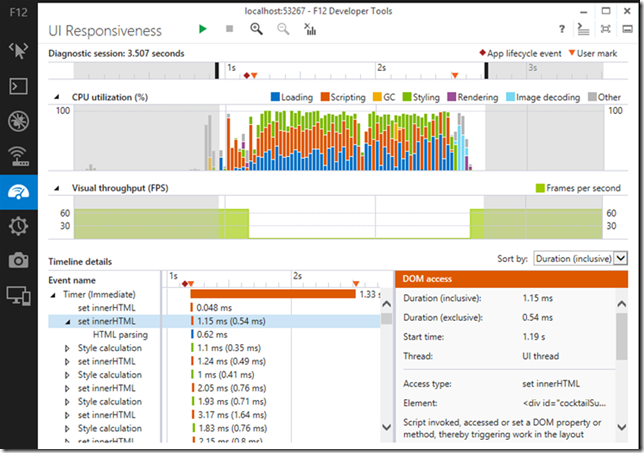
Debugging and Tuning Web Sites and Apps with F12 Developer Tools in IE11- IEBlog. OMG!!! I am so crushing on the new “F12” profiling and responsiveness tool interface in IE 11! Please tell me this is going to be backwards compatible with Win 7. (Why yes, Virginia, it is…)

3ohix43s.dfg

Anyway, back to more Firefox 23 release news and details.

  • Firefox 23 lands with a new logo and mixed content blocking - Ars Technica
  • Firefox Notes - Desktop - Mozilla.org
  • Firefox 23 enables mixed content blocking, consolidates search settings - BetaNews
  • A Look At What's New In Firefox 23 - Addictive Tips blog

Troubleshooting TCP/IP Connectivity Issues with This Command-Line Utility Portqry.exe - Next of Windows. Been using portqry.exe from the command line along with the PortQueryUI GUI fro some time. Dead helpful in a pinch!

PuTTY: a free telnet/ssh client - just released at version beta 0.63 for you console fans! See the extensive Changes page for all the details

  • PuTTY Portable 0.63 - PortableApps.com build version as well is available and updated.

KiTTY - let’s not forget about this fork version of PuTTY that has some additional bells-and-whistles!

  • News - latest KiTTY news is update 0.62.2.3 minor update in late May 2013.
  • Recent changes - tracking site-changes at KiTTY’s house
  • KiTTY Portable - why “yes” there is a PortableApps.com build version as well for KiTTY fans.

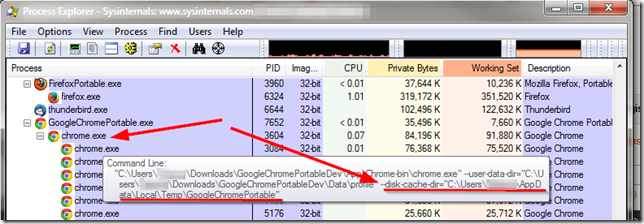
Finally, at home I run Mozilla Firefox, Portable Edition and Google Chrome Portable rather than installing them directly on my system. However I was trying to use some of NirSoft’s Browser Tools to explore and check my Google Chrome(ium) cache and wasn’t finding anything at all.

Strange.  Bug in the tool?

Turns out the answer was “of course not dummy” it’s the dummy’s bug.

Where is the Google Chrome Portable cache folder? - PortableApps.com. Bruce Pascoe kindly puts it like this:

Chrome Portable, like FFP, doesn't save the cache by default.

Note that unlike Firefox however, there's no way to turn the cache off completely in Chrome, so while it's running the cache is stored in the local temp directory (%TEMP%), but then it's immediately deleted when you exit Chrome.

So anyway, yeah, no surprise that you couldn't find it.

and cleared up a bit by “The MAZZTer”

The cache folder is saved in %TEMP%\GoogleChromePortable.

Where the %TEMP% is the user’s temporary file location under their profile.

04i5mjur.uan

This is interesting as it explains why the NirSoft tool ChromeCacheView wasn’t finding anything while pointing to the default user profile location in my Portable Apps application structure that ChromeHistoryView didn’t seem to have any issue with parsing. So even though the files were removed when the program terminated, it most likely did not “secure” delete them, so (depending on overwrite activity of the file system/free-space scrubber utilities) it might be possible to carve and recover them from a system that the portable-apps version of Chrome was used on. And that sounds like a challenge for another day…

Cheers!

--Claus Valca

Read More
Posted in browsers, Firefox, forensics, Google, Internet Explorer, Link Fest, Microsoft, networking, NFAT, security, troubleshooting, utilities | No comments

Sunday, July 28, 2013

New Apps and Utility Updates

Posted on 1:30 PM by Unknown

Submitted here for your frustration is a jumble of new and updated software applications I’ve collected over the past couple of weeks.

Think of it like the “pot-luck” box where everything is free for the taking after the week-long garage sale has concluded.

Only you might really want something in this mix.

MetroTextual 1.5 - SingularLabs - slick notepad replacement has some new improvements in this edition. Including Transformers (Plugins).

SpeedyFox - CRYSTALIDEA Software - Some time back got bumped to version 2.0.4. I run this regularly to clean up my Firefox/Chrome/Thunderbird databases. It really helps with launch speed. See also SpeedyFox Portable - PortableApps.com

CPU Meter Pro - Microsys - The GUI is very nice though the level of detail might be a bit less than some sysadmins might prefer.

DLL UnInjector - NoVirusThanks - unload DLLs within a selected process. More at this Unload loaded DLLs with DLL UnInjector post.

Download Backup Thunderbird - free tool to back up Thunderbird email clients spotted in this AddictiveTips post Easily Backup & Restore Your Mozilla Thunderbird Accounts & Their Data. I personally have always relied on MozBackup.

NetworkLatencyView - Nirsoft - New tool that calculates the network latency. Some details in this NirBlog post: New utility that calculates the network latency of every TCP connection. Looks pretty cool for you network troubleshooting and monitoring geeks.

TightVNC version 2.7.10. - What's New in TightVNC

LibreOffice 4.1 is here! - LibreOffice.org

LibreOffice - Home

LibreOffice Productivity Suite Download - LibreOffice

LibreOffice 4.1.0 Portable - PortableApps.com

Opera Next 16 hints at new features - BetaNews. I don’t really follow Opera web-browser development very closely any longer. Most of my time is focusing on Firefox/Chrome/Chromium/Internet Explorer. Hover there are some detail here that might be worth noting.

Network monitor debuts in latest Firefox beta - Mozilla Links. I really, REALLY like this addition…browser-bloat or not.

SMF v 5.0 – Search my Files - funk.eu - I’ve got more than many Windows file finders, searchers, and file indexing apps that I can summon at will. However funk’s SMF and NirSoft’s SearchMyFiles tools are my go-to file finders without peer. They both have been recently updated with loads new features and rather than see them as competitors, I see them as complimentary utilities depending on the search need at hand.

Intel® Driver Update Utility - Back while I was working on my “What is this “PC-Doctor Module” you speak of?” post, I noted Lavie’s system had the Dell Support Center software installed and how it can help with keeping OEM drivers updated. I checked my own system and the software wasn’t there. Maybe I uninstalled it? Anyway, this Java based application from Intel will do a scan of your system and report if any Intel-based hardware components are present and if a newer driver is available. Sometimes the OEM-branded driver will be preferred, however in most all cases, I have found the Intel driver is much, much fresher and more improved than the OEM version. Yesterday it told me my IntelProNic/WiFi network driver was way old so I updated it to the latest Intel driver version. No issues.

View DELL Service Tag and Express Service Code From Linux and Windows - The Geek Stuff.  Because sometimes it’s a hassle to flip your Dell laptop/desktop around to look for the codes:

1. Get DELL Service Tag on remote Windows system

Login to the Windows remote-host using VNC or remote desktop connection. Use WMIC on Windows to get service tag as shown below.

C:\>wmic bios get serialnumber
SerialNumber
ABCDEF1

Following WMIC command will give make and model number along with service tag.

C:\>wmic csproduct get vendor,name,identifyingnumber
IdentifyingNumber Name Vendor
ABCDEF1 PowerEdge 2950 Dell Inc.

If VNC or remote desktop connection to the remote-host is not available,  execute the following from the local-host to get the service tag of the remote-host.

C:\>wmic /user:administrator /node:remote-host bios get serialnumber
SerialNumber
ABCDEF1
[Note: Replace remote-host with the machine name of your remote-host.]

PeStudio 7.26 - winitor - (updated) - “PeStudio is a free tool to perform static analysis and investigation of any Windows executable file. A file being analyzed with PeStudio is never launched. Therefore, you can evaluate unknown executable files and even malware with no risk. PeStudio runs on any Windows platform and is fully portable, no installation is required. PeStudio does not change the system or leave anything behind.”


SoftPerfect Network Scanner - version 5.4.12 - a free network scanner, tweaked and updated. It’s one of my all-time favs.


Get the Start menu back in Windows 8 and 8.1 with Classic Shell - BetaNews - Tip from Mike WIlliams that Classic Shell 3.9 beta has improved their flagship tool for reclaiming the ground lost by users everywhere in the ongoing battle for Win8 Start Menu hill against Microsoft. I really like the way this looks. Pop over to Classic Shell directly to download the beta bits if you are interested. I find that I still (for now) prefer IObit Start Menu 8 Free for my Windows 8 tweaking. One of these days I’ll get caught up and empty out my lethargic Windows 8 post-launch pile-o-links that has more than a few additional alternatives. My little brother recommends Stardock’s $ Start8 application for what it’s worth.


Cheers.


--Claus Valca

Read More
Posted in browsers, Firefox, Internet Explorer, Link Fest, malware tools, Microsoft, networking, Opera, security, utilities | No comments

Sunday, June 30, 2013

Microsoft’s EMET v 4.0 Released … in case you missed it

Posted on 3:01 PM by Unknown

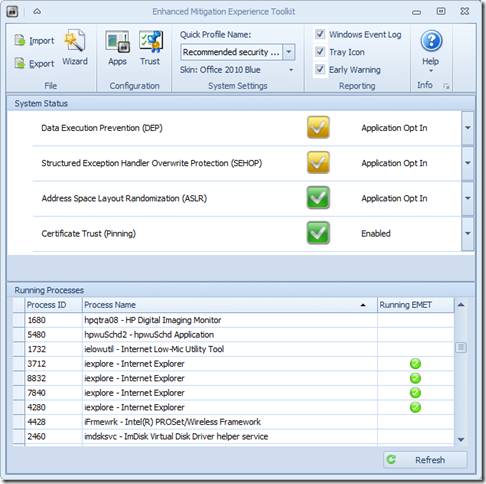
Microsoft’s Enhanced Mitigation Experience Toolkit 4.0 - EMET - just got released about two weeks ago.

It really hasn’t made that big a splash in the security news pond; maybe getting lost in all the waves from coverage on our domestic network digital data gathering, leaks in the SS Minnow, and that whole Facebook Shadow Profile data collection fiasco.

Oh, then there is that whole breaking story in the food world that has everyone shocked and a-twitter--How Cronuts Are Driving New York City Crazy.

So it’s not surprising that news of the release of a Windows-specific security tool to prevent advanced malware attacks got little notice.

So here you go.  Little rock toss into a big pond.

a0n12tap.xsg

I’ve got it running on all our home systems as well as all my Windows virtual machines. I’ve seen no performance issues at all and it is super-quiet; no chatter at all. Accordingly, I would recommend it to all my friends/family-members, especially those who insist on using Internet Explorer and do a lot of work in MS Office applications and documents. It is not a solution to replace any existing anti-virus/anti-malware security software you have, but rather it works to supplement and harden it.  I’m running it aside Microsoft Security Essentials (Win 7 systems), Windows Defender (Win 8 systems), and Bitdefender Antivirus Free (Win 8 systems). It works great.

  • Nuclear Scientists, Pandas and EMET Keeping Me Honest - SANS ISC Diary - great post from Johannes Ullrich detailing just how deployment and use of EMET (v3.5) could have prevented a recent “watering-hole” attack. It’s a great introduction on how the EMET software works. Version 4.0 is better.
  • EMET 4.0 is now available for download - SANS ISC Diary notice/followup.
  • EMET 4.0 now available for download - Microsoft Security Research & Defense blog. Great overview of the tool and all the new features and capabilities. Read this next before considering deployment
  • Enhanced Mitigation Experience Toolkit 4.0 - Official Microsoft Download Center source. It runs on everything from XP SP3 to Windows 8 platforms, as well as all related Server OS’s as well.
  • Enhanced Mitigation Experience Toolkit 4.0 - bink.nu - quick recap summary scraped from the product details of the official download site.
  • Microsoft’s EMET 4 adds even more malware-blocking power - Betanews overview of the tool.
  • Microsoft releases Enhanced Mitigation Experience Toolkit 4.0 - Help Net Security announcement of the tool.
  • Enhanced Mitigation Experience Toolkit 4.0 final is out - Ghacks.net - Nice review and overview of the EMET 4.0 features.

Not impressed enough yet to download?

Well, did I mention it has “skins” so you can change the theme to some pretty snazzy color schemes?

Seriously, if you spend any time on the Web (particularly in IE) and run a Windows system, then you really should consider deployment of this tool. Just take the default configuration settings to get started, then you can tweak away and add additional protection coverage after you read the manual.

Cheers!

Claus Valca.

Read More
Posted in anti-virus software, browsers, Internet Explorer, malware tools, Microsoft, networking, security, viruses, Windows 7, Windows 8, XP | No comments

Sunday, April 28, 2013

Browsers Browsers Everywhere!

Posted on 2:03 PM by Unknown

…and in browser news and trends, things are getting pretty interesting…

Firefox/Mozilla

  • Firefox turns 20—version 20, that is - Ars Technica
  • Firefox 20.0: Find out what is new - GHacks.net
  • New In Firefox 20: Private Window, Improved Download Manager & More - AddictiveTips blog
  • Download Manager Tweak - Firefox Extension Guru's Blog. I actually like the new Download Manager feature a lot, still haven’t yet shed my Download Statusbar Add-on in Firefox. But I probably could and likely will.
  • Download Manager Tweak - Firefox Extension Guru's Blog
  • Samsung teams up with Mozilla to build browser engine for multicore machines - Ars Technica
  • Mozilla and Samsung team up to kill Chrome mobile - BetaNews
  • Newsfox: 1.0.8.4.2 - RSS reader Add-on for Firefox just got some updates. Release notes 
  • Firefox Stub Installer on Beta Channel - Firefox Extension Guru's Blog. As The Guru points out, newer versions of Mozilla Beta/nightly releases download a small “stub” and than then downloads and installs the main binary sets over the wire. This does keep initial download sizes low, but also can wreak havoc on controlling custom deployments of some of these packages. Chrome does the same thing and they also “hide” their Chromium Dev download sources very well so now I have ended up dropping over to PortableApps.com: Google Chrome Portable/Additional Versions at SourceForge.net to snag and apply my portable Dev builds. Not impressed…especially now that Mozilla is rolling that direction as well. More info here on the Mozilla nightly stub-installer background if you are curious: Mozilla Adds Chrome-Like Downloader to Streamline Firefox Installs - TheNextWeb & Stub Installer in Firefox Nightly – Try it out, Give feedback, and Test it! - QMO – quality.mozilla.org
  • Firefox prefetching: what you need to know - Firefox Extension Guru's Blog - Great tweaking tips from The Guru.

…meanwhile over at the other hot-rod shop…

  • Google going its own way, forking WebKit rendering engine - Ars Technica
  • Blink: A rendering engine for the Chromium project - Chromium Blog
  • Does WebKit face a troubled future now that Google is gone? - Ars Technica
  • Blink - The Chromium Projects

Sadly, I remain terribly frustrated that Chrome developers just will not add a “sidebar” feature for bookmark management to Chrome like Mozilla has. This is a soapbox I just can’t seem to climb down from with Chrome. Again I say, if it were not for this one missing feature, I might jump to using Chrome/Chromium as my primary browser and relegate Firefox to the #2 slot.

The closest “solution” I have found are tree-style tab organizers…but the drawback of them is having to leave the tabs open.  Something I don’t like doing.

Sigh.

  • Get A Tree Style View Of Chrome Tabs; Group & Hibernate Them - AddictiveTips blog. 
  • Sidewise Tree Style Tabs - Chrome Web Store
  • Tabs Outliner: the ultimate Chrome tab management extension? - GHacks blog
  • Tabs Outliner - Chrome Web Store

Finally…it’s a bit older post, but I really found this post by Alex Limi very fascinating from a power user’s standpoint in using a browser. I don’t at all like the idea of removing control and configuration settings from access. That said, as a sysadmin, you can certain spend many frustrating hours troubleshooting a user’s web-experience problems before finding a buried browser setting that was causing the issue.

  • Checkboxes that kill your product — Alex Limi

Cheers,

--Claus Valca

Read More
Posted in browsers, Chrome/Chromium, Firefox | No comments

Flash/Java Updating

Posted on 12:21 PM by Unknown

Unless you really do live under a rock, the past two weeks have been pretty full of news of Adobe Flash and Oracle Java update news.

Here you go for those under-ground dwellers.

  • Adobe updates Flash Player and AIR, announces future plans - Betanews
  • Adobe April 2013 Black Tuesday Overview - ISC Diary
  • New security protection, fixes for 39 exploitable bugs coming to Java - Ars Technica
  • How to protect your computer against dangerous Java Applets - Microsoft Malware Protection Center
  • Java 7 Update 21 is available - Watch for Behaviour Changes ! - ISC Diary
  • Java 8 release schedule delayed for renewed focus on security - ISC Diary
  • Java Downloads for All Operating Systems - Oracle. Right now sitting on 7.21
  • Adobe Flash Player Distribution - Adobe. Right  now sitting on 11.7.700.169
  • Shockwave Player Distribution Downloads - Adobe. Right now sitting on 12.0.2r122
  • Archived Adobe AIR SDK version - Adobe. Right now sitting on 3.7.0.1530

All done and loaded up? Fire up this Qualys BrowserCheck page in each of your web-browsers and check to be sure.

--Claus V.

Read More
Posted in browsers, security | No comments

Sunday, March 17, 2013

Internet Explorer 10 (for Win 7), Firefox bits, and How Google Works

Posted on 8:40 PM by Unknown

News of Microsoft’s release of Internet Explorer 10 for Windows 7 seemed to go off like a flare; lots of noise and brilliance…and then flickering out to nothing.

In my security posture of trying to keep all the web browsers installed on all our home systems current, I went ahead and jumped on IE 10 and installed it almost immediately after release on our Windows 7 systems. 

None of us (well except Alvis with her college portal) regularly use Internet Explorer.

I use still primarily use Firefox for my daily heavy-lifting at home, and supplement it with Chromium (a build version of Chrome).

Alvis prefers the public release version of Chrome…which self-updates BTW…so that is fine by me.

Lavie uses Firefox exclusively….also because of the bookmark sidebar feature.

But I leave Internet Explorer on our systems (for compatibility reasons with some applications and websites).

Anyway, it went on all out systems without much fuss…well, not really on mine. Lessons learned. If you want to manually put it on your system, just make sure of all the links you are offered, the one you are using is to the actual FINAL release installer and not one of the IE 10 “preview” release version installers. In my haste (and trust in the IE Blog post I used) I grabbed a preview version and had to go through a series of additional security updates and IE 10 release upgrades to eventually arrive at a fully updated version of IE 10.  I didn’t make that same mistake with subsequent installs on everyone else’s systems.

  • Internet Explorer 10 finally released for Windows 7 - Ars Technica
  • Internet Explorer 10 now available for more than 700M Windows customers - Exploring IE Blog
  • IE10 for Windows 7 Globally Available for Consumers and Businesses - IEBlog
  • RELEASED - Download Internet Explorer 10 for Windows 7 - Scott Hanselman’s ComputerZen
  • Bloody well time, Microsoft releases Internet Explorer 10 for Windows 7 - BetaNews
  • Internet Explorer For Windows 7: New Features & Improvements - Addictive Tips
  • IE10 on Windows 7: 5 Essential Facts - Software -Information Week
  • Download Internet Explorer 10 for Windows 7 (32-bit) - Official Microsoft Download Center
  • Download Internet Explorer 10 for Windows 7 64-bit Edition and Windows Server 2008 R2 64-bit Edition - Official Microsoft Download Center
  • Download Internet Explorer 10 Language Packs for Windows 7 and Windows Server 2008 R2 - Official Microsoft Download Center
  • Release Notes - Microsoft
  • Download Internet Explorer 10 - Microsoft Windows - Worldwide installation packs

Meanwhile, these Firefox articles were pretty timely.

  • Prepare Mozilla Firefox for Enterprise Deployment and Virtualization - Aaron Parker
  • The Firefox Extension Guru's Blog links to this How to make Firefox the Fort Knox of browsers - over at Ghacks.

And Google has some great presentations to help you understand how their email and search services work.

  • Follow an email’s journey with Story of Send - Google Official Blog
  • The Story of Send - Google
  • Google Releases Interactive Infographic: "How Search Works" - Search Engine Land
  • How Search Works - Google

Stay informed & Browse safe.

Claus Valca

Read More
Posted in browsers, Firefox, Gmail, Google, Internet Explorer, Microsoft, search engines, security, Windows 7 | No comments

Abandon Hope all ye who log into the Web…

Posted on 7:34 PM by Unknown

Sigh.

I really shouldn’t have read Bruce Schneier’s CNN Opinion post over the weekend: The Internet is a surveillance state

I’m not a tinfoil-hat wearing guy…Stetson is more my thing, but I think he makes a valid point. The rate at  which we generate capturable data in our daily lives continues to get easier and easier. Almost every local or national store I do business at wants to capture my email address or phone number. More than a few look offended at me when I decline to immediately sign up for a “consumer rewards” card at checkout.

Our ISP’s and our cellular providers likely capture more data about our web-habits, our locational habits, and all points in between.

I seriously doubt we could successfully fly “under the radar” even if we ditched all things electronic, because even if we don’t directly create “data track patters” via digital activities, our “off-line” actions would continue to get logged by others who remain plugged in.

I’ve come to accept that -- even it my head is dizzy from the constantly accelerating pace of data collection we subject ourselves to -- what really, truly, frightens me are the following things;

  1. Others who collect that data just don’t seem to be able to keep it secure.
  2. The personal consequences for data loss/theft/abuse become larger and more catastrophic in impact.
  3. More and more people seem to just not know or care about data collection or protection.
  4. Data collection to these business, organizations, entities seems to be a right -- not a privilege.
  5. Your rights to control (and knowledge about) the data collected on you seems to get more and more removed from your ability to do anything about it.

In many people’s minds it has just become another price to pay for the privilege of eating at the trough.

The consumers are the consumed. Reminds me of a digital version of a certain classic film.

Bruce’s well composed post reminds us in IT…gatekeepers, sysadmins, for/sec incident responders, and policy makers that our own cry should be “Data is people!”  And never, ever forget it.

Filed under “Oh Bother”

  • Former Obama advisor argues Comcast is a threat to the open Internet - Ars Technica
  • The World Has No Room For Cowards - Krebs on Security
  • If I Can’t Trust You with my Photos, How Can I Trust You with My Sensitive Data? - Newsome.Org
  • Yahoo Mail accounts still hijacked daily - Help Net Security
  • Yahoo Mail Accounts Have Been Getting Hacked for Months - TheNextWeb - These Yahoo account hacks are still happening way to frequently. Every couple of weeks I get a call from a friend (or see a spam email sent to me from their Yahoo mail account). Yahoo claims to have fixed the XSS issues but it serves as a solid reminder to me to never, ever, ever, browse the web logged into any secure account I have.  I log into the service…do my business…log out. Dump my cache/cookies/saved forms/etc. Restart the browser, and go on to the next site. It is a super-hassle but is the best I can do to avoid XSS site hacks/exploits (even beyond using NoScript).  A simpler way would be to drop into your browser’s “Private” browsing mode for your secure login session.
  • Bits from Bill: Hackers Steal WinPatrol Data Already Available
  • Most PC security problems come from unpatched third-party Windows apps - Ars Technica

Cold Java

I was feeling so smug and confident having recently thrown in the towel with Java here at the Valca homestead and removing it from all of our Windows systems.  At seeing notice of the latest Java releases I automatically began moving towards my Java download site to snag the updated…when I realized I didn’t need to.

When I set up my father-in-law’s new (to him) laptop with Windows 7 I didn’t install Java. He asked me about Java when I was showing him just how similar Windows 7 would be to him from his old XP system. He said he was wondering how he needed to update Java since it was always complaining on his old XP system. He looked relieved when I told him he probably wouldn’t need it so I didn’t event install it. The Java update notices in the system tray just confused him to no end.

So Saturday, Alvis started complaining about her on-line college class course not working on her laptop.  A “sidebar” was missing used to navigate the course and material.

Hmm.

At first I thought it had something to do with the upgrade to IE 10 I did on her Windows 7 laptop. It’s been Spring Break so she hasn’t worried about classes since the update.

I added the college domain into the IE compatibility mode and that helped (the site now saw the browser engine as IE 7) but didn’t fix the issue.

According to the college, their program was only supported on IE, not Chrome or Firefox or Opera. I tried.

More troubleshooting with their helpfully unhelpful wizard.

Eventually I figured out it was trying to call to Java. Well, that made sense since I removed it at the same time I upgraded to IE 10.

So I did the “correct” thing and installed the latest, most secure version of Java, 1.7.17.  Only it still didn’t’ work as that was an “unsupported” version of Java.

SO I did the next-best “correct” thing and installed the latest, most secure previous version of Java, 1.6.43…and went into the Java control panel applet to disable use of the 1.7.17 version (and showed Alvis how to toggle between them). That works for me at work with a particular Symantec Java console applet that likes 1.6 but not 1.7. Alas, the college’s web portal still saw the 1.7 version and wouldn’t run.

(Side note: The Java 1.6 download versions aren’t easily accessible to install directly from Java.com as it is no longer being publically made available.) I had to grab a copy off a trusted third-party software mirroring site. Later I was able to finally find a public link to it on Java after-all: Java Downloads for All Operating Systems Version 6 Update 43). That will probably be the end of the line for 1.6 so you better bookmark this link if your Java app doesn’t like 1.7 builds.

SOOOO I uninstalled Java 1.7.17 completely.  And then the web-app portal was happy and Alvis could finish the course homework she had put off over Spring Break.

And all the hard work and victory I felt about us “plain home users” not needing to fuss with Java evaporated.

So it looks like I will have to continue to regularly scratch that itch on at least one of our home systems for the foreseeable future.

  • New holes discovered in latest Java versions - The H Security: News and Features
  • The Lowest Hanging Fruit: Java - F-Secure Weblog : News from the Lab
  • All I need Java for is .... - ISC Diary
  • Oracle investigating after two more Java 7 zero-day flaws found - ZDNet
  • New Java 0-day exploited in ongoing attacks - Help Net Security
  • Blackhole Exploit Kit Run Adopts Controversial Java Flaw - Security Intelligence Blog / Trend Micro
  • Another Java zero-day exploit in the wild actively attacking targets - Ars Technica
  • And the Java 0-days just keep on coming - ISC Diary
  • Java j6u43 update #YAJU - ISC Diary -
    • http://www.oracle.com/technetwork/java/javase/6u43-relnotes-1915290.html
  • ISC Diary | Java 7u17 update #YAJU - ISC Diary -
    • http://www.oracle.com/technetwork/java/javase/7u17-relnotes-1915289.html
  • Oracle plugs critical Java vulnerability it knew of in February - The H Security: News and Features
  • Oracle releases emergency patch to fix exploited Java flaw - Help Net Security
  • Malicious Java applet uses stolen certificate to run automatically - Help Net Security

..and the Emperor Flash is found to have no clothes…

  • Adobe releases third security update this month for Flash Player - Ars Technica
  • Flash in Windows 8 - IEBlog
  • Microsoft changes default Flash behavior in Windows 8 and RT - ZDNet
  • Microsoft Adds Flash Back To IE10 - Is That A Good Thing? – ReadWrite
  • Guess what? Flash is vulnerable again...still - BetaNews
  • Adobe closes more critical holes in Flash Player - The H Security: News and Features
  • Flash Safety 101 - Security Intelligence Blog / Trend Micro

For those who care…

  • Adobe Flash Player Distribution - Adobe
  • Shockwave Player Distribution Downloads - Adobe
  • Java Downloads for All Operating Systems - Java.com
  • Qualys BrowserCheck

Stay safe.

--Claus Valca.

Read More
Posted in browsers, curmudgeon, Internet Explorer, security | No comments

Saturday, January 12, 2013

Saturday Linkfest - Cold Pizza Edition

Posted on 2:56 PM by Unknown

The other night on my way home from work, I was tired and exhausted. I didn’t feel like going grocery shopping for dinner so I punted.

I stopped by the pizza parlor, grabbed three large pies. We ate one for dinner, then have been snacking on cold-pizza leftovers for the past two days.

I’m almost out of slices so I guess it will be to the grocery store tomorrow for some real food again.

USB-based Windows System Install Options

The other day at work, a co-worker asked me for some feedback on a particular problem they had at home.

Seems that he had decided to upgrade (actually a fresh install) a laptop from Windows XP to Windows 7. Only problem was the CDROM drive was in pretty bad shape, and all he had was optical install disks. So how could he get the upgrade on.

Although I supposed he could find an external USB-based CD/DVD-ROM drive to use, that seemed like an unnecessary purchase. He did have a working Windows desktop system, however, so the solution seemed quite simple: create a bootable USB drive with the installation media present. Boot the laptop from the USB drive and install away!

So here are three methods to accomplish that task; full-hands on, Windows tool, and automated utilities.

If you are game and want to learn a bit of the structure of creating such a tool, then this TechRepublic post is perfect: How do I ... create an installation flash drive for Windows 7? I noticed it doesn’t have instructions to make the partition/device bootable via bootsect. BOOTSECT /NT60 <usb drive letter>    (Where <usb drive letter> equals your USB device).

Microsoft has a nice and simple tool to assist you with the process: Windows 7 USB/DVD download tool.  This guide How To Create Bootable Windows 7 USB To Install Windows 7 From USB Flash Drive (Using Windows 7 DVD/USB Tool) from Into Windows provides a nice walkthrough of the process.

Finally, there are some specialized utilities that give you a bit more control over the creation process. I particularly like these two:

  • WinToFlash - Install Windows from usb - Home page
  • Rufus - Create bootable USB drives

Piece of cake.

ForSec Bits

  • EMET 3.5: The Value of Looking Through an Attacker's Eyes - ISC Diary - This was a fascinating post about the Microsoft Enhanced Mitigation Experience 3.5 toolkit and how it can leverage additional anti-malware protection on systems. I’m not sure a site-wide deployment would make a lot of sense, but for workbench systems and testing it might be a smart move to consider.
  • Hunting Down and Killing Ransomware - Mark's Blog. Mark Russinovich provides an excellent technical review on dealing with scareware/ransomware infections on a system.
  • A picture worth a 1000 barcodes? - ISC Diary - be careful what you post!
  • Adobe Security Bulletins Posted - Adobe Product Security Incident Response Team (PSIRT) Blog
  • Microsoft and Adobe close almost 40 holes - The H Security: News and Features. Time to patch Windows and Adobe holes again!
  • Carving Station – RAR Files - M-unition. Mary Singh has a highly in-depth post coving file-carving from unallocated disk space. Not exactly light reading, Mary provides some excellent coverage on this topic.
  • Freeware Release: Redline 1.7 - M-unition. New version released. download page
  • TeamViewer 8 - Forensic Artifacts - Useful information on system artifacts left by TeamViewer 8 usage.
  • You down with LNK? - SpiderLabs Anterior

Installing Stuff

  • How to install Ubuntu on Acer’s $199 C7 Chromebook - Ars Technica
  • Installing Windows XP to SSD - TinyApps.org
  • Repurpose PCs with Windows ThinPC - Anything about IT (via tip from TinyApps bloggist).  See also AnandTech - Windows Thin PC: Windows, Slimmed Down

Tips for Techs

  • No sound from Google Chrome: Adobe Flash issue and workaround - MarkWilson.it
  • Easily Fix Or Delete Broken Desktop & Start Menu Shortcuts - AddictiveTips. Uses NirSoft tool ShortcutsMan for housecleaning.
  • Free e-books for Windows administrators (updated) - 4sysops
  • 150 Best Windows Apps Of Year 2012 - AddictiveTips
  • Standalone Sysadmin - blog.  TinyApps bloggist pointed me to Matt Simmon’s great website a while ago. In addition to the great posts, Matt also provides a super-handy List of Subscribed Feeds covering all kinds of tech/sysadmin/forsec goodness. If you are new to RSS feeds and need a great “seed list” to get started with, look no further. Matt also provides a more current OPML file for use. Whew!

Network Monitoring

  • PCAP Files Are Great Arn't They?? - SpiderLabs Anterior - fantastic examples of tshark-fu and other tricks for extracting great data-points out of PCAP files.
  • Filtering with Message Analyzer - MessageAnalyzer Blog. It’s been a while since we have seen much chatter regarding the replacement for Network Monitor. Paul E Long has some great tips for filtering in the new tool; especially useful for those used to filter use patterns in Network Monitor. More posts promised soon.
  • Installing Wireshark 1.8.4 and WinPcap 4.1.2 on a Windows 8 System - Moon Support Weblog

Tools, Utilities, and Updates

  • Updates: Autoruns v11.4, ProcDump v5.12, SDelete v1.61 - Sysinternals Site Discussion
  • GMER 2.0 arrives - BetaNews review. Rootkit detection tool now adds support added for Windows 8 and x64 systems. GMER download pager
  • JavaRa Definitions Updated - SingularLabs - Use these with JavaRa to help install/update/remove Java Runtime Environment installations on your systems.
  • Dev Eject - version 1.0.26 beta - this is a fantastically clever tool that can not only help you eject removable devices from Windows, but it also can tell you specifically what is causing (locking) the device from ejection.
  • Oracle VM VirtualBox - Now at version 4.2.6. Overview of significant changes: VirtualBox 4.2.6 delivers many fixes - BetaNews.
  • TightVNC: What's New in TightVNC - Now at version 2.6.4. Download TightVNC
  • DMDE (DM Disk Editor and Data Recovery Software) - free/$ versions - Interesting advanced file recovery tool. The free version is pretty limited but is a good place to start and play around with. Portable so no installation required. DMDE is a handy free data recovery tool for Windows experts - BetaNews review.

Firefox News

  • Mozilla to Continue 64-Bit Windows Firefox Builds - Firefox Extension Guru's Blog
  • Private windows coming to Firefox - Mozilla Links

Cheers!

--Claus Valca

Read More
Posted in boot-cd's, browsers, Firefox, forensics, Link Fest, Linux, malware tools, networking, NFAT, RSS, security, troubleshooting, utilities, Windows 7 | No comments

Thoughts on Chrome(ium) Privacy Attainment

Posted on 12:31 PM by Unknown

It is no secret to GSD blog fans that I’m a heavy supporter/user of Firefox browser. It remains my primary workhorse for web surfing. Updates come pretty steadily and performance and stability issues haven’t been an issue for me. Plus the specialized add-ons I use make it super-handy.

That said, the Google Chrome -- specifically Chromium Dev build -- is the browser I launch when I want to do mindless web surfing, or leave a full-screen web-page up while I am monitoring something specific.

When I help a friend/family-member set up a new system, I always install and give a walkthrough of Chrome. More times than not they quickly come to prefer it over Internet Explorer.

In fact, one of the only reasons I don’t use Chrome(ium) more is the continued (and probably “forever”) lack of a bookmark-sidebar option that Firefox has.  With my personal bookmarking/blogging habits, that feature is a “must-have.” Lacking that, hard-core regular usage of Chrome remains an exercise in frustration.  More on my attempts to overcome this in a follow-up post.

On my system I have kept two (portable) build versions of Chrome; Chromium (Dev) and SRWare Iron.

I use and prefer Chromium builds because they are updated quite frequently. I have been a long user of SRWare Iron because the developer has offered out a list of specific privacy feature enhancements under the hood that you don’t get with Chrome versions.

Additionally, there is Comodo Dragon Web Browser also based on Chrome and providing some additional security/privacy features. However I don’t use this version.

Chrome Flavors - Full Install versions

These versions will install a “full” version directly onto your Windows system

  • Chrome Browser - Download current Chrome browser release version
  • Chromium - The Chromium Projects (overview)
  • Download Chromium - Download current Chromium browser release version
  • SRWare Iron - Download a “privacy-enhanced” version build of Chromium
  • Dragon Internet Browser - Download a “privacy-enhanced” version build of Chromium; includes “Domain Validation” feature from Comodo, cookie/web-tracking & browser download tracking for privacy.

Chrome Flavors - Portable versions

These “no-install” versions allow you to take your Chrome-browser with you on a USB stick…or if you just want to run it locally without installing onto your Windows system.

  • Google Chrome Portable - PortableApps.com.  The main version level is right there at the top. This is the “mainstream” Chrome version. Scroll down a bit on the page and you will find  additional download links for portable versions of Chromium (Dev) and Beta release versions. This is the source of the Portable Chromium (Dev) package I use/update.
  • Chromium Portable - This is another portable Chromium (Dev) package another group maintains.
  • Iron Portable - Download the PortableApps.com version of SRWare Iron
  • SRWare Iron - Look carefully and there is portable version (zip) offered on the developer’s download page.
  • Comodo Dragon Portable - Basically this forum tip says to just download the regular version and pay attention to choose the “portable” version install option while doing so.
  • Sandcat Browser - Syhunt. This is a specialized portable penetration-testing oriented web-browser based on the Chromium browser. Supports live HTTP Headers, request editor, fuzzer, JavaScript Executor, Lua executor, PageInfo extension, HTTP brute-force, CGI scanner scripts, and much more

Updating Challenges

I also have a bit of an OCD app updating problem. If there is a newer version out -- particularly important with browsers and browser-plugins for security reasons -- I download and apply.

This is a challenge for both my portable Chromium and portable SRWare Iron builds as they don’t have/support in-app updating. So I have to watch the webs/feeds for signals a new version is released then manually update them.

As of this post date, Chromium Dev is at 25.0.1364.29. SRWare Iron is at 23.0.1300.0.

So to remedy the issue I keep an eye open of the Chrome Release blog (via my RSS feed reader). Then I pop over and check the direct download page for the source of the particular portable version I use and snag it when it appears..usually just a few days later.

  • Chrome Releases - Chrome release notice blog
  • Google Chrome PortableApps / Additional Versions - SourceForge.net file repository downloads
  • Chromium Portable - SourceForge.net file repository downloads
  • SRWare.net • View forum - SRWare Iron Support (English) - New version releases noted at the top.

Rolling your own Privacy Build of Chrome - Overview

So, what I want to have is all the privacy enhancements of SRWare Iron but in the “current” level of Chromium (Dev) and on a regular basis. Could I manually tweak-out a Chromium installation to achieve the same (or similar) privacy gains? 

One of the nice things of SRWare Iron is that the developer does all this work for you under the hood. But if like me you are comfortable making lots of browser configuration changes manually, and don’t mind doing some research, maybe you can get to the point of having an up-to-date Chrome-based browser with most/all of the features the SRWare Iron version has.

Aside: This isn’t really meant to be a discussion on creating an “ultra-secure/private” web-browsing experience in Chrome. I’m not seeking a completely “stealth” web-browsing experience. I’m not interested in setting up proxy/TOR sessions to try to bypass network/ISP tracking, nor is it to discuss the merits of “in private” mode browsing and all that. Who really knows what/how-much deep-packet inspection and logging at ISP’s may be going on. Rather, this attempt is to reasonably minimize the number of tracking features normally encountered in standard web browsing sessions. Yes, those “features” can be used by ISP/web-sites/content-providers to “enhance” your browsing experience in serving customized web-content, advertisements, and search-results specific to your browsing habits. That may be a good thing or not depending on you perspective. I personally to prefer to pour my coffee black and then add cream/sugar/etc depending on my mood. Same with my browser.

I started looking at the list of primary feature comparisons provided by SRWare; Chrome vs Iron.

Once I was familiar with these items, I started hitting Google to see how I could make each change manually. I soon found what I was looking for.

My plan was to post a link to explain how to achieve each setting.

But then as I dug just a bit deeper, I started finding some interesting discussions about recommended security and policy settings for Chrome builds; as well as some updated comments on the relevancy of the items targeted in SRWare Iron.

So instead, I’m posting links to those as I think this approach will allow someone to better (and more easily) create a customized privacy/browsing configuration for their own Chrome usage needs.

  • Google Chrome Privacy Whitepaper - Provided by Chrome, this excellent web-page outlines just about all the most critical features in Chrome/Dev that interface with Google and/or third-party services and sites including,
    • “Ominibox” predictions - how to enable/disable
    • “Chrome Instant” - search results and in-line prediction serving/logging
    • Google search locale
    • Phishing/malware protections - how to enable/disable
    • Navigation error tips - enable/disable
    • Google Update - (and those component ID tags)
    • Installation tokens, Promotional tags/tokens
    • Usage stats and crash reports - enable/disable
  • SRWare Iron Browser - A Private Alternative To Chrome? - InsanityBit - I found this post to be very helpful in understanding the benefits that I was seeking to have in SRWare Iron. It is pretty clear the writer takes a position against SRWare Iron’s advertised benefits over stock Chrome/Chromium builds. After reading you can do additional research and come to your own conclusions. I found it very helpful and it led me to personally drop using SRWare Iron and just stick with my own tweaked-out version of Chromium.
  • Chrome vs Iron (Privacy Comparison) with Poll for Chrome users - MalwareTips forum - This discussion thread contains discussion (and content) based on the previous link. It also touches on the Dragon build version, and has some screen shots of privacy features options in Dragon.
  • Google Chrome Security Settings and Configuration Guide for Enterprise - Root777 - Ajit Gaddam has a really super post that outlines recommendations for a more secure enterprise deployment of Chrome. Even if you aren’t deploying it in an organization, I found the discussion and points super-helpful. Lots of background information. Some changes are made in Group Policy Editor, but there are tips that can be followed for manual configurations.
  • Policy List - The Chromium Projects - List of policies that Chrome refers to and uses. Note that Chrome and Chromium policy settings will have different locations in the Registry depending on build.

Rolling your own Privacy Build of Chrome - Assistive Tools and Tips

If you don’t like the idea of making a lot of manual setting and configuration changes, then there are a number of excellent utilities and Chrome extensions that can assist you with the process.

In fact, these may be the only tools and tips most average privacy tweakers of Chrome need.

  • How to remove Google Chrome installation ID for anonymous surfing? - TechTrickz - These are two older tools that remove the unique “client_id” for your chrome browser. I can’t find a direct link to Abelssoft’s UnChrome tool any longer but some download sites still have it. Chrome Privacy Protector from Aquila is still around Chrome Privacy Protector. I don’t know if these will work with “portable” versions of Chrome or not.  In fact, according to this post Chrome to ditch unique ID, sort of via The Download Blog back in 2010, this feature should now be ditched.
  • Privacy manager - Chrome Web Store - I really like this Chrome add on. It provides awesome granular control over primary privacy settings, cookie handling, and some network behavior. I can’t believe I haven’t been using this tool from the very beginning! For a deeper review, see this AddictiveTips blog post: Privacy Manager: Chrome Security Settings & Junk Data Cleaning.
  • Privacyfix by Privacychoice - Chrome Web Store - this Chrome add-on allows you to make specialized privacy setting tweaks to your Chrome browser. It is really easy to follow and does a great job explaining the options and makes it easy to change/restore the settings depending on what you need to accomplish.
  • Adblock Plus - Chrome Web Store - Block most ads in Chrome and the tacking stuff that comes with them.
  • FlashBlock - Chrome Web Store - Block Flash media from auto-launching without your permission.
  • Google Analytics Opt-out Add-on (by Google) - Chrome Web Store - Use to instruct Google Analytics JavaScript to not sent any info about the website you are on to Google Analytics. More tips and background on this particular privacy subject here: Keep Google From Tracking Your Every Move Online - How-To Geek
  • How to Optimize Google Chrome for Maximum Privacy - How-To Geek - Additional tips and info on tweaking Chrome for privacy.
  • How to Set your Google Chrome for Maximum Privacy|Set google for privacy - Hack How - Additional tips and info on tweaking Chrome for privacy.

Cheers

--Claus V.

Read More
Posted in browsers, Chrome/Chromium, Google | No comments

Sunday, October 28, 2012

For-Sec & Utility Jumble Linkfest

Posted on 6:52 PM by Unknown

Wordle_2012-10-28_10-49-54

The short weekend is done. The “Sandy Watch” is on for what could be -- for our northeastern friends -- a storm event to be remembered for many years to come. So comes a pile of security/forensic and utility-minded links spill out below for the curious and information hungry.

Forensics and Security

Girl, Unallocated: Be Very Quiet... I'm Tracking Emails Through Headers - Girl, Unallocated Blog. The Girl has a great post looking at email headers and their bits and perils. One gem is a report (PDF) from Stroz Friedberg and a particular focus on email headers. The report as a whole is a great read and again provides a lesson in technical report writing and presentation as well as some forensics pushback on anti-forensics techniques. At 102 pages, it isn’t a brief, but well worth the time to download and study.

The Girl’s post reminded me of another great publicly-available report that addressed emails in a forensic investigation.  In my GSD post Interesting Malware in Email Attempt - URL Scanner Links, I wrote the following bits at the end:

A recent Digital Forensics Case Leads post has mention of a super-fantastic investigation/forensic report involving anonymous emails. This is must-read material, not just in terms of the investigative methodology but also the way the report was composed and presented. Very clearly done!  I’m keeping a saved copy of the report for future reference; both technically and as a report template. From the post via the link above:

“University of Illinois recently released a detailed investigation report (PDF) regarding anonymous emails allegedly sent by its Chief of Staff to the University's Senates Conference. The report is an interesting read, and also serves as a potentially useful model for those looking for report samples and templates.”

How a Google Headhunter's E-Mail Unraveled a Massive Net Security Hole - Threat Level @ Wired.com.  I almost overlooked Kim Zetter’s post on how Mathematician Zach Harris -- as an exercise -- discovered a flaw in some providers user of a weak DKIM key to sign emails originating from them. Fascinating and short read.

DEFT 7.2 and DEFT english manual, ready for download! DEFT Linux - Computer Forensics live cd . New DEFT version out. Last one in x32 bits. Future versions will be strictly x64 flavored.

Xplico – Xplico 1.0.1 - Xplico new version release just dropped. From the brief post:

ChangeLog:

  • nDPI integration
  • performace improved
  • FTP dissector improved
  • Added the prism dissector
  • CLI execution bug fixed
  • PCAP-over-IP SSL encryption
  • IRC dissector improved
  • File reconstruction from Fragmented Payloads improved
  • FaceBook Chat updated
  • FaceBook Message (partial)
  • HTTP without initial packets (packets lost)
  • RTP dissector improved
  • PCAP2WAV, RTP2WAV interface added

And don’t forget! Now you can update/get via apt-get! for Ubuntu 11.04 and higher.  Sweet!

sudo bash -c 'echo "deb http://repo.xplico.org/ $(lsb_release -s -c) main" >> /etc/apt/sources.list'
sudo apt-key adv --keyserver keyserver.ubuntu.com --recv-keys 791C25CE
sudo apt-get update
sudo apt-get install xplico

LastActivityView - Nirsoft brand new utility! - Use this new tool to view the latest computer activity in Windows operating system. Nir Softer has some more details on his NirBlog: New utility that shows general computer activity. Could be useful for incident response and analysis and other “quick peeks” for key system activity indicators to narrow down the search.

FileAlyzer Portable 2.0.5.57 (detailed file analyzer) Released -PortableApps.com

Hacking KeyLoggers - Open Security Research has a great post that not only identified a USB keylogging device, but takes it to the next level in hacking it to determine the impact of the device and when it might have been dropped. Clever stuff.

Attacking TrueCrypt - The H Security: News and Features. Another interesting post that almost slipped by me. Interesting by itself but also shows the benefit of using “cascaded algorithms” in TrueCrypt to thwart current attacks…for now.

Restoration of defocused and blurred images - Yuzhikov.com. This is super cool.  Vladimir Yuzhikov hasn’t just done a proof of concept for de-fuzzing blurred imaged (either out of focus or those blurred with a mathematical algorithm), no, he has actually released a free Windows app to demonstrate the possibilities. Besides images, text that is out of focus can be unblurred as well. This is very fascinating and could assist investigators facing images and other digital files with blurred faces or content. It’s not exactly easy or guaranteed to work, but it is very promising start and Vladimir notes he is continuing development and refinement. Read his work please and snag the download.

Google Drive opens backdoor to Google accounts - The H Security: News and Features . Quoting from the post, “The Windows and Mac OS X desktop clients for Google's Drive file storage and synchronisation service open a backdoor to users' Google accounts which could allow the curious to access a Drive user's email, contacts and calendar entries.”  read the post for more info. As usual it seems to be a convenience versus security trade-off again. Choose your cake wisely. I stick with using only the web interfaces and pass on the client versions of these cloud-based storages services…for now.

Virtualization

The TinyApps bloggist has been hard at work digging out great tips and techniques for importing the virtualized “Windows XP Mode” into popular virtualization software. As always, the posts are impeccable with lots of details and supporting source documentation for additional study and research.

  • Import Windows XP Mode into VMWare Player - TinyApps.org blog
  • Import Windows XP Mode into VirtualBox - TinyApps.org blog
  • Must-have tool for VirtualBox users - TinyApps.org blog.

Oracle VM VirtualBox - Version 4.2.4 just dropped…by the way. I almost missed it were it not for my RSS feed filters. See the changelog for more details.  And be sure to grab the 4.2.4 VM VirtualBox Extension Pack as well.

Miles’ posts reminded me of an earlier GSD summer post Virtual Solutions and his great post comment guiding me to getting MS’s IE VirtualPC images running in Virtual Box.

How to run Microsoft’s IE VPC images in VirtualBox
http://tumblr.jonthornton.com/post/11405634980/how-to-run-microsofts-ie-vpc-images-in-virtualbox

ievms - Automated installation of the Microsoft IE App Compat virtual machines
https://github.com/xdissent/ievms

Browser Plugin Update Time…Again.

Yes dear readers, it is “Jack and Jill” time again. Bother.

Adobe Shockwave got updated, as of this post, the newest (Windows) version of Adobe Shockwave is currently 11.6.8.638.

  • Adobe - Adobe Shockwave Player - direct download
  • Adobe - Security Bulletin: APSB12-23 - Security updates available for Adobe Shockwave Player - Adobe
  • Adobe patches 6 critical security flaws in Shockwave - ZDNet
  • Adobe fixes critical Shockwave vulnerabilities - The H Security: News and Features

Adobe Flash was updated as well. Newest (Windows) version is currently 11.4.402.287.

  • Adobe - Flash Player - version information
  • Adobe releases 25 critical Flash patches - The H Security: News and Features
  • Adobe - Security Bulletins: APSB12-22 - Security updates available for Adobe Flash Player - Adobe

Java also got a quick update to both build versions. Windows Java updates are available in 1.6.0_36 and 1.7.0_09.

  • Java SE 6 Update Release Notes - Oracle
  • Java SE 7 Update Release Notes - Oracle
  • Java SE Downloads - Direct download

Trying to figure out if all your browser plug-ins are current can be a super-pain for the inexperienced and geekless.

My go-to recommendation remains to pop over to Qualys BrowserCheck in each of your installed web-browsers, be it Chrome, Windows IE, or Firefox. Alas, Opera, Safari, and other browsers are not currently supported, however a check in one of the supported browsers may quite likely uncover a outdated plug in, patching it may fix the others in the process.  For a backup check, hope over next to The Secunia Online Software Inspector for a second opinion.

If you want a good all-in-one location to manually download your plugs, check out Browsers and Plugins Downloads over at FileHippo.com.

Utility and SysAdmin Finds of the Week

Defrag Tools: #13 - WinDbg - Defrag Tools @ Channel 9. New video on Sysinternals tool usage; specifically integrating Debugging Tools for Windows.

Case of the CertUtil Import Refusing The Correct Password - chentiangemalc. Great practicum post on troubleshooting a strange password error where the password was correct but not being taken.

SpeedyFox - Boost Firefox,Skype,Chrome,Thunderbird in a Single Click! - CRYSTALIDEA Software . It has been forever…like dinosaurs roaming the earth eras ago…since I last saw any post anywhere on speeding up a pokey Firefox browser by “optimizing” the JSON databases. This is a dead-simple process to improve launch-time for a well-used Firefox browser. It’s been months since I last optimized mine. When I went to run SpeedyFox, my favorite tool to do so, I wondered if there had been an updated release. My version was at least a year old.  Happily I found there was a newer version, and that it now supports optimizing Chrome-based browsers as well. It remains available as a free edition. Current version is 2.0.3 but while I was sleeping, the developers have been adding support for Skype, Chrome (including SRWare Iron and Pale Moon), Mozilla Thunderbird, and Firefox (including Epic Browser). There is a Mac version (Firefox only) also.

If you use Firefox/Chrome/Thunderbird, stop, drop and run right now!  Did I mention it supports custom paths to your browser profiles so you can optimize portable versions on your drive/disks? Sweet baby Jebus!

CR2 Converter - I shot a lot of photos for Lavie and her family last weekend with the Canon 5D Mark II.  Pops asked for copies and when I was getting ready to pass them off, I realized I had not changed the setting from “RAW” only to RAW+JPEG. So I had over 300 digital images in RAW .cr2 format that his computer cannot read and that are not really a practical format for him anyway to use. Sure, I could batch-convert them in Lightroom/Photoshop, but I really just needed to get them quickly on a CD for him.  I have more than a few RAW freeware tools for tweaking individual RAW file images but that was too time-consuming to use. Luckily, with just a bit of Google diving, I found the freeware Canon RAW Image Converter “CR2 Converter”.   It supports batch-conversion and did an acceptable job for this task. My i7 x64 8 GB RAM system chewed through converting the files in no-time.  To my eyes the resulting images were a bit lightly purple-tinted…not bad or unpleasant but definitely noticeable when compared to the RAW file. Nothing that some simple color correction can’t fix if really important. For Pops it wasn’t but YMMV.  I wouldn’t use it everyday for batch processing but for quick-n-dirty RAW .cr2 to JPEG/JPG/GIF/BMP/PNG/TIFF conversions it is a super time-saver. Tuck it away for when needed in a pinch.

Cheers and hopes and prayers for the very best across the north-east seaboard as Sandy rolls in.

--Claus V.

Read More
Posted in browsers, Firefox, forensics, Google, graphics, hurricanes, Internet Explorer, Link Fest, Microsoft, networking, NFAT, security, troubleshooting, utilities, video, Virtual PC, virtualization, Windows 7, XP, Xplico | No comments
Older Posts Home
Subscribe to: Posts (Atom)

Popular Posts

  • New Year’s Day - First Post 2011
    Same day I came out with my first post after a long drought, I fell upon this article Blogging Seems To Have Peaked, Says Pew Report over a...
  • Oscar watch Linkpost
    Alvis and Lavie are watching the Oscars tonight and I’m along for the ride. I wasn’t able to come even close to getting out some of the pos...
  • Finally! Time to Post! New material list
    After a recent text from my bro reminding me it has been since March since I’ve done a blog post, I was finally able to clear the schedule a...
  • Ubuntu 13.10 Upgrade - Lessons Learned & VIDMA utility found
    A few weeks ago a new release of Ubuntu came out. Naturally that meant it was update time! I have been getting pretty good at this now so ...
  • iodd : Multi-boot madness!
    Like many computer technicians and responders, I seem to always have at hand a collection of bootable media; CD’s, DVD’s, USB-HDD’s, flash m...
  • Network Capture Tools and Utilities
    At a conference this week, we had quite a section regarding network captures. The instructor was going on about how you can try to sort ou...
  • It just has to be bigger on the inside…
      Last Christmas, Lavie gifted me with a cute little Jawbone JAMBOX unit. I thought it was pretty cool. It uses a Bluetooth connection t...
  • Mostly Minor Network Notes
    Here are some minor tweaks and features, mostly of a network nature. Manual Uninstall of the Cisco VPN Client « Mobile Expertise -- becaus...
  • Windows Live Mail error 0x80041161
    Dad is working with his father-in-law who has an issue with his Suddenlink web-mail-based “forwarding” handling of messages. Seems that (an...
  • FireCAT 1.5 “Plus” Add-On Collection
    In yesterday’s GSD post I noted the following: Both of these tools brought be back to the excellent FireCAT 1.5 collection of Firefox...

Categories

  • Active Directory
  • anti-virus software
  • Apple
  • architecture
  • art
  • AVG
  • Blogger
  • blogging
  • books
  • boot-cd's
  • browsers
  • cars
  • cell-phones
  • cheat sheets
  • Chrome/Chromium
  • command-line interface
  • cooking
  • crafts
  • crazy
  • curmudgeon
  • DHC
  • Dr. Who
  • E-P1
  • Education
  • family
  • Firefox
  • firewalls
  • For the Gentleman
  • forensics
  • Gmail
  • Google
  • graphics
  • hacks
  • hardware
  • humor
  • hurricanes
  • imagex
  • Internet Explorer
  • iOS
  • iPhone
  • iPod
  • iTunes
  • Kindle
  • Learning
  • Link Fest
  • Linux
  • malware tools
  • Microsoft
  • movies
  • music
  • networking
  • NewsFox
  • NFAT
  • Nook
  • Opera
  • organization
  • PDF's
  • photography
  • politics
  • PowerShell
  • recipes
  • Remote Support
  • RSS
  • science
  • Scripting
  • search engines
  • security
  • Shuttle SFF
  • software
  • Texana
  • Thunderbird
  • troubleshooting
  • TrueCrypt
  • tutorials
  • utilities
  • VBscript
  • video
  • Virtual PC
  • virtualization
  • viruses
  • Vista
  • Vista mods
  • wallpapers
  • Win FE
  • Win PE
  • Win RE
  • Windows 7
  • Windows 8
  • Windows Home Server
  • Windows Live Writer
  • Windows Phone
  • writing
  • XP
  • XP mods
  • Xplico

Blog Archive

  • ▼  2013 (83)
    • ▼  November (8)
      • Ubuntu 13.10 Upgrade - Lessons Learned & VIDMA uti...
      • ForSec Linkfest - 2013 DST Fallback Edition
      • CryptoLocker Ransomware Info & Free Prevention Sol...
      • Linkfest for the SysAdmins
      • Microsoft Security Essentials/Defender & PowerShell
      • Miscellaneous TrueCrypt linkage
      • PowerShell 4.0 and a tiny “gotcha”
      • New Software Updates + VMware Tools Update fix
    • ►  October (8)
    • ►  September (14)
    • ►  August (6)
    • ►  July (10)
    • ►  June (10)
    • ►  April (11)
    • ►  March (6)
    • ►  February (7)
    • ►  January (3)
  • ►  2012 (96)
    • ►  December (8)
    • ►  November (4)
    • ►  October (9)
    • ►  September (8)
    • ►  August (12)
    • ►  July (4)
    • ►  June (3)
    • ►  May (7)
    • ►  April (13)
    • ►  March (3)
    • ►  February (5)
    • ►  January (20)
  • ►  2011 (41)
    • ►  December (8)
    • ►  November (7)
    • ►  September (4)
    • ►  August (4)
    • ►  July (2)
    • ►  June (6)
    • ►  March (5)
    • ►  February (1)
    • ►  January (4)
  • ►  2010 (69)
    • ►  December (1)
    • ►  October (3)
    • ►  September (2)
    • ►  August (13)
    • ►  July (17)
    • ►  June (3)
    • ►  May (3)
    • ►  April (3)
    • ►  March (11)
    • ►  February (1)
    • ►  January (12)
  • ►  2009 (177)
    • ►  December (20)
    • ►  November (11)
    • ►  October (7)
    • ►  September (7)
    • ►  August (21)
    • ►  July (17)
    • ►  June (7)
    • ►  May (18)
    • ►  April (9)
    • ►  March (17)
    • ►  February (23)
    • ►  January (20)
  • ►  2008 (35)
    • ►  December (23)
    • ►  November (12)
Powered by Blogger.

About Me

Unknown
View my complete profile