Bios Password

  • Subscribe to our RSS feed.
  • Twitter
  • StumbleUpon
  • Reddit
  • Facebook
  • Digg
Showing posts with label troubleshooting. Show all posts

Saturday, November 2, 2013

Miscellaneous TrueCrypt linkage

Posted on 11:47 AM by Unknown

I have used TrueCrypt for a long time…but only with TrueCrypt container files that stand alone and are mounted.

Then I branched out and started using full-volume encryption to protect some back-up external USB drive devices.

Recently, I bit the bullet and started using TrueCrypt system-wide encryption to protect my personal home laptop…all system volumes. No worries so far.

Because of that I pay close attention to TrueCrypt news, and here is some linkage, in case you are interested.

Let's audit Truecrypt! - A Few Thoughts on Cryptographic Engineering blog by Matthew Green

New effort to fully audit TrueCrypt raises $16,000+ in a few short weeks - Ars Technica

Is TrueCrypt Audited Yet? - project homepage

How I compiled TrueCrypt 7.1a for Win32 and matched the official binaries - technically heavy-duty and most excellent article by Xavier de Carné de Carnavalet.

Windows 8.1 upgrade: be careful with TrueCrypt - GTranslated - Borns IT and Windows Blog - Basically, if you are using full-system partition encryption with TrueCrypt, the recommendation is to first fully-decrypt and remove TrueCrypt encryption…then apply the Win 8.1 upgrade…then reapply the TrueCrypt full system partition encryption. If not you might hose your system during the upgrade. That’s a bad thing.

Cheers,

Claus Valca

Read More
Posted in security, troubleshooting, TrueCrypt, utilities, Windows 8 | No comments

PowerShell 4.0 and a tiny “gotcha”

Posted on 11:35 AM by Unknown

I spotted news last week that Microsoft released a new updated version (4.0) of PowerShell.

Download Windows Management Framework 4.0 - Microsoft Download Center

I thought I read and had met all the prerequisites successfully, so I installed away. Only when I checked the installed version it still reported 3.0. Hmmm.

I checked the “Add/Remove” program list and didn’t find the update listed in the Windows components. Strange. And when I tried to reinstall it, it said it was already installed…despite not being listed in the installed components.

What gives.

Long story short, after additional troubleshooting I found out that a required component for PowerShell 4.0 was missing.  WMF 4.0 requires Microsoft .NET Framework 4.5

I thought I had it on already, but turned out I had .NET Framework 4.0. My bad.

So I downloaded the .NET Framework 4.5 from the Microsoft Download Center and got it on my system, then reinstalled WMF 4.0 one more time.

This time it took and a version-check in PowerShell showed the new version was present.

bxi1mnbd.adw

A few days later this issue became pretty common information so you may want to consult this post if you haven’t figured it out yet. It has great technical details.

  • WMF 4.0 - Known Issue: Partial Installation without .NET Framework 4.5 - Windows PowerShell Blog

Related:

  • PowerTip: Find if Computer has .NET Framework 4.5 - Hey, Scripting Guy! blog

So now what?

  • PowerShell 4.0 – A first look - 4sysops - Guest author Jeffery Hicks has a great pre-release review and rundown.

Cheers.

Claus Valca

Read More
Posted in Microsoft, PowerShell, troubleshooting | No comments

New Software Updates + VMware Tools Update fix

Posted on 11:19 AM by Unknown

The Valca household has survived last week’s torrential rain event. Unfortunately both our vehicles took a hit.

No…no cars were flooded due to poor driving decisions…they stayed high-and-dry…but they did suffer some incidental damage.

My beloved Saturn Ion apparently had material in the catalytic converter come loose and cause a blockage in the exhaust system.  That led to a significant power-loss -- I was only able to nurse it up to 55-60 MPH on the freeway. That’s a life-threatening highway speed here in Texas. I found a new local repair shop that was able to diagnose it (and +1 point for my dad who also guessed that would be the issue). So it awaits a new cat-converter install…and for good measure I’m having the front struts replaced as well as they are OEM and the front suspension is all clunky over road bumps and RR tracks. With almost 200,000 miles on it, I guess it is time.

Meanwhile, I got in Lavie’s car yesterday to borrow it while mine is in the shop. She doesn’t drive it much. It is a 2001 Nissan Altima with barely 43,000 miles on it. All was well until I went to unplug and toss her cell-phone charger on the passenger side foot-well floorboard…and found it full with 1.5” of standing water. Gasp!  Luckily I hadn’t put the car in reverse yet to slosh it out. Bother.  After some extensive wet/dry vac work it was only damp and between a few sunny dry days and some well placed Damp Rid containers I think we will be good. The windshield has some cracks in it that might cause it to not pass this month’s due vehicle safety inspection so the decision was made to schedule a windscreen replacement…which will result in all new weather seals.  The rest of the car was bone-dry so I really don’t think it was a seal that failed. My guess is the torrential rains (appx 3.5 inches in 24 hours) cascading down the windshield may have poured into the fresh-air intake vent under the hood which ran down into the passenger side foot well.  Not sure why it was just that side and not the driver’s as well. Thoughts?

So with one car finishing the air-out process and the other in the shop, it has been a bit stressful. Fortunately family and friends and Boss have been supportive and encouraging…and our older but beloved (and paid for) vehicles will continue to drive on a while longer.

Anyway…enough boring personal stuff…here is small collection of updated software you might want to check out as well as a fix for an aggravating VMware Player problem I ran into this morning after updating the main VMware Player application.

VMware Player Plus - Now updated to version 6.0.1. Note that VMware Player Plus is the $ version for commercial license usage. The free for personal use VMware Player is still around, but you just have to confirm that option during the setup. I prefer to use this VM software platform for my Windows guest clients and VirtualBox for my Linux-based ones.

  • Download VMware Player 6.0
  • VMware Player 6.0.1 Release Notes

One curious thing about this most recent version that I hadn’t encountered until now.

I had just upgraded to this latest VMware Player (host) software on Windows 7 and then launched an XP client so I could update the VMware Tools as well.

Strangely the Windows XP guest I started up reported it was stuck downloading the tools. On boot up of the VM guest, it offered me the upgrade tools option at the bottom of the window, and when I selected that action button, it popped a dialog window that said "VMware Tools installation cannot be started until the current download finishes." If I go to the VMware host’s menu, it says "Downloading VMware Tools" where it should say Upgrade/Reinstall VMware Tools.

I took matters into my own hands and was able to map the virtual CD ROM in my virtual XP client to the VMWare Tools ISO file for Windows at "C:\Program Files (x86)\VMware\VMware Player\windows.iso" figuring that it was the latest version and came down for the ride when I updated the host client software.

Once "mounted" it auto-started the VMWare Tools setup wizard in the XP guest session which I ran though and installed with no issues. A reboot and it was current in the XP VM.

However....on reboot VMware Player host software still was reporting the upgrade tools option at the bottom of the window, and when I selected that again, it said "VMware Tools installation cannot be started until the current download finishes."

Here's how I cleared it in VMWare Player (based on this forum thread I found and solution offered by John Swanagon).

    • Launch VMware Player.
    • Click "Player"
    • Click "File"
    • Click “Player Preferences”.
    • Under "Software updates” section.
    • Click “Connection Settings”.
    • In the “Connection Settings” window, change the proxy from “No proxy” to “Windows proxy settings”.
    • Click OK.
    • Click OK.
    • Open Internet Explorer. (note these IE steps may vary based on your IE version)
    • Click "Tools" then select “Internet Options”.
    • Click the “Connections” tab.
    • Click the “LAN settings” button.
    • Confirm/Select the “Automatically detect settings” option.
    • Click “OK”.
    • Click “OK”.
    • Close Internet Explorer.
    • Exit VMware Player.
    • Run VMware Player as an Administrator.
    • Click "Player"
    • Click "File"
    • Click “Player Preferences”.
    • Under "Software updates” section.
    • Click “Edit” -> “Preferences”.
    • Click “Download All Components Now”.

Additional components for other guest OS systems downloaded and when done, and VMware player re-launched, the message at the bottom of the screen finally was cleared!

Updates: PsExec v2.0, RAMMap v1.3, Sigcheck v2.0  - Sysinternals Site Discussion Blog

Updates: RAMMap v1.32, Sigcheck v2.01 - Sysinternals Site Discussion Blog

New Utility - QuickHash - Foolish IT LLC

OSFMount - updated 10-22-13 - version 1.5.1014.

  • Fixed issue with detecting partitions for ImageUSB images
  • Windows dynamic disks are now supported
  • Fixed issue with mounting via OSFMount command line with "-o rw" option
  • Fixed issue with mounting multiple partitions in an image file as writable due to file sharing permissions
  • Fixed issue with mounting multiple partitions in an image file from command line
  • Drive letters 'A' and 'B' can now be used
  • Propagated changes from Imdisk v1.7.5 including some key fixes:
    • Disks with "lost" drive letters can now be removed
    • Notifications hanging on drive creation and removal

I personally prefer to use Olof Lagerkvist’s ImDisk Virtual Disk Driver, also recently updated on 10-25-13 to build version 1.7.6.

Why do I mention that? well the OSFMount utility is based on Olof’s ImDisk software. That’s all.

mozdev.org - newsfox: installation - My favorite Firefox RSS reader is updated to 1.0.8.4.4.  Release notes

Speaking of Mozilla, Firefox was updated to version 25.0 and Thunderbird was updated to 24.1.0

Also, I’ve gone to a 3-monitor setup at home with my laptop. My desk is quite full!

I’m running my primary display from the attached Dell Studio 15 HD laptop display. It is super-sharp and has great resolution.

My secondary display is one of a pair of older Samsung SyncMaster 930B-A displays I got a long time ago as a gift from my brother. Maximum resolution is just 1280x1024 so it looks a bit under-scaled with the other displays but it seems to work great for text which is fine when I am pounding out blog posts. No OEM Win7 x64 bit hardware drivers exist for it either so it’s running the standard Microsoft PnP display driver just fine. The 4:3 ratio (the others are wide-screen format) also makes composing text documents more comfortable.

Since (like most Dell laptops) the laptop can only drive a maximum of two display outputs natively, I’m running this display with a StarTech USB 3.0 to DVI Adapter. I didn’t have any issues getting the drivers installed and the system up and running. It’s a must-have hardware accessory if you are running multiple monitors with a laptop and can’t toss in another hardware card internally.

My third display is a HP Pavilion 22bw 21.5-inch Diagonal IPS LED Backlit Monitor(C4D29AA) that I picked up some time ago on sale at a big-box outlet. Not a lot to say. It is HD and I am running it off the HDMI port on my laptop. Overall it is decent, but I am disappointed in the text-clarity of the display. Watching a video on it is fine, but for extended text-composition on it, it just isn’t as clear as I would prefer.

In good news, under Windows 7 (at least) you can set the ClearType text on a per-monitor basis!

5jle4vuv.ji2

That has helped a bit but the text still doesn’t compare with my primary laptop display.

Cheers!

Claus Valca.

Read More
Posted in Firefox, hardware, Link Fest, Microsoft, troubleshooting, utilities, virtualization, Windows 7 | No comments

Sunday, October 20, 2013

Security Tidbits

Posted on 7:39 PM by Unknown

And here are some security related links that caught my fancy this week.

Vulnerabilities Discovered in Global Vessel Tracking Systems - Trend Micro’s Security Intelligence Blog - Super study that sent chills down my spine reading. We take so many critical infrastructure systems for granted. I hear the next block-buster action novel waiting to pounce on this for the storyline.

Cryptolocker Prevention - Foolish IT LLC bloc - information on a new freeware tool to lock down any Windows OS (preventively) to block infection from the Cryptolocker malware/ransomeware. When infection occurs it encrypts personal files then offers to decrypt them for a paid ransom. More details on the utility here: CryptoPrevent. And the attack details courtesy of Ars Technica: You’re infected—if you want to see your data again, pay us $300 in Bitcoins.

Tools for reviewing infected websites - ISC Diary. They listed four and there are some more suggestions in the comment thread. Back in January 2012 I posted this fairly extensive roundup: Interesting Malware in Email Attempt - URL Scanner Links. I’ve not checked recently but hopefully more than a few of these are still active.

Learn By Example - The Hacker Factor Blog - Dr. Neal Krawetz has some wise words and poor examples of a generation that doesn’t seem to see the concern with publically posting tweeted photos of their debit/credit cards online. I’m clueless how someone can be so ill-informed. This is just one example. I see the commercials showing banking apps for smartphones that let people take a photo of a check and deposit it in their account. I also wonder if this is common as well…or even health-coverage ID/Info cards perhaps?  I suspect this is just the tip of the iceberg.

40 inappropriate actions to take against an unlocked PC - Troy Hunt’s blog - As a sysadmin, all I can say is that it is probably a violation of several computer usage agreements in the workplace to walk away from your computing device without first locking the screen to prevent unauthorized access. At the same time, it is probably a violation of additional computer usage agreements in the workplace to tamper with someone else’s computer -- even if they were a bonehead in the first place and left it unlocked. Instead what you need to do is take a photo of their unlocked screen and tweet it to everyone in the workplace. No wait…I just learned by example in the previous post that probably isn’t wise to do either. Never mind. Help us all out and just pull the power-cord out slightly to kill power to the system and make them call the sysadmins when it won’t power back on. No don’t do that either after further consideration. That might kill the system/drive and lead to a charge of wonton destruction of corporate resources; or at the very least prevent someone's unsaved labor of love on the critical TPS reports for the day. That would be bad too. OK…I give up.

Contrary to public claims, Apple can read your iMessages - Ars Technica

Experian Sold Consumer Data to ID Theft Service - Krebs on Security - Seriously, if you can’t trust the data broker companies who hold all your credit and personal financial data history records (and who they sell that data to) then who can you trust with it? Time go start digging out that backyard bunker again. Go read the article. Then get mad.

New effort to fully audit TrueCrypt raises $16,000+ in a few short weeks - Ars Technica

For your security, please email your credit card and driver’s license (and what PCI has to say about that) - Troy Hunt’s blog. See, it’s only a crazy idiotic thing to tweet your CC information if you don’t have a really important reason to do it. If you do it is stupidly insecure. However, if you are a big corporate entity (or govermint agency/official) then you can have something call “a policy” to require your customers to photocopy items critical to establishing and proving your identify and they can do whatever they want…oh, and by the way…please dent them to us via unencrypted email communications because like, nobody can sniff that traffic while it winds it’s way from your laptop to our desks. Sheesh. Needless to say, Troy goes to town on this one and why it is a Bad Thing™.

Please be wise, be patient, and be proactively safe.

Claus Valca

Read More
Posted in anti-virus software, Link Fest, malware tools, security, troubleshooting, utilities, viruses | No comments

In the SysAdmin Lounge

Posted on 6:37 AM by Unknown

Tips, trainings and warnings for the sysadmins in IT.

  • IT Hiccups of the Week - IEEE Spectrum - Being “good” in IT is really hard. Much harder than people think.
  • You may be a victim of software counterfeiting (or not) - MoonPoint support blog
  • Defrag Tools: #58 - Sysinternals Streams and Autoruns Example - Defrag Tools Channel 9
  • Plan Your Free Online Education at Lifehacker U: Fall Semester 2013 - Lifehacker has a really great roundup and details on free online courses covering a wide range of subject matter…and not just in IT.
  • free-programming-books/free-programming-books.md at master · vhf/free-programming-books · GitHub amazing collection of online books and reference materials for programmers. Spotted in this Grab Over 500 Free Programming Books from GitHub post at Lifehacker.
  • Students Can Get Microsoft Office 365 For Free - MakeUseOf blog. From the post…

Starting on December 1st, Universities that license Office Education for their faculty and staff can offer students Office 365 ProPlus for free thanks to a new program called Student Advantage. For students at these institutions, that means free access to Word, PowerPoint, Excel, OneNote, Outlook, Access, Publisher, and Lync. While many cheaper alternatives to Office have sprung up, many students still rely on Redmond’s good ol’ productivity tools.

  • TRAINING: Utilizing SysInternals Tools for IT Pros - Kurt Shintaku's Blog. From the post…

Microsoft’s Virtual Academy has published a training course specifically for SysInternals Tools, including Process Explorer, ProcessMonitor, PS Tools, PsTools, Autoruns, etc.

Microsoft Premier Field Engineers step through a technical deep dive on utilizing SysInternals tools. This course focuses on key administrative and diagnostic utilities and addresses key insights, and best practices.

  • TRAINING: Utilizing SysInternals Tools for IT Pros
    http://www.microsoftvirtualacademy.com/training-courses/utilizing-sysinternals-tools-for-it-pros
  • Tracking page file reads and writes - Clint Huffman's Windows Troubleshooting in the Field Blog
  • [PowerShell Tip] Using WMIObject to Check Disk Partitions Info and Block Size - Next of Windows
  • PowerTip: Use PowerShell to Obtain Disk Image Info - Hey, Scripting Guy! Blog
  • The Net Command Line to List Local Users and Groups - Next of Windows
  • 10 reasons for using PowerShell ISE instead of the PowerShell console - 4sysops
  • Where can I find the USMT return codes and error messages for USMT 5 based migrations ? - just another windows noob ? blog
  • Viewing Cached Google Pages from DuckDuckGo - MoonPoint support blog
  • Cache (explained) - DuckDuckGo features page
  • DuckDuckGo !Bang - DuckDuckGo feature detail page

Cheers

Claus Valca

Read More
Posted in Education, Learning, Link Fest, Microsoft, PowerShell, Scripting, search engines, troubleshooting, utilities | No comments

Saturday, October 19, 2013

Back to MS-Security Essentials for now…

Posted on 8:29 PM by Unknown

In the last GSD post, I made note that I had made the change from Microsoft Security Essentials to Bitdefender Antivirus Free._2013-10-04_19-24-14

The installation process went smoothly. Once on my Win 7 x64 bit system seemed a bit “peppier” after reboots.  For the first week or two I really didn’t notice any issues at all.

Then about two-three weeks in to using it I noticed a little notification that I had 15 files quarantined.

Goodness!

A quick review of the log found that I hadn’t succumbed to an onslaught of malware and viruses due to sloppy computing habits.

No. Bitdefender finally got around to scanning my collection of Windows utilities and found it ripe with all kinds of potentially unwanted software applications. Bad stuff.  Things from NirSoft that let me recover passwords and other things from beloved family members’ systems when they forget their system and email and other account passwords -- among other things. Oh my!

Bitdefender Antivirus Free Edition - Logs_2013-10-04_19-25-21

Here is what a Bitdefender quarantined file looks like.

asterisk logger - FreeCommander XE_2013-10-04_19-27-37

Well, we can’t have that!  So I went though the process of un-quarantining them.

Bitdefender Antivirus Free Edition - Logs_2013-10-04_19-26-00

And quickly I was done.

gc423pge.jby

Yea!

asterisk logger - FreeCommander XE_2013-10-04_19-28-07

Only when I went to use one of them, the executable file refused to run!  Blocked!

Nothing I could do could get it running. It was showing “Excluded” but I just couldn’t run it.

To complicate matters, after a reboot (troubleshooting) Bitdefender appeared to be trying to do a pre-Windows clean and file removal too. Hmm. Turns out that while I was working on that issue, it also found a USB stick I carry these tools on as well and had gone to town on the same file sets on it as well. I had removed the USB stick before reboot so it couldn’t find the files it was looking for. Fortunately the system came up no worse for wear despite some fairly scary language, but my attempts to later un-quarantine the files on the USB drive failed horribly and it refused to find/see them when I tried to exclude them.  Right-clicking the quarantined files and trying to restore them wasn’t successful on the USB drive either.

So I figured I would just re-download the handful of them from Nir Sofer’s website, delete my original files on my C: and USB drives, and put them back in.

Except I was met with a very frightening and ugly warning message in my browser that Bitdefender had identified the NirSoft website as a dodgy and dangerous location and didn’t really want me going there. In fairness, on the Bitdefender Free website, if you dig down on the page it does clearly say that the product does the following:

HTTP Scanning - Protects you from scams such as credit card phishing attempts, Bitdefender Antivirus Free Edition scans all the links you access from your browser and blocks them when they prove to be unsafe.

Unfortunately for me, that was the final straw.

So I uninstalled Bitdefender and reinstalled Microsoft Security Essentials.

Then I had to delete the still not really working “excluded/quarantined” files shown above off both my local hard drive and my USB drive. Luckily I could do that once Bitdefender had been removed and the system rebooted.

Then I downloaded all the “lost” files again from their sources. MSSE caught a few of the Nir Soft downloads but they alerted immediately and I was able to restore/exclude them with no fuss and about 30 minutes later had everything put back together again.

qjiw0nr5.qab

So, I must really be unhappy with Bitdefender right?

Well, it was an inconvenience to say the least, but I’m really not bummed out. If Bitdefender were to make some minor changes to their product, it might still win me back. I really, really, really liked the fast speed and light resources it displayed; particularly in that it made my post-boot and Windows login experience must faster and responsive that when using MSSE.

What I would like to see is a better set of options for controlling and enabling/disabling/fine-tuning features in Bitdefender free.  Unless they are there and I’m totally overlooking them…

  • I want to be able to disable the HTTP scanning.
  • When I restore/exclude a file, I want it to return to full functionality and remain whitelisted for future downloads and execution.
  • I want to exclude portable/external drives from scans when I feel like it.
  • I would like to know when Bitdefender finds something with a real-time pop-up alert and ask me what I want to do then and there…not let me find out about it later.
  • I really would like Bitdefender to warn me at a system shutdown if it has any “pending actions” that it plans to take on the reboot…and let me decide to follow-through with those actions or postpone or cancel that activity.

I guess I just want somewhat more advanced technical control over the operations and fewer headaches putting things back to normal.

Even “basic” MSSE allows me to…

  • Disable scanning of removable drives,
  • Exclude specific running processes from scans,
  • Exclude specific file-types from a scan,
  • Exclude specific files and locations from a scan, and,
  • not fiddle with monitoring and intercepting HTTP traffic to and from my web browser.

Hopefully future versions of Bitdefender Free can incorporate these items.  If so then I’m game and open to give it another shot.

Until then, I’m sticking with MSSE and continuing to recommend it to my own family and IT-support provided friends…unless they are horribly poor with their computing activity and I have to clean their systems more than a few times in a row…only then will I recommend they go to a more powerful (and less flexible) AV/AM solution, and that would be Bitdefender Free over most of the other free AV/AM offerings for Windows systems.

At least for now….

Possibly related:

  • Goodbye Microsoft Security Essentials: Microsoft Now Recommends You Use a Third-Party Antivirus - How To Geek website
  • Microsoft (allegedly) Now Recommends You Use a Third-Party Antivirus - BleepingComputer news forum.
  • Sensationalist Press Got it WRONG! Microsoft Does Not Recommend Two Antivirus Programs! - Security Garden
  • Our commitment to Microsoft antimalware - Microsoft Malware Protection Center Blog

Cheers,

--Claus Valca

Read More
Posted in anti-virus software, malware tools, security, troubleshooting, utilities, viruses | No comments

Saturday, September 14, 2013

What an MS Update Cycle This Month + others as well

Posted on 1:56 PM by Unknown

n0fusp3j.4gt

Is it just me? Or has this been a super-challenging MS Update cycle this time ‘round?

At home on our Windows 7/8 systems I must have had scan for updates, install updates, reboot, re-scan for updates, install more updates, reboot, re-scan for updates, install final round of updates a few more times than I can previously recall.

Lots and lots of updates (though that may be partially my fault for leaving Office 2007 on when I installed Office 2010).  I do that for trouble-shooting support as not all my peeps are are on the same version of Office that I would like to be on.

And at work on our XP systems, for some reason we got bit with the MS bug where we successfully install KB2760411 and KB2760588 but after reboot, Windows Update says they still need to be installed! Wow.

Here is more linkage than  you need regarding Microsoft and third-party app updating this month.

First Up: Microsoft Patching Information

Microsoft fixes bad patch detection - ZDNet Zero Day blog

Why all the errors in Microsoft updates lately? - ZDNet Zero Day blog

Update for Outlook 2013 breaks folder pane - ZDNet Zero Day blog

Microsoft botches still more patches in latest Automatic Update - Microsoft windows - InfoWorld

Outlook 2013 Folder Pane Disappears After Installing September 2013 Public Update - Office Sustained Engineering - TechNet Blogs

I’ve actually been holding off running my monthly WSUS Offline Update build until word comes out that these have been resolved.

Microsoft Patch Tuesday, September 2013 - SpiderLabs Anterior - Amusing and helpful patch summary

Lovely tokens and the September 2013 security updates - MSRC blog - details with pretty graphs

Assessing risk for the September 2013 security update - Security Research & Defense blog

Microsoft September 2013 Black Tuesday Overview - ISC Diary post

Next in Line: Adobe (Flash, Shockwave, Air)

Adobe September 2013 Black Tuesday Overview - ISC Diary post

Update Flash, Shockwave ASAP! Adobe also patches Acrobat and Reader - ZDNet Zero Day blog

Adobe, Microsoft Push Critical Security Fixes - Krebs on Security

Chrome Releases: Flash Player Update - Chrome Releases blog

On the Tail End: Oracle’s Java

It's about time: Java update includes tool for blocking drive-by exploits - The Register

Oracle Updates Java - Threatpost

Oracle finally adds whitelisting capabilities to Java - Computerworld

Security of Java takes a dangerous turn for the worse, experts say - Ars Technica

New features aim to shore up Java’s flagging security - Ars Technica

Go Get ‘Em Cowboy!

Hopefully your system is already set to download and process your Microsoft Updates. If not, stop, drop, and roll and get them on now manually if you must.

Adobe Flash may do an auto-updating or not, depending on your installation and settings.  I've not seen Air or Shockwave self-update ever.

Java might offer the update to you…or not.

If in doubt, you should be able to find direct downloads here.

  • Adobe Flash Player Distribution - Adobe
  • Shockwave Player Distribution Downloads - Adobe
  • Archived Adobe AIR SDK version - Adobe
  • Java Downloads for All Operating Systems - Oracle

Finally, if you have any doubt at all regarding your update level for these particular applications try one of these options; or even better, run both.

  • Qualys BrowserCheck - be sure to hit this link in all browsers that you use on your system!
  • The Secunia Software Inspector - Online Software Inspector (OSI) - they have a PSI installable version as well worth checking out.

They are really nice and pretty and are often overlooked…like the proverbial girl next door.

However they will hold your hand just as warmly and the kisses are just as sweet!

Stay patched, my friends.

Cheers!

--Claus Valca

Read More
Posted in Link Fest, Microsoft, security, troubleshooting, Windows 7, Windows 8, XP | No comments

iPhone Traffic - ZAP’ed, Security, and Network Tap Tap Tapping

Posted on 9:59 AM by Unknown

This week brought in a very interesting post from web security/developer Troy Hunt.

 Unearthing the hidden shortcomings in Aussie mobile app security - Troy Hunt’s blog

Please go read then come back.

Interesting isn’t it?

I know most GSD readers probably wouldn’t be surprised to find some of their favorite mobile-apps leak user ids and passwords in plain-text, but for those who don’t know, some do.

Case in point (that has now been reported as fixed!):  Zscaler Research: Mobile App Wall of Shame: ESPN ScoreCenter

Naturally that got me thinking about a common mantras in the For/Sec world; “know your tools” & “verify, verify, verify”.

What I want to do is some benchmarking and analysis of the mobile apps I use on my own iPhone to have a better understanding on what is happening with their network traffic. This would be valuable information to know for general usage, and critical knowledge in case you unknowingly encounter a Wi-Fi Pineapple in the wild or a more complex man-in-the-middle Wi-Fi attack and get your network traffic captured.

One super-easy (and lazy) way I have found is to use ZAP - Zscaler Application Profiler.  From the “About” page link:

About ZAP

Zscaler Application Profiler (ZAP) is web based tool designed to streamline the capture and analysis of HTTP(S) traffic from mobile applications. ZAP is capable of analyzing traffic from both iOS and Android applications and includes the following functionality:

  • Search: View summarized historical results for past scans.
  • Scan: Proxy traffic from a mobile device through the ZAP proxy and the mobile app traffic will be automatically captured and analyzed
  • iPCU: Upload your iOS device configuration file(.deviceinfo) to check risk score of installed application. It will give you overall risk score of your device. The information provided is based on out knowledge base.

ZAP classifies traffic into the following buckets and calculates an overall risk score for the application:

  • Authentication: Username/password sent in clear text or using weak encoding methods.
  • Device Metadata Leakage: Data that can identify an individual device, such as the Unique Device Identifier (UDID).
  • Personally Identifiable Information Leakage: Data that can identify an individual user, such as an email address, phone number or mailing address.
  • Exposed content: Communication with third parties such as advertising or analytics sites.

Zscaler also has a detailed video on this service on their blog: Zscaler Research: Introducing ZAP.

So you can either check their historical report data on apps already researched, you can connect your device to their proxy to do a scan on a new app/version not already captured historically, or even upload your own iOS device config file.

Wow.  Bookmark this resource link now!

However, there may be cases you want to do your own local network traffic capture and analysis…because you like pain and frustration (and hands-on learning perhaps).

Part I - In Which Hardware TAP Options are narrowed down

At work (when & where authorized) we can set up network packet captures either on a specific system or on the LAN using port-SPAN.

At home, I don’t have a managed switch (or dumb hub) that can do that.  I suppose I could buy a USB-NIC (so I can have two wired network ports on my laptop) and then capture traffic temporarily though one of these messy devices (home-built or purchased) but that isn’t quite as elegant as I would prefer.

Or (as the TinyApps bloggist kindly just reminded me) use Cain & Abel.

  • Capturing Packets on a Broadcom Card - The Flying Frank
  • Configuration - OXID.I

Instead I decided I'll pick up a specialized device that support a network TAP.  This way I can just hook it in line between my Wi-Fi router and the cable modem and capture everything that passes though. It may not be 100% on packet captures, but I think it will be good enough for my home testing.

So the next question is what device?

I’ve settled on the following options:

  • Dualcomm DCSW-1005 USB Powered 5-Port 10/100 Fast Ethernet Switch TAP (Port Mirroring) - Amazon.com link
    • Dualcomm DCSW-1000/1005PT - Dualcomm product page
  • Dualcomm DCGS-2005L 5-Port 10/100/1000 Gigabit Ethernet Switch Network TAP (Plastic Case) - Amazon.com link
  • Dualcomm DCGS-2005 5-Port 10/100/1000 Gigabit Ethernet Switch Network TAP (USB Powered, Port Mirroring, PoE Pass-Through) - Amazon.com link
    • Dualcomm DCGS-2005/DCGS-2005L - Dualcomm product page

The DCSW-1005 model is an attractive basic option. It supports port-mirroring, is USB powered, and has 5-ports. (note only port #1 is mirrored to port #5).  The price is good.  The only “drawback” I see is that it only supports 10/100 speed on the network.  While I seriously doubt I would ever approach over 100 Mbps and cause a bottleneck on my home network…most all my other network equipment is 1000 Mbps capable.  So thinking forward, this could be slightly limiting down the road, or if I am asked by family/friends/associates to do some network troubleshooting on a “true” 1000 Mbps network, or tapping in between two network devices actually running at 1000 Mbps.  So there is that. Also, the buffer memory used by the device in the mirroring process is 256 KB. So if that gets saturated, there is the possibility of dropped packet captures.

The only difference between the DCGS-2005/2005L seems to be the “L” model has a metal cabinet while the other doesn’t. Of course, that option comes with a $20 markup as well.  I’m pretty sure the plastic cabinet would be just fine, but the vanity in me just likes the metal cabinet appearance a bit more. Probably just a bit more durable when tossed around in a go-bag and maybe it might dissipate heat a bit better? This model does support up to 1000 Mbps so there is that benefit since it is (at least $100 more expensive) but the buffer memory is just 104 KB. Hmmm. 

Should I be concerned about overloading either of the devices’ memory buffer when capturing home-network traffic? Probably not but what say you pros?

I did find these pretty basic and older reviews, including one from the guru of network security Richard Bejtlich.  I really didn’t find any more recent reviews of the device so if/when I get my hands on one, you can be assured I’ll have a write-up review.

  • DualComm Port Mirroring Switch - TaoSecurity - (Sept. 2010)
  • Review of Dualcomm 5-Port Pass-Through Port Mirroring Switch - LoveMyTool - Betty DuBois - (April 2010)
  • Network Security Monitoring with Dualcomm DCSW-1005PT - CyberArms - D.Dieterle - (Nov. 2010)

Part II - In Which Other Alternatives are discovered

So let’s assume that you are already comfortable with network packet captures, installing network software, and making network configuration changes to Wi-Fi devices.

Are there any options to capture iPhone network traffic without going to the trouble and expense of picking up TAP hardware just for that task?

Yep.

First option is a tool called Paros. It is Java based (I know, I know..) and can assess web application vulnerabilities. The link has a Windows binary that appears back from August 2008.

Here is a nice walkthough on using Paros Sniff Your iPhone's Network Traffic by Jerod Santofrom to give you some introduction to it.

There was a comment on the Paros page providing information to a very current “fork” of Paros: ZAP

(Note: Not to be confused with the Zscaler ZAP service)

OWASP Zed Attack Proxy Project - OWASP - OWASP.org

There are tons of information on that page on this tool:

  • Screenshots
  • wiki videos page
  • project pamphlet - a very quick intro
  • project presentation - longer presentation

And here are some quick links on ZAP usage:

  • Owasp ZAP - InfoSec Institute post
  • Debugging SSL on Both iOS Devices and Simulators with Man-in-the-middle Proxies - CodeProject
  • Intercepting iPhone traffic with your MacBook - Shaun Zinck’s blog

Next up, we have Fiddler, a free web debugging proxy from Telerik

  • Capturing HTTP traffic on an iPhone with Fiddler - Scott Wojan’s DotRant blog
  • Configuring Fiddler to Capture Web Traffic from an iPhone/iPad Device - ESRI Support Services blog
  • How To Sniff iPhone Network Traffic - Matt McClure’s blog

Finally, if you are hard-core, just go use Wireshark.

  • iPhone Meets Wireshark – Capture Wireless Network Traffic from Mobile Devices - EtherLook

Part III - Resources, References, & Pineapples

Here are some additional links related to all of the above discussions including the Dualcomm products, SPAN/TAP considerations, and the next network device I’m interested in picking up to play with; the Wi-Fi Pineapple.

SPAN Out of the Box (PDF Link) - John He’s Dualcomm Technology PowerPoint presentation at SharkFest 2010. Goes into details about SPAN/TAP considerations and specifics on what DualComm feels makes their product super special. SPAN out of the Box (Blip video)

B-7 (Battaglia) TAPS Demystified (PPT Link) - Samuel Battaglia’s Network Critical PowerPoint presentation at SharkFest 2010.

SPAN Port vs TAP (Video) - Betty DuBois- SharkFest 2009 presentation. PowerPoint presentation here (ZIP).

SPAN Port or TAP? CSO Beware - LoveMyTool blog - Tim O’Neill

Network Monitoring Madness: Poor Man’s Resource Linkfest - GSD blog post from 2010.

Let’s Get For/Sec-Motivated! - GSD blog post from 2011.

The beginners guide to breaking website security with nothing more than a Pineapple - Troy Hunt’s blog.

Your Mac, iPhone or iPad may have left the Apple store with a serious security risk - Troy Hunt’s blog.

Pineapple Surprise! Mixing trusting devices with sneaky Wi-Fi at #wdc13 - Troy Hunt’s blog.

Netgear DS104 4-Port 10/100 Dual Speed Hub with Uplink Button (Amazon link) - recommended to look into as well by TinyApps bloggist who reports he had good experience with it.

CaptureSetup/Ethernet - The Wireshark Wiki

CaptureSetup/WLAN - The Wireshark Wiki

Cheers!

--Claus Valca

Read More
Posted in Apple, forensics, iOS, iPhone, networking, NFAT, security, troubleshooting, tutorials, utilities, video | No comments

Saturday, September 7, 2013

Microrant: Microsoft Security Essentials & File Restore

Posted on 8:07 AM by Unknown

I’ve been a long time fan of the anti-virus/anti-malware application Microsoft Security Essentials for non-technical family and friends for the following reasons.

  1. It’s free.
  2. The GUI is not “scary” or threatening to civilians.
  3. It plays very well with all Windows OS’s (XP-Win7).
  4. It automatically updates the engine and DAT files as part of the Windows Updates settings.

Since I have been running it on my own personal systems for quite a while, it is super-easy to walk folks through solving most any problems they have without needing to get a remote session to their PC.

Granted, while it has rated low in recent AV-TEST results my confidence it it has remained high enough to continue to use and recommend it to others.  (MSSE rebuttal to those results here.)

However the UI frustrated me today and I am strongly considering switching over to Bitdefender Antivirus Free.

I’ve been running Bitdefender Free on my Win 8 virtual machines for some time and absolutely love it.  The interface is a bit more “geeky” and technical than MSSE and you need to provide/register it with a valid email address. However that also gets you access to a “cloud-based” console to manage and view history on all your Bitdefender free systems that you have registered. That’s kinda handy and useful for geeks like me who use a similar approach at work.

Bitdefender products also get rated high in recent AV-TEST results.

(See also Virus Bulletin summary results.)

Anyway, the rant today is because of the current MSSE handling of potential threats; or to be more accurate, the behavior encountered in the UI when trying to recover from MSSE’s handling of potential threats.

This morning I had downloaded an updated version of Nir Sofer’s IE PassView.  I use this great utility when I am responding to a user’s system where they have forgotten passwords (and didn’t write them down or put them in a digital password manager app). Often they saved the password to “auto-enter” in IE when the browse to the page (yuck but what are you gonna do?). So I can use this tool with their permission to look for and recover the password for them. If I don’t find it there, I try many of the other password tools Nir Sofer has on his site. Usually I get lucky and can recover it.

Only today, when I downloaded the ZIP file package for the application, MSSE kept intercepting the downloaded file and quarantining it as a threat.

No biggie. I’d expect as much since it could be used by others for nefarious purposes.

So I just opened up MSSE, clicked on the “History'” tab, and found it present under the Quarantined items list.

So I did what seemed natural and ticked the checkbox next to the line item, and hit the “Restore” button.

It disappeared out of the list.

I checked back to my download location.  File not there.

Hmmm.

So I downloaded the file again from NirSoft.  Again it was intercepted and quarantined. Again I restored it.

Again it disappeared to the netherworlds.

I didn’t see an UAC prompts even though the “Restore” button has a little shield like it should be prompting me for confirmation action.

Hmmm.

Clearly “Restore” didn’t restore anything. Nor did it whitelist the file for future downloads.

It wasn’t listed in my “Allowed items” list in MSSE either.

Ok.

So, non-intuitively, I selected the “All detected items” radio button.

In the list was the file listed several times for all the repeated download attempts.

5j3qw4s4.prl

I clicked on one of those and selected “Allow item”.

A UAC prompt appeared and I said “OK”.

I checked my download location and there was the restored file now.

The item still wasn’t added and listed in the “Allowed items” list.

Hmmm.

So (as of today) it appears that in some cases with MSSE, when a file is intercepted and quarantined, and you want to free it from quarantine and restore it;

  1. don’t select it from the quarantine list and “Restore” from there.
  2. select it from the “all detected items” list and “Allow item” from there.

Running iepv.exe didn’t generate any MSSE alerts or warning bells.

Subsequent retries shows that MSSE no longer quarantines downloads of the ZIP file.

So MSSE seems to have been quite good at intercepting the ZIP file for IE Pass View during download, and quite good at making it challenging to “restore” the download file after it had been quarantined. However it also was quite poor about easily allowing me to “whitelist” it. Nor did it complain or protect me (not that I really wanted I to…just saying) from the actual execution and presence of the iepv.exe binary.

Hmmm.

This alone isn’t enough reason to jump away from MSSE, however it is one more data-point in my considerations of moving to a different solution on my personal system.

Posting in case anyone else searches the Googles for this particular issue.

--Claus V.

Read More
Posted in anti-virus software, malware tools, Microsoft, security, troubleshooting | No comments

Monday, September 2, 2013

Admin-Related Links - GSD Linkpost

Posted on 5:29 PM by Unknown

…and here are some fun links for the SysAdmins in the crowd

Videos!

  • Defrag Tools: #51 - Support Diagnostics - (video) - Defrag Tools @ Microsoft’s Channel 9
  • Defrag Tools: #53 - Crashes, Hangs and Slow Performance - (video) - Defrag Tools @ Microsoft’s Channel 9
  • Defrag Tools: #44 - WPT - DiskIO Analysis - (video) - Defrag Tools @ Microsoft’s Channel 9
  • Defrag Tools: #43 - WPT - Wait Analysis - (video) - Defrag Tools @ Microsoft’s Channel 9
  • Defrag Tools: #41 - WPT - Command Line - (video) - Defrag Tools @ Microsoft’s Channel 9
  • Defrag Tools: #39 - Windows Performance Toolkit - (video) - Defrag Tools @ Microsoft’s Channel 9

The awesomely helpful 4sysops site has some good info posts:

  • What is the System Reserved Partition? - 4sysops
  • Windows 8 Secure Boot - 4sysops
  • Five free admin tools from Netwrix - 4sysops
  • Move VirtualBox folder with virtual machines to a new location - 4sysops

How to enable Group Policy Preferences Logging via the Local Group Policy Editor - Anything about IT blog

FIX: Adobe Flash not working on Windows 8/Internet Explorer 10 running on a Lenovo ThinkPad X1 Carbon Touch - Kurt Shintaku's Blog

For Office 365 folks:

  • Office 365 Migration Considerations (Part 1) - WindowsNetworking.com post by Mitch Tulloch
  • Office 365 Migration Considerations (Part 2) - WindowsNetworking.com post by Mitch Tulloch
  • Office 365 Migration Considerations (Part 3) - WindowsNetworking.com post by Mitch Tulloch

Windows PE boot in BIOS or UEFI mode (Google Translated) - Borns IT and Windows Blog

Redefining what "Never doing that again" means... Troubleshooting with the Windows Sysinternals Tools, Second Edition - Aaron Margosis' Non-Admin, App-Compat and Sysinternals WebLog

Cheers.

--Claus Valca.

Read More
Posted in Active Directory, Link Fest, Microsoft, troubleshooting, tutorials, virtualization | No comments

Saturday, August 31, 2013

QuickPost: VMware Player micro-fix

Posted on 12:19 PM by Unknown

A quick-post in case others search for a solution for this particular issue:

I’ve been running VMware Player 5.0 on my Windows 7 x64 system for a long while now.

This morning when working in all my Modern.IE Tester VM’s (Win7Ent, Win8 & Win8.1) as well as a fully-installed (and licensed) version of XP Home I noticed the following issues:

  • No options showing on VMWare Player tool-bar for three-key toggle, etc.
    kw5y1qnn.rin
  • Unity working fine however allowing drag/drop of files between host and client desktops.
  • After shutting down the running virtualized OS cleanly (Start--shutdown/power-off), the running vm window just stays black and doesn’t close after any length of time.
  • Trying to close or force shutdown with the VMware Player options says it is still running and to wait.
  • Checking the running processes showed the sub-process “vmware-unity-helper.exe” still running:
    3xp2z0pu.mdn
  • I was able to kill the process tree to close out the window but that seemed very brutal.

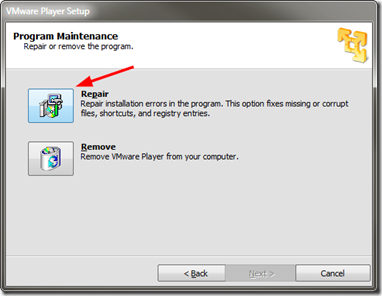
I first tried running a “repair” of VMware Player from the “Programs and Features” options but it would not work as it said the core installation files were missing.

I re-downloaded the VMware Player setup file from VMware and then ran it.

I selected the “repair” option and let it do its thing.

v3vregoy.bva

Once finished I relaunched the vm’s and all ran fine, my VMware Player toolbar was restored, and after closing the vm out, after a brief pause, the window closed and the running processes terminated normally.

Not sure what caused the issue but all is well again.

VMware Player “repair” is your friend!

--Claus V.

Read More
Posted in troubleshooting, virtualization | No comments

Sunday, August 11, 2013

Network & Network Security Quickpost - Last call NFAT edition

Posted on 8:22 PM by Unknown

I just couldn’t wrap up the weekend without sharing these links. I’m so going to be nodding off in my training class tomorrow. Must bring Thermos of extra coffee with me! Don’t want to make the teacher unhappy!

So many network tools, tricks, and nuggets came out last week I’m still exciting thinking about how to use them all!

Security Advisory: Two Vulnerabilities in NetworkMiner - NETRESEC Blog - Don’t let the boring post title fool you! Based on this, Erik Hjelmvik has released a new version of NetworkMiner! Now sparkling at version 1.5 (free/pro editions)

NetworkMiner packet analyzer - Download NetworkMiner version 1.5 (free) here.

While I was doing some super-fast (but apparently productive) beta testing for Erik on some Windows 7 and Windows 8/8.1 systems, I noticed I wasn’t getting great results from my test captures made with and being processed in NetworkMiner. My “doh”. Erik kindly reminded me of his post NETRESEC RawCap - A raw socket sniffer for Windows where he pointed out that using Windows raw socket sniffing has some problems. I had forgotten I didn’t yet install Wireshark/WinPcap on these particular test systems. From Erick’s post:

Microsoft's newer operating systems (later than WinXP) have limitations associated with raw socket sniffing of external interfaces, i.e. everything that isn't localhost. Known limitations in Windows Vista and Win7 are:

  • Windows 7 - Can't capture incoming packets
  • Windows Vista - Can't capture outgoing packets
Due to these limitations in the raw sockets implementations of Microsoft's current operating systems we suggest running RawCap on Windows XP if you need to capture from external interfaces.

Baselining Dropbox With Wireshark (by Tony Fortunato) - LoveMyTool blog video presentation.

Editing Tracefiles With TraceWrangler (by Tony Fortunato) - LoveMyTool blog video presentation. This short video presentation on a new (Alpha release) tool, TraceWranger blew me away. There are methods of sanitizing trace files for sharing/training but they are fraught with challenges for mere mortals. This new tool is amazing and I really hope the developer Jasper Bongertz gets the support needed to encourage his continued refinement and development of this valuable tool for analysts.

  • TraceWrangler - (alpha software) - currently at build version 0.1.3. Standalone application. No installation needed. Unzip and go. Written by Jasper Bongertz.
  • TraceWrangler Documentation - This is Must Read material if you are interested in using this tool properly
    •  Starting TraceWrangler - the basics
    • Anonymization Tasks - details for the options
  • Trace File Sanitization NG - SEC-04_Trace-File-Sanitization-NG_Jasper-Bongertz (PDF) - Link to his presentation of the tool at Sharkfest 2013.
  • Sharkfest 2013 - Trace File Sanitization (Jasper Bongertz) - YouTube. While PDF versions of presentations are nice, on a whim I decided to see if Jasper’s presentation was actually up on YouTube for viewing. It was!
  • Trace file sanitization for network analysts - Packet Foo - Jasper’s blog post with additional details on his tool in case you missed the presentation.
  • The notorious Wireshark “Out of Memory” problem - Packet Foo. Oh how this has hobbled me over the years! So much so that CLI based captures became my dearest friend!
  • Packet Foo RSS - Yeah. It’s that good. Feed yourself on it!

Nmap - Now at version 6.40 - Free Security Scanner For Network Exploration & Security Audits.

  • Nmap Change Log
  • Download Nmap Security Scanner - for Linux/MAC/UNIX or Windows

Message Analyzer Beta3 Refresh has Been Released (Build 6215) - MessageAnalyzer - Lost in all the news was a quiet announcement of the next generation of Microsoft’s own network traffic analysis tool MessageAnalyzer getting a Beta 3 refresh release. The interface is very different (to me) from Wireshark, but since I used NetMon a ton to supplement my Wireshark work, it is taking some getting used to.

HolisticInfoSec: toolsmith: C3CM Part 1 – Nfsight with Nfdump and Nfsen - HolisticInfoSec blog - Russ McRee’s post rocks on so many levels. Well worth the read and review.

Firefox Developer Tool Features for Firefox 23 - Mozilla Hacks – the Web developer blog. In case you missed it, Firefox 23 was released last week. Included in it (besides the new app icon update) was a new network tool called “Network Monitor.” 

I so love this! “F12” is the new “must know” hotkey in these modern browsers!

If only Mozilla (or Chrome or IE 10) were “approved” web-browsers in our enterprise. This feature alone would so help with network and web-app diagnostics and troubleshooting from the end-user desktops.

What’s that you say? One single element of your cloud-based web-application seems to time out in IE 8, crashing your session? The network is fine, site bandwidth is fine. Your PC is fine. Seems like it could be a server-side application issue. Let me make a ticket for your issue and send it up. (Response often comes back, “There is no problem…must be a client-side issue…check the PC and bandwidth, follow our response template and let us know…”) (Sigh…)

  • Network Monitor, now in Firefox Beta - Mozilla Hacks – the Web developer blog - More details on the feature.
  • A look at Firefox's new Network Monitor - Ghacks - Martin Brinkmann does an outstanding job introducing it as well.

Turns out Chrome web browser can do this trick as well

  • Evaluating network performance - Chrome DevTools — Google Developers
  • Performance profiling with the Timeline - Chrome DevTools — Google Developers
  • Chrome Dev Tools: Networking and the Console - Nettuts+
  • Google Chrome Dev Tools: Network Panel - TechRepublic

Turns out that Internet Explorer (IE9, IE10, IE11) also have a “F12” feature for network analysis in the browser.

  • Introduction to F12 Developer Tools (Windows) - IE Dev Center
  • Navigating the F12 Developer Tools Interface (Internet Explorer) - IE Dev Center
  • Internet Explorer's F12 Developers Tools: A feature walk-through - TechRepublic
  • A Peek at Internet Explorer’s Developer Tools - Nettuts+
  • Network Traffic Capturing with IE9 Developer Tools - LINQED.NET

And in IE11, it’s about to bring the house down on the competition!

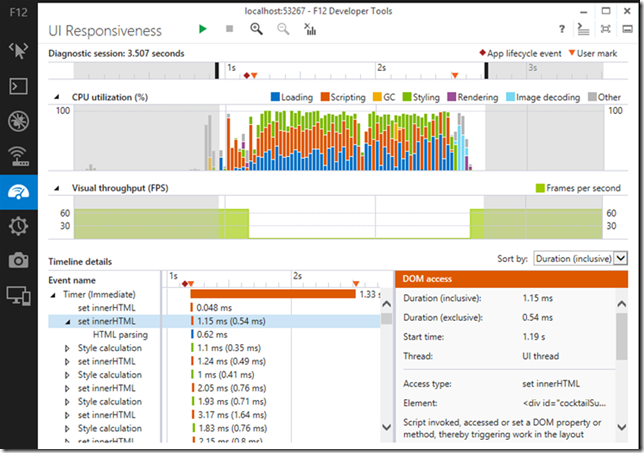
Debugging and Tuning Web Sites and Apps with F12 Developer Tools in IE11- IEBlog. OMG!!! I am so crushing on the new “F12” profiling and responsiveness tool interface in IE 11! Please tell me this is going to be backwards compatible with Win 7. (Why yes, Virginia, it is…)

3ohix43s.dfg

Anyway, back to more Firefox 23 release news and details.

  • Firefox 23 lands with a new logo and mixed content blocking - Ars Technica
  • Firefox Notes - Desktop - Mozilla.org
  • Firefox 23 enables mixed content blocking, consolidates search settings - BetaNews
  • A Look At What's New In Firefox 23 - Addictive Tips blog

Troubleshooting TCP/IP Connectivity Issues with This Command-Line Utility Portqry.exe - Next of Windows. Been using portqry.exe from the command line along with the PortQueryUI GUI fro some time. Dead helpful in a pinch!

PuTTY: a free telnet/ssh client - just released at version beta 0.63 for you console fans! See the extensive Changes page for all the details

  • PuTTY Portable 0.63 - PortableApps.com build version as well is available and updated.

KiTTY - let’s not forget about this fork version of PuTTY that has some additional bells-and-whistles!

  • News - latest KiTTY news is update 0.62.2.3 minor update in late May 2013.
  • Recent changes - tracking site-changes at KiTTY’s house
  • KiTTY Portable - why “yes” there is a PortableApps.com build version as well for KiTTY fans.

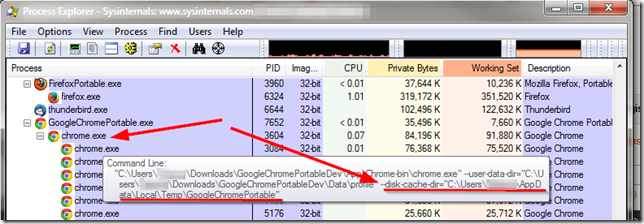
Finally, at home I run Mozilla Firefox, Portable Edition and Google Chrome Portable rather than installing them directly on my system. However I was trying to use some of NirSoft’s Browser Tools to explore and check my Google Chrome(ium) cache and wasn’t finding anything at all.

Strange.  Bug in the tool?

Turns out the answer was “of course not dummy” it’s the dummy’s bug.

Where is the Google Chrome Portable cache folder? - PortableApps.com. Bruce Pascoe kindly puts it like this:

Chrome Portable, like FFP, doesn't save the cache by default.

Note that unlike Firefox however, there's no way to turn the cache off completely in Chrome, so while it's running the cache is stored in the local temp directory (%TEMP%), but then it's immediately deleted when you exit Chrome.

So anyway, yeah, no surprise that you couldn't find it.

and cleared up a bit by “The MAZZTer”

The cache folder is saved in %TEMP%\GoogleChromePortable.

Where the %TEMP% is the user’s temporary file location under their profile.

04i5mjur.uan

This is interesting as it explains why the NirSoft tool ChromeCacheView wasn’t finding anything while pointing to the default user profile location in my Portable Apps application structure that ChromeHistoryView didn’t seem to have any issue with parsing. So even though the files were removed when the program terminated, it most likely did not “secure” delete them, so (depending on overwrite activity of the file system/free-space scrubber utilities) it might be possible to carve and recover them from a system that the portable-apps version of Chrome was used on. And that sounds like a challenge for another day…

Cheers!

--Claus Valca

Read More
Posted in browsers, Firefox, forensics, Google, Internet Explorer, Link Fest, Microsoft, networking, NFAT, security, troubleshooting, utilities | No comments

Regarding the Modern.IE Tester VM’s

Posted on 5:08 PM by Unknown

I’ve spend much of the weekend building and tweaking the various Internet Explorer | modern.IE Virtual Machine builds. I went with the VMware Player versions as I tend to use that platform for Windows systems while using VirtualBox for Linux machines.

Anyway, this wasn’t for kicks and grins. Rather I needed to do some platform testing of different remote-control access and these seemed perfect, after some modifications.

Again, carefully read Rey Bango’s blog post and the comments to get a good sense of these systems; Making Internet Explorer Testing Easier with new IE VMs

Time Limits on the VMs

All of the VMs have a time limit 90 days of total time from the moment you first use the VM. Basically it’s 30 days usage with two 30-day rearms. To rearm, go into a command prompt with Administrator privileges and type in “slmgr –rearm”

At the end of the 90 days, you’ll be able to use the VM for an hour before it shuts down. At this point, you’ll need to decide if that’s okay or if you’d like to recreate the VM and use it for another 90 days. Remember, you can reuse the same files you originally downloaded to recreate the VM so don’t delete them (unless you just love downloading big files).

After I enabled Remote Desktop access to the first system (Windows 7 Enterprise) and then started trying to use mstsc.exe (Remote Desktop Connection), it would connect…then instantly through an error and disconnect. Remote Desktop Access is disabled on these VM’s by default. I assume you know how to enable them but if not…Enabling Remote Desktop Connections in Windows 7 | 7 Tutorials

Took me awhile to figure it out, but the system was also configured with the single profile account and to automatically log into the account. Once I connected to the account with remote desktop, it logged the running account off, then that caused it to force the relogin of the same account, knocking me off!

This then required me to disable the “auto-login” feature for the accounts. Again, I’m sure all my dear readers know how to do that but if not…Tip: Auto-Login Your Windows 7 User Account | Cool Stuff | Channel 9 except in this case after first running “control userpasswords2”, for step 4 you want to “Check the option “User must enter a user name and password to use this computer.”  Now you won’t get kicked off when you use Windows Remote Desktop Connection to reach it.

Of course, if you do that, you will now need to enter the default password for these systems.  You do know the default user account password for the VM’s right? No?

I found it clearly documented in this provided PDF: Modern.IE VM Notes - 6-24-2013. The PDF is interesting as the file name says 06-27-2013 but the internal document date is 06-24-2013. Oh well. Here is another earlier version as well: Modern.IE VM Notes. Rey Bango actually references the first one in his post if you can find it in the last sentence of the last paragraph of his “Installing the VMs” section.

What else…Oh…as I was setting these up in VMWare Player, for one of them I somehow configured it to use Home Groups. Oopsie.  It ended up creating a non-delete-able HomeGroup icon on my host desktop. Hmmm. Followed this tip from “reminore reminore” to get it cleared off: Unable to remove Homegroup Icon - Microsoft Community. There are a couple of techniques in the post but this did it simply for me.

This worked for me win 7 - 64 bit home premium
1) Drive to "Folder Options"
2) Click "View"
3) Scroll down to "Use Sharing Wizard (Recommended)" it must be checked
4) Un-Check  the Check -box
5) Click "Apply"......the Icon will be removed from your desktop
6) Re-Check the Check-box .....the icon will not be back

HomeGroup Desktop Icon - Add or Remove - Windows 7 Help Forums has some additional pre-packaged .REG file fixes if that is your thing, or the above doesn’t work.

One last tip. Once I finished tweaking the user-account/settings and adding some core files/portable apps to it in the profile folder, to make future rebuilding of these systems super-easy, I just ran the Easy Transfer Wizard on one of them to build an “myaccount.mig" file and off-loaded it back to my host system. Then after I set up the Win 7 system I could semi-clone that profile setup to the rest of them with much less setup time than the first one, and when I have to rebuild them after the 90-day period ends. How to Use Easy Transfer in Windows 7 - For Dummies

--Cheers.

Claus Valca.

Read More
Posted in Internet Explorer, Microsoft, troubleshooting, tutorials, virtualization, Windows 7, Windows 8 | No comments

Sunday, July 28, 2013

ForSec “Value Package” Linkfest - No coupons required!

Posted on 5:00 PM by Unknown

One last Linkfest from a now exhausted GSD blogger this weekend.

Cleaning out the “to-be-blogged” hopper is always rewarding, but I tend to get very behind on the weekend chores. My saving grace this weekend has been frequent scattered showers and an equally tired Lavie who hasn’t been interested in going out for shopping, groceries, or dining out. The kitchen has been cleaned. The laundry has been done for the week.

Next stop, a few hours of rest, post-blogging, then a wind-down with Endeavour on PBS Masterpiece.

Too Funny Not To Miss

Bloody galah scammers still not getting the message - Troy Hunt’s blog. Security guru Troy Hunt has had his fair share of “this is (not) Microsoft cold calling you…your PC is infected…let me remote control it” scams and has picked them all apart to the bone.

This time he takes a new angle…in a way that only an Aussie could pull off!  This is a classic! Troy, please offer us some of those sound files or link to where we can get them!  I need to put together a Texan sound-effect package for similar fun with unwanted callers. Brilliant!

Microsoft Security News

Microsoft Releases New Mitigation Guidance for Active Directory - Microsoft Security Blog

Overview of Microsoft`s "Best Practices for Securing Active Directory" - SANS Computer Forensics and Incident Response blog’s Mike Pilkington does a great summary and takeaway of the new AD mitigation guidance.

Security Awareness Training: Your First Line of Defense (Part 4) - WindowSecurity.com’s Deb Shinder discusses evaluating training effectiveness short and long-term.

See also these previous series posts:

  • Security Awareness Training: Your First Line of Defense (Part 1)
  • Security Awareness Training: Your First Line of Defense (Part 2)
  • Security Awareness Training: Your First Line of Defense (Part 3)

Network Security, News and Techniques

Wireshark 1.8.9 and 1.10.1 Security Update - ISC Diary

  • Wireshark 1.10.1 - Release Notes
  • Wireshark 1.8.9 - Release Notes
  • Wireshark - Downloads

Next up are some great and detailed video presentations from Sharkfest 2013

  • Sharkfest 2013 - Wireshark Network Forensics (by Laura Chappell)
  • Sharkfest 2013 - Trace File Sanitization NG (by Jasper Bongertz)
  • Sharkfest 2013 - Attack Trends and Techniques (by Steve Riley)
  • Sharkfest 2013 - Capture Limit of a Laptop, When does it Drop Packets? (by Chris Greer)

Recent Forensically Focused Posts

  • HowTos - Windows Incident Response blog
  • HowTo: Malware Detection, pt I - Windows Incident Response blog
  • HowTo: Data Exfiltration - Windows Incident Response blog
  • HowTo: Add Intelligence to Analysis Processes - Windows Incident Response blog
  • HowTo: Determine/Detect the use of Anti-Forensics Techniques - Windows Incident Response blog
  • HowTo: Investigate an Online Banking Fraud Incident - Windows Incident Response blog
  • Finding an Injected iframe - Journey Into Incident Response blog
  • MS Excel and BIFF Metadata: Last Opened By - Digital Forensics Stream blog

Physical (In)Security?

Duplicate house keys online - Keys Duplicated - This is either freaking amazing or super-scary. I just can’t decide! According to their Security page, precautions are taken.

The Keys Duplicated Blog - A couple really cool and technical posts on the behind the scenes things that make their keys pretty good.

…as spotted on Lifehacker’s post: Shloosl Copies Your House Keys Using a Smartphone Photograph

When 'Smart Homes' Get Hacked: I Haunted A Complete Stranger's House Via The Internet - Forbes

ForSec LiveCD Distro News

  • More on WinFE and Autopsy - Windows Forensic Environment blog
  • DEFT Linux 8 stable with DART 2 is out! - DEFT Linux - Computer Forensics live cd
  • Kali Linux Summer Update Release 1.0.4 - Kali Linux
  • Pass the Hash toolkit, Winexe - Kali Linux
  • Downloads - Kali Linux

AV/AM Bits

Microsoft Security Essentials quietly released version 4.3.216.0 engine update for their free antivirus scanning program. If you use MSSE, you should get it via the automatic updates…if you have them turned on…you do have them turned on right?

Download Microsoft Security Essentials - Microsoft Download Center - Like most things MSSE, trying to figure out just what got updated is next to impossible so let’s just say for now that this one must be better than the previous version and move on.

I’m still using MSSE around the Valca home on all our home systems. I also continue to recommend it to friends and family (generally everyone non-work-related) who I provide friendly IT support to. I find it is pretty non-threatening to the non-technical users I know and though it loves to alert on many of my security programs (potentially unwanted programs) since they can also be used for 3vil, it seems to do a more than adequate job security the systems.

For my Windows 8 systems, I’m instead relying on Bitdefender Antivirus Free. In some ways it’s a bit different model in that you need to sign up with an email address to set up your account. Then you can download the client to the system. What is nice is that if you manage multiple systems in your home, you can log into your account at their site and then get a console feedback on the status of those systems. That’s something that I do at work with another vendor’s enterprise AV client health/status management console. That’s super cool for a free product. I’m seriously leaning to expanding it’s coverage to my main Windows 7 laptop at home. Performance has been outstanding on my Windows 8 systems.

Kaspersky tops real world protection test - BetaNews - this post does point out that Bitdefender tied Kaspersky with a 99.9 % protection level in AV-Comparatives Independent Tests of Anti-Virus Software for July 2013. While Microsoft Security Essentials rated a 92.5 % protection level. There are some additional disclaimers so read the short BetaNews article carefully. Then head over to AV-Comparatives to dig deeper and see the full findings.

  • AV-Comparatives Real-World Protection Test March-June 2013 - AV-Comparatives
  • AV-Comparatives Real-World Protection Tests - AV-Comparatives

Finally, we wrap up this segment with this interesting discussion:

The evolution of Ronvix: Private TCP/IP stacks - Microsoft Malware Protection Center

It’s a bootkit infection that has its own private TCP/IP stack. By doing so it can be extra stealthy and bypass personal firewall hooks and can lurk unseen in standard tools and utilities (such as nbtstat). Doing so, depending on packet/network monitor off the infected machine may be ineffective. However, it still must talk ON the network, so an independent network monitoring and forensics analysis approach using a network monitoring appliance or span port capture may detect the traffic. This may be why comparing outside network traffic captures from a system on the network to network traffic captured on the system may be a useful exercise for incident response and monitoring purposes.

Legally Focused

I’ve been reading a wider range of subjects, and a small part of those touch on our legal system. Mainly they apply to digital law and crime but some are more general. I’m just tossing them out there for the interested or curious. Generally they tend to analysis of current events or provide a more detailed lawyer’s review than the talking/shouting legal heads we encounter on mass-media “news-like” entertainment outlets these days.

  • CYB3RCRIM3 - Susan Brenner’s blog on cybercrime and cyberconflicts in technology and law.
  • Popehat - group blog with a mostly legal focus (though topics can range far afield!)
  • Le·gal In·sur·rec·tion - group blog with mostly legal and law-in-today’s-culture focus. Pretty vibrant opinions. Alignments may vary.
  • Lowering the Bar - Sometimes lighthearted (though always serious at the core) look at some of the nonsense the legal system contains, or foists on others from time to time. Great site.
  • Massad Ayoob - legal, cultural, and educational postings primarily dealing with legal private firearm ownership issues. Also analysis of public media trends and news stories.

Have a great week!

--Claus Valca

Read More
Posted in Active Directory, anti-virus software, boot-cd's, cheat sheets, firewalls, forensics, humor, Link Fest, malware tools, Microsoft, networking, NFAT, security, troubleshooting, tutorials, utilities, video, viruses, Win FE | No comments
Older Posts Home
Subscribe to: Posts (Atom)

Popular Posts

  • New Year’s Day - First Post 2011
    Same day I came out with my first post after a long drought, I fell upon this article Blogging Seems To Have Peaked, Says Pew Report over a...
  • Oscar watch Linkpost
    Alvis and Lavie are watching the Oscars tonight and I’m along for the ride. I wasn’t able to come even close to getting out some of the pos...
  • Finally! Time to Post! New material list
    After a recent text from my bro reminding me it has been since March since I’ve done a blog post, I was finally able to clear the schedule a...
  • Ubuntu 13.10 Upgrade - Lessons Learned & VIDMA utility found
    A few weeks ago a new release of Ubuntu came out. Naturally that meant it was update time! I have been getting pretty good at this now so ...
  • iodd : Multi-boot madness!
    Like many computer technicians and responders, I seem to always have at hand a collection of bootable media; CD’s, DVD’s, USB-HDD’s, flash m...
  • Network Capture Tools and Utilities
    At a conference this week, we had quite a section regarding network captures. The instructor was going on about how you can try to sort ou...
  • It just has to be bigger on the inside…
      Last Christmas, Lavie gifted me with a cute little Jawbone JAMBOX unit. I thought it was pretty cool. It uses a Bluetooth connection t...
  • Mostly Minor Network Notes
    Here are some minor tweaks and features, mostly of a network nature. Manual Uninstall of the Cisco VPN Client « Mobile Expertise -- becaus...
  • Windows Live Mail error 0x80041161
    Dad is working with his father-in-law who has an issue with his Suddenlink web-mail-based “forwarding” handling of messages. Seems that (an...
  • FireCAT 1.5 “Plus” Add-On Collection
    In yesterday’s GSD post I noted the following: Both of these tools brought be back to the excellent FireCAT 1.5 collection of Firefox...

Categories

  • Active Directory
  • anti-virus software
  • Apple
  • architecture
  • art
  • AVG
  • Blogger
  • blogging
  • books
  • boot-cd's
  • browsers
  • cars
  • cell-phones
  • cheat sheets
  • Chrome/Chromium
  • command-line interface
  • cooking
  • crafts
  • crazy
  • curmudgeon
  • DHC
  • Dr. Who
  • E-P1
  • Education
  • family
  • Firefox
  • firewalls
  • For the Gentleman
  • forensics
  • Gmail
  • Google
  • graphics
  • hacks
  • hardware
  • humor
  • hurricanes
  • imagex
  • Internet Explorer
  • iOS
  • iPhone
  • iPod
  • iTunes
  • Kindle
  • Learning
  • Link Fest
  • Linux
  • malware tools
  • Microsoft
  • movies
  • music
  • networking
  • NewsFox
  • NFAT
  • Nook
  • Opera
  • organization
  • PDF's
  • photography
  • politics
  • PowerShell
  • recipes
  • Remote Support
  • RSS
  • science
  • Scripting
  • search engines
  • security
  • Shuttle SFF
  • software
  • Texana
  • Thunderbird
  • troubleshooting
  • TrueCrypt
  • tutorials
  • utilities
  • VBscript
  • video
  • Virtual PC
  • virtualization
  • viruses
  • Vista
  • Vista mods
  • wallpapers
  • Win FE
  • Win PE
  • Win RE
  • Windows 7
  • Windows 8
  • Windows Home Server
  • Windows Live Writer
  • Windows Phone
  • writing
  • XP
  • XP mods
  • Xplico

Blog Archive

  • ▼  2013 (83)
    • ▼  November (8)
      • Ubuntu 13.10 Upgrade - Lessons Learned & VIDMA uti...
      • ForSec Linkfest - 2013 DST Fallback Edition
      • CryptoLocker Ransomware Info & Free Prevention Sol...
      • Linkfest for the SysAdmins
      • Microsoft Security Essentials/Defender & PowerShell
      • Miscellaneous TrueCrypt linkage
      • PowerShell 4.0 and a tiny “gotcha”
      • New Software Updates + VMware Tools Update fix
    • ►  October (8)
    • ►  September (14)
    • ►  August (6)
    • ►  July (10)
    • ►  June (10)
    • ►  April (11)
    • ►  March (6)
    • ►  February (7)
    • ►  January (3)
  • ►  2012 (96)
    • ►  December (8)
    • ►  November (4)
    • ►  October (9)
    • ►  September (8)
    • ►  August (12)
    • ►  July (4)
    • ►  June (3)
    • ►  May (7)
    • ►  April (13)
    • ►  March (3)
    • ►  February (5)
    • ►  January (20)
  • ►  2011 (41)
    • ►  December (8)
    • ►  November (7)
    • ►  September (4)
    • ►  August (4)
    • ►  July (2)
    • ►  June (6)
    • ►  March (5)
    • ►  February (1)
    • ►  January (4)
  • ►  2010 (69)
    • ►  December (1)
    • ►  October (3)
    • ►  September (2)
    • ►  August (13)
    • ►  July (17)
    • ►  June (3)
    • ►  May (3)
    • ►  April (3)
    • ►  March (11)
    • ►  February (1)
    • ►  January (12)
  • ►  2009 (177)
    • ►  December (20)
    • ►  November (11)
    • ►  October (7)
    • ►  September (7)
    • ►  August (21)
    • ►  July (17)
    • ►  June (7)
    • ►  May (18)
    • ►  April (9)
    • ►  March (17)
    • ►  February (23)
    • ►  January (20)
  • ►  2008 (35)
    • ►  December (23)
    • ►  November (12)
Powered by Blogger.

About Me

Unknown
View my complete profile