Bios Password

  • Subscribe to our RSS feed.
  • Twitter
  • StumbleUpon
  • Reddit
  • Facebook
  • Digg

Sunday, August 23, 2009

Utility & Miscellany

Posted on 8:53 PM by Unknown

Too many chores this weekend.

Spend last week out of town in a technical conference.

Had a raging bout of the highly contagious and discomforting "Caribou Cold” while there and am still suffering the tail ends of it.

Spent yesterday on my home “workbench” swapping out my system onto a new hard (larger/faster) laptop hard-drive which involved over 14 hours of work (mostly due to having to decrypt the whole-disk encryption prior to imaging it and porting it onto the new drive.

Had hoped to post much more this weekend but was not to be the case.

So here you go, semi-naked linkage.

Utilities

  • SuperCopier – One of my favorite specialized file-copy apps. Now active again at version 2.2 beta.
  • TinyApps.Org Blog : Formatting partitions over 32GB as FAT32 in Windows XP – Link to the curiously useful fat32format tool.  I suspect this could be useful on portable USB drives.

Forensics

  • Forensics: Mounting partitions from full-disk ‘dd’ images – Tip from SANS-ISC Handler’s Diary blog.
  • Tools and Links – Lots of linkage to tools and techniques from the Windows Incident Response blog
  • JADsoftware – EDD – Version 1.1.0 now released. EDD checks HDDs for encrypted partitions from various whole-disk encryption solutions. See also TechPathways ZeroView, and TCHunt Quickly Find TrueCrypt Volumes – 16 Systems, as well as the File Investigator TOOLS version 2.23
  • JADsoftware – IEF – Version 2.0 now out of the “Internet Evidence Finder”.  Really nice and more full-featured tool.  I quickly added this to my collection and tossed the older one.
  • Forensics from the sausage factory: Vista Volume Shadow Copy issues – Great tips on how to access and manage the Vista Volume Shadow when inspecting the system.
  • Automated Recovery of Multimedia from Unallocated Space - SANS Forensics blog. Good information to know.  Primary information related to NFI Defraser at SourceForge.net
  • Somehow that eventually led me to Csaba Barta website and a tool called ptfinder to carve out processes from memory images.

“…ptfinder versions for Windows Server 2008 SP1, 2003 SP2 and Windows 7 beta are developed by me, and can be downloaded here.

The details of the technique can be found here.

Semi-Stealth Windows Live Updates

I’ve been waiting for some time for an update to Windows Live Writer, my blogging platform software. After the information below came out that a new version was available (14.0.8089.726 (previous build was 14.0.8064.206)).  I quickly launched my WLW and used the update tool to get the update. Curiously it said I was still using the latest update.  I manually updated it (successfully) to the higher version noted but still have been unable to find a change-log detailing just what got improved/fixed/updated.

  • RELEASE: Windows Live Essentials “Wave 3” updated - Windows Live.
  • Windows Live Writer - Windows Live download.

And fresh off my Video-Editing Resource Roundup post going over various builds and different downloads to get Windows Movie Maker installed on your XP/Vista/W7 system now there is this:

  • Get The New Windows Live Movie Maker Today! - The Windows Blog.
  • New Windows Live Movie Maker debuts, says good-bye to XP for good – Betanews.
  • Windows Live Movie Maker Review – Paul Thurrott’s SuperSite for Windows.

VHD booting and Virtual PC Stuff

  • How to Boot from VHD (VHD booting re-visited.) – James O’Neill’s blog.
  • 7 Things about Windows 7 Native Boot VHD – Windows 7 Hacker.
  • Windows 7 VHD Native Boot without any Hosting Operation System – Windows 7 Hacker.
  • Running Virtual PC 2007 on Windows 7 – Virtual PC Guy's WebLog.  Yes you can. Just uninstall “Virtual PC” (the new one) from Windows 7 first (if so installed) before installing Virtual PC 2007 (the old one).
  • Windows Virtual PC RC and Jump Lists – Virtual PC Guy's WebLog
  • Windows Virtual PC and Undo Disks – Virtual PC Guy's WebLog.  Just some house-cleaning in the new version.
  • Windows Virtual PC Blog. Finally found a “official” Microsoft Windows technical blog on Virtual PC. Hope it provides good information.

Windows Technical Bits ‘n Pieces

  • Ask the Performance Team : Two Minute Drill: Using PROCDUMP – Ask the Performance Team blog – Nice and clear tips on using the SysInternals – ProcDump tool to dump process information in troubleshooting.
  • Dell Now Offering Windows 7 Drivers for Commercial Desktops and Laptops - Windows Experience Blog.
  • What order should you install drivers in? – Ed Bott’s Windows Expertise blog.  From Dell, information on just how you should order your device driver installations for maximum impact and compatibility  Good information to keep handy for system builders.

Summer’s over.  Alvis heads back to school tomorrow morning.

Cheers!

--Claus V.

Read More
Posted in forensics, graphics, Link Fest, movies, troubleshooting, utilities, Virtual PC, virtualization, Windows 7, Windows Live Writer | No comments

Network Capture Tools and Utilities

Posted on 7:49 PM by Unknown

At a conference this week, we had quite a section regarding network captures.

The instructor was going on about how you can try to sort out users and what they are doing via Wireshark with the packet captures.  He was really wanting to figure out who the largest users were and what they were doing to saturate the bandwidth.

I politely asked if he was familiar with NetworkMiner Network Forensic Analysis Tool (NFAT) and Packet Sniffer.  He was not.  So I asked if I could come up and demo the one I had stowed on my USB stick.

The rest of the lesson was filled with throwing the packet capture files he had brought at NetworkMiner and carving out the results.  The instructor was amazed and grateful for the power that this tool was going to give him.  I passed the download link around to the class attendees quite liberally afterward.  It is an amazing tool.

It was quite fun and informative for all.

Later I saw (by chance) the Tools for extracting files from pcaps post at the ISC-SANS Handler’s Diary.  It was filled with quite a number of other great suggestions for carving information out of pcap files.

I’ve also downloaded NetWitness Investigator Software (free) which I understand has quite a collection of features as well.  Registration is required to get it working so that will need to wait until tomorrow.

Most of the ISC-SANS items are *nix based.  I’m mostly (with the exception of Linux forensics LiveCD’s) Windows based exclusively.  However, the packet analysis tool Xplico - Internet Traffic Decoder really seems outstanding and up my alley for needs.  Fortunately, it is included in the DEFT Linux - Computer Forensics live cd.

In addition to Wireshark, I generally keep a few other packet capture tools on my laptops, just in case.  Most are pretty tiny and light for super-fast and flexible captures.

One of those other larger tools for packet captures that I have installed is Microsoft Network Monitor 3.3.

I hadn’t realized that it has arrived fairly recently, but that link has some more feature details.

In addition, while reading the Network Monitor development blog I was pleased to find that there are some specialized plug-ins for it that might be darn useful:

  • TCP Analyzer Expert: Make Your Network Run Faster – For Microsoft Network Monitor 3.3
  • Top Users Expert for Network Monitor 3.3 – For Microsoft Network Monitor 3.3

The first is a post describing the tool which can analyze and suggest issues with your network based on packet capture data.  The second provides a report on which users are eating up all the bandwidth.

Both are pretty cool.  Check them out.

Of course, you could also try a tool like ZNetWatch 1.01 (freeware) which also specifically sniffs network traffic and rats out who the biggest users are.  While this could be caused by users looking at the latest YouTube videos or streaming radio (against network policy usage perhaps) it could also be caused by virus or malware command and control communications.

As I said, it was a lot of fun tossing Network Miner at the packet capture sample files.  If you don’t have any handy, but want to really test out these (or other) tools that can read and parse that data, here are two great starting places to get some pcap files of your own to play with.

SampleCaptures - The Wireshark Wiki

SourceForge.net: Publicly available PCAP files – networkminer

Cheers.

--Claus V.

Read More
Posted in networking, utilities | No comments

Java Silent Install Notes

Posted on 7:23 PM by Unknown

Just dropping some links from home so I can study them more at work later.

Issue:  Windows Java (JRE) versions frequently offer trialware or other products when ran at install/update time.  End users are frequently seeing these Java Update requests and selecting them, installing the trialware in the process.

  • Say “No” to Java Trial-ware - Things that Should be Easy blog

Idea is to do a “silent” install from the command line, as darned if I can find a setting in the Java Control Panel item that will allow automatic downloading and installing (without trialware) of fresh Java updates.

  • Silent Installation – Sun Java
  • Silent Installation – Sun Java
  • Silent Installation – Sun Java
  • Sun/Java Updates - Users Adding "Trialware" Inadvertently? - Spiceworks Community
  • How do I arrange a silent (unattended) Java installation? – Sun Java

Moving on…

--Claus V.

Read More
Posted in software | No comments

Sunday, August 16, 2009

Utility Gumbo

Posted on 9:33 PM by Unknown

There’s a lot in this pot.  Probably something everyone can find to enjoy.

I’m serving it up tonight out of the back of the truck on the side of the road.  So it will be short on dialog, full on flavor.

Feel free to pick-around.  Just wash your hands first.

And yes..bring your own bowl because unless noted, it’s all free

RE: Windows Roux

  • TinyApps.Org Blog : Computer hardware chart – Amazing find from TinyApps.  Great image detailing lots of different forms of connectors, ports, memory chips, CPU’s, etc.  Real work of love there.  Download and keep that image handy.
  • Mark’s Blog : The Case of the Temporary Registry Profiles. – More advanced than usual investigation of a software-error message.  Great tutorial on advanced troubleshooting techniques.
  • Debug 101: What does !analyze do? and Debug 101: What does !analyze do? – Ask the Performance Team blog continues its Debugging theme.
  • Updates: Autoruns v9.52, VMMap v2.2, procdump v1.2, procmon v2.5 – Microsoft Sysinternals tools update notices.
  • Updates: Autoruns v9.53, ProcDump v1.3, Process Monitor v2.6 – Microsoft Sysinternals tools update notices.
  • Updates: Zoomit 4.0, procdump v1.2 – Microsoft Sysinternals tools update notices.   Whew! Got em all?
  • PowerGUI 1.9 RTMs - Dmitry’s PowerBlog: PowerShell and beyond. Much updated version of a GUI manager for Windows PowerShell script building and management.
  • Upgrading from Windows 7 RC to RTM… you had to try it didn’t you? – MarkWilson.IT – Me? I’m planning on just copying my data off to a USB drive, doing a clean install, then reinstalling as needed.  Though I will make an ImageX image of all my systems’ partitions.  That way if I miss anything I can just mound the WIM’s and extract the data as needed.  Clean installs are always the way to go in my book.
  • WinFontsView: View samples of Windows fonts installed on your system. – New clever tool from NirSoft.  Very fast and handy.  I’ve personally been using the slick NexusFont tool but what Nir’s lacks in GUI polish it more than makes up in size and speed.
  • Update: UserAssist Tool Version 2.4.3 and see also UserAssist -- Didier Stevens – “The UserAssist utility displays a table of programs executed on a Windows machine, complete with running count and last execution date and time. Windows Explorer maintains this information in the UserAssist registry entries. My program allows you to display and manipulate these entries.”  Keep it handy as it’s portable.
  • LockHunter – A freeware utility that comes in both x32 and x64 bit flavors to delete stubborn locked files.  This version supports Win7.  Runs as application directly or from the Windows Shell integration.  For more locked file and process killers see grand stream dreams: I will kill thee a hundred and fifty ways ... post.
  • Sunbelt Blog: The 40 Most Popular Tools for Your System Admin Bag.  Excellent list and great descriptions.  I’m saving this to go back and explore some more.  Many tools are (proudly) found on my USB sticks.  There are some that are new to me as well in this list.  Can’t wait to start checking them out.  One of these day’s I’m going to take up an off-line challenge and work with a fellow blogger to come up with a collection of our own as my Portable SysAdmin Tools list is still good, it is quite light to what I now carry around and needs significant updating
  • What’s My Pass? » Tech Toolkit 2.0. – Amazing collection of sysadmin-worthy tools that are all USB portable in various forms.  Developer gets around the issue that others have run-afoul of in building such collections by using Ketarin to have the end-user (you) download all the tools directly from the developer’s own sites, rather than packaging them up himself.  Good stuff, but be aware, depending on your AV solution, many of the tools included (particularly those of Nir’s) may set off AV/AM alarms as hacktools or potentially unwanted programs (sigh).  Poor Nir.  Send him some love guys and gals.  I’d be lost without his brilliant tools and generosity in sharing with the community.
  • Malware causes "Access is denied" error – TinyApps blog.  Nice and simple tip for dealing with malware that renders exe’s un-executable.  Great CLI and CALCS info.

RE: “Prettification”

  • Rainmeter – x32/x64 bit Windows desktop customization package.  Really amazing stuff.  Spotted via Rainmeter 1.0 Brings the Enigma Desktop to Everyone – Lifehacker post.  My desktops are covered almost full time when I am in front of them so I don’t get as much value out of these as I would wish. Thus give me a nice wallpaper, a good icon-dock (RocketDock), and maybe a larger calendar/task-manager (Rainlendar) and from time-to-time, stickys (PNotes Portable), a non-standard “official” MS theme (XP Embedded Theme – Cool Blue!) and my desktop is good to go on XP. I have found the default themes in Vista/Win7 sufficient, though the apps above come along for the ride.
  • Samurize.com – The above statement aside, the only time I really went “wild” trying to trick out my desktop with extra gadgets, I found Samurize to be my preferred desktop gadget-building tool of choice. Of course there are a lot more tools as well. See these older GSD posts: A BIG List of 34 Free XP and Vista Tweaking Apps and 20 Free Ways to Pimp Windows XP if you are curious.

RE: A Hard Drive to Crack

  • Tableau Disk Monitor – free with registration – nice tool for providing information on hard-disks. Particularly from a forensics perspective.  Interfaces with supported read-write blocker devices as well (it appears).  I registered and downloaded it.  Requires installation. Has some handy extra features when used in conjunction with a Tableau disk bridge device. For more see these Pocket Hard-Drive Utilities post and more newer finds at this Tweak SharePoint and NAS Links post.
  • Atola Insight - ($6990 - $8990) (not free) – I have to confess I wasn’t really sure what to make of this.  From a feature-standpoint it definitely seems to have all the bells-and-whistles for just about any hard-drive servicing needed under the sun including firmware backup/restore and hard-drive password display/recovery/blanking. Atola Technology blog has more information and demos.  Before you run off because of the price, give them credit as they also are the producers of the free/pro versions of Partition Find and Mount — free partition recovery software which is simply an amazing piece of software and something every sysadmin should be familiar with.
  • Acronis® True Image Home 2010 Beta II – TinyApps blog recently brought to my attention that Acronis is accepting beta-tester signups for this application.  I’m mostly an ImageX guy for my imaging needs at work, as well as use a basic backup solution that came with my FreeAgent drive, but I must confess I haven’t really deployed an effective data-backup solution at home.  I hope I have some time to kick the tires on this one.
  • O&O Software - O&O DiskImage 4 Express – free version for home users – More of a real-time imaging/backup solution than a real-time backup solution.  Nonetheless, it still might provide a certain level of ease-of use and recovery for home users.  Version 4 reports some good feature updates.

RE: Other Stuff

  • Java SE 6 Update 16 Is Here – SDN Program News.  Wasn’t auto-picking up on my systems with the Java Control Panel tool.  Manually get the update here..
  • ATI/AMD Catalyst 9.7 - first unified Vista and Windows 7 WHQL driver - Aaron Tiensivu’s Blog.  - I’ve been accepting the default drivers for Windows 7/Vista provided by Microsoft Updates.  However if both our systems did continue to have BSOD issues with the video driver (Catalyst…you would know), I might try this fix.  So far only been having them on Vista.  Win7 x64 bits (RC) is rock-solid stable so far
  • Recuva – file recovery app – lots of updates of late: View full version change history...
  • Paint.NET v3.5 Enhanced for Windows 7 - Windows Experience Blog – I love Paint.NET. Will be designed to use a special Win7 API to enhance some performance and rendering.  You can download an alpha build (build 3509) of Paint.NET v3.5 here.

RE: Browsers

  • Namoroka, Portable Edition 3.6 Alpha 1 - PortableApps.com - “Standalone” portable version of the next-gen release of Firefox.  Use this to play with it without installing or changing your current version of Firefox.
  • Mozilla Security: Opt-in security with ForceTLS (Firefox add-on introduced) – Donna’s SecurityFlash.  Read carefully to understand the concept and impact of using this. Locking up the valuables: Opt-in security with ForceTLS at Mozilla Security Blog and Force-TLS :: Add-ons for Firefox.  For some reason I want to say I saw some comments that suggested that early adopters found some weird behavior (not malicious but just unexpected) when using this as it seems to be cutting-edge stuff.
  • Tab previews in Firefox 3.6. Third time the charm? - Mozilla Links.  Nice but I’d rather have a trim and fast browser in a small footprint.  I’m concerned about built-in bloat in Firefox growing. (As opposed to the bloat I add via my selected/desired Add-ons.)
  • Practicing safe surfing can derail attempts to cruise ‘Net anonymously - Network World.  I’m not sure this qualifies as “new” news, but is a good reminder that even anonymous web-browsing isn’t really all that anonymous.  Good read.

RE: A/V Sweetness

  • hype-free: Basic multi-media (post)processing.  Great tips from cdman83 on post-processing along with some great freeware/OpenSource tools listed in the post as well as below.  Go read it and get better output.  See also this related “hype-free” post No codec packs please!
  • The Levelator – drag-n-drop processor to auto-adjust sound-levels in audio files. Sweet! 
  • VLC Media Player Portable – Who needs Windows Media Player? Not Me!.
  • The KMPlayer – My personal preference.  Seems to have all the codecs I need to play the audio/visual files I regularly encounter at work and home. Nice interface also.
  • ffdshow tryouts -  “ffdshow tryouts is a DirectShow and Video for Windows codec with support for a wide range of audio and video formats, such as Xvid, DivX, and H.264. It includes a powerful filter set that can enhance the video quality - with filters for resizing, deinterlacing, and displaying subtitles - as well as audio quality through normalization, down-/upmixing, and resampling.”  Bleeding edge versions also available that now support x64.

Thanks cdman83!  Great tools all the way round.

Cheers

--Claus V.

Read More
Posted in browsers, Chrome/Chromium, Firefox, forensics, Link Fest, Microsoft, music, security, software, troubleshooting, tutorials, utilities, video, Vista mods, Windows 7, XP, XP mods | No comments

Rapid-Fire Security and Response Linkpost

Posted on 7:56 PM by Unknown

Trying to clear out the “to-blog” hopper so I can have a clean start next week.

  • TaoSecurity: 2009 CDX Data Sets Posted. packet captures generated by NSA Red Team activity, packet captures from West Point defenders, and Snort, DNS, Web server, and host logs all brought to you by the Information Technology Operations Center of the United States Military Academy. That’s West Point to you. Have fun culling though the material for tips and techniques.

  • Two convicted for refusal to decrypt data – The Register.  Just because you can encrypt it, doesn’t mean you don’t have to surrender your passwords to it under legal court order.  Encryption is great for protecting data from physical device loss. However, if you do want to be a hero (or patriot) and try to go down fighting, be aware there may be a penalty to not surrendering your passwords.

  • Update: Win32dd 1.2.2.20090608 (fixes + improvements) - Matthieu Suiche’s blog – Go snag this updated version of a useful memory-capture tool.

  • The Lab Rat – Testing Digital Forensics Tools and Gear – SANS Computer Forensics, Investigation, and Response blog.  Another review I found of the Tableau T35es write-block device that I am trying hard to get appropriations for purchase at work for.

  • A Forensic Analysis Of The Windows Registry – by Derrick Farmer – Computer Forensics forums and Forensic Analysis of the Windows Registry Computer Forensics (PDF) by Peter Davies. Two very good overviews of Windows Registry Forensics.  I’m saving pennies so I can get the gold-standard in Windows Registry Analysis: Windows Forensic Analysis DVD Toolkit, Second Edition by the esteemed Harlan Carvey.  In the meantime, I’m adding these materials to my “study-kit”. Check out this recent Q&A: Windows forensics at Helpnet Security that Harlan responded to.  He has some excellent statements that apply not just to forensic examiners or incident responders, but to system admins and “family-fix-it-geeks” as well.  Quoting from that “interview”:

    Which Windows forensics tools would you recommend to our readers?

    …I tend not to recommend commercial tools, as doing so seems to create an over-reliance on these tools, where the reliance should be on the examiner's ability to understand the goals of the examination, as well as their ability to develop an appropriate analysis plan. The "tool" I recommend is "wet-ware", or your brain. If you don't know what "Registry analysis" consists of and what you're trying to prove or disprove through this activity, then no tool, free or commercial, is going to be of any use. A builder doesn't decide what a building will look like based on the tools that are available, and throughout history, new tools have been developed because a need was recognized and understood. The same should be true for incident response and forensic analysis - understand the need first, then choose the tool. – Harlan Carvey

  • Computer Forensic Guide To Profiling USB Devices on Win7, Vista, and XP -- SANS Computer Forensics, Investigation, and Response blog – Two more excellent take-a-way PDF guides to approaching USB device forensics on XP and Vista systems. As noted in the comments, probably good coupled with Nir Sofer’s freeware utility USBDeview along with the unofficial list of VendorID/ProductID for USB devices, found here.

  • Windows 7 Firewire Attacks and Defense Techniques – SecurityResearch.  Spend some time here!  Using Firewire to attack a Windows system is not new. (more at Firewire, DMA & Windows).  Security Research has done some pen-testing work using this technique against Windows 7 and found it still (generally) comes up lacking. Quoting:

    “Windows 7 systems are susceptible to Firewire-based attacks as well, as the Security Research Lab demonstrates. Besides a description how password authentication can be bypassed through memory manipulation via Firewire ports, the implications on BitLocker, Encrypted File System (EFS) and Windows Domains are described as well.”

Get the Windows 7 Firewire discussion materials from the post above or the links below:

  • Whitepaper (PDF) – Very readable material great for pentesters and sysadmins alike.
  • Whitepaper (PDF) – describing software-based attack blocking technique developed in the process.  Great stuff and quite thought-provoking.
  • After you read both the papers, you might find yourself wanting to apply the researcher’s proposed solution.  Get the free download firewireblocker.zip for the application described above.  Still in development but it is worth looking into and testing on your own if you have some particular high-value needs to secure.

Lock it down or loose it.

--Claus V.

Read More
Posted in cheat sheets, forensics, Link Fest, networking, security, utilities, Windows 7 | No comments

Inspiring Designs #2

Posted on 4:48 PM by Unknown

Some more really brilliant and inspiring home designs from architectural blog Arch Daily.

Because everyone has to dream and imagine…

I’m leaving these for the girls to look through together.

  • Nelson House / TWS & Partners – ArchDaily
  • L House / moomoo Architects – ArchDaily
  • Camouflage House / Johnsen Schmaling Architects – ArchDaily
  • Tehama Grasshopper / Fougeron Architecture – ArchDaily
  • Studio 2 in 1 / TWS & Partners – ArchDaily
  • Emu Bay House / Max Pritchard Architect – ArchDaily
  • Livraria da Vila / Isay Weinfeld – ArchDaily
  • NG House / Arquitectos Anonimos – ArchDaily
  • Sage Residence / Arbor South Architecture – ArchDaily
  • House B2 / Vaillo + Irigaray – ArchDaily
  • Villa Room / Paul de Ruiter – ArchDaily
  • House in the Woods / archimania – ArchDaily
  • House + / Anne Menke – ArchDaily
  • Villa Hesthagen / RRA – ArchDaily

So, which one do you like best Alvis?  How ‘bout you Lavie?

Which room would be your Alvis?

Where would Brambles hang out?

--Claus V.

Read More
Posted in architecture, family | No comments

Saturday, August 15, 2009

GSD Hurricane Tracking Links – 2009

Posted on 7:36 PM by Unknown

Hurricane Gordon

CC attribution: Public Domain. NASA via pingnews on flickr.

After all that “Ike Badness” last year I’m not sure I am emotionally ready for this again.  However we have really improved our processes at home and work due to “Lessons Learned” exercises and our business impact and business continuity plans are sharpened and more refined than ever before.

With that in mind, I’ve decided to go back and update my GSD Hurricane Tracking Links – 2008 post

Bookmark ‘em all!  (Or al least this post!)

Gulf Coast Watch List

So here are the hurricane links I am watching at home and work, to track the impending winds. Listed in order of my personal preference…

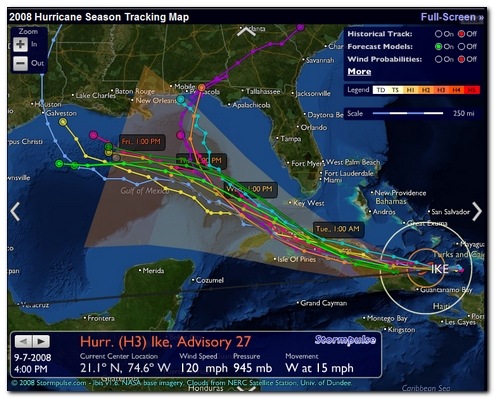
2008-09-07_164059

  • Stormpulse / Hurricane tracking, mapping - If you like dark-themed, special-op center techno-sites, this is the one for you. The site has a lot of information and can be customized in extra data inclusions on the chart. What really makes this one cool is that it has a “Full-Screen” mode that displays as much detail as you want for the storm-track on your monitor.  It provides a standard storm-track model, but you can select to include a bevy of additional forecast models if you want to really psych yourself out. Loaded up in Google Chrome or Chromium coupled with a nice dark Google Chrome Theme it really stands out projected on the wall of the incident command center.

  • SciGuy Blog – Chon.com’s Eric Berger - Eric has been providing outstanding details, commentary, live chat-sessions, and analysis of all science and  prognostication tropical.  Highly recommended as a filter of reason and temperance in a media-market filled with over-hype, smashing graphics, and fear-factor extremes. Besides that, you can count on Eric to provide great meteorological linkage to excellent source material like this GFS global model or this the European model.  It’s a must-follow/must-RSS feed blog for all Texas Gulf Coast residents. Period.  (see also Jeff Masters’ Wunder Blog : Weather Underground).

  • IBISEYE.com -- Your Atlantic Hurricane Season Tracking Map Source – An awesome site that mashes up tracking data on hurricanes and points of interest, along with Google Maps.  Heavy on the JavaScript but makes up for it in pure visual delight.  Easy enough even the “old-folks” can understand.  Not only are hurricanes and projected paths displayed, but also counties are added as they fall under various storm watches and warnings.  Zoom in/out for more detail.

  • Tropical Atlantic: NHC Model Data for Tropical Storms – TropicalAtlantic beta – For folks who need to have more than one storm-track model presented, this is like going from riding a pony to driving cattle from North Dakota to the Fort Worth Stockyards.  Look at the top of the page to select any current storms.  Then when the Google Map mash-up launches, you can pick from 32 “Early” models and 38 “Late” model storm track models.  Plot one or plot them all! Awesome! Additional NOAA summary of storm-track models. Also, Tropical Atlantic: Information About Atlantic Hurricanes – main-page.

  • Hurricane and Storm Tracking - Terrapin's site remains a dear favorite. It is lean and simple and allows for quick location of information without lots of graphic overkill. The storm-track plots come in two flavors, a simple historical and future projection track that is static as well as a java-based animated one. Loads fast and updated as new forecasts are posted.

  • National Hurricane Center - This website maintained by the National Weather Service is my number two choice. Lots more linkage on the sidebar for hurricane related topics and preparations. The main page has links to a number of graphics and advisories.

  • (NHC's) Atlantic Graphical Tropical Weather Outlook - A "beta" sub-page of the site listed above. This is pretty cool. Any current tropical systems are overlayed on a satellite image with an icon. Hovering over the icon pulls up a quick update view. Clicking on the update popup then takes you to the system's detailed page.

  • Moreweather.com -- Tropical Atlantic Weather Page - T-Storm Terry Faber has created a great hurricane system page here. Not only does it have lots of links to any active systems, but it also contains links to radar and satellite images, many in great details and high resolution. The hurricane tracking maps and projections are there, of course. T-Storm Terry also provides links to other sources of information as well as historical data on previous storm systems.

  • Tropical Weather : Weather Underground - This is a fantastic site that has the widest range of linkages, maps, images, models, and everything. Just about the only thing it doesn't provide is winds blown into your face through the monitor. Which is why I put this at the bottom and not the top: there is just so much information it overwhelms.

  • Oklahoma Weather Lab | Hoot - Models: GFS Model Upper-Level Wind 850mb provided us great forecast models of the high/low pressure zones and ridges leading up to Ike’s eventual landfall and really helped us understand the forces driving its path.

Local Winds

For local Houston area facts and updates, most of the local news stations have their web-sites powered up.

  • Hurricane Central | Chron.com - Houston Chronicle - I generally turn to the Houston Chronicle's website for the majority of my information locally.

  • Harris County Homeland Security & Emergency Management - Main page links to the new Evacuation maps, Contraflow routes, etc.

  • Fox News 26 - Hurricane Toolbox - Lots of links and helpful tips

  • abc13.com: Gulf Coast Hurricane Guide - Again lots of links and preparedness tips.

  • StormWatch, KPRC Local 2 Click2Houston - News channel 2's public information page.

  • HURRICANE CENTRAL from 11 News KHOU.com - One more local news site's tropics page.

Even More Weather

I have found these additional links pretty cool:

  • e-WALL : PSU ELECTRONIC MAP WALL – Too Much Information!  But still cool.

  • TROPICAL ATLANTIC e-WALL – I’m no meteorologist, but I can play one at work and home!

  • Real Time Tropical Cyclone Research Page– University of Central Florida. Lots of additional links.

Road Kill

  • Houston TranStar Real-Time Traffic Map,

  • Houston TranStar Cameras, and

  • Houston TranStar Incidents and Road Closures.

You just don’t want to be caught off guard when one of these comes knocking at your door.

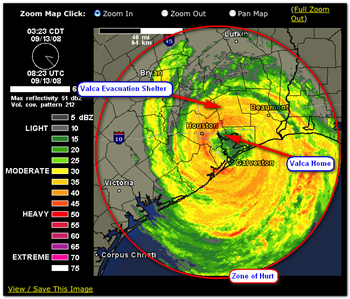
Ike_Bad

Ike radar image captured by Jim Thompson of jimthompson.org

--Claus

Read More
Posted in hurricanes, Link Fest, Texana | No comments
Newer Posts Older Posts Home
Subscribe to: Posts (Atom)

Popular Posts

  • New Year’s Day - First Post 2011
    Same day I came out with my first post after a long drought, I fell upon this article Blogging Seems To Have Peaked, Says Pew Report over a...
  • Oscar watch Linkpost
    Alvis and Lavie are watching the Oscars tonight and I’m along for the ride. I wasn’t able to come even close to getting out some of the pos...
  • Finally! Time to Post! New material list
    After a recent text from my bro reminding me it has been since March since I’ve done a blog post, I was finally able to clear the schedule a...
  • Ubuntu 13.10 Upgrade - Lessons Learned & VIDMA utility found
    A few weeks ago a new release of Ubuntu came out. Naturally that meant it was update time! I have been getting pretty good at this now so ...
  • iodd : Multi-boot madness!
    Like many computer technicians and responders, I seem to always have at hand a collection of bootable media; CD’s, DVD’s, USB-HDD’s, flash m...
  • Network Capture Tools and Utilities
    At a conference this week, we had quite a section regarding network captures. The instructor was going on about how you can try to sort ou...
  • It just has to be bigger on the inside…
      Last Christmas, Lavie gifted me with a cute little Jawbone JAMBOX unit. I thought it was pretty cool. It uses a Bluetooth connection t...
  • Mostly Minor Network Notes
    Here are some minor tweaks and features, mostly of a network nature. Manual Uninstall of the Cisco VPN Client « Mobile Expertise -- becaus...
  • Windows Live Mail error 0x80041161
    Dad is working with his father-in-law who has an issue with his Suddenlink web-mail-based “forwarding” handling of messages. Seems that (an...
  • FireCAT 1.5 “Plus” Add-On Collection
    In yesterday’s GSD post I noted the following: Both of these tools brought be back to the excellent FireCAT 1.5 collection of Firefox...

Categories

  • Active Directory
  • anti-virus software
  • Apple
  • architecture
  • art
  • AVG
  • Blogger
  • blogging
  • books
  • boot-cd's
  • browsers
  • cars
  • cell-phones
  • cheat sheets
  • Chrome/Chromium
  • command-line interface
  • cooking
  • crafts
  • crazy
  • curmudgeon
  • DHC
  • Dr. Who
  • E-P1
  • Education
  • family
  • Firefox
  • firewalls
  • For the Gentleman
  • forensics
  • Gmail
  • Google
  • graphics
  • hacks
  • hardware
  • humor
  • hurricanes
  • imagex
  • Internet Explorer
  • iOS
  • iPhone
  • iPod
  • iTunes
  • Kindle
  • Learning
  • Link Fest
  • Linux
  • malware tools
  • Microsoft
  • movies
  • music
  • networking
  • NewsFox
  • NFAT
  • Nook
  • Opera
  • organization
  • PDF's
  • photography
  • politics
  • PowerShell
  • recipes
  • Remote Support
  • RSS
  • science
  • Scripting
  • search engines
  • security
  • Shuttle SFF
  • software
  • Texana
  • Thunderbird
  • troubleshooting
  • TrueCrypt
  • tutorials
  • utilities
  • VBscript
  • video
  • Virtual PC
  • virtualization
  • viruses
  • Vista
  • Vista mods
  • wallpapers
  • Win FE
  • Win PE
  • Win RE
  • Windows 7
  • Windows 8
  • Windows Home Server
  • Windows Live Writer
  • Windows Phone
  • writing
  • XP
  • XP mods
  • Xplico

Blog Archive

  • ▼  2013 (83)
    • ▼  November (8)
      • Ubuntu 13.10 Upgrade - Lessons Learned & VIDMA uti...
      • ForSec Linkfest - 2013 DST Fallback Edition
      • CryptoLocker Ransomware Info & Free Prevention Sol...
      • Linkfest for the SysAdmins
      • Microsoft Security Essentials/Defender & PowerShell
      • Miscellaneous TrueCrypt linkage
      • PowerShell 4.0 and a tiny “gotcha”
      • New Software Updates + VMware Tools Update fix
    • ►  October (8)
    • ►  September (14)
    • ►  August (6)
    • ►  July (10)
    • ►  June (10)
    • ►  April (11)
    • ►  March (6)
    • ►  February (7)
    • ►  January (3)
  • ►  2012 (96)
    • ►  December (8)
    • ►  November (4)
    • ►  October (9)
    • ►  September (8)
    • ►  August (12)
    • ►  July (4)
    • ►  June (3)
    • ►  May (7)
    • ►  April (13)
    • ►  March (3)
    • ►  February (5)
    • ►  January (20)
  • ►  2011 (41)
    • ►  December (8)
    • ►  November (7)
    • ►  September (4)
    • ►  August (4)
    • ►  July (2)
    • ►  June (6)
    • ►  March (5)
    • ►  February (1)
    • ►  January (4)
  • ►  2010 (69)
    • ►  December (1)
    • ►  October (3)
    • ►  September (2)
    • ►  August (13)
    • ►  July (17)
    • ►  June (3)
    • ►  May (3)
    • ►  April (3)
    • ►  March (11)
    • ►  February (1)
    • ►  January (12)
  • ►  2009 (177)
    • ►  December (20)
    • ►  November (11)
    • ►  October (7)
    • ►  September (7)
    • ►  August (21)
    • ►  July (17)
    • ►  June (7)
    • ►  May (18)
    • ►  April (9)
    • ►  March (17)
    • ►  February (23)
    • ►  January (20)
  • ►  2008 (35)
    • ►  December (23)
    • ►  November (12)
Powered by Blogger.

About Me

Unknown
View my complete profile