Bios Password

  • Subscribe to our RSS feed.
  • Twitter
  • StumbleUpon
  • Reddit
  • Facebook
  • Digg

Monday, January 19, 2009

Custom Win PE Boot Disk Building: Dead Ends Ahead!

Posted on 7:16 PM by Unknown

And that ended up being a Good Thing.

No I haven’t forgotten.

  • Custom Win PE Boot Disk Building Saga: Introduction
  • Custom Win PE Boot Disk Building: Step One – WAIK up
  • Custom Win PE Boot Disk Building: Step Two – PGP Injection

The next installment is going to be the first of two interesting dead-ends I took.

I’ll address the method I used to try to find why the Dell Optiplex USB keyboard wouldn’t load under a WinPE 2.0 WAIK wim VistaPE build but would under the Vista setup disk wim VistaPE build and the plain-Jane WinPE 2.0 WAIK boot disk build.

Once I got the required drivers identified, I had to extract them then inject them back into the WinPE 2.0 WAIK wim VistaPE build again (since the PGP Injection method BSOD’s the Vista setup disk based VistaPE build).

That didn’t ultimately fix the issue, but a little “hack” I worked out did extend my knowledge of ways to load extra drivers in VistaPE builds.

The second dead-end brought me closer to working out what would become the third-step in producing my custom PGP-WDE driver-injected VistaPE’ish Win 2.0 boot CD.  And we will play with some neat WIM file tools in the process.

Unfortunately, this extended weekend brought a barrel-full of unexpected and unpleasant surprises involving unplanned emergency maintenance to both of our vehicles (battery replacement for the Ion, radiator replacement for the Altima), Lavie going to the ER (she is better but her worn-out system just can’t shake this flu-bug), more than a few “honey-I’m-sick-can-you-run-out-to-<insert store here>” errands, as well as my handling the full slate of regular household chores I have to budget for on the weekends (grocery shopping, laundry, house-cleanup, etc.). 

Though to confess, it felt nice sitting on our swing in the back yard in the sun and cool breeze getting some fresh air and sun with Lavie curled up next to me.  Good medicine and I had fun carelessly pulling up a few wild green-onions from the clumps that somehow are spread across the backyard.  Their scent reminds me that spring is near.

Sometimes the super-dad’s schedule gets out of whack and something has to give so I wasn’t able to give out the full measure of posting I had planned.

Hang in there.  It’ll be worth the wait.

Cheers!

Claus V.

Read More
Posted in family, Win PE | No comments

Linkfest: Inaugural-eve Edition

Posted on 5:32 PM by Unknown

Quite a selection of great and useful applications have been updated over the past weeks.

Belly up to the bar and have a pint.

For the Visual Learners

  • Flickr: Search The Commons and Library of Congress Releases Report on Flickr Pilot – The Library of Congress uploaded thousands of visual images in their archives to Flicker.  It is a simply amazing collection of material.  Much of it unseen until now.  It is a treasure-trove of images from a by-gone era.
  • FlickrLeech – FlickrLeech used to be a web-site location where you could enter some search terms, pick a date, etc. and then be treated with a ton of greatly arranged and presented images from Flickr.  It was tons cooler and more effective than going to Flickr itself.  Unfortunately for the creator this caused a few issues.  The first was bandwidth, the other was that it could pull images that might not be appropriate according to various country’s censorship laws.  In the end, Andrew Houser scrapped the current model and is developing FlickrLeech (in alpha) so you can now download this tool (Adobe Air based) and do your searching here.  Current caveats: First you need to have a Flickr account and when you start the application, you must log in to Flickr to agree to the content presented.  Secondly, this early version only allows searching for most interesting images based on date.  There are many tantalizing enhanced features that are visible but not active quite yet.  So have fun kids and stay tuned for updates. This has become my daily diversion application!  It runs smooth and fast on our Vista systems no no problems, but it seems to lock up our XP system with CPU cycles getting pegged.  I’m not sure if that is just me or an XP thing.
  • TiltShiftMaker - (web-service) – Site does some photo-manipulation work using blur filters to create a tilt-shift lens effect.  Not quite as good as the real thing, but it is a bit fun.
  • The 10 Most Stunning Photo Blogs | MakeUseOf.com – Nice roundup of some other websites that feature the best in amateur photography.  Quite a nice list of sites. Almost all of them provide daily images. 
  • The Air Force’s Rules of Engagement for Blogging — Global Nerdy – Completely non-image related post, but provides an interesting flow-chart that reflects on decision to respond via comments to a blog post or not.  Besides being a great flow-chart, it also is quite translatable to a guide for posting comments of your own.  I like the way it shows that some “engagements” might not be worth pursuing.

Utilities

  • OperaCacheView -  v1.15 – “...a small utility that reads the cache folder of Opera Web browser, and displays the list of all files currently stored in the cache.” Changes include adding 'Show Zero-Length Files' option and add of filter by file type. (text/html, image, audio, video, application).

  • ChromeCacheView – v1.10 – “...a small utility that reads the cache folder of Google Chrome Web browser, and displays the list of all files currently stored in the cache.”  Changes include adding 'Show Zero-Length Files' option and add of filter by file type. (text/html, image, audio, video, application).

  • RegDllView – v1.30 – “…a small utility that displays the list of all registered dll/ocx/exe files (COM registration). For each registered file, you can view the last date/time that it was registered, and the list of all registration entries (CLSID/ProgID).  RegDllView also allows you to unregister dll/ocx files that you don't need on your system anymore.”  Changes include the following new informational columns: File Modified Time, File Created Time, File Attributes.

  • SysExporter – v1.41 – “…allows you to grab the data stored in standard list-views, tree-views, list boxes, combo boxes, text-boxes, and WebBrowser/HTML controls from almost any application running on your system, and export it to text, HTML or XML file> This version add a new option: Add Tree Indent Spaces To Exported Data.

  • OpenedFilesView – v1.30 – “…displays the list of all opened files on your system. For each opened file, additional information is displayed: handle value, read/write/delete access, file position, the process that opened the file, and more... Optionally, you can also close one or more opened files, or close the process that opened these files.”  New option: Bring process to front and enhanced with more accelerator keys.

  • CurrPorts - v 1.56 – “…displays the list of all currently opened TCP/IP and UDP ports on your local computer. For each port in the list, information about the process that opened the port is also displayed, including the process name, full path of the process, version information of the process (product name, file description, and so on), the time that the process was created, and the user that created it.”  Newest release adds option: Ask before any action.

  • CCleaner – new release version offers these tweaks: command-line secure deletion, google Chrome thumbnail cleaning, moved language files to /lang folder, improved options cookie list browser detection, fixed minor bug in XP prefetch cleaning, fixed bug in IE History Index.dat cleaning, installer engine updates, and minor architecture improvements.

  • Recuva -  This is a great freeware tool to restore files that have been accidentally or purposely deleted from a Windows system. Works on both hard drives, flash memory devices, and digital camera memory cards or MP3 players.  Changes to this release include Improved messages when cancelling large file recovery, secure delete is now grayed for non-deleted files, improved recovery of .TIF files from FAT32 drives, filter category text now updates dynamically when changing languages, fixed 'Check for updates' position in Vista, along with various minor tweaks and improvements.

  • VirtualBox 2.1 – While I still primarily use Virtual PC 2007 for my Microsoft virtual systems, if I need to do virtualization of a Linux system, this is the tool I go to.  In addition to a large number of tweaks, performance enhancements, and bug-fixes, the following major changes were made: support for hardware virtualization (VT-x and AMD-V) on Mac OS X hosts, support for 64-bit guests on 32-bit host operating systems (experimental), experimental 3D acceleration via OpenGL, full VMDK/VHD support including snapshots, new NAT engine with significantly better performance, reliability and ICMP echo (ping) support, and new Host Interface Networking implementations for Windows and Linux hosts with easier setup (replaces TUN/TAP on Linux and manual bridging on Windows).

NirBlog: NirSoft utilities on Windows 7 Beta – Nir Softer has been playing with the new Windows 7 beta version and finds that his wonderful apps seem to work just fine.  That’s great news!

 New Finds

  • Fried Babelfish – Do you do a lot of language translation work?  Generally when I do I fire up a web-browser session and hop over to Google Translate and to the job.  Fried Babelfish doesn’t use the Babelfish service but does use the Google Translate service, accessing it from within the application itself and not via a web-browser.  Clever!  Spotted over at Download Squad.

  • Free Desktop FLV Player – nice standalone Flash video player.  GUI is very sweet.  Quite portable so you can take it with you on your USB stick.

  • SUPER  - I don’t usually do much re-coding of media files.  Generally I need to do it only when I am converting a video for use on one of the girls’ iPod nanos.  Super is a great tool to simply that process.  This is a new release version.  Spotted via Download Squad.

  • Howto: Generate many files of a particular size in Windows « the back room tech – Great post that points to a simple technique to generate test-files in high volume for testing of data or application handling.  Great tip Julie!

  • Stardock ObjectDock - (freeware) -  OK. Confession.  I am a RocketDock fanboy and thing that next to nothing can go wrong with that application.  However, Stardock’s ObjectDock offers a freeware version that might give RocketDock fans pause to wonder.  RocketDock hasn’t been updated for a while (which based on its current stability isn’t a bad thing) but Stardock seems to continue product improvement.  If you are looking for some sexy eye–candy dock launchers, I think either one might fit your bill.                       

Browser Bits

  • The Opera Christmas Edition and the newer New Year snapshot – both are beta-version releases of the Opera browser and may bring users (and brave testers) a taste of even newer features and capabilities.  These could be comparable (sort of) to Firefox nightly releases or Safari “seed” releases.  Test at your own risk.
  • Block ads in Chrome-based SRWare Iron with a single file – Tip from Download Squad on how you can do some ad-blocking in the Iron version of Chrome.  Might be handy if you are a Chrome lover and are looking to skip out of ads. 

  • Beta Beat: Google Chrome 2.0 Pre-Beta Now Available, Supports Profile Switching, User Scripts (Lifehacker), and Google Chrome Update With Form Auto-Completion And More (GoogleBlogOScoped), and Google begins work on Chrome 2.0 (Download Squad), and finally,  Hands on: Google leaps forward with Chrome 2.0 dev. preview (ArsTechnica).  All great looks at the latest features in the next version of Google Chrome.
  • How To Spell Check With The Firefox Dictionary - MakeUseOf.com.  Most Firefox users probably are already fairly skilled in use of the internal dictionary.  MakeUseOf however brings in additional tips and tweaks to help enhance the power of this handy tool.

  • Firefox new tab behavior to be updated – MozillaLinks tips us that the new tab handling feature in Firefox 3.1 is being tweaked a bit.  While it doesn’t look like it is getting a kill-command to nuke the bad behavior, it will now open child tabs directly to the right of the parent tab.  I guess that might make things simpler for some folks. 

  • Update Firefox’s search bar with new Google favicon, again (MozillaLinks). You may or may not have noticed, but Google recently updated their favicon.  In most cases my Google-related bookmarks have slowly been updating to the new icon, but not the Google icon in the searchbar.  I tried the tweak linked but it didn’t stick in my 3.1 builds.  So I came up with another technique that did.  First I deleted Google from my list of searchbar plugins and selected another as the default.  Then I hopped over to the Mycroft Project: Google Search Engine Plugins and reinstalled the Google searchbar item and set it as the default.  That worked and it sticks. 

  • Textarea Cache :: Firefox Add-ons – Great little extension that caches the contents of text-area text while you type in comments.  Users can now recover the saved texts in the cache window, even the tab or the window is closed unexpectedly.  This might help save the day if you accidently crash while composing that extended comment or click-off with a hand-to-mouse spasm.

Full yet?

--Claus V.

Read More
Posted in browsers, Chrome/Chromium, Firefox, Google, Link Fest, Opera, photography, search engines, utilities, video | No comments

Saturday, January 17, 2009

In other EU “Dept. of Silly Ministries” legal news…

Posted on 12:43 PM by Unknown

image

cc credit: work by southtyrolean on flickr

Just saw this:

Microsoft Ordered to Delete Browser - NYTimes.com

Then wondered when we won’t next see this:

BRUSSELS (DS) — The European Union said Friday that Ford and GM’s practice of selling tires together with their individualized transportation systems (i.e. cars and trucks) violated the union’s antitrust rules.

It ordered the battered US vehicle making giants to untie tires from their products in the 27-nation union, enabling makers of rival tyres to compete fairly.

“These Yanks tying of tires to their vehicles harms competition between tyre makers,  undermines product innovation and ultimately reduces consumer choice,” the E.U. said in a statement.

It gave the Big Two eight weeks to respond, adding that the companies could defend their position in a hearing if it found that useful for the amusement of the EU court systems.

A frustrated US product spokesman issued a statement saying, “We are committed to conducting our business in full compliance with European law, no matter how difficult our attempts to navigate and understand confusing EU member government ministries might be.”

The commission’s investigation into these latest charges of unfairly equipping their vehicles with tires began a year ago, after European Carmakers filed a complaint. They argued that US car makers hurt EU competitors not only by bundling tires with vehicles, in effect allowing them to drive vehicles these products directly off the dealer lot after purchase, but also continued to hurt their feelings by not following accepted internationally accepted standards as to which side of the road is the proper one to drive on.

According to the EU spokesman after catching his breath from a laughing-fit, Chrysler was left out of the suit because, “…nobody takes them seriously anyway…they are like that software made by penguins in the Arctic.”

I’m certainly no Internet Explorer fan, but I’m thinking most folks are savvy enough to know how to download and install an alternative browser to IE on their own by now.

I can’t believe I am saying this, but I can’t imagine a Windows OS release that didn’t include any web-browser included at all as part of the install package.  Certainly Microsoft has a right to include a web-browser in their software OS packages?  Yes I wish the Windows OS didn’t require IE for operation of some things, but sheesh.  Cut ‘em some slack here guys…

I haven’t forgotten the uproar and furor that IE generated last time this reared its head.  But come, on.  Now I think things are getting a bit silly overseas!

--Claus V.

Read More
Posted in humor, Internet Explorer, Microsoft | No comments

Security and Forensics Roundup #4: Eyes on you

Posted on 12:01 PM by Unknown

Alvis got a major teen upgrade last month.

We moved our old TV out of the bedroom and into her room.

I haven’t had time yet to run a cable line from a junction-box to it just yet, but she is diligently reminding me that I had promised to address the lack of visual connectivity this weekend.

So I prepare for a trip to Lowe’s.

As much as I like watching the new LCD TV as a family, this might get me the extra wiggle room needed to catch up on some classic movies I’ve so far been unable to watch due to a lack of control on the remote.

While I am working out the cable-runs, I thought I would toss these security and forensics tidbits your way to snack on.

Just chew quietly…wouldn’t want to get on the bad-side of any librarians.  They work hard to keep us safe!

Web Watching

BartZilla has been hard at work recently.  He dropped a line to me that he has puzzled out just how Firefox 3’s “safebrowsing” functions both in regular and “private-browsing mode.

  • ”Firefox 3 "Antiphishing/Antimalware" (so-called "safebrowsing") Server-side Project

I am seeing a number of short-linked URL’s lately in comments.  TinyURL is one of many locations that takes a really long URL and shortens it.  This makes it much easier to copy/past to a user.  However it also may mask information on what could turn out to be a malicious web-url.

spylogic.net – What’s behind that short URL? took a look at these issues and recommended a great Firefox Add-on that promises to remove and re-display the short-url back to its full-length splendor.

  • Long URL Please – Firefox Add on.  Supports 32 different short-url services.  So you don’t have to worry about being tricked by a mysterious short-URL.

Hidden IP Addresses Not Hidden Anymore – This post from infosecurity.us isn’t really that new.  Security wonks have known for years that anonymizer services can be seeded or tricked into “decloaking” a user’s actual IP address using a number of techniques.  They bring attention to a new write up of one tool in particular.

Security and the Net has published a superb write-up of the newly updated Metasploit decloaking engine, utilized to determine the original (supposedly anonymized)  IP of a connecting machine (when that computer is  tunneling its’ network communications through an anonymous proxy).  More information regarding the capabilities of the Metasploit Decloaker, and how to find the original IP, even with an anonymous proxy server running) appears after the jump.

If properly configured, one can still use these anonymizing tools to hide an IP address with reasonable certainty.  But that takes more work to do than casual users of these utilities might pay attention to.

More Autorun hacking

In a recent post, we looked at USB autorun file dangers and methods to protect them.

In that context I had come across yet another danger in autorun files I wasn’t aware of…malicious code can be dropped in what looks like garbage text in the file and still execute.

  • When is AUTORUN.INF really an AUTORUN.INF? - F-Secure Weblog : News from the Lab

As the images on that link show, must sysadmins and even regular pc users might be able to decode a call to a malicious file in a standard autorun file content.

However, if you open up some and see what looks to be encrypted/or garbage text fields, you might just pass it off as a harmless corrupted file.

That’s not the case.  See Windows will ignore all the junk text in the file until it finds something it can execute, and away it goes.

The noteworthy text is found somewhere around the middle of this 90kB file. At the bottom of the screenshot. See it?

Open=RUNDLL32.EXE .\RECYCLER\jwgvsq.vmx

…which would execute a DLL called jwgvsq.vmx from a hidden folder on the USB drive.

The rest of the binary junk are comments and will be ignored by Windows. And of course, the file size and amount of binary junk is different every time.
Nice trick.

So yes, I’m sorry but you must examine any such files very carefully.  They might contain a hidden executable call. 

Virus Testing your Email Protection

Anonymous was having some problems testing the efficacy of his AV system in checking emails for malicious content.  It’s a good point.  Unless you have malicious files hanging around and can mail them to yourself, how do you know your AV program is sufficiently protecting you.

While I do collect the odd malicious file in my desktop-support responses, I keep them only long enough to safely send to some AV research labs for inspection and inclusion.  Once I have removed the threat, I rarely keep them around.

And if you are working with a malicious file, chances are that your AV protection will keep on catching it and locking it down.  Try sending a malicious file via Gmail and it gets scanned and removed.

See the problem?

Even the “safe” EICAR Test Files are a frustration to work with in testing email protection as they too, by design, should be caught and locked down by your AV system, preventing you from emailing them to yourself! 

However, there is an easy workaround when it comes to testing your email protection system—use one of these sources!

  • Information Technologies: EICAR Information and Test page.
  • Send EICAR Test E-Mail to Check Reliability of Your Anti-Virus E-Mail Protection

Both offer a free and easy, third-party way to send an “infected” test file to yourself without tripping any of your local AV protections in the process!

Great way to no only see if your AV system is working, but it can be used to explain to mom and dad what (should) happen if someone send them a malicious file.  Or testing a potentially compromised system to see if email/download protections for the software have been turned off somehow.

Watching for the Inside Job

We watched Numb3rs last night and it wasn’t 1/3 of the way in before I was telling Lavie that the cop and his fiancée both were in on the job.  We were right.  The fiancée was casing the F.B.I. tactical room as a “concerned” family member and feeding the bad-guys information to keep them one-step ahead of the game.

Many times we might become complacent to the nature and motives of those who work around us.  This includes our customers, our vendors, our co-workers, and the hardware that we support.  In our willingness and drive to meet service-levels and keep the productivity flowing, we might decide to overlook or ignore things that just don’t quite jive with the way things should be.

That can be a serious security mistake.

Printer Scanning the Firewall? – Andrew Hay’s blog.  Is IP scanning of the network by a printer normal or is something else going on? Turns out that that one can actually use a JetDirect box as an Nmap Idlescan Zombie.  While not likely a common attack vector, you never know….

SynJunkie has started yet another new series on a modified social-engineering based attack on a system.  Good read.

Syn: The Story of a Newbie Hax0r - Part 1

Syn: The Story of a Newbie Hax0r - Part 2. My Evil AP

Meanwhile, letting a malicious file into your network, which has not been kept current on security patches can have devastating results:

  • Microsoft® Malware Protection Center : MSRT Released Today Addressing Conficker and Banload – Pretty graphic included.
  • How Big is Downadup? Very Big. – F-Secure blog
  • Calculating the Size of the Downadup Outbreak – F-Secure blog

Still having trouble getting the bean-counters to respond seriously?  Could be the case. I mean with the economy in the tank, I could see IT shops reconfiguring their priorities to focus on production and not prevention.

Might want to drop them a link to this post.

  • Computer forensics - a subject every executive should understand - David Lacey’s IT Security Blog

It links to Peter Sommers deep whitepaper: Directors' and Corporate Advisors' Guide to Digital Investigations and Evidence (PDF-link).

At 100 pages, many might think they don’t have the time or need to review just how critical and understanding, plan, and relationship with digital investigations and forensics really is.

In the forward, Sir Edmund Burton sums up the importance in that typical understated British manner:

This useful guide highlights the potential risks for enterprises that do not have a
detailed planned response to typical risk scenarios.  It points out that the ‘Low
Frequency/High Impact’ events are disruptive and emphasises that ‘High
Frequency/Low Impact’ events are also disruptive and must be addressed by
contingency plans and preventative measures.

An Effective Wiping Technique

…..for hard drives.  Sheesh!

I and our IT group apply Secure Disk-wiping Software solutions to all the hard-drives and memory storage devices we manage. Unneeded CD/DVD and floppy material goes into the shredder.  Depending on the hardware/firmware, a policy-mandated DoD-grade three-pass secure-wipe can take anywhere from 30-minutes to several hours to complete on a single hard-drive.  It is a time-consuming, but critical function of data handling and management.

So I read with curiosity the following posts:

  • Single drive wipe protects data, research finds – SecurityFocus
  • Secure deletion: a single overwrite will do it - heise Security UK

With the exception of the Data Sanitization Tutorial (PDF-link) written by the University of California at San Diego Center for Magnetic Recording Research, I haven’t seen very many other official-grade research papers that detail just how effective a single-pass bit-wipe of a drive is in comparison to a 3-pass or even a 35-pass wipe.  Now there’s a new research paper on the block Overwriting Hard Drive Data: The Great Wiping Controversy that seeks to dispel the mythos surrounding multi-pass wipes.

From the heise Security link:

Craig Wright, a forensics expert, claims to have put this legend finally to rest. He and his colleagues ran a scientific study to take a close look at hard disks of various makes and different ages, overwriting their data under controlled conditions and then examining the magnetic surfaces with a magnetic-force microscope. They presented their paper at ICISS 2008 and it has been published by Springer AG in its Lecture Notes in Computer Science series (Craig Wright, Dave Kleiman, Shyaam Sundhar R. S.: Overwriting Hard Drive Data: The Great Wiping Controversy).

They concluded that, after a single overwrite of the data on a drive, whether it be an old 1-gigabyte disk or a current model (at the time of the study), the likelihood of still being able to reconstruct anything is practically zero. Well, OK, not quite: a single bit whose precise location is known can in fact be correctly reconstructed with 56 per cent probability (in one of the quoted examples). To recover a byte, however, correct head positioning would have to be precisely repeated eight times, and the probability of that is only 0.97 per cent. Recovering anything beyond a single byte is even less likely.

The actual paper itself must be accessed for $ or bought via a book, however the author kindly repackaged the research paper in a recent post at SANS Computer Forensics blog.  The details there should be sufficient for most mortals.

Overwriting Hard Drive Data – Dr. Craig Wright, SANS Computer Forensics, Investigation, and Response blog

Now if we can only convince our director that once will be good enough….old habits and wisdom die hard. 

Tin-foil hat-wearers are free to continue to worry.

Tips, Tools, and Techniques

  • A quick analysis helper – Forensic Incident Response blog. Hogfly drops a gem of a tip that points to the registry location where Symantec keeps their last date scanned and the date of the definition files.  Yes I realize you could try to load up the installed Symantec GUI and use it to look for log information, but when you are looking at a system via the captured image, that might not be a viable option. As Hogfly also points out, it can provide information whether the scan was a scheduled scan or initiated manually by a user.

  • Memory Collection and Analysis Tools and New and interesting things – Windows Incident Response blog.  Harlan must not have much work to do on his 2nd edition update.  Obviously he has some free-time on his hands as he continues to share with us awesome tools for memory data collection and analysis.  Be careful,  there are a lot of links for awesome tools.  You will likely loose significant blocks of time checking them out!  I also advise you to check out the post comment threads.  Good detail in there.  Thanks for sharing Harlan!  Looking forward for the book!

  • MANDIANT First Response – free tool to remotely collect key data on a system by security and investigation responders. “MANDIANT First Response provides the ability to remotely collect the volatile data, file lists, registry information, event logs, running processes, running services, file time/date stamps and many other data sources to allow an organization to perform precision strike responses when an incident may have occurred.”  This is a data-collection tool, not a data-analysis tool.

  • F-Secure Exploit Shield – (freeware) – Heuristics based beta tool that runs real-time to provide protection against web-based malicious exploits and malware.  It does phone-home and provide data to the F-Secure labs to help with exploit detection and response.  So be aware.  See this F-Secure post for screenshots and more details.  Download link here.  Supported on Windows XP.  No word on Vista/W7 editions yet.  Similar freeware product: ThreatFire.

  • F-Secure Easy Clean – (freeware) – Free and easy to use tool to remove common malware and viruses from a system.  Also does root-kit check before scan commencement.  Can be run in Safe-Mode. XP/Vista compatible. For more details see F-Secure Easy Clean – FAQ.

  • ThreatFire Research Blog – I’m always on the lookout for security blogs that have both technical and real-world information.  Finally uncovered the ThreatFire blog.  Even if you don’t use the free product, the information from their blog could be helpful in threat-assessment and defense.

  • Exiftool - (freeware) – Tool by Phil Harvey allows for read, write, and edit of meta-data information.  This is golden stuff, especially if you are investigating information on recovered image format files.  (Example Output).  This tool could provide clues in investigation work.  Depending on the camera itself (and assuming the meta-data hasn’t been tampered with), one might be able to to use data in the files to associate an image, to a specific image capture date/time, to a specific camera, and maybe to a specific owner.  Could be a stretch, but cases have been broken with less…

  • Security Database Tools Watch - FireCAT 1.5 released – This update of FireCAT (Firefox Catalog of Auditing exTension) is a mindmap collection of the most efficient and useful firefox extensions oriented application security auditing and assessment.  The latest version now lists a number of new Add-ons in some restructured categories.  If you are into security research and use Firefox, you simply must spend some time checking this out!  If you don’t want to do a pick-n-choose to get them installed, pop over to the Package de plugins FireCat 1.5 (natively in French so here is the English Version a-la Google) and download the compressed file and install away.

  • SANS SIFT Workstation Version 1.2 Released - SANS Computer Forensics, Investigation, and Response blog.   “The SANS SIFT Workstation is a VMware Appliance that is preconfigured with all the necessary tools to perform a forensic examination. It is compatible with Expert Witness Format (E01), Advanced Forensic Format (AFF), and raw (dd) evidence formats.”

  • Zero Wine: Malware Behavior Analysis – Open Source – Tool to “…dynamically analyze the behavior of malware. Zero wine just runs the malware using WINE in a safe virtual sandbox (in an isolated environment) collecting information about the APIs called by the program.”  I must say, this is really cool and can provide a fast and locally obtained malware-behavior report similar to those offered by the web-based CWSandbox - Automated Malware Analysis or the Norman SandBox Information Center.  Having a local-system-based lab-tool like this really can speed incident response analysis and response.

Cheers!

--Claus V.

Read More
Posted in anti-virus software, browsers, Firefox, malware tools, security, utilities, viruses | No comments

Monday, January 12, 2009

On the Download…

Posted on 8:17 PM by Unknown

Confession time again here.

Very rarely do I touch a torrent file.

Seriously.

Most of the software that I get come from sources that use either ftp or http protocols.  And I’m not out looking for movies or songs to download.  We worship at the iTunes mountain for those. 

If the only option is to download a particular file I need is via torrent and it isn’t a must-have, I generally take a pass.

However, every now and then the Linux LiveCD distro I’m looking into only supports download via a torrent.  So I pull out one of any number of portable torrent downloaders and grab the file.

Torrent Support via Firefox – Light Lifting only

Even my favorite Firefox browser doesn’t support torrent downloads automatically.

Otherwise, both the Download Statusbar :: Firefox Add-ons and the DownloadHelper Add ons are the only ones I have ever found use for in my Firefox configurations.

So I noted with interest a new Firefox add-on in early development stages that seemed to fit the bill:

  • FireTorrent – FireAddons

This indeed seemed like a helpful utility for a casual torrent file downloader as myself.

Information from the project page is next-to-nil so from the TorrentFreak post FireTorrent Brings BitTorrent to Firefox comes a bit more background on the project from Ernesto:

The add-on uses the popular libtorrent library and fully integrates into the native download manager of Firefox.

Since it’s an alpha release, there are no options or preferences to configure yet. The official release, however, will include adjustable download and upload limits and several other basic configurable settings. Completed downloads will currently be stored in the desktop folder, this can be changed in the beta release that will come out in a few weeks.

Firefox 3.0 or greater is required to get the add-on to work properly. At the moment, the upload speed is capped at 15kB/s. This is for the alpha release only, but since BitTorrent is based on ‘tit-for-tat’ sharing, it doesn’t really help to get the downloads up to full speed. That aside, the add-on works just fine, and download speeds on most connections are comparable to clients such as uTorrent and Vuze.

You can sign up for the alpha project info or just jump to the download page.

The Fat Lady really can Sing!

Reading the comments from the TorrentFreak page led me to another realization: Opera natively supports torrent file downloads.

  • Opera 9.22 Available with Improved BitTorrent Support – Cybernet News

So that’s a second resource for grabbing torrent file downloads.

Yes I’m a bit late to that dance.  Feel like the last guy to dance with the prom queen again.

Anyway, some folks actually feel pretty strongly about not using an embedded torrent manager in Opera. If you feel that way too there is a way to Disable BitTorrent Integration in Opera [Techie Buzz].

Heavy Download Lifting, Torrent Style

Though I don’t really use “standalone” download managers for daily use, I have found they can come in really handy when downloading ISO files or other similar files that are over 300 MB.  In my case these almost always end up being Linux LiveCD ISO’s.

In these cases, download managers can dramatically assist in reducing download times by splitting the file into sections and downloading them simultaneously via multiple connections.  As long as it doesn’t overwhelm the server (and others) by using too many connections at once, and as I do it infrequently, I don’t feel too bad.

Free Download Manager - absolutely free download accelerator and manager - (freeware) – is a pretty amazing tool I’ve been playing around with.

The GUI is very nice and polished; very intuitive stuff.

The feature list is very rich as well:

  • GNU General Public License   
  • BitTorrent support available in Windows 2000/XP/2003/Vista
  • Upload manager
  • Flash video download
  • Portable mode
  • Enhanced audio/video files support
  • Download acceleration
  • Resuming broken downloads
  • Smart file management and powerful scheduler
  • Adjusting traffic usage
  • Site Explorer
  • HTML Spider
  • Simultaneous downloading from several mirrors
  • Zip files partial download

I also like that when running it provides a transparent “drop-zone” that allows me to drag/drop download links out of my browser onto for download queuing in the program.

Spotted over at this post:

  • Open Source Free Download Manager v3 adds tons of new features ... Lifehacker

Other popular (and free) Torrent download applications

µTorrent - The Lightweight and Efficient BitTorrent Client

BitComet - A free C++ BitTorrent/HTTP/FTP Download Client

Orbit Downloader - File and media download manager. Newer star on the block.

BitLord - The Ultimate Torrent Downloader

Halite BitTorrent Client – BinaryNotions.com – Fairly active project that uses a clean interface to get the job done.

G3 Torrent – Python coded utility that has a nice and simple interface with lots of features under the hood.  Hasn’t been updated for quite a while (years) as far as I can tell.

BitLet - the BitTorrent Applet. This one is an odd duck.  It actually isn’t an “application” but a web-based applet that allows you to paste in a torrent-file link and then it will act as the intermediary handler to download to your otherwise torrent-unsupported system locally.  Clever and handy to bookmark and use in a pinch.

Then there was this one…

Vuze/Azureus - Bittorrent Client

That last one is pretty contentious.  I (like many others really like it under the Azureus builds, but since it got gobbled up and rebranded/modded into the Vuze product as a media-torrent file downloader/manager, many folks who are purists have been loath to recommend it.  Fortunately, you can still fine old versions of Azureus still around for download.

Most all of those listed above are “portable” in some form or fashion for hauling around on your USB stick.

Many, many, many more BitTorrent clients can be found on this List of BitTorrent clients page over at Wikipedia.

Just use all this downloading power for good.

--Claus V.

Read More
Posted in browsers, Firefox, Opera, utilities | No comments

RocketDock Booster

Posted on 7:14 PM by Unknown

I’ve been a longtime fan of RocketDock.

It is basically a Windows freeware clone of the Apple Dock.  It’s highly recommended by others and myself.

While it supports gadgets and other things, I like to use it as an application launcher with sweet eye-candy.  Since it can be skinned and supports swapping the original program icon with any custom high-quality icon you might have around (and I have plenty), it is very pretty to look at once configured and tweaked.

It works under both Windows XP and Vista. And is sophisticated enough to work with multi-display monitor arrangements.

I never fail to get compliments and questions from folks who see it on my systems.

In all that time I’ve used it I’ve had very few issues.  Performance hit is negligible. It behaves nicely when monitored with Process Monitor.  That’s something that some similar dock apps cannot claim based on my monitoring and testing.

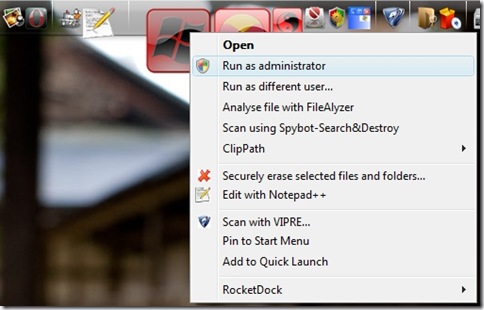
Yet one thing on Vista has always bothered me.  Launching applications from it in Vista results in them running under “normal” security level permissions.  If I wanted to run, say Process Explorer or a command window, I’ve had to go and dig for the original file to right-click to “run as administrator.”

Sure, it does have command-line launching support and can even handle special arguments with aplomb. So I could have made both “normal launch” and “run as admin” launching icons but that seemed to negate the otherwise clean and simple number of key application icons I use.

Right-clicking on any of the icons in RocketDock brings up the normal RocketDock icon item option menu as seen below.

RocketDockNml

Not very useful for an otherwise awesome app-launching utility.

I didn’t read the manual (big mistake) and was poking around in the RocketDock options last night and noticed a curious option I hadn’t paid attention to before at the very bottom.

“Popup Menu   Display Special Actions”

RDControl

I enabled it and then went back to see what “Special Actions” the popup menu would offer for the icon in question (in this case it was Process Explorer).

Wow!

RocketDockBoost

Behold the RocketDock launching power options when I want to boot the launch-stage!

So that’s what “Display Special Actions” means.

Almost full “normal” right-click context menu options, including the desired “Run as..” options.

And at the very bottom, the standard RocketDock icon management options are still available.

I guess I should go back and read the documentation some more….

Cheers!

--Claus V.

Read More
Posted in hacks, tutorials, utilities | No comments

Sunday, January 11, 2009

Windows 7: Unexpected Discoveries

Posted on 10:45 PM by Unknown

Yes, I know that Windows 7 Beta got released last week.

I had tried valiantly this past Friday to get my W7 Beta key and W7 ISO downloads.

The key was a complete wash until Saturday when the floodgates opened and I was able to get several along with a quick download of the ISO file.

I had been worried but found that Microsoft uncapped the download and key limits for the next two weeks!

The Key to the problem is…

Here's where we stand - Windows 7 Team Blog.

"Due to an enormous surge in demand, the download experience was not ideal so we listened and took the necessary steps to ensure a good experience. We have clearly heard that many of you want to check out the Windows 7 Beta and, as a result, we have decided remove the initial 2.5 million limit on the public beta for the next two weeks (thru January 24th). During that time you will have access to the beta even if the download number exceeds the 2.5 million unit limit."

(Turns out that the MS W7 EULA allows multiple installations with the same key. Thanks for the tip, Dwight!)

So don’t sweat that you will left out of this latest gold-rush.  Grab your beta key and move on.  There’s lots to see and you don’t need to waste your time filling your pockets. Leave some for the late-comers.

Swatting at W7 NATs

I suppose I could have followed this Lifehacker post ( Windows 7: How to Dual Boot Windows 7 with XP or Vista ) and done a dual-boot configuration of one of my systems with Windows 7 Beta, but I am a bit risk adverse with my home systems.

Instead, I took the safer route and created a fresh virtual hard-drive file in VirtualPC 2007 picking Vista as the intended system.  I mounted the downloaded W7 beta ISO file with VirtualPC as I booted the new vhd.  That got me directly to the installation process and it went surprisingly fast.  Much faster than what I had encountered under the Vista beta versions I had tested.

I got it installed on a VirtualPC session with no issues (except I had to set the VirtualPC session to use NAT routing due to the wireless config I had.  Then the virtual Windows7 couldn’t find the Internet through my host system until I did a little research and on a hunch tried to manually assign the IP address for the DNS Server for the Windows 7 virtual operating system to 192.168.131.254, the virtual gateway IP address used by Virtual PC.  That did the trick and the Webs flowed quick and fast.

For a walkthrough on this process see this great post with visuals:

  • Brian Keller: Technical Evangelist for Team System : Installing the Windows 7 Beta with Virtual PC 2007 SP1

Virtual Machine Additions…

Once I had the virtualized W7 Beta rocking in VirtualPC I wanted to do some drag-n-drop file transfers and set up a shared folder between the VirtualPC of Windows 7 and my hosting Vista system.  However, I couldn’t do that without installing Virtual Machine Additions in the client.  Only I haven’t yet found a Windows 7 version of them yet.

Would the set (ISO file) that came with VirtualPC 2007 work?

Surely not!

I browsed to the VirtualPC program folder and found the ISO file and attached to it.

Sure enough, Windows 7 took the setup and installed them with no complaints.  After a reboot I was good to go with both sound as well as the drag-n-drop and shared folder features working perfectly.  No BSOD or other fatal flaws have been encountered.

Who knew Windows 7 was so flexible and Vista-backward supportive?

That really bodes well.

Windows 7 WAIK = WinPE 3.0 ?

I didn’t get much time this weekend to play with it, but what I did see impressed me.  It ran speedy and well with just 512MB system RAM allocated to the Windows 7 virtual machine.

I also found these related Microsoft items regarding Windows 7 that are now available.

  • Download details: Windows AIK for Windows 7 Beta documentation

  • Download details: WAIK Windows® 7 Beta

  • Windows 7 Walkthrough: User State Migration Tool

  • Windows 7 Walkthrough: Deployment Image Servicing and Management

  • Windows 7 Walkthrough: Enterprise Application Compatibility

Knowing that there is a Windows Automated Installation Kit beta already available for Windows 7 is very exciting.

The current WinPE 2.0 is based on the current Vista WAIK.  And as we are finding out, WinPE 2.0 can do amazing things and is quite customizable.

I’m not sure if we can call the Windows 7 WAIK the road to WinPE 3.0, but if early indications bear out, it might be even more versatile than PE 2.0 is.

And those other finds with the USMT for W7 as well as image serving will demand close inspection!

Microsoft’s Windows 7 Driver Goals

The post Engineering Windows 7 : Primer on Device Support and Testing for Windows 7 is a long and fairly dry and technical post.  However, it did contain this interesting tidbit that again looks well for upgrades of existing Vista-supported hardware platforms.  Folks with working Vista systems that are fence-sitting regarding Windows 7 might feel more welcome than the XP folks who got splinters in their tooshies from Vista.

From that post (emphasis mine):

One of our primary goals for Windows 7 is compatibility with all Vista certified drivers and to ensure that people have a seamless upgrade experience. This breaks down into several requirements that guide how we test:

  • Drivers for basic functionality are in-box (by in-box we mean available as part of the installation of Windows). This includes drivers for mainstream storage, network, input, and display devices so the OS can be installed and user can get online where, if needed, additional drivers can be acquire from Windows Update.
  • Drivers update and/or install with minimal end user effort.
  • When drivers are upgraded, there aren’t problems with the new drivers.
  • Drivers are reliable.

That may explain why the VirtualPC 2007 additions went on smoothly.

The post then goes on to detail the elements of clean installs, attaching devices without setup disks (containing drivers at hand), and updating drivers via Windows Update or an independent hardware vendor (IHV) website source.

There was much more in the post than meets the eye at first blush.

Windows 7 Problem Steps Recorder

One of the challenges in Help Desk work for end-user workstation support is tracking down the cause of the error they are reporting.

Sure there are system and event logs.  If I am lucky I can remote-attach to the user’s system while the problem still is present or the error alert is showing.

Usually, I have to play detective and use a variety of interrogation and system inspection techniques to get the clues and facts needed to replicate the issue…and then work out the solution.

Long Zheng drops a killer tip that Windows 7 might have dramatically improved my ability to collect meaningful fault data.

  • Windows 7 Problem Steps Recorder: miracle tool – istartedsomething Blog

A feature new to Windows 7, called “Problem Steps Recorder” looks to be the missing tool for documenting where it all goes wrong.

What the tool is a simple but advanced variation of a screen capture software. Think of it as an automated “Print Screen” plus a little monkey in the background documenting all the mouse clicks, key strokes and gathers some technical reading material, who then ties up everything in a neat box and saves the results. The neat little box you get is a zipped MHTML report page which can be sent off directly to the help desk.

The report page is where this tool really shines. It actually is an XML page documenting each step of the user’s actions complete with a screenshot with the item highlighted. You can view the report as is, or as a slideshow, or even dig into the raw XML to expose greater detail like the X&Y coordinates of the mouse.

To try the “Problem Steps Recorder” for yourself, type and select “psr.exe” in the Windows 7 start menu.

Long Zheng helpfully provides a link to a report he prepared earlier for your viewing pleasure. You must use Internet Explorer to view MHTMLs.

Check it out.  It’s tre’ chic!

Crime? You can’t hide in Windows 7!

Leave it to Windows forensic expert Harlan Carvey to not let any Windows 7 grass grow on his side of the fence!

He decided to start poking the Windows 7 beta fish bowl with a stick to see what he could stir up.

Windows Incident Response: Windows 7 Beta Registry

He does some looking and found a VMWare built virtual drive of Windows 7 beta and brings it home to play with.

Initial results were very positive.

Very cool! Not only do the tools seem to work just fine, but it looks as if the VMDK is a Windows 7 Beta VM. Very nice. Other plugins, such as samparse, seemed to work just fine, but parsing the UserAssist key in the NTUSER.DAT file was problematic...the "normal" GUID key didn't seem to be in the hive.

So, it would seem that the binary format of the Windows 7 (the Beta, anyway) Registry hive files has not changed. I'm sure that the content has, as keys have changed names and functionality, and values and ways of recording data have changed. However, as with the move from Windows 2000 to XP, there may simply be more opportunities for forensic analysts.

There may be some changes/additions required, but seeing as Windows 7 is built upon much of the foundations already laid in Vista, the forensics and system administrators alike should find the under-the-hood workings pretty similar and recognizable to current tools and techniques.  Tweaking them to the Windows 7 environment changes hopefully will be minimal.

I have no doubt Harlan’s is the first of many great W7 related forensic posts to come.

BTW…be sure you grab and apply an anti-virus application to your Windows 7 build from one of several Windows 7: Security Providers.  Nice to know these are coming out pretty quickly along with the Beta release.

Wishing you were here…

For the folks who are curious what all the geek ruckus that has hit the blog-o-sphere over Windows 7 but could care less as they are still trying to come to terms with both XP and this new-fangled “Vista” thing they got for Christmas, here is a selection of posts that have lots of pretty pictures and cover a range of features and issues to be found in Windows 7 (to date).

Think of them as postcards for the Windows 7 tourist set…

  • TechBlog: Windows 7 beta: first impressions – Dwight Silverman’s TechBlog
  • First look at Windows 7 beta 1 Windows 7 beta 1 (build 6.1.7000.0.081212-1400) - Hardware 2.0 | ZDNet.com
  • Windows 7 Beta Review – Paul Thurrott’s SuperSite for Windows
  • Windows 7 Beta Review, Part 2  – Paul Thurrott’s SuperSite for Windows
  • Windows 7 Beta Compatibility  – Paul Thurrott’s SuperSite for Windows
  • Windows 7 Beta: Notes and Observations  – Paul Thurrott’s SuperSite for Windows
  • Windows 7 @ Paul Thurrott’s SuperSite for Windows

That’s all for now.

More Windows 7 technical linkage and finds are waiting in the wings.

Check back soon.

--Claus V.

Read More
Posted in Microsoft, security, tutorials, Virtual PC, virtualization, Win PE, Windows 7 | No comments
Newer Posts Older Posts Home
Subscribe to: Posts (Atom)

Popular Posts

  • New Year’s Day - First Post 2011
    Same day I came out with my first post after a long drought, I fell upon this article Blogging Seems To Have Peaked, Says Pew Report over a...
  • Finally! Time to Post! New material list
    After a recent text from my bro reminding me it has been since March since I’ve done a blog post, I was finally able to clear the schedule a...
  • Oscar watch Linkpost
    Alvis and Lavie are watching the Oscars tonight and I’m along for the ride. I wasn’t able to come even close to getting out some of the pos...
  • Ubuntu 13.10 Upgrade - Lessons Learned & VIDMA utility found
    A few weeks ago a new release of Ubuntu came out. Naturally that meant it was update time! I have been getting pretty good at this now so ...
  • iodd : Multi-boot madness!
    Like many computer technicians and responders, I seem to always have at hand a collection of bootable media; CD’s, DVD’s, USB-HDD’s, flash m...
  • Network Capture Tools and Utilities
    At a conference this week, we had quite a section regarding network captures. The instructor was going on about how you can try to sort ou...
  • Mostly Minor Network Notes
    Here are some minor tweaks and features, mostly of a network nature. Manual Uninstall of the Cisco VPN Client « Mobile Expertise -- becaus...
  • It just has to be bigger on the inside…
      Last Christmas, Lavie gifted me with a cute little Jawbone JAMBOX unit. I thought it was pretty cool. It uses a Bluetooth connection t...
  • Windows Live Mail error 0x80041161
    Dad is working with his father-in-law who has an issue with his Suddenlink web-mail-based “forwarding” handling of messages. Seems that (an...
  • FireCAT 1.5 “Plus” Add-On Collection
    In yesterday’s GSD post I noted the following: Both of these tools brought be back to the excellent FireCAT 1.5 collection of Firefox...

Categories

  • Active Directory
  • anti-virus software
  • Apple
  • architecture
  • art
  • AVG
  • Blogger
  • blogging
  • books
  • boot-cd's
  • browsers
  • cars
  • cell-phones
  • cheat sheets
  • Chrome/Chromium
  • command-line interface
  • cooking
  • crafts
  • crazy
  • curmudgeon
  • DHC
  • Dr. Who
  • E-P1
  • Education
  • family
  • Firefox
  • firewalls
  • For the Gentleman
  • forensics
  • Gmail
  • Google
  • graphics
  • hacks
  • hardware
  • humor
  • hurricanes
  • imagex
  • Internet Explorer
  • iOS
  • iPhone
  • iPod
  • iTunes
  • Kindle
  • Learning
  • Link Fest
  • Linux
  • malware tools
  • Microsoft
  • movies
  • music
  • networking
  • NewsFox
  • NFAT
  • Nook
  • Opera
  • organization
  • PDF's
  • photography
  • politics
  • PowerShell
  • recipes
  • Remote Support
  • RSS
  • science
  • Scripting
  • search engines
  • security
  • Shuttle SFF
  • software
  • Texana
  • Thunderbird
  • troubleshooting
  • TrueCrypt
  • tutorials
  • utilities
  • VBscript
  • video
  • Virtual PC
  • virtualization
  • viruses
  • Vista
  • Vista mods
  • wallpapers
  • Win FE
  • Win PE
  • Win RE
  • Windows 7
  • Windows 8
  • Windows Home Server
  • Windows Live Writer
  • Windows Phone
  • writing
  • XP
  • XP mods
  • Xplico

Blog Archive

  • ▼  2013 (83)
    • ▼  November (8)
      • Ubuntu 13.10 Upgrade - Lessons Learned & VIDMA uti...
      • ForSec Linkfest - 2013 DST Fallback Edition
      • CryptoLocker Ransomware Info & Free Prevention Sol...
      • Linkfest for the SysAdmins
      • Microsoft Security Essentials/Defender & PowerShell
      • Miscellaneous TrueCrypt linkage
      • PowerShell 4.0 and a tiny “gotcha”
      • New Software Updates + VMware Tools Update fix
    • ►  October (8)
    • ►  September (14)
    • ►  August (6)
    • ►  July (10)
    • ►  June (10)
    • ►  April (11)
    • ►  March (6)
    • ►  February (7)
    • ►  January (3)
  • ►  2012 (96)
    • ►  December (8)
    • ►  November (4)
    • ►  October (9)
    • ►  September (8)
    • ►  August (12)
    • ►  July (4)
    • ►  June (3)
    • ►  May (7)
    • ►  April (13)
    • ►  March (3)
    • ►  February (5)
    • ►  January (20)
  • ►  2011 (41)
    • ►  December (8)
    • ►  November (7)
    • ►  September (4)
    • ►  August (4)
    • ►  July (2)
    • ►  June (6)
    • ►  March (5)
    • ►  February (1)
    • ►  January (4)
  • ►  2010 (69)
    • ►  December (1)
    • ►  October (3)
    • ►  September (2)
    • ►  August (13)
    • ►  July (17)
    • ►  June (3)
    • ►  May (3)
    • ►  April (3)
    • ►  March (11)
    • ►  February (1)
    • ►  January (12)
  • ►  2009 (177)
    • ►  December (20)
    • ►  November (11)
    • ►  October (7)
    • ►  September (7)
    • ►  August (21)
    • ►  July (17)
    • ►  June (7)
    • ►  May (18)
    • ►  April (9)
    • ►  March (17)
    • ►  February (23)
    • ►  January (20)
  • ►  2008 (35)
    • ►  December (23)
    • ►  November (12)
Powered by Blogger.

About Me

Unknown
View my complete profile