Bios Password

  • Subscribe to our RSS feed.
  • Twitter
  • StumbleUpon
  • Reddit
  • Facebook
  • Digg

Saturday, July 27, 2013

Fun with Lightworks, the Canon 5D Mark II, and little Bro

Posted on 6:40 PM by Unknown

A few weeks ago, an exciting opportunity came up.

I had the chance to publically record a nationally-winning high-school student’s (re)performance of his work under controlled settings.

So out came the Canon EOS 5D-Mark II, lenses, and a solid tripod.

My brother had just moved back in town so he got an invite too.

He set up from a different angle with his own amazing Canon EOS 60D.

Someone yelled “action” and we both started shooting HD video on our Canons.

Side note: I am continually surprised and amazed when I learn of feature movies and video productions being shot with the Canon 5D Mark II/III.  I am humbled that I am carrying such a amazing piece of hardware in my camera bag now. Thanks bro! It’s inspiring!

There was one minor flub in the performance so I shot a tight retake of that section with the actor.

Data video files were downloaded and shared. It was grand fun.

A week or two later I sat down at my laptop and faced the daunting task of somehow editing the video from two different camera angles, and the two different audio tracks into a single video performance.

I had a lot of options, both new software and old ones.

In the end I decided to jump off the proverbial cliff and went with the free community version of Lightworks.

The learning curve was very, very high, but I had done due-diligence by spending a few days re-reading the PDF manuals downloaded earlier, I then watched (with full attention) the official Video Tutorials. Peter Bridgman did a bang-up job showing all the core features and things to know to quickly get grounded in the application.

From there I just jumped in (with significant text-messaging support from my brother throughout the day), imported the multiple 4 GB MOV files each of the Canons had captured and started working away.

I had planned on using some of the audio/video syncing features it carries, but in the end the time codes were not quite perfect between the cameras so it took a bit of trial-and-error to manually make all the angle cuts sync smoothly. IU

The different angles and lenses also caused some differences in the color. I was able to edit the color in both to match very closely for continuity.  Even the section of performance “retake” slipped in seamlessly.

The final challenge was exporting the video. My first attempt resulted in almost a 80GB AVI file. Wow!

Another go with some different export settings knocked it down to a more manageable 40 GB size. I still had to run it through a secondary audio/video re-coder app to bring it down to a final 127 MB video file size so that it could play on a DVD format without stuttering.

The end result was a pretty awesome HD video production shot with my bro, after at least 12 hours of learn-as-you-go video editing and post processing. The family of the student we shot the video for were blown away with the results, as were my brother and other family who got to share in the final production.

Through it all Lightworks (x64 bit build 11.1) never choked or had any problems. My Intel i7 processor with 8 GB system RAM kept up with the workload as well.  I’m super glad I made that investment at the time of purchase. It hardly broke a sweat!

For being an amateur videographer on a first foray into HD video recording and editing, it was a lot of fun and I’ll definitely have much more confidence the next time we roll into the field.

Not soon after I was done, I spotted news about Adobe Premiere Pro’s own features and multi-video sync support:

Adobe Premiere Pro CC Hands-On: Multi-GPU Support and More - Windows Extreme Blog

While Lightworks isn’t probably going to win most home users away from more friendly video-editing apps, it is a truly professional-grade video editing platform…and the free version will probably be way beyond most average users’ ability to exceed it’s options.

More:

  • Importing and synching non-standard video clips into Lightworks - YouTube
  • Lightworks - Sync group and live editing basics - YouTube
  • Sync audio in Lightworks tutorial / Synkronisera ljud i Lightworks instruktionsvideo - YouTube
  • Multi tracks video edit - How to ? - Lightworks
  • TOPIC: Importing audio - Lightworks
  • EOS 5D Mark II best video on Vimeo
  • CANON EOS 60D Channel on Vimeo

And the New Lightworks Version 11.1.1.e Now Available as Public Beta looks even more amazing!

Lightworks NLE free edition - Highly Valca Recommended!

--Claus Valca

Read More
Posted in family, movies, photography, software, tutorials, video | No comments

What is this “PC-Doctor Module” you speak of?

Posted on 3:49 PM by Unknown

Overall, Lavie has really enjoyed her Inspiron 15 (3520) Laptop from Dell.  It runs Windows 8 x64 bit flawlessly, and aside from installing and configuring IObit StartMenu8 Free so she can get directly to the desktop and have a traditional “Start” menu experience, issues have been nil.

So it was with surprise that a few months ago she started cursing it.

After one particularly colorful fuss-session when it locked up (again) right in the middle of some fan-fiction story she was in the middle of, she tossed it to me and said, “Here, deal with it!”

After some careful and tender IT support questioning (remembering the end user was my wife and not a customer at work), it became apparent the issue had been happening daily for some time.

Examining the laptop, it was completely locked. Though one clue that the CAPS lock key still worked, suggested it wasn’t a hardware lockup issue of the system, but rather something process related.

I set all our laptops to run Process Explorer at login, and to display a number of graphs in the system tray. It provides me great visual data…especially when troubleshooting an issue…even during an apparent lockup. Did the CPU throttle up? Did the RAM get all used up? Did I/O or network activity increase? All great clues.

Unfortunately, they weren’t moving either and didn’t look unusual, the spinner donut was stale, and no matter of three-key-toggle coaxing could get the system to respond…the slight good news was that it wasn’t showing a black-screen-of-death.

Each time it locked up, the spinner would first kick off, then the system would freeze.  A hard power-cycle would restore it with no apparent harm done…until the next lockup the following night.

After I power-cycled it and brought it back up I first went carefully through all the running processes in Process Explorer but didn’t find any evidence of malware/foist-ware/etc. Looked clean as a whistle and matched my baseline recollection when the system was first pulled from the factory box.

Next I checked the Reliability Monitor and problem history.

Jackpot!

rgr4yqw0.sr4

Each of those red circle-x’s indicated “PC-Doctor Module” stopped working. Scrolling back in time, it was a consistent and terrible failure, and very likely the core source of the daily laptop freeze.

I wasn’t familiar with it, but it sounded like some nasty malware or scamware that Lavie may have accidently encountered in her web-surfing. Time to play some DuckDuckGo.

The very first link filled me in with enough details to grasp the situation:

PC-Doctor Module has stopped working but not sure if I have it on my computer… - Microsoft Community

Turns out this isn’t an unknown problem with many users who have Dell (and other) systems. Some additional focused searching reveals a large number of forum posts with many complaints about system lockups and crashes.  The general recommendation is to just uninstall PC Doctor and be done with the issue.

I learned some good news from my search, PC-Doctor Module is legit software and could be very helpful and useful to end-users.

However, more than a few users replied in frustration that the “simply uninstall it” option didn’t sit too well as the overall software package that contain it does contain some additional dead-useful tools and utilities--particularly OEM focused--for additional diagnostics work and driver updating.

I have to agree with them.

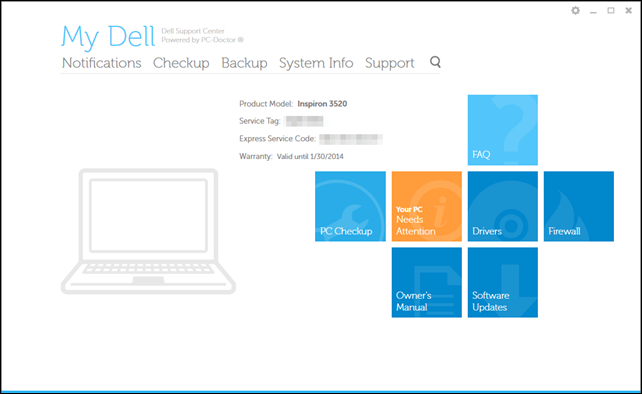
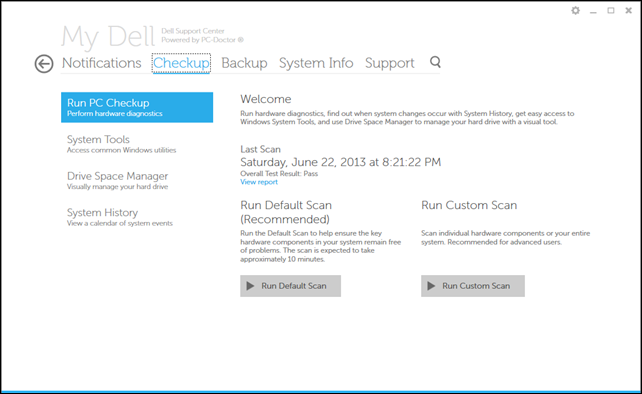
In Lavie’s Dell laptop’s instance, it is included under the Dell Support Center PC Checkup group.

So I did what any normal IT guy does when handed a regularly freezing laptop by their spouse.

I first launched the app.

b20s3be3.qss

Dove into it.

qizgt2ri.1b0

Confirmed it had some extra features that looked useful enough to keep around, rather than uninstalling…

bnbv5gss.bbs

And planned to tell it to disable the regular scheduled hardware scans.

But there weren’t any scheduled.  Hmm.

efgr0552.iz1

So then I did what any sysadmin IT guy does when handed a regularly freezing laptop by their spouse, fire up Auto Runs, find the auto-start entries for PC-Doctor and disable them.

2hctazjq.jci

Done.  I handed the laptop back to Lavie, grinned with that practiced humble-IT-guy smirk we often have after solving an issue, and went back to whatever it was I was doing.

So I was a hero and Lavie gave her prince a kiss.

Turns out that was a froggy-prince she kissed.

The very next day, Lavie was back with her laptop fussing again about it being locked.

So, that wasn’t quite the brilliant solution I had hoped; to preserve the Dell Support Center but disarm the PC-Doctor Module.

Now it was gloves-off time, my clever IT guy skills were being besmirched by PC-Doctor, and the audacity to do so in front of my precious end-user #1.

I went directly back to the Reliability Monitor after another hard-boot to get it going again.

The same PC-Doctor Module error was there again.

I had learned something very important in my first failure, that something else was calling it to launch, on a regular basis, almost as if…it…were…scheduled?!!!

Yep.

This time I pulled up Task Scheduler and very, very, very carefully picked my way though all the entries.

There it was, the missing bit.

Both “PCDEventLauncher” and “PCDOctorBackgroundMonitorTask” were showing disabled, from my previous Auto Runs work. But I missed one non-PC-Doctor labeled item:

l2xdoswm.r4t

I quickly set that one to “Disabled” as well.

nzbbmy1n.fgn

Since catching this one additional item, no more lockups since.

wec0l5tb.c2s

YMMV with this fix, but I feel confident this resulted in a balanced solution for us; the Dell Support software remains installed and available if ever needed on the system but the utility process causing the lockups has been neutralized.

I wish I could provide some “root-cause” analysis on why that module caused Lavie’s laptop to freeze each and every time. Since it was like clock-work, I suppose I could run a Windows Performance Monitor, Windows Performance Analyzer (especially the new Windows 8 version), or maybe even a simple Process Monitor trace session just before the time it always locks up to see what was causing problem; a resource issue? conflict with another running process? missing file?  Maybe simply re-installing the Dell Support Center to a newer version would resolve it. I’m not bothering right now.

In this case, end-user #1 was delighted to have uninterrupted fan-fiction reading sessions restored and I was happy Lavie was happy. And she loves her new Windows 8 Dell laptop again. We call that a win/win.

If you have Windows 7/8 system, don’t forget about the Reliability Monitor for gathering intel in troubleshooting. It’s super-useful.

If you need to access it directly, you can A) add a Reliability Monitor Shortcut (Windows 7 Help Forums) or B) just start typing “reliability history” in the “search all programs and files” box under your Start menu.

I hope this helps.

Cheers,

--Claus Valca

Read More
Posted in troubleshooting, Windows 8 | No comments

Sunday, July 14, 2013

ForSec briefs - Low Post Consumer Waste version

Posted on 5:17 PM by Unknown

Forensic LiveCD News

  • DEFT Linux 8 public beta & DART 2 stable ready for download DEFT Linux - Computer Forensics live cd
  • Running Autopsy 3 Digital Forensics Platform on WinFE Lite for Triage Forensics -Windows Forensic Environment blog

EMET 4.0 Related

  • toolsmith: EMET 4.0 - These Aren’t the Exploits You’re Looking For - HolisticInfoSec blog
  • Windows Security 101: EMET 4.0 — Krebs on Security
  • Threat Mitigation with EMET 4.0 - Microsoft Security TechCenter
  • Microsoft's EMET v 4.0 Released … in case you missed it - GrandStreamDreams blog

Fundamentals are Everything

Windows Incident Response Blog’s Harlan Carvey is running a great series of “How To” posts

  • HowTo: Determine Users on the System
  • HowTo: Correlate Files To An Application
  • HowTo: Determine Program Execution
  • HowTo: Determine User Access To Files
  • HowTo: Track Lateral Movement
  • HowTo: Correlate an Attached Device to a User
  • Finding Malware Like Iron Man Slide Decks - Corey Harrell - Journey Into Incident Response

Updates! Get Yer Updates!

  • Second batch of Windows 8.1 updates improve application compatibility - BetaNews
  • Adobe, Microsoft Release Critical Updates — Krebs on Security

Cheers.

--Claus V.

Read More
Posted in anti-virus software, boot-cd's, forensics, Link Fest, Linux, malware tools, Microsoft, software, Win FE | No comments

File under “That’s one way to do it.”

Posted on 4:44 PM by Unknown

A KACE solution is used to produce a multi-platform image of our systems.

I’m not exactly sure how they make the master editions. The Home Office works behind closed doors once every few months when the moon cannot be seen at midnight. I guess it’s an “eye of newt, toe of toad” thing.

Anyway, we get the master USB stick, deploy it with much chanting and spinning to a local system, then pass some Latin command-line FU to the all powerful “Run" box. About 3-4 hours later a completely built KACE system (re)imaging stick spawn results. Then we have to repeat to build the next storm trooper clone.

It’s a time consuming process, and since I don’t have a physical multi-USB drive replication device, it can take up to a week (while multi-tasking) to update all the drives our team carry for system reimaging when a new refresh occurs.

So what I do is to to build a single updated one, then use Alex’s awesome USB Image Tool to capture a full image of the built stick. For the standard 16 GB stick we use, it doesn’t take too long to capture the “IMG” file back to the system HDD.

Once I have that, I just turn around and write that image back to each of the follow-on USB sticks. The process still takes up to an hour per stick to write back out, but that’s several hours faster than the standard process takes.

One alternative is OSForensics - ImageUSB. I like it and USB Image Tool as they allow you to take an image and write an image all with the same tool.  I also found Flash Drive Image Creator which just lets you take an image, and Win32 Disk Imager or USBWriter which then allow you to write that image to a USB drive. I haven’t used them unlike ImageUSB or USB Image Tool so YMMV.

All this is well and good until recently we got some 64 GB USB sticks to use.

The stock scripted process we follow from the master set of building files works fine with them…up to a point. See when done, it results in a 16 GB formatted partition. The remaining volume space is left unallocated in the process.

As I understand it (but haven’t verified myself) the process the KACE tool uses to create each of the sticks using the long-process uses UFDPREP.EXE to do the target USB drive’s formatting and conditioning to make it bootable to the KACE PE (just a custom WinPE) environment from which the image deployment scripts run out of.

It has been said (again I haven’t been able to find documentation to support) that UFDPREP only supports setting the formatting size for the flash drive up to 16 GB.  As I haven’t tested it independently, it might be that the script that the UFDPREP runs for in the drive building process is set somewhere to just use a 16 GB size. Changing its “/size=n” argument value to /size=65536 might work. Maybe.

(Side note: yes I know there are lots of ways and tons of tools to accomplish the formatting and boot-support prepping of a flash drive to almost whatever upper size you want limited only by the physical memory capacity of the device. The challenge here is that the official tool/process automates use of UFDPREP at the very onset of the scripted build process to the target device. So a maximum 16 GB formatted partition is what you get on the output if you want to also get the built image deployment tools and files with it.)

Anyway, I didn’t have the spare time to look into this too deeply. I needed a solution now.

So what I did was take my previously captured IMG file of a 16 GB built USB imaging stick and used “USB Image Tool” to restore it to one of the 64 GB sticks.

It went on fine and quick and resulted (as expected) in a fully functional USB stick for imaging purposes that had a 16 GB volume (just like the original it was captured from) with the remainder unallocated space. That would work “as is” for image deployments but we can’t let that unallocated space go to waste can we?

So I then booted a lab system with a Parted Magic “LiveCD”.

I attached the 64 GB stick and used the “Partition Editor” utility to first locate the device (I think it was listed as “/dev/sdb”), then went though the process to resize the 16 GB partition to take in the remaining unallocated space. I ran the operation and after a warning that it might screw up the data it completed with no fuss. See a visual walkthrough on the process concept below.

  • Using Parted Magic to resize a partition - Draalin - Basically it is just like this but you are looking for the USB device not a fixed internal disk. Other than that, it’s the same thing.

When the properties for the updated device were checked on a Windows system, the full 64 GB size available on the stick partition was now showing!  Further testing in image deployments found that no corruption to the files/data occurred. It worked great.

I understand that if instead of XP we were running Windows 7 (or Vista) -- which we are not -- then I could have accomplished the same thing natively with the Disk Management tool. Maybe that day will come soon.

I found using Parted Magic a breeze. It was super fast and has been dead-on reliable all the years I have used it to clean up and fiddle with drive partitions.

However there are some other free partition management software tools that run natively in Windows. Check the licensing requirements to make sure they are not “personal use only” and respect accordingly. Some of the free versions have stripped down feature from the “pro” paid version the same company offers.

I keep one or two of these on my USB utility stick as a “just in case” if either DISKPART or Parted Magic fail me. But they really aren’t the butter for my bread.

That said, they look like they could do the same thing that Parted magic is delivering if Linux isn’t your thing.

  • Best Free Partition Management Software - Gizmo’s Freeware - List of multiple free GUI-based partition management applications.
  • MiniTool Free Partition Manager - this tool seems to get pretty positive comments in various net forums.
  • EaseUS Partition Master Free Edition - EaseUS continues to make inroads to the partition software area with their great Windows tools.
  • Paragon Partition Manager Free Edition - Another nice looking and easy to navigate partitioning tool.

Like I said, file this under “that’s one way to do it” for using a USB IMG file created from a smaller sized partition on a larger sized USB flash drive, then restoring the additional unallocated space.

If any GSD readers have any additional ways to accomplish the same thing via Windows Command-Line Fu or a small GUI utility I’d love to hear your suggestions; especially if the utilities are freeware/open-source or command-line only and especially if they would work in XP.

Also, if anyone can find documentation on any formatting size limitations that UFDPREP.EXE carries, I’d love to see the linkage. My Google search skills are not too shabby but I haven’t had luck with the right key search terms just yet. I’d like to know formatting limits of the tool before I tear into the actual process to see if our method is passing it a hard-coded \size=16384 or not.

Cheers.

--Claus V.

PS: Misc links I found in the process of searching for info on UFDPREP.EXE that might be interesting to someone:

WinPE Bootable USB - Creating from XP - The CD Forum - Walkthrough on where to get the binary file (from original source) and how to extract it (note it involves Microsoft’s Windows Embedded feature pack).

A Deep Dive into USB Boot - msdn - How UFDPREP actually does it’s magic.

Read More
Posted in hacks, Linux, Microsoft, utilities, Win PE, XP | No comments

Sunday, June 30, 2013

Odds and Ends: Recent Utilities and Tips of Note

Posted on 5:42 PM by Unknown

Here is a quick dash-off of some free software and utilities that struck my fancy.

Please use caution as your fancy may not be quite as robust as mine…

  • Portable Update - free and interesting tool to update your MS Windows system in an isolated environment.
  • WSUS Offline Update - This is the tool that we use to do almost all our heavy post-image application Microsoft system updating. It was updated to version 8.4 on May 27 2013.
  • JavaRa 2.2 - SingularLabs JavaRa freeware utility that lets you deploy, update and remove the JRE. Really handy when you are dealing with lots of deployments or think you have a mis-install of JRE causing issues.
  • Updates: Autoruns v11.6, Procexp v15.31, Procmon v3.05, Sigcheck v1.92 - Sysinternals
  • TurnedOnTimesView - Nirsoft - new tool from Nir Sofer that reads the Windows Event logs and only reports on those system system launch/shutdown events.  Read Nir’s utility announcement at his blog.  I had been using PC On/Off Time but the freeware version was limited to the last 3-weeks it would report on. The NirSoft version doesn’t quite have the nice graphical view but has no limitations at all on the range of event log data it reports, and the NirSoft app allows you to export your data to a file.
  • Macrium Reflect FREE Edition - version 5.2 -  Information and download. This BetaNews post has more details on the improvements: Macrium Reflect Free improves Explorer integration, updates recovery builder tool
  • Parted Magic - Linux LiveCD - an awesome good tool that seems to be updated every other day. That is a REAL work of love to keep up that effort. Latest version was released June 14 2013 at version 2013_06_15. I used this tool to overcome a particularly interesting image deployment situation recently and it really worked brilliantly well. You will have to wait just a bit for that blog post to come! It was a great “thinking outside the box” solution.
  • Sandboxie  - Major update of version 4.02. For some details take a look at at BetaNews post: Sandboxie adds full 64-bit protection, improves compatibility
  • Oracle VM VirtualBox - free - Newly released version 4.2.14 (and matching Extension Pack) came out June 21 2013. See the Changelog for details.
  • PassMark MemTest86 - Now at Version 4.2.0 released March 18 2013. It’s nice to see this perennial RAM tester still supported and being updated regularly. You may also remember Memtest86+ which is very similar, but hasn’t been updated in several years. I carry both, just in case.
  • Running Mac OS X on Windows VMware Workstation - Chris Nackers Blog. While I do Apple iOS quite well on our iPhones and iPad, I don’t have any experience on OS X. Last time I used a Macintosh was back when it was a chunky box with a black/white monitor. Seriously! However I am always on the lookout for cool ways and tips to load different OS versions in virtual machines so this well-written guide really caught my eye. Chris Nackers is a neat IT guy and Microsoft MVP. I’m digging RSS feeding his blog. You should too!
  • Native VHD Boot in Windows 8 - 4sysops - Nice post by Timothy Warner. Don’t let the title fool you. He walks through setting up a Windows Server 2012 build in a “Boot from VHD” configuration. We’ve covered booting from VHD before here at GSD and it never fails to amaze me just how cool that ability is for Windows multi-boot fans.

Cheers!

Claus Valca.

Read More
Posted in Apple, boot-cd's, Link Fest, Linux, Microsoft, tutorials, utilities, virtualization | No comments

Forensic News and Blog Update Link Fest

Posted on 3:25 PM by Unknown

Here is a mini-roundup of some great forensic posts over the past few weeks I bookmarked.

  • There Are Four Lights: Incident Response - Windows Incident Response blog - I’m always on the lookout to be humbled (and schooled) in better incident response methodologies.
  • There Are Four Lights: LNK Parsing tools - WIndows Incident Response blog
  • Crossing Streams - WIndows Incident Response blog
  • RegRipper Updates - WIndows Incident Response blog
  • The Tool Validation "Myth-odology" - WIndows Incident Response blog -file under “know your tools”.
  • Good Reading, Tools - WIndows Incident Response blog
  • Unleashing auto_rip  - Journey into Incident Response blog - nice new tool walkthough that leverages “RegRipper” for doing some pre-assessment of a potentially compromised system.
  • Is WinFE still being used? - Windows Forensic Environment blog. Uh, Hell Yeah it is! This post has some excellent links on how WinFE is being used, and ways to build your own. Of course Brett Shavers’ WinFE blog is littered with links, tools, and tips on how to do that if you didn’t already realize it!
  • A Windows Live CD plugin for my UserAssist utility - Didier Stevens - (updated)
  • Control Panel Forensics: Evidence of Time Manipulation and More - Cool stuff from Chad Tilbury over on the SANS Computer Forensics and Incident Response blog.

Meanwhile, in the world of digital forensics, our dear friend Dr. Neal Krawetz has had his hands full between teaching us the nuances of digital image forensics and fighting the noble fight against clarity, objectivity, and transparency in the world of digital news photography and photography contests. You go Dr. Krawetz!

  • Unbelievable - The Hacker Factor Blog
  • Angry Mob - The Hacker Factor Blog
  • Deep Dive - The Hacker Factor Blog

When I grow up I want to be gothic physical/digital forensic examiner…just like Abby Sciuto!

Seriously…

(IN)SECURE Magazine - June 2013 edition (PDF download) covers a number of great topics this month including:

    • Becoming a computer forensic examiner
    • UEFI secure boot: Next generation booting or a controversial debate
    • How to detect malicious network behavior
    • DNS attacks on the rise: Rethink your security posture
    • IT security jobs: What's in demand and how to meet it
    • Remote support and security: What you don’t know can hurt you

Cheers!

--Claus V.

Read More
Posted in boot-cd's, forensics, Link Fest, security, tutorials, utilities, Win FE | No comments

Microsoft’s EMET v 4.0 Released … in case you missed it

Posted on 3:01 PM by Unknown

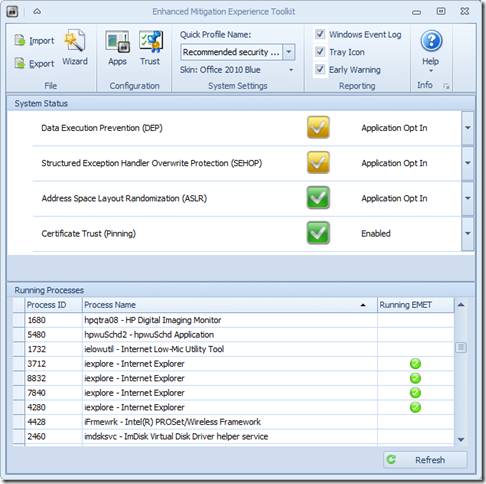
Microsoft’s Enhanced Mitigation Experience Toolkit 4.0 - EMET - just got released about two weeks ago.

It really hasn’t made that big a splash in the security news pond; maybe getting lost in all the waves from coverage on our domestic network digital data gathering, leaks in the SS Minnow, and that whole Facebook Shadow Profile data collection fiasco.

Oh, then there is that whole breaking story in the food world that has everyone shocked and a-twitter--How Cronuts Are Driving New York City Crazy.

So it’s not surprising that news of the release of a Windows-specific security tool to prevent advanced malware attacks got little notice.

So here you go.  Little rock toss into a big pond.

a0n12tap.xsg

I’ve got it running on all our home systems as well as all my Windows virtual machines. I’ve seen no performance issues at all and it is super-quiet; no chatter at all. Accordingly, I would recommend it to all my friends/family-members, especially those who insist on using Internet Explorer and do a lot of work in MS Office applications and documents. It is not a solution to replace any existing anti-virus/anti-malware security software you have, but rather it works to supplement and harden it.  I’m running it aside Microsoft Security Essentials (Win 7 systems), Windows Defender (Win 8 systems), and Bitdefender Antivirus Free (Win 8 systems). It works great.

  • Nuclear Scientists, Pandas and EMET Keeping Me Honest - SANS ISC Diary - great post from Johannes Ullrich detailing just how deployment and use of EMET (v3.5) could have prevented a recent “watering-hole” attack. It’s a great introduction on how the EMET software works. Version 4.0 is better.
  • EMET 4.0 is now available for download - SANS ISC Diary notice/followup.
  • EMET 4.0 now available for download - Microsoft Security Research & Defense blog. Great overview of the tool and all the new features and capabilities. Read this next before considering deployment
  • Enhanced Mitigation Experience Toolkit 4.0 - Official Microsoft Download Center source. It runs on everything from XP SP3 to Windows 8 platforms, as well as all related Server OS’s as well.
  • Enhanced Mitigation Experience Toolkit 4.0 - bink.nu - quick recap summary scraped from the product details of the official download site.
  • Microsoft’s EMET 4 adds even more malware-blocking power - Betanews overview of the tool.
  • Microsoft releases Enhanced Mitigation Experience Toolkit 4.0 - Help Net Security announcement of the tool.
  • Enhanced Mitigation Experience Toolkit 4.0 final is out - Ghacks.net - Nice review and overview of the EMET 4.0 features.

Not impressed enough yet to download?

Well, did I mention it has “skins” so you can change the theme to some pretty snazzy color schemes?

Seriously, if you spend any time on the Web (particularly in IE) and run a Windows system, then you really should consider deployment of this tool. Just take the default configuration settings to get started, then you can tweak away and add additional protection coverage after you read the manual.

Cheers!

Claus Valca.

Read More
Posted in anti-virus software, browsers, Internet Explorer, malware tools, Microsoft, networking, security, viruses, Windows 7, Windows 8, XP | No comments
Newer Posts Older Posts Home
Subscribe to: Posts (Atom)

Popular Posts

Categories

  • Active Directory
  • anti-virus software
  • Apple
  • architecture
  • art
  • AVG
  • Blogger
  • blogging
  • books
  • boot-cd's
  • browsers
  • cars
  • cell-phones
  • cheat sheets
  • Chrome/Chromium
  • command-line interface
  • cooking
  • crafts
  • crazy
  • curmudgeon
  • DHC
  • Dr. Who
  • E-P1
  • Education
  • family
  • Firefox
  • firewalls
  • For the Gentleman
  • forensics
  • Gmail
  • Google
  • graphics
  • hacks
  • hardware
  • humor
  • hurricanes
  • imagex
  • Internet Explorer
  • iOS
  • iPhone
  • iPod
  • iTunes
  • Kindle
  • Learning
  • Link Fest
  • Linux
  • malware tools
  • Microsoft
  • movies
  • music
  • networking
  • NewsFox
  • NFAT
  • Nook
  • Opera
  • organization
  • PDF's
  • photography
  • politics
  • PowerShell
  • recipes
  • Remote Support
  • RSS
  • science
  • Scripting
  • search engines
  • security
  • Shuttle SFF
  • software
  • Texana
  • Thunderbird
  • troubleshooting
  • TrueCrypt
  • tutorials
  • utilities
  • VBscript
  • video
  • Virtual PC
  • virtualization
  • viruses
  • Vista
  • Vista mods
  • wallpapers
  • Win FE
  • Win PE
  • Win RE
  • Windows 7
  • Windows 8
  • Windows Home Server
  • Windows Live Writer
  • Windows Phone
  • writing
  • XP
  • XP mods
  • Xplico

Blog Archive

  • ▼  2013 (83)
    • ▼  November (8)
      • Ubuntu 13.10 Upgrade - Lessons Learned & VIDMA uti...
      • ForSec Linkfest - 2013 DST Fallback Edition
      • CryptoLocker Ransomware Info & Free Prevention Sol...
      • Linkfest for the SysAdmins
      • Microsoft Security Essentials/Defender & PowerShell
      • Miscellaneous TrueCrypt linkage
      • PowerShell 4.0 and a tiny “gotcha”
      • New Software Updates + VMware Tools Update fix
    • ►  October (8)
    • ►  September (14)
    • ►  August (6)
    • ►  July (10)
    • ►  June (10)
    • ►  April (11)
    • ►  March (6)
    • ►  February (7)
    • ►  January (3)
  • ►  2012 (96)
    • ►  December (8)
    • ►  November (4)
    • ►  October (9)
    • ►  September (8)
    • ►  August (12)
    • ►  July (4)
    • ►  June (3)
    • ►  May (7)
    • ►  April (13)
    • ►  March (3)
    • ►  February (5)
    • ►  January (20)
  • ►  2011 (41)
    • ►  December (8)
    • ►  November (7)
    • ►  September (4)
    • ►  August (4)
    • ►  July (2)
    • ►  June (6)
    • ►  March (5)
    • ►  February (1)
    • ►  January (4)
  • ►  2010 (69)
    • ►  December (1)
    • ►  October (3)
    • ►  September (2)
    • ►  August (13)
    • ►  July (17)
    • ►  June (3)
    • ►  May (3)
    • ►  April (3)
    • ►  March (11)
    • ►  February (1)
    • ►  January (12)
  • ►  2009 (177)
    • ►  December (20)
    • ►  November (11)
    • ►  October (7)
    • ►  September (7)
    • ►  August (21)
    • ►  July (17)
    • ►  June (7)
    • ►  May (18)
    • ►  April (9)
    • ►  March (17)
    • ►  February (23)
    • ►  January (20)
  • ►  2008 (35)
    • ►  December (23)
    • ►  November (12)
Powered by Blogger.

About Me

Unknown
View my complete profile